Customer Experience
  Blog
Blog  Business Communication
  Leadership
  Marketing & Sales
  Nextiva News
  Productivity
  VoIP
VoIP 
Customers expect fast answers and minimal friction when contacting support. Interactive voice response (IVR) systems play a central role in meeting those expectations, especially as automation and cloud-based communications mature. So choosing the right IVR provider has become a strategic decision rather than a purely technical one.
But many businesses don’t use their IVR system the way it’s meant to work. If your call center still treats IVR as just a cost-saving tool, you’re missing its real value: fueling prompt, personalized, and self-driven service. And it all starts with the right IVR provider.
What Is IVR Software?
Interactive voice response (IVR) software is an automated telephony technology that interacts with callers, gathers information, and routes calls to the appropriate agent or department, all without human intervention. For instance, when a customer dials in and hears “Press 1 for sales, press 2 for support,” that’s IVR at work.
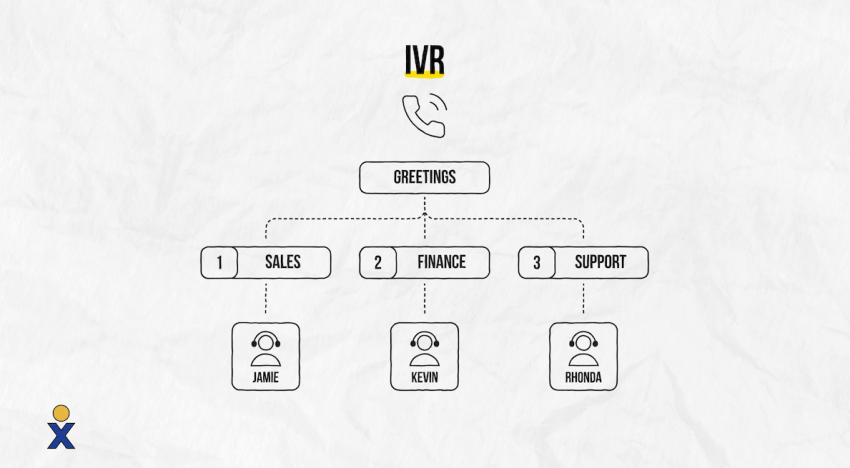
At its core, IVR software uses a combination of pre-recorded voice prompts and touch-tone keypad input (DTMF)—or, in more advanced systems, natural language processing (NLP)—to understand what a caller needs and respond accordingly. Instead of sending every caller to the same queue, IVR helps direct calls based on intent, urgency, account type, or business hours. And it can connect callers to a live agent when needed.
And now, IVR technology go beyond simple phone tree and menu-based navigation. They integrate with CRM systems, customer data, and AI-driven analytics to make every interaction “smart”. They can recognize returning callers, personalize greetings, authenticate users, process payments, and hand off calls to a human with full context.
From healthcare and financial institutions to retail and utilities, IVR software is used across industries.
What cloud IVR means
A cloud IVR is a hosted solution that uses cloud infrastructure to deliver IVR capabilities without requiring on-site hardware. Because it is software-based, it is typically easier to update, scale, and manage than a traditional on-premises system. Cloud IVR can also support integrations with CRM, contact center, and business communication tools, which helps teams handle changing call volumes more efficiently.
With a cloud-based IVR system, your business can:
- Design multilevel IVR menus that effectively guide callers to the right resource or department. This reduces friction from the very first interaction.
- Automate routine tasks through intuitive self-service experiences without involving a live agent. This includes payment processing, password reset, and appointment confirmation.
- Route calls based on logic such as business hours, agent availability, caller input, or customer data.
- Connect with your CRM or contact center software, which gives agents the context they need before the conversation starts.
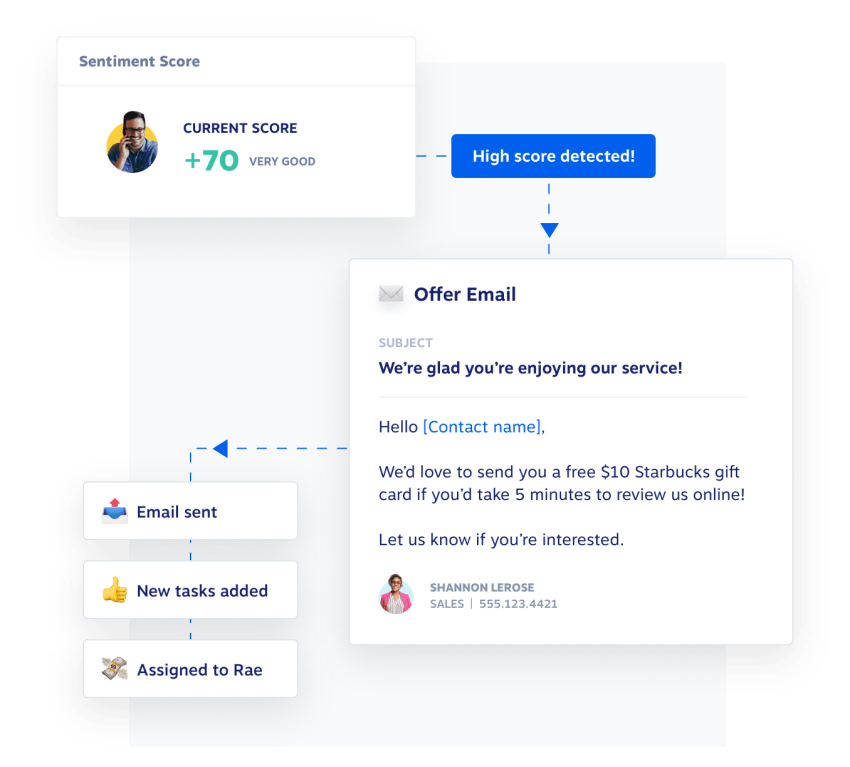
- Evaluate customer calls using AI-powered tools that reveal drop-off points, sentiment trends, and routing inefficiencies.
What separates cloud IVR from legacy systems is cost and flexibility. Teams can configure or update IVR workflows remotely in mere minutes. And as business needs shift, scalability becomes easier. As your company grows, cloud IVR is also easier to scale, making it a practical option that allows for more control over call handling without the overhead of traditional hardware-based systems.
How IVR Works in a Cloud Phone System
A cloud phone system runs IVR entirely through software hosted on remote servers, meaning that every interaction, from the opening greeting to the final call transfer, is processed in the cloud and delivered over VoIP. There’s no physical hardware managing the logic; instead, configurable workflows handle everything through a web-based interface that administrators can access from anywhere.
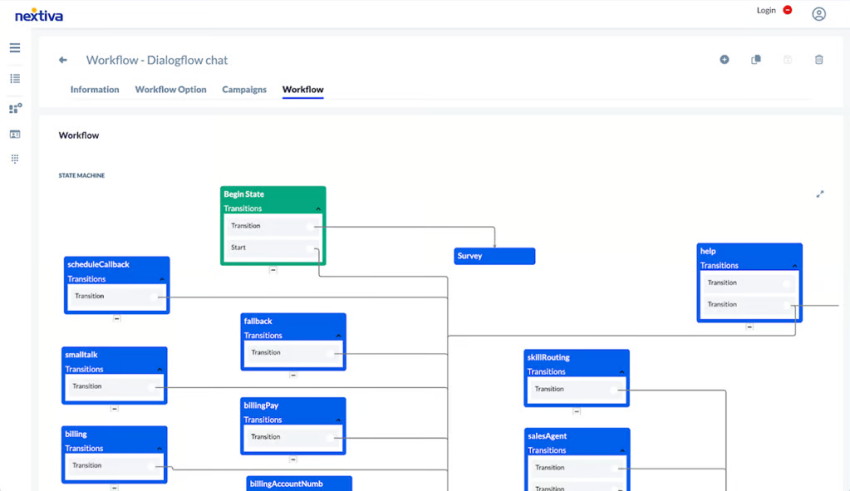
Here’s what happens under the hood when a customer calls in.
Caller input and menu navigation
When a call connects, the IVR system plays a pre-recorded or text-to-speech (TTS) prompt and waits for the caller to respond. Most systems support two input methods:
- DTMF (dual-tone multi-frequency): The caller presses a number on their keypad, and the system detects the corresponding tone to advance the menu.
- Natural language input: More advanced systems use speech recognition and NLP to interpret spoken responses, aka speech-to-text (STT), so a caller can say “I need help with my bill” rather than pressing a number.
From there, the system navigates a decision tree built around your IVR menu structure. Callers move through layers of prompts—choosing a language, selecting a department, confirming an account, etc.—until the system has enough context to act. How deep that tree goes depends entirely on how the workflow is configured.
A few design factors shape how well this experience works in practice:
- Prompt clarity determines whether callers understand their options on the first listen (this reduces misroutes and repeat input).
- Timeout and retry logic handles what happens when a caller doesn’t respond or enters an invalid input: looping back, escalating, or connecting to an agent rather than dead-ending the call.
- Caller recognition allows the system to greet returning customers by name, skip redundant prompts, or pre-populate their account data based on their phone number or authentication input.
The goal at this stage is to gather enough information to either resolve the call without an agent or hand it off with full context.
Call routing, queues, and self-service
Once the IVR has captured caller intent, it decides what happens next. This is where the cloud architecture makes a meaningful difference because routing decisions can draw on live data that an on-premise system simply wouldn’t have access to.
- Intelligent call routing directs the caller based on a combination of factors: the selections they made in the menu, their customer history pulled from a connected CRM, the current availability of agents, and any priority rules your team has configured.
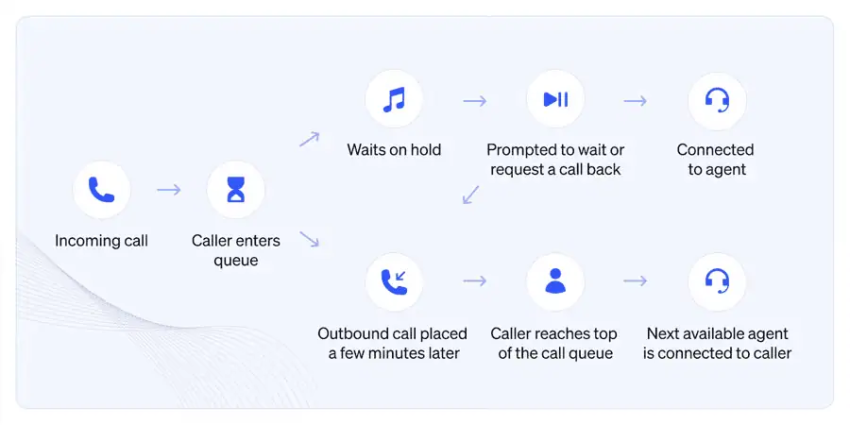
- Queue management handles what happens when no agent is immediately available. Callers can be placed in a waiting queue with estimated hold times, offered a callback option so they don’t have to stay on the line, or redirected to a self-service IVR flow while they wait.
- Self-service resolution handles requests that don’t require a live agent at all. Within the same call flow, the IVR can authenticate a caller, retrieve account data via API, and complete a transaction (paying an invoice, confirming a delivery, etc.), all without any human involvement.
When a call does reach an agent, the cloud system passes along a summary of what the IVR captured, such as the menu path taken, any data entered, and relevant CRM context, so the agent doesn’t have to start from scratch.
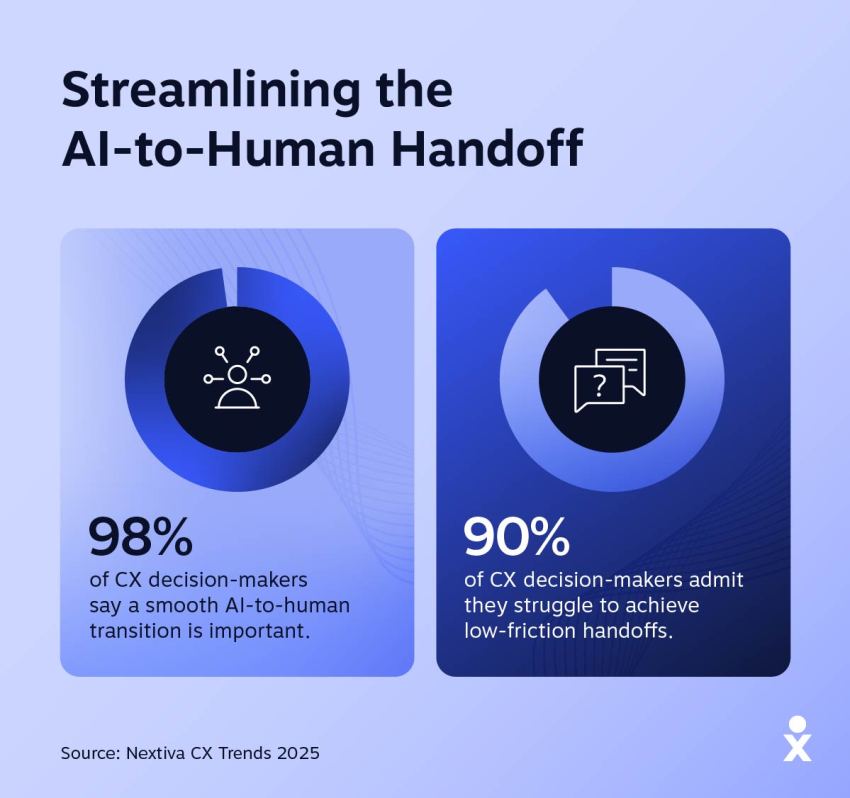
This handoff quality is often what separates a well-built IVR from one that frustrates callers right before the conversation even begins.
5 Best IVR System Providers in 2026
Features are important when choosing the right IVR vendor, but so is the fit. The best call center IVR should match your business size, technical needs, and customer service goals. Here’s how the top platforms compare — starting with the one that leads the pack.
Nextiva — The best overall IVR provider
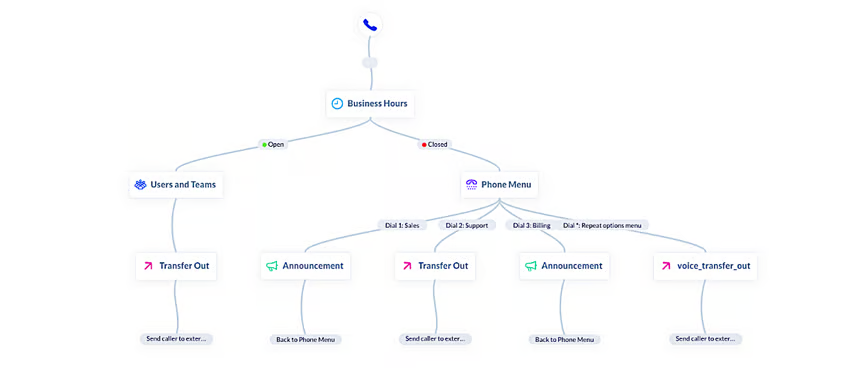
Why it stands out: Nextiva’s AI-powered IVR system lets businesses design multilevel IVR menus, build smart call flows, and integrate with CRMs like Salesforce and HubSpot.
It sets the standard for modern IVRs. Teams can easily set up the logic for business hours, holidays, or routing rules without asking IT for help. Nextiva is often praised for its intuitive interface and ability to reduce wait times. Users appreciate how the tool helps improve customer satisfaction by delivering a responsive experience across channels.
Key features:
- AI-powered speech recognition and text-to-speech support
- Custom call routing for sales, customer support, and departments
- IVR analytics for call flow optimization
- Omnichannel support (voice, SMS, email, and video)
- 24/7 support with 99.999% uptime reliability
- Real-time reporting and call recording
Price: Starts at $15/user/month, with IVR included in the Scale plan.
Best for: Businesses looking for a full-package business communication platform with advanced AI IVR and a focus on CX.
Five9 — Strong for contact center integration
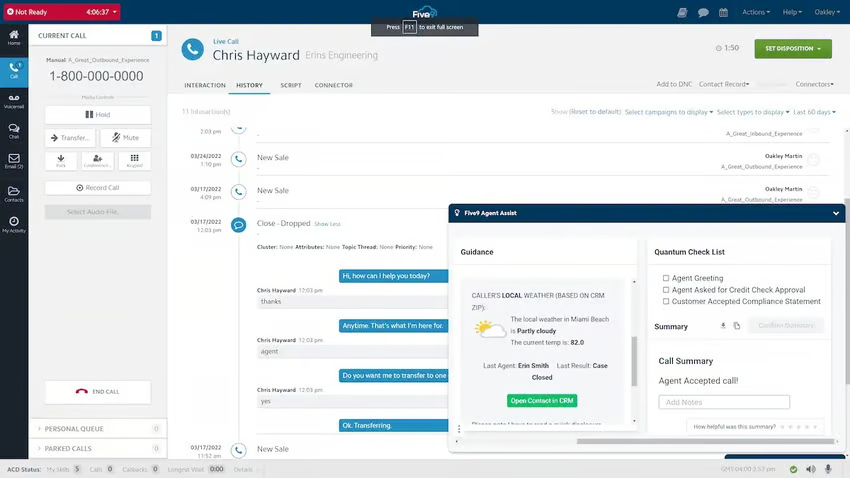
Why it stands out: Five9’s IVR includes drag-and-drop workflows and deep CRM integration, making it flexible for larger teams and contact centers.
Its visual builder enables nontechnical users to build menus and route customer calls based on live data. While its UI earns positive feedback, some users cite friction from managing multiple dashboards.
Key features:
- Visual IVR builder for non-technical users
- Intelligent call routing using CRM data
- Omnichannel support (voice, chat, email, and SMS)
- Callback options to reduce wait times
- AI-powered agent assistance and analytics, available as add-ons
Price: Starts at $119/user/month, with contact-center and IVR features in Core and above.
Best for: Large call centers that benefit from flexible IVR functionality and CRM integration across multiple channels.
Genesys Cloud — Best for NLP-based IVR
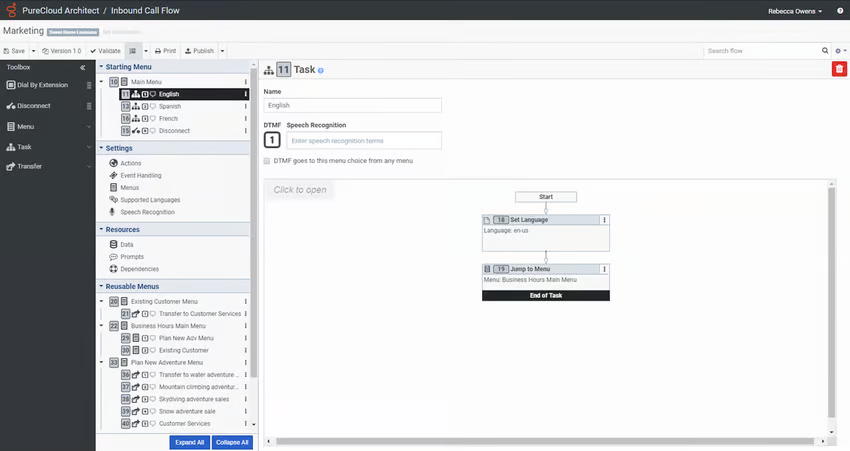
Why it stands out: Genesys Cloud excels in conversational IVR with natural language processing (NLP).
Genesys offers dynamic, voice-driven customer experience for complex touchpoints. It’s a strong fit for enterprises replacing rigid menus with open-ended prompts. Reviewers appreciate its flexibility and smart routing, though scaling advanced features often requires custom work.
Key features:
- NLP-based IVR system with AI-driven call routing
- Omnichannel support (voice, chat, email, and social)
- Real-time sentiment analysis
- Advanced CRM integrations
- Automated transcriptions
Price: Starts at $75/user/month, with speech-enabled IVR included in CX 1 and above.
Best for: Enterprises that want scalable, AI-powered IVR service that feel human.
NICE CXone — Best for traditional IVR
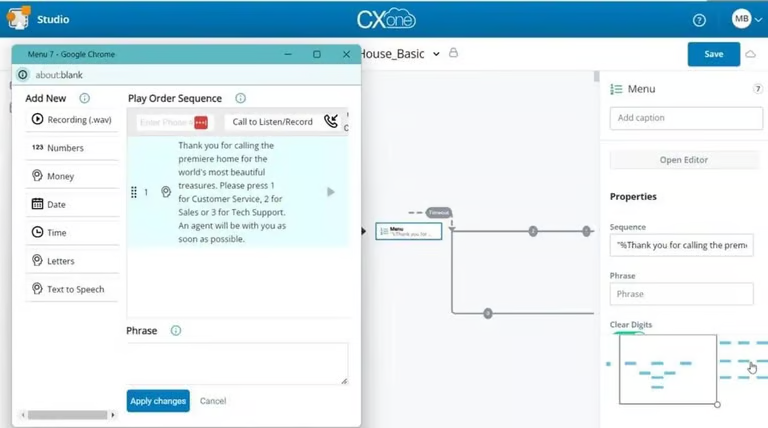
Why it stands out: NICE CXone offers a stable IVR solution with a strong emphasis on enterprise-grade self-service and automation IVR workflow.
It’s ideal for businesses that need standard self-service options like account verification and payment processing. It provides multi-language menus and compatibility with legacy telephony systems. NICE CXone’s clean, user-friendly interface is frequently cited as a top benefit.
Key features:
- Self-service IVR for payments, account access, and FAQs
- Speech recognition and cloud-based automation
- Text-to-speech support
- Call analytics and agent performance tracking
Price: Starts at $71/user/month, with IVR capability included from Voice Agent and above.
Best for: Businesses that need a customizable, traditional IVR service provider that scales reliably.
RingCentral MVP — Good for smaller business
Why it stands out: RingCentral MVP includes built-in IVR as part of its cloud phone system, making it a smart entry point for small businesses.
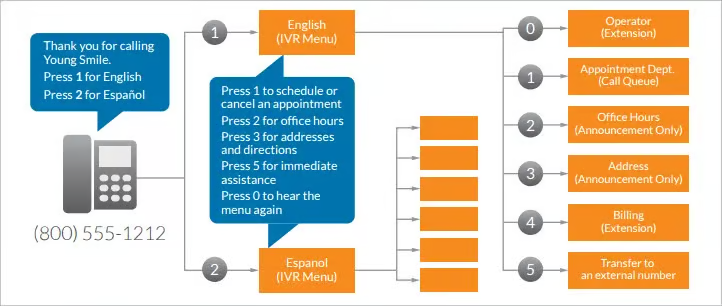
Its auto attendant and multi level IVR menus guide callers efficiently, while tools like voicemail-to-text add usability. Though not as robust as enterprise call routing tools, it provides solid value for money. It’s also easy to manage and quick to launch.
Key features:
- Auto attendant and IVR menu support
- Voicemail-to-text transcription
- Mobile app integration
- Basic IVR analytics
- Simple call-routing tools
Price: Starts at $20/user/month annually, and basic IVR is included in Core.
Best for: Small businesses that want a straightforward, cloud-based IVR number provider.
Key Features to Look for in an IVR System
The right IVR system facilitates faster, smarter, more human interactions at scale. As customer behavior evolves, these features now shape whether your IVR solves issues or creates new ones.
Multilevel IVR menus
Organizing calls is just the starting point of multilevel IVR menus. A robust system reduces churn in real time. When callers hear what they expect—and skip what they don’t need—they move confidently through the IVR menu. Top systems now enable conditional menus based on business hours, service outages, or known issues.
This adaptability creates a more personalized path from the very first prompt.
Speech recognition
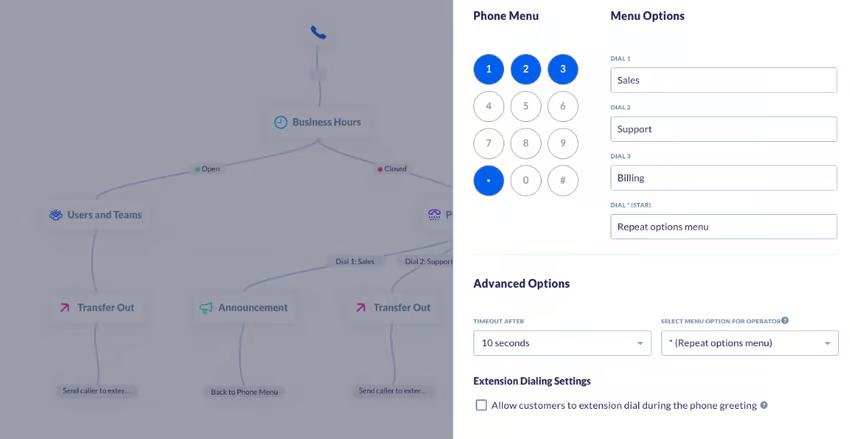
Speech recognition upgrades IVR from the standard “Press 1” to a more conversational “How can I help you?” without sacrificing structure. What’s often overlooked is the ROI in reducing misroutes. Voice-first navigation reduces keypad errors, while text-to-speech adds flexibility.
Both functionalities enable the system to “speak back” using dynamic, real-time data like account balances or delivery updates without relying solely on prerecorded messages.
CRM integration
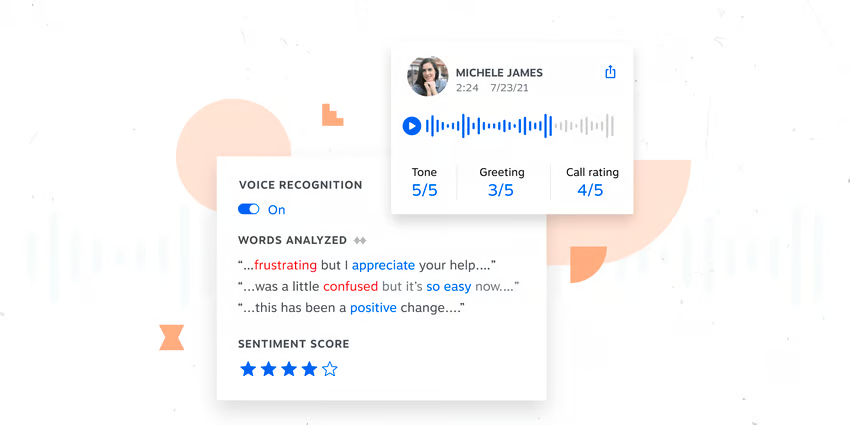
Continuity is what makes CRM integration indispensable. It connects IVR data with past interactions, so live agents don’t ask the same questions twice. Seamless integration with Salesforce, HubSpot, or Microsoft Dynamics helps businesses capture intent earlier in the customer journey.
This enables IVRs to auto-adjust based on recent calls or open support cases. Advanced IVR integration options are also beneficial for teams that need both customization and real-time visibility.
Omnichannel support
Omnichannel IVR was once a special solution. These days, it’s the baseline. But what makes it powerful is context carryover: When a customer starts on chat, replies to an email, and follows up via text, the system should already know who they are and what they need. However, voice still matters, by a mile.
According to Nextiva’s State of CX report, in health care, 29% of customers say voice is their primary CX channel, proving the phone isn’t going anywhere.
Self-service options
The most effective self-service options answer questions and deflect the inapplicable ones. Modern IVR integrates AI with backend data to let callers complete tasks, like updating contact details, without human assistance. Many of these experiences are now powered by conversational AI, which makes the interaction feel more natural while still fully automated.
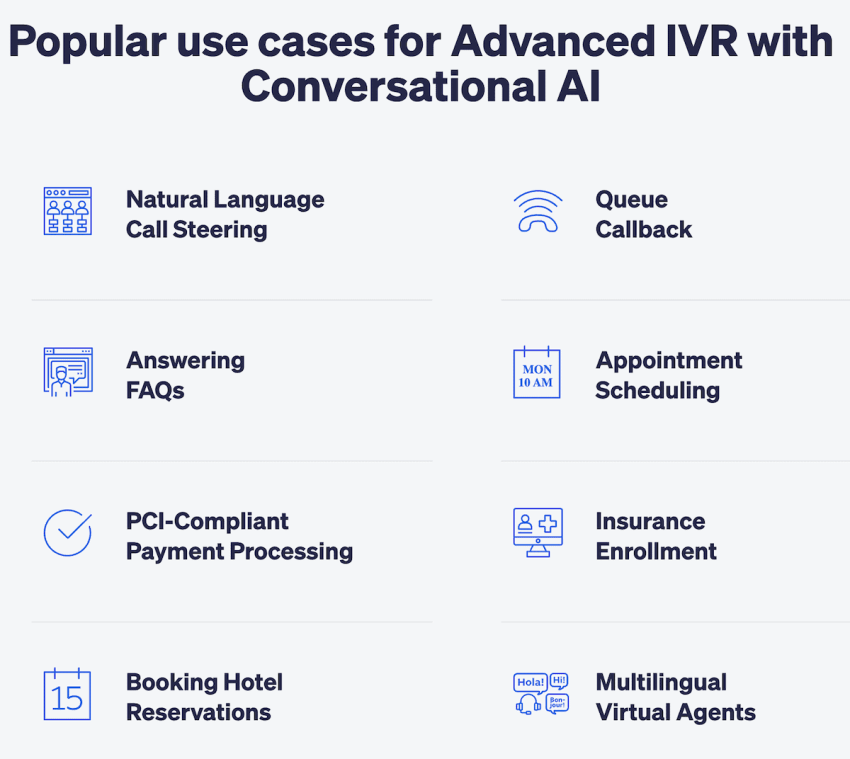
As adoption of chatbots and voice IVR continues to grow, offering smart self-service has become a core CX strategy.
Intelligent call routing
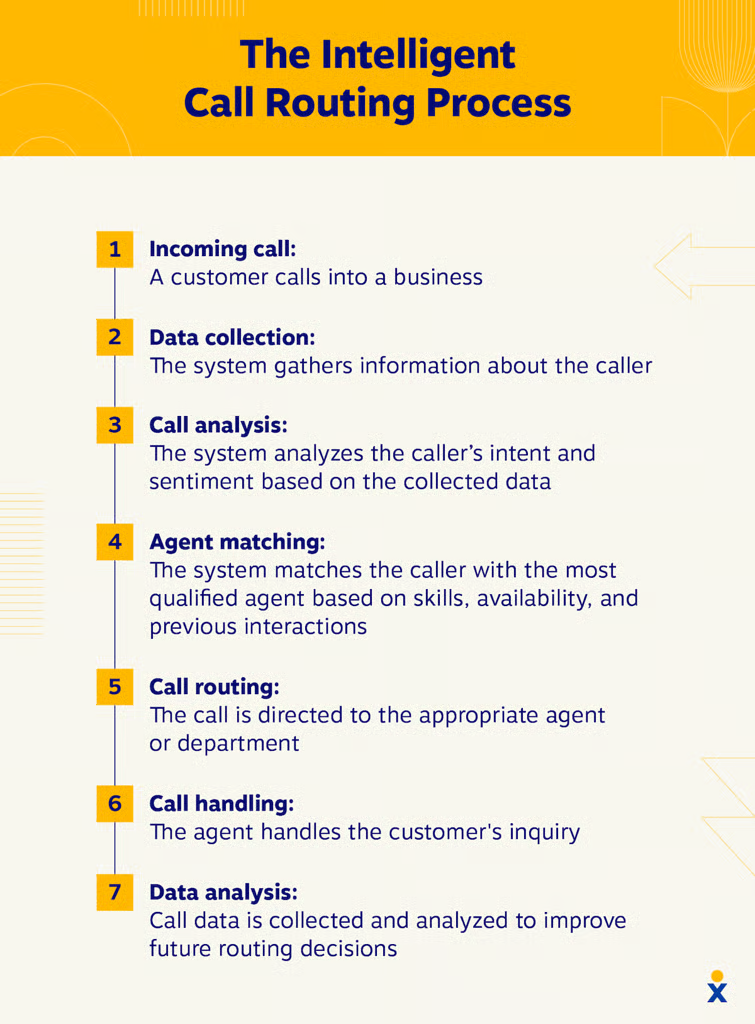
Intelligent call routing is where the real-time brain of your IVR lives. It uses past behavior, sentiment, and priority status to direct inbound calls to the right agent, not just the available one. This means fewer escalations, shorter wait times , and higher conversion potential.
Intelligent call routing also enables businesses to create advanced logic based on location, account status, or custom rules, which elevates routing into a CX advantage. Pairing this with call routing best practices like monitoring performance and regularly reviewing feedback can further enhance the overall CX.
Real-time call analytics
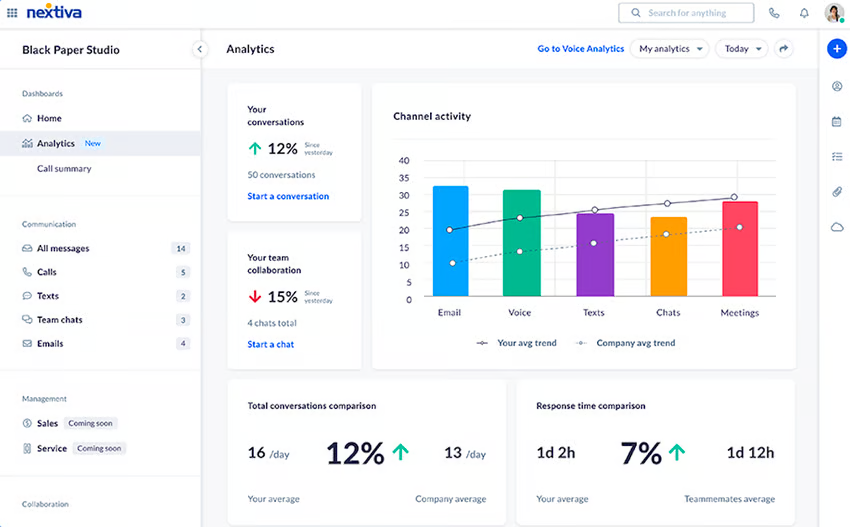
Without real-time visibility, businesses risk losing sight of performance bottlenecks. IVRs provide live data on call volumes, menu performance, and drop-off points so businesses can iterate fast. Sophisticated systems also provide proactive alerts, which flag spikes in hang-ups or bottlenecks in call flows. This helps the team fix friction before it affects revenue.
Queue callback functionality
Callback goes beyond convenience. Providing this feature improves customer perception. Giving callers the option to skip the line signals respect for their time. Better yet, smart IVRs let users choose callback windows that match agent availability. This streamlines call volume spikes without hurting service levels.
Benefits of Hosted IVR
Hosted or cloud-based IVR systems are smarter, easier, and more adaptable to manage than their legacy counterparts. With the shift toward more flexible communications, hosted IVRs uncover real gains in efficiency, automation, and agility.
Cost savings
Traditional IVR setups require physical infrastructure, telecom hardware, and dedicated IT staff to maintain them. A hosted IVR solution eliminates all of that, replacing capital expenditure with low monthly pricing plans. These systems also cut operational costs by dropping the burden on in-house teams.
Scalability
Hosted IVR lets businesses scale operations without a complete overhaul. They expand menu options, integrate new tools, or handle higher call volumes without downtime. Cloud IVR offers flexible scaling, whether you need to onboard seasonal agents or add a new department. It all depends on what your business needs.
Ease of configuration
Most hosted IVRs now include user-friendly builders that allow admins to adjust call flows, routing logic, and menu options with drag-and-drop simplicity. This frees up the IT department to focus on their work. This kind of agility also keeps businesses aligned with customers’ changing priorities and expectations.
AI automation
Nextiva’s State of CX report found that although 92% of companies use AI for CX, only 9% consider their implementation advanced. Cloud IVRs help close this gap by integrating automation directly into the system. This way, routine interactions like answering FAQs are handled while live agents focus on delivering accurate responses on more complex issues.
Better call handling
With smarter call routing based on agent availability, time of day, or caller history, calls are distributed efficiently and fairly. Call routing software is the engine behind this efficiency, and hosted IVRs make it easier to tailor those flows without external tools. This means fewer dropped calls, shorter wait times, and better first-call resolution.
How to Choose the Right IVR Provider
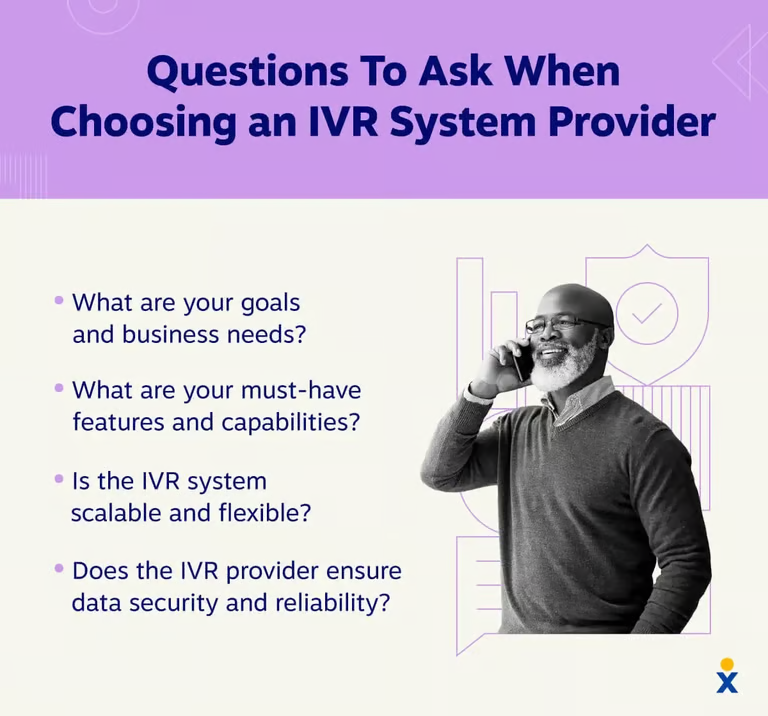
Not all IVR platforms are built for the same business. The right choice depends on how your team currently handles calls, where the gaps are, and what you need the system to grow into.
These five criteria will help you evaluate providers that are best for you.
1. Assess your call volume and support complexity
Start with the numbers. How many inbound calls does your team handle daily, and how does that volume fluctuate by hour, day, or season? A small support team fielding a few hundred calls a week has very different needs from a contact center managing thousands of concurrent interactions during peak periods.
But volume alone doesn’t tell the whole story. If most of your calls follow a predictable pattern—say, billing questions, appointment confirmations, order status—a straightforward IVR with well-designed menus may be sufficient. If your callers have varied, nuanced needs that frequently require escalation, you’ll want more sophisticated routing logic and stronger reporting to identify where the system breaks down.
Be realistic about where you’ll be in 18 months, not just where you are today.
2. Evaluate core features and self-service capabilities
At a minimum, a capable cloud IVR should offer multilevel menu configuration, DTMF and speech recognition input, call recording, and basic analytics. Beyond that baseline, the features that matter most depend on your use case.
If self service option is a priority, look closely at how each provider handles it. Can the IVR authenticate callers and pull account data in real time? How flexible is the workflow builder for non-technical users? Also consider the AI layer, because some platforms support conversational IVR powered by NLP that handles open-ended requests naturally, while others rely on rigid menu trees.
If your call types vary widely, the quality of the AI engine matters significantly.
3. Check integrations with your existing tech stack
An IVR that operates in isolation delivers a fraction of its potential value. Before committing to a provider, map out the integrations you need on day one and those you’re likely to need down the line. Most enterprise platforms offer native integrations with major CRMs like Salesforce and HubSpot, but the depth varies. A native integration that syncs basic contact records is quite different from one that surfaces full interaction history the moment a call connects.
Also ask about API access. If your stack includes custom or less common tools, you’ll want the flexibility to build integrations yourself rather than waiting on a vendor’s roadmap.
4. Compare pricing models and total cost
IVR pricing is rarely straightforward. Most providers charge on a per-minute, per-seat, or tiered usage basis (and sometimes a combination). A platform that looks affordable at low volume can become expensive quickly as customer call traffic grows, so look beyond the monthly fee.
Factor in set-up costs, charges for add-ons, overage fees, and any professional services needed for implementation. Some vendors bundle these in, others treat them as separate line items that add up fast.
If a provider offers a free trial or sandbox environment, use it. Real usage data from your own call flows is far more reliable than vendor estimates.
5. Consider ease of setup and ongoing management
Some platforms are built for developers: flexible, but dependent on technical resources. Others offer drag-and-drop workflow builders designed for operations teams who need to make changes without filing an IT request.
Think about who will own the IVR day-to-day in your organization. Also consider what routine management looks like post-launch: How quickly can you update a menu prompt, add a routing rule, or pull a performance report? The longer it takes to make changes, the longer suboptimal experiences persist for your callers.
Why Nextiva Stands Out as the Best IVR Service Provider
The right IVR provider empowers your operations, whether you’re a small business owner or the CEO of a high-volume call center. Nextiva does exactly that with a feature-rich, AI-driven platform. Its intuitive platform makes it easy to build dynamic call flows, automate routine tasks, and connect every phone number to the right destination.
What sets Nextiva apart is how seamlessly it connects across your business communication stack. With built-in CRM integrations, real-time call analytics, and advanced IVR software capabilities, it supports smarter decisions at every customer touchpoint.
Plus, Nextiva’s XBert AI is an advanced AI receptionist that can replace or augment parts of IVR, especially intake, qualification, FAQ handling, and routing
And because it’s all backed by 24/7 support, intelligent call routing, and industry-leading uptime, you can be assured that it’s doing its job to meet your goals.
Ready to see it in action? Book a demo to explore how Nextiva’s advanced IVR solution powers conversions.
Conversational AI is the next generation of IVR.
Focus your agents on the important cases and let the AI automate and improve call routing, reduce hold times, and save you money.
IVR FAQs
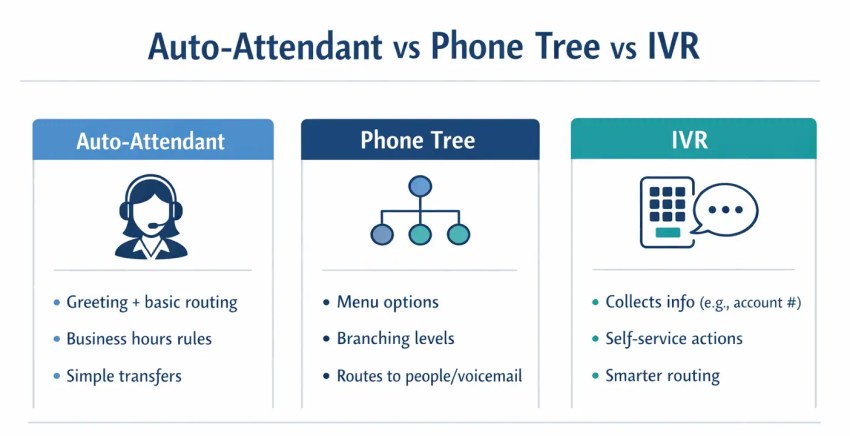
An auto attendant routes calls through a simple menu (press 1 for sales, press 2 for support). IVR goes further. It can collect and process information, authenticate callers, complete transactions, and resolve requests without a live agent. Think of an auto attendant as a digital receptionist and IVR as a self-service system.
It varies widely. Basic cloud IVR plans start around $20–$150 per user per month, while mid-market and enterprise platforms can run into hundreds of dollars per seat or charge on a per-minute usage basis. Total cost depends on call volume, feature requirements, and how many integrations you need. Most vendors offer tiered plans, so it’s worth testing a free trial before committing.
Yes. Cloud IVR has made the technology accessible to businesses of any size. Unlike legacy on-premise systems that required significant upfront hardware investment, modern cloud platforms are subscription-based and scalable.
Yes, and this is one of its most valuable features. Most cloud IVR platforms offer native integrations with popular CRMs like Salesforce, HubSpot, and Zoho. When connected, the IVR can pull customer data in real time: recognizing callers, surfacing account history, and passing context to agents before the conversation begins.