Customer Experience
  Blog
Blog  Business Communication
  Leadership
  Marketing & Sales
  Nextiva News
  Productivity
  VoIP
VoIP 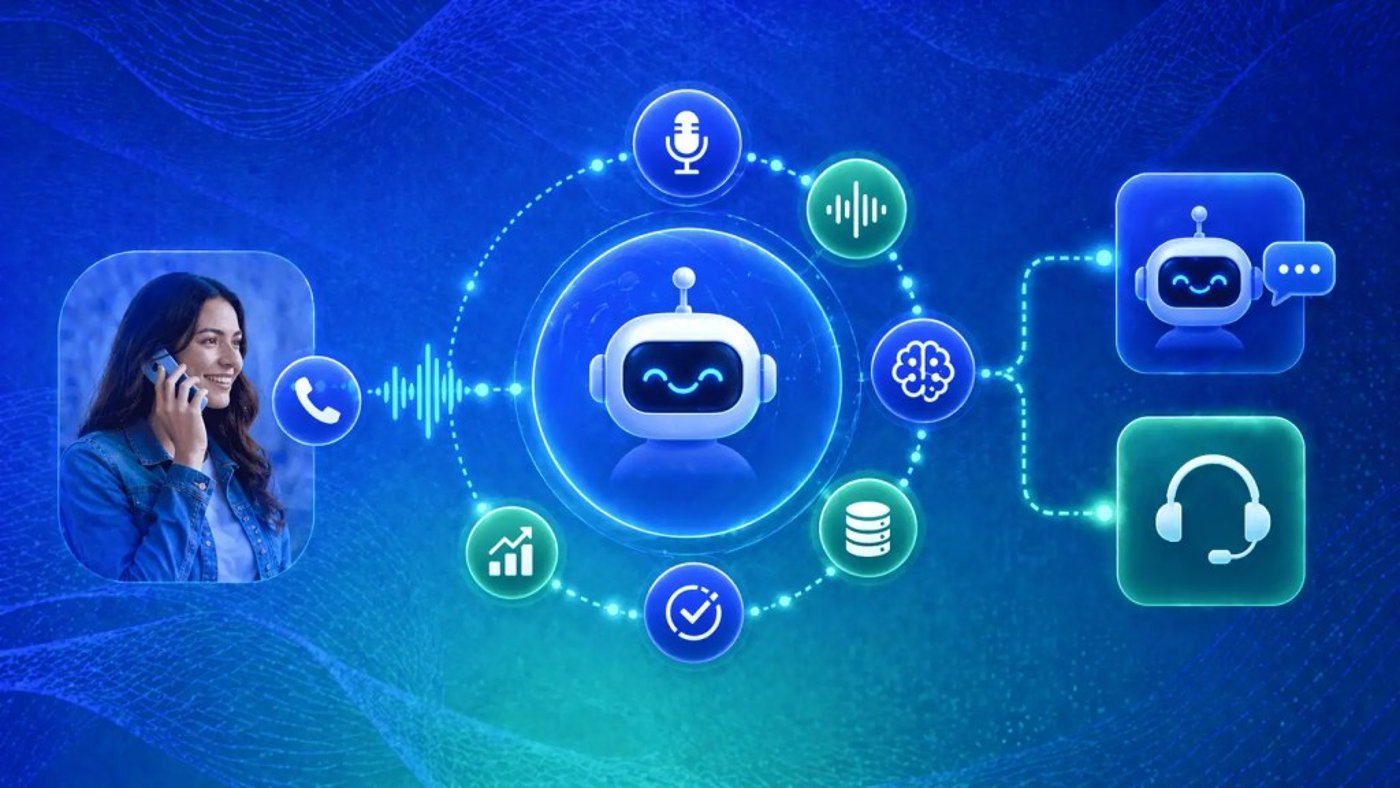

You call a company’s support line, and this is what you hear:
“Press 1 for billing. Press 2 for technical support. Press 3 for…” By option 7, you’ve forgotten what option 2 was. You press 0 hoping for a human, get transferred to the wrong department, repeat your issue, and sit on hold, where you wait for 12 minutes to ask a question that should have taken 30 seconds.
Sound familiar?
This is an example of a traditional interactive voice response (IVR), and an artificial intelligence interactive voice response (AI IVR) is built to replace it.
AI IVR lets callers speak naturally, understands intent immediately, and resolves or routes issues without the need for menus or repeated explanations. This guide covers what AI IVR is, how it works, which call flows drive the best results, and how to implement it effectively.
Try the best AI answering service free for 14 days
XBert AI answers questions and captures leads. Add your 24/7 answering service in minutes.
What Is AI IVR?
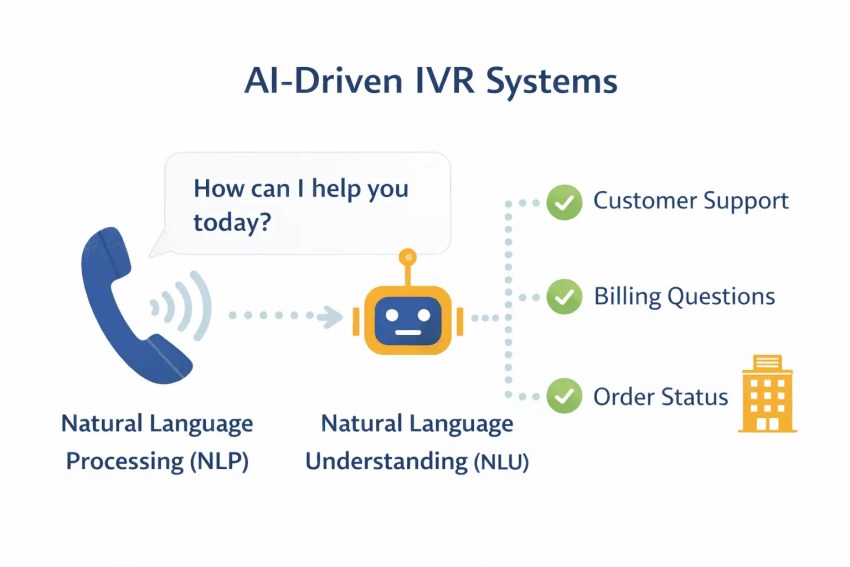
AI IVR is a voice automation system that uses conversational AI to understand a caller’s spoken requests and respond intelligently without forcing the caller through rigid touch-tone menus or keypad navigation. Instead of “Press 1 for X,” the system simply asks, “How can I help you today?” and actually understands the answer.
Four core technologies make this possible:
- Automatic speech recognition (ASR) converts spoken words to text in real time.
- Natural language processing (NLP) and natural language understanding (NLU) interpret meaning and caller intent, not just the literal words.
- Machine learning improves accuracy with every call.
- Text-to-speech delivers natural-sounding responses that resemble a real conversation rather than a prerecorded, robotic script.
If you’re a caller, you’re likely to notice the difference immediately. Let’s say you need to reschedule an appointment. You can simply say, “I need to reschedule my appointment for next Tuesday.” AI IVR understands this and acts immediately.
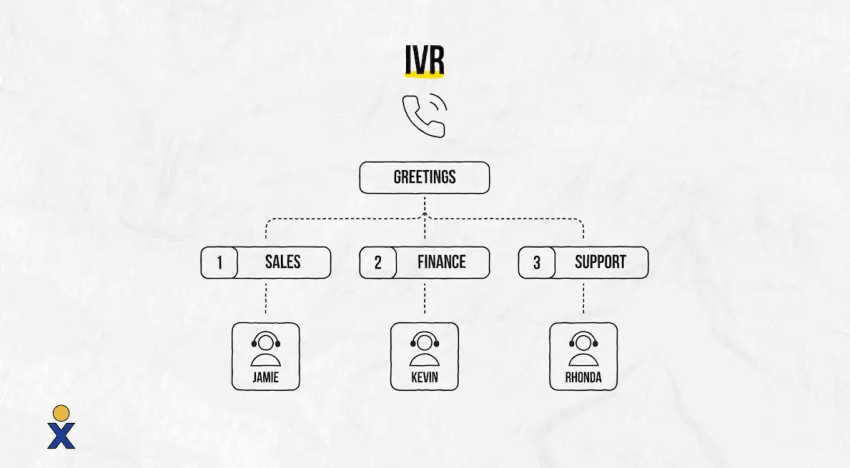
With traditional IVR, you have to go through a fixed menu tree. Pressing the numbers can take seconds, but the other steps can take minutes and often end in frustration.
AI IVR resolves calls rather than just routing them. It handles FAQs, retrieves account balances, manages appointment scheduling, processes payments, and escalates complex issues to a human agent, with full context transferred.
Machine learning continuously refines its intent models based on real caller language, so the system automatically improves with every interaction.
AI IVR vs. Traditional IVR: What’s the Difference?
Anyone who’s spent time managing a contact center knows what legacy IVR looks like from the inside: a decision tree built months or years ago, maintained by someone who no longer works there, and updated only when complaints get loud enough. It does what it was told to do. It just wasn’t told much.
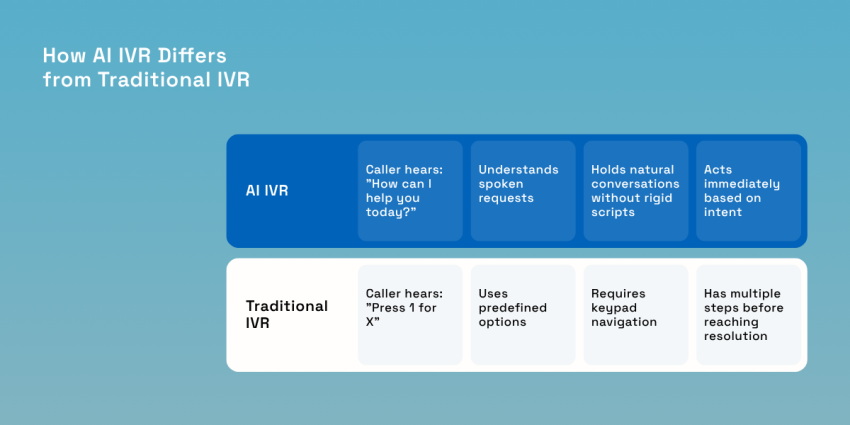
The structural problem with traditional IVR systems is that they only work when callers do what the systems expect. The moment someone says something slightly off script or even just presses the wrong number, the whole system breaks down.
AI IVR doesn’t have that brittleness. It understands a caller’s intent, not just their input. When a caller says, “I think I was charged twice,” the system knows what the caller means and where to direct them.
The table below lays out how the two approaches compare across the dimensions that actually matter in day-to-day operations.
| Feature | Traditional IVR | AI-Powered IVR |
|---|---|---|
| Caller interaction | Keypad/touch-tone menus | Natural language speech |
| Language understanding | Keyword-based, limited | Contextual NLP, accent-tolerant |
| Learning capability | Static, no adaptation | Learns from every interaction |
| Personalization | None | CRM-aware, context-driven |
| Call routing | Rules-based, rigid | Intent-based, dynamic |
| Self-service depth | Basic FAQs only | Multistep transactions, bookings |
| Multilingual support | Separate recordings required | Real-time language detection |
| Customer experience | Slow, frustrating menus | Conversational, humanlike |
| Analytics | Basic call logs | Sentiment, intent trends, transcripts |
| Scalability | Requires manual updates | Scales with AI model improvements |
What the table above doesn’t show is that updating a traditional IVR system means filing an IT ticket and hoping nothing breaks. Conversely, adjusting an AI IVR call flow is similar to editing a document, which matters when you need to respond quickly to a product launch or seasonal spike.
How AI IVR Works
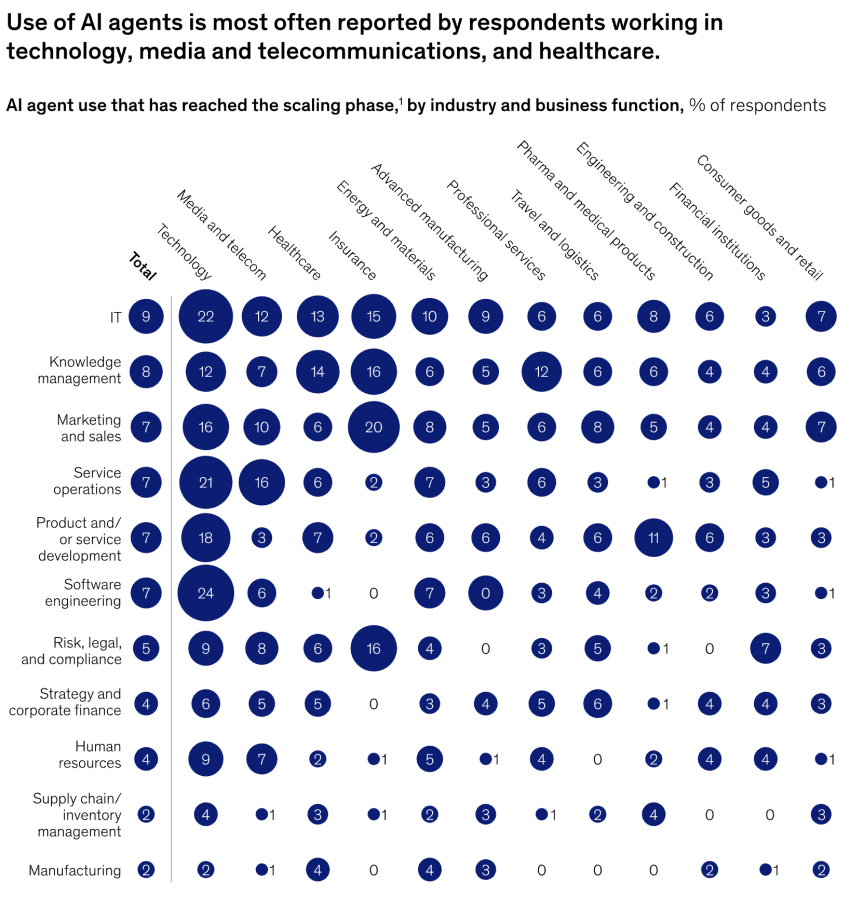
Each call moves through a sequence of steps that happen fast enough to resemble a normal conversation. Here’s what’s actually going on at each stage.
1. Caller connection and greeting
The AI opens with a natural prompt, such as “Hi, thanks for calling. How can I help you today?” The caller doesn’t have to sit through a list of options. By inviting natural speech right away, the system signals that the caller doesn’t need to adapt to the technology. The technology adapts to them.
2. Speech recognition
As the caller speaks, ASR transcribes their words to text in real time, fast enough to keep the conversation flowing naturally. ASR handles accents, background noise, and varying speech speeds without breaking the conversation flow.
3. Intent recognition
NLP and NLU analyze the transcription to determine what the caller actually wants rather than the words they used, separating conversational AI from basic keyword matching.
AI IVR recognizes “I’m locked out of my account” as an account recovery request. “There’s a weird charge on my bill” routes to billing because the system understands the meaning.
4. Context and data retrieval
Before responding, the AI pulls data from connected systems, such as CRM, billing, scheduling, and knowledge base, via APIs. The system already knows who’s calling and what their history looks like (past purchases, issues). A caller won’t face roadblocks like “Can I get your account number?”
5. Action execution or routing
If a customer can’t resolve their issue through self-service, such as checking an order, processing a payment, or rescheduling an appointment, the AI handles it end-to-end without involving an agent. If a human is needed, the AI transfers the call to the most qualified available agent, with full context attached so the caller won’t have to repeat themselves.
6. Continuous learning
After every interaction, machine learning models update. The system picks up new phrasings, corrects misroutes, and gradually improves its accuracy across all call types. AI IVR gets better the more it’s used, while traditional IVR stays exactly how it was set up until someone manually updates it.
One of the biggest frustrations with older IVR systems was that callers couldn’t interrupt them; they had to listen to the entire menu. Modern AI-powered IVR systems support the barge-in feature. This means the AI can interrupt callers and continue the conversation in real time. This low latency ensures that the conversation feels more human than robotic.

Key Benefits of AI-Powered IVR
Having managed teams where legacy IVR was the front line, the friction shows up in transfers, handle time, and callbacks. The improvements AI IVR delivers show up in the same places.
Faster resolution and shorter handle times
AI IVR resolves routine inquiries without agent involvement. By routing callers more accurately on the first attempt, it minimizes unnecessary transfers and delays.
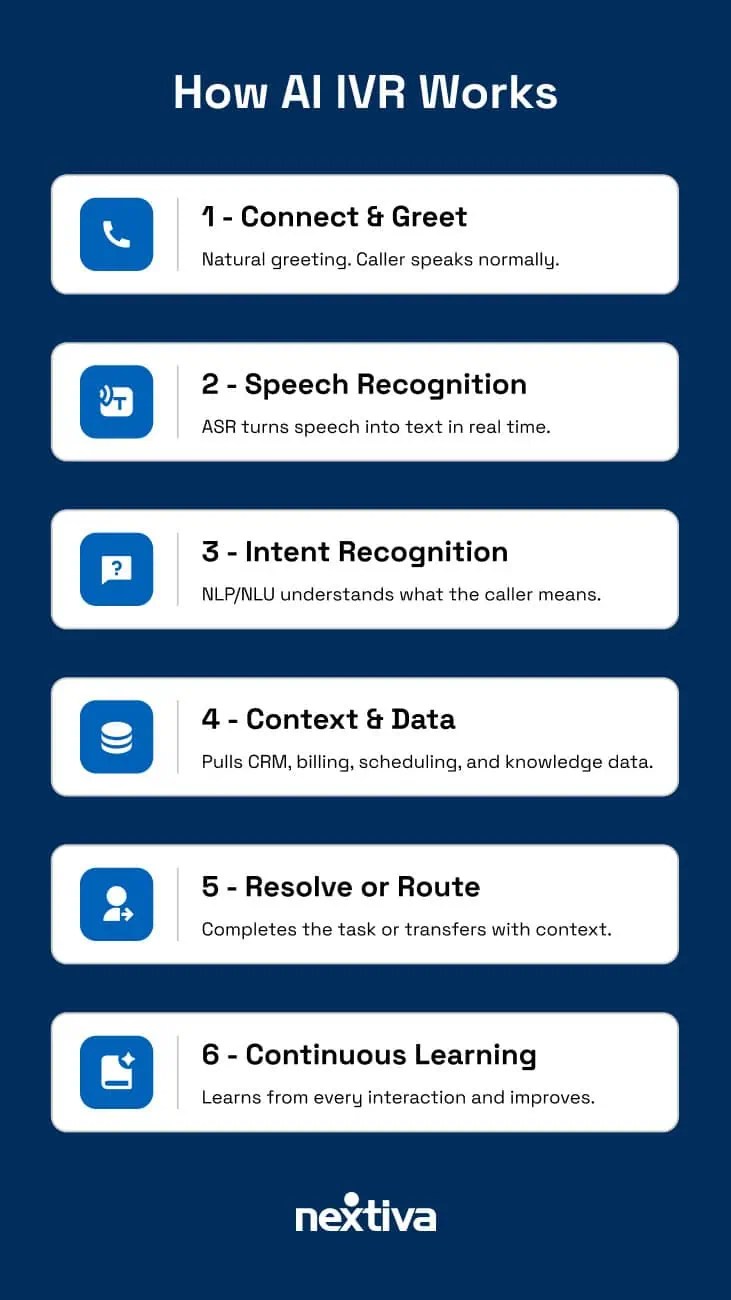
McKinsey’s research on generative AI suggests that it could automate up to 30% of work hours across operations. It’s capable of routing customers to the right agent and can flag churn risks using predictive analytics, among other capabilities, CX today reported.
If calls do escalate to a live agent, the AI will have already identified the issue and transferred context. That way, the agent receives context upfront instead of spending the first two minutes asking who they’re talking to and why.
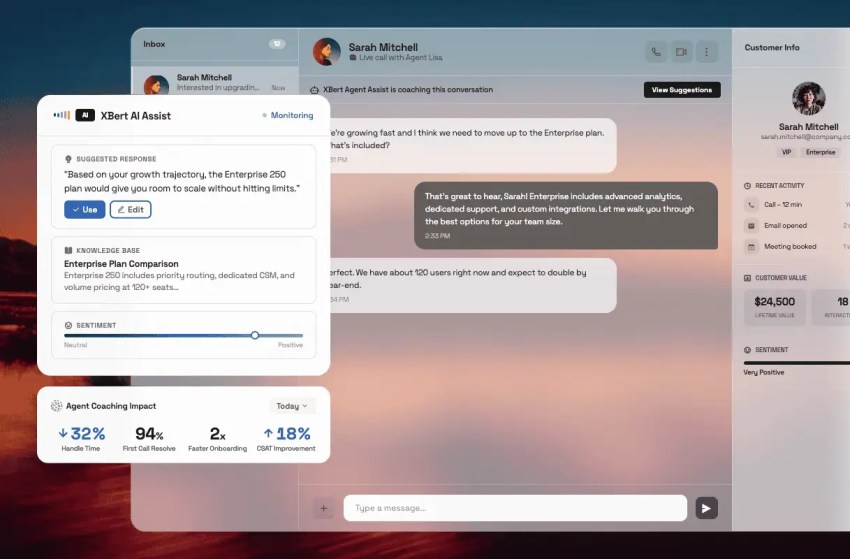
A real-world example of this would be Lenovo, which deployed AI agents to support customer service. Per a McKinsey interview, Lenovo is experiencing “double-digit productivity gains” in call handling times.
Higher first-call resolution
Intent-based call routing directs calls to the right destination on the first attempt.
Businesses that have made the switch from legacy to AI-driven IVR consistently report first-call resolution improvements of 25% or more. This directly reduces repeat call volume and the costs that come with it.
24/7 availability
AI IVR covers overnight calls, weekends, and volume spikes with the same conversational quality as peak hours. Per McKinsey, AI-driven automation could enable companies to handle up to 30% more calls, even while having fewer agents.
For healthcare, e-commerce, and financial services teams where after-hours demand is real and consistent, this is a fix for a revenue and service gap that traditional IVR and basic auto-attendants can’t seem to close.
Reduced operational costs
Calls resolved through self-service remove the need for agent involvement. Automating high-volume, repetitive calls frees staff for work that actually requires a person.
Additionally, consolidating into one platform eliminates separate IVR scripting tools, speech recognition add-ons, and legacy telephony hardware, which is advantageous, as each carries its own maintenance cost.
Improved customer satisfaction
Faster resolutions and more natural interactions directly improve customer satisfaction.
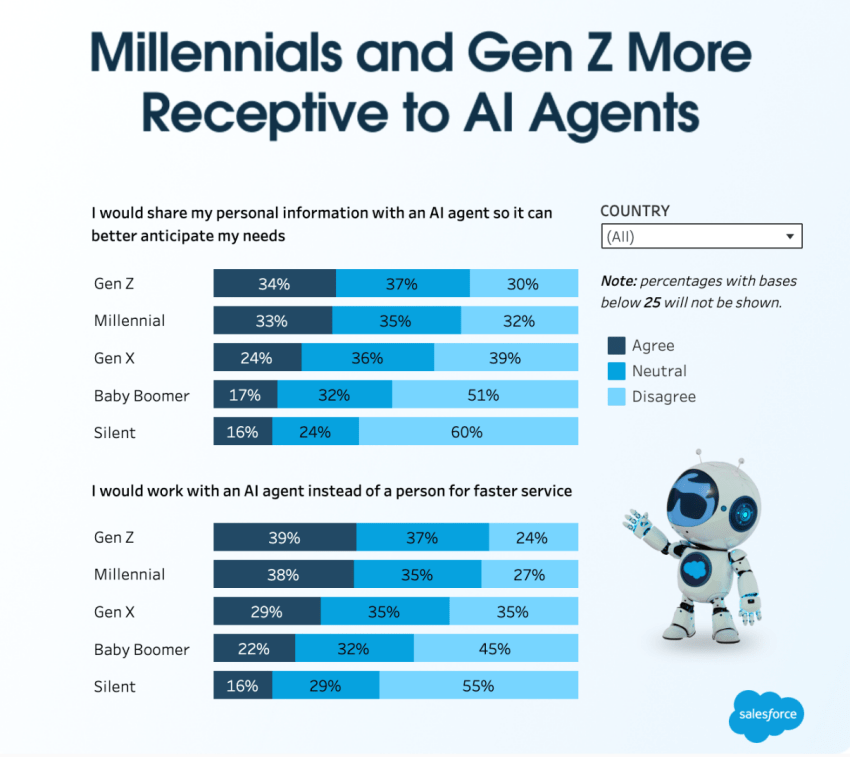
According to a Salesforce report, 89% of service professionals think that conversational AI can help increase self-service resolution rates, while 88% say that the technology improves resolution times.
Actionable analytics and insights
AI IVR captures data that legacy systems simply can’t. This includes full call transcripts, intent trends, sentiment signals, containment rates, and resolution outcomes, all in real time.
Going well beyond basic call logs, AI IVR can also determine the reasons for a call, where callers get stuck, which self-service flows are working, and where to focus next.
Hear why XBert AI is the best AI receptionist
XBert AI receptionist handles customer questions, captures leads, and books appointments. Try it free for 14 days.
Top AI IVR Call Flows That Drive Results
Not all call flows are equal candidates for automation. The ones worth targeting first share a common profile. They are high volume, have a predictable structure, and are resolvable without a human in most cases.
Here are the call flows that consistently produce the strongest results.
| Call Flow | How AI IVR Handles It | Business Outcome |
|---|---|---|
| Customer support triage | Caller describes the issue naturally; AI identifies intent, pulls CRM data, and resolves or routes with context. | Fewer transfers, faster first-call resolution |
| Appointment scheduling | AI checks availability, confirms patient/client details, and books or reschedules in real time. | Reduced no-shows, lower admin workload |
| Order status and tracking | Caller asks about an order; AI retrieves tracking info from backend systems instantly. | Zero agent involvement for routine inquiries |
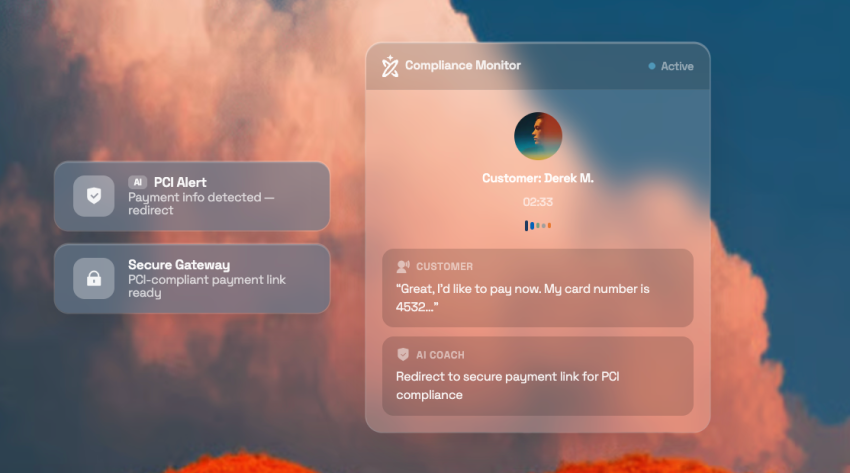
| Billing and payments | AI verifies identity, retrieves balance, and processes secure payment via PCI-compliant flow. | 24/7 payment processing, reduced call volume |
| After-hours and overflow | AI handles calls outside business hours or during volume spikes with full conversational capability. | No missed calls, consistent customer experience |
| Lead qualification | AI asks qualifying questions, captures contact info, scores leads, and routes hot prospects to sales. | Faster pipeline velocity, higher conversion rates |
| Outbound notifications | AI places automated calls for reminders, confirmations, surveys, and proactive updates. | Improved engagement, reduced manual outreach |
| Multilingual routing | AI detects the caller’s language in real time and responds accordingly without prerecorded prompts. | Consistent global service, lower localization costs |
Customer support triage
This is the highest-impact call flow by volume. The caller describes their issue in natural language; the AI identifies intent, checks CRM history, and either resolves the issue or routes the call to the right agent, with full context.
This flow eliminates the “Press 1 for X” bottleneck and cuts transfers significantly. Fewer handoffs mean faster resolution and less chance that the caller gives up before getting an answer.
For example, a caller says, “My internet has been slow since yesterday.” The AI identifies a known outage in their area, gives an estimated resolution time, and offers to send a text update, all without an agent touching the call.
Appointment scheduling and management
AI can handle bookings, rescheduling, and cancellations through natural conversation, with real-time availability checks and identity verification built in. A HIPAA-compliant AI IVR system can handle businesses with high appointment volume, like healthcare institutions, without adding front-desk headcount.
Order status and tracking
Say someone calls to ask about the status of an order. The AI pulls tracking data directly from the OMS or CRM and delivers an instant update, no agent required.
For e-commerce and retail businesses, “Where’s my order?” is one of the most common inbound call types. Automating it fully can eliminate a meaningful share of daily inbound calls and redirect agent capacity toward more complex customer needs.
Billing and secure payments
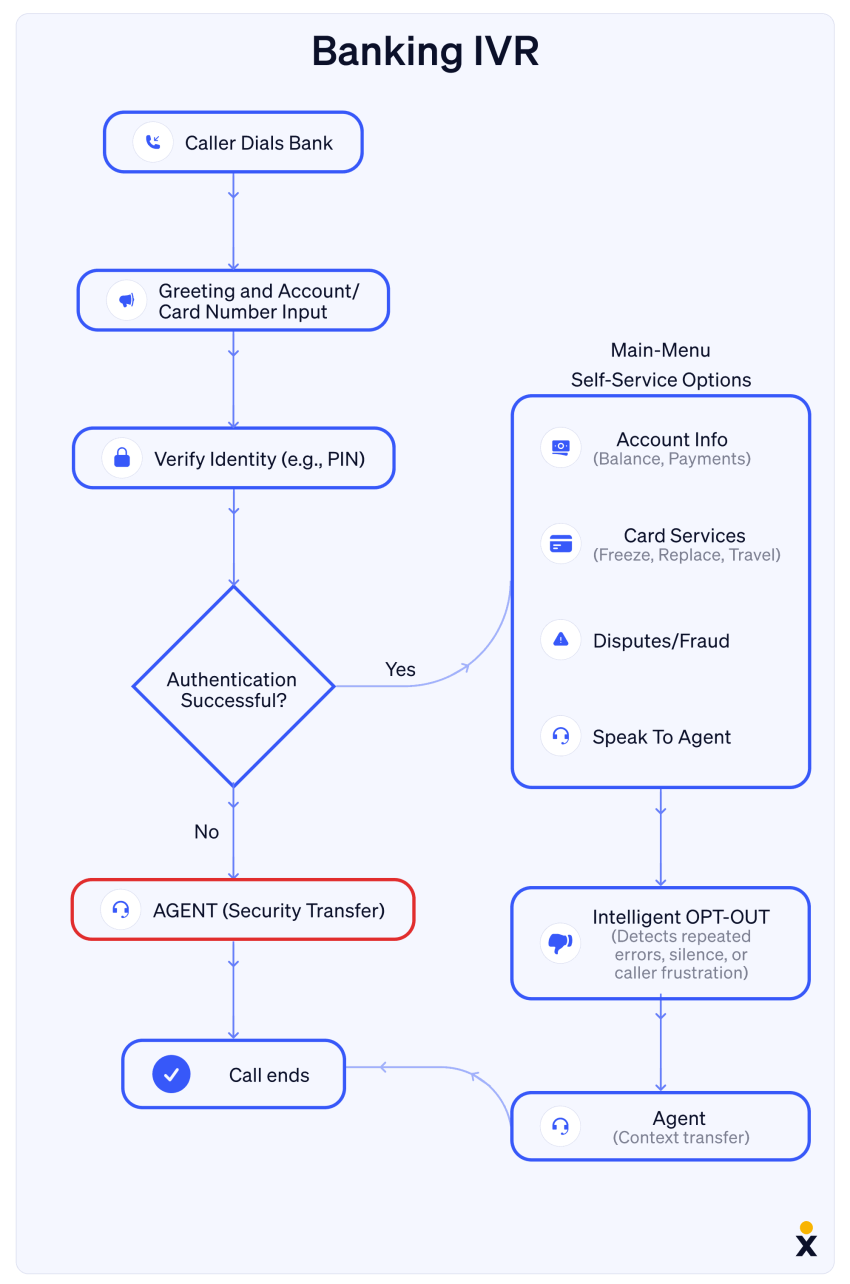
AI verifies caller identity, retrieves the account balance, and processes payments through PCI-compliant flows, enabling 24/7 payment handling without live agents. Authentication, such as PIN verification or knowledge-based authentication, is woven into the conversation naturally.
After-hours and overflow handling
Calls outside business hours are handled the same way as peak-hour calls. A caller won’t be greeted by a message asking them to call back the next day or by a voicemail asking them to leave a message.
For businesses running basic auto-attendants after hours, this is one of the fastest ROI improvements available. Every call that previously would have gone to voicemail can now be handled right away.
Lead qualification and sales routing
The AI asks qualifying questions, captures contact details, scores the lead against predefined criteria, and routes high-priority prospects directly to sales with the full conversation summary attached. This turns inbound calls into pipeline opportunities without agent screening, which allows sales teams to focus on closing instead of qualifying.
Best Practices for AI IVR Implementation
Here’s what the teams that get it right tend to do.
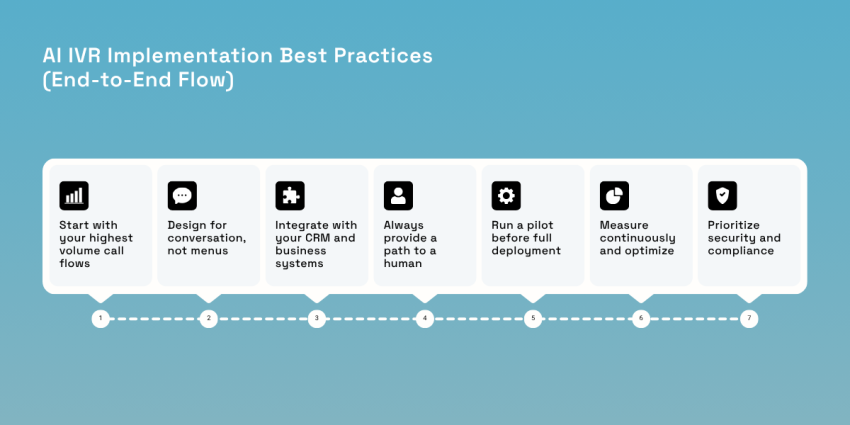
Start with your highest volume call flows
Pull three to six months of call data and find which types of calls have the highest volume, follow a predictable pattern, and rarely need a judgment call. These are the least complex flows and are the first targets for automation.
A tight first phase of two or three well-trained flows will outperform a sprawling launch (aka automating everything at once) every time. You get better results, data, and a proof of concept that is easier to build on.
Design for conversation, not menus
Open-ended prompts like “How can I help you today?” outperform structured ones because callers tend to respond more naturally to them, and they produce more accurate intent recognition.
Train intent models on real call transcripts and not on assumptions about what customers will say. Callers phrase things in ways product teams can rarely predict, and your AI needs to reflect actual language.
Integrate with your CRM and business systems
AI IVR is only as useful as the data behind it. Connect it to your CRM, ticketing system, billing platform, and scheduling tools via APIs because that integration is what turns a generic voice interaction into a personalized one.
CRM-connected AI can greet returning callers by name, surface their recent history, and resolve issues with account-specific data. Platforms like Nextiva have this built in, helping avoid integration bottlenecks that delay most rollouts.
Always provide a path to a human
Every AI IVR will hit its limits. The option to reach a live agent should be surfaced naturally and not buried after three failed recognition attempts. Agents should receive a full summary of what the caller said and what the AI did. Nextiva’s intelligent call routing passes full context at transfer so agents can continue the conversation without missing a beat.

Run a pilot before full deployment
Deploy your AI on a subset of traffic for 30 to 90 days, and set baseline metrics before the pilot starts. These metrics should include containment rate, average handle time, escalation rate, and CSAT. Without a pre-deployment baseline, there’s no way to know what actually improved. Expect to iterate after the first 1,000 calls. Review transcripts for misroutes, listen for phrasings the AI missed, and refine intent models with real data.
Measure continuously and optimize
Track the metrics that matter, such as containment rate, first-call resolution, average handle time, transfer rate, abandonment rate, and CSAT, before and after deployment and on an ongoing basis. Use AI-generated transcripts and intent reports to find gaps in coverage, identify new call types to add, and surface call flows where the experience is breaking down.
Prioritize security and compliance
For healthcare, financial services, and insurance, compliance is a prerequisite, not an option. Verify that your AI IVR platform meets HIPAA, PCI-DSS, SOC 2, and GDPR requirements before a single live call goes through it.
Look for encrypted voice transmission, role-based access controls, audit trails, and on-demand redaction for sensitive data. Nextiva’s platform carries HIPAA and SOC 2 certifications and PCI-DSS compliance out of the box, which eliminates a significant amount of compliance legwork during procurement.
How Nextiva Powers AI IVR for Modern Contact Centers
A common frustration with AI IVR platforms is that they work well in isolation but poorly in practice. Think impressive demos but messy integrations.
Nextiva integrates AI IVR into the same platform that handles voice, SMS, chat, and CRM, so they actually communicate with each other. Its Advanced IVR with Conversational AI runs on NLP from Google Dialogflow and IBM Watson, so callers can speak naturally instead of navigating menu trees.
Building and updating call flows don’t require a developer or an IT ticket. The visual Call Flow Designer uses drag-and-drop so contact center managers can easily reconfigure IVR flows.
Intelligent call routing factors in caller intent, CRM data, real-time agent availability, and agent skills. The built-in analytics dashboard surfaces call volumes, containment rates, sentiment signals, and resolution outcomes without needing a separate reporting tool.
For teams that want an always-on front line, XBert is an AI receptionist that handles inbound calls 24/7. This includes qualifying leads, booking appointments, answering common questions, and routing complex situations to the right person. XBert starts at $99/month and functions as a true AI voice agent rather than a glorified auto-attendant.
Security and compliance are baked in. The platform is HIPAA-certified, SOC 2 attested, and PCI-DSS compliant, which matters for healthcare, financial services, and insurance teams where security and compliance are not optional. The uptime SLA is 99.999%, so you’re always connected to customers.
Stop Making Callers Navigate Menus They Didn’t Ask For
The “Press 1 for billing” experience reflects the limitations of old phone systems. In 2026, callers have grown accustomed to interacting with technology that understands them. And when a phone system doesn’t, the frustration is sharper than it used to be. AI IVR closes that gap by replacing menu navigation with actual conversation.
Having seen legacy IVR setups up close (the outdated scripts, the transfer loops, the callers who hang up because it’s not worth the effort), the improvements AI-powered systems deliver are significant. Teams handle more calls without adding headcount, agents spend their time dealing with problems they actually need to deal with, and customers stop dreading the experience of calling in.
Nextiva’s Advanced IVR with Conversational AI and XBert, the AI receptionist, is built for exactly this kind of transformation — not as add-ons but as core parts of a unified contact center platform.
Ready to see how replacing rigid menus with intelligent conversations works in practice? Talk to a Nextiva expert today.
Conversational AI is the next gen of IVR.
Focus your agents on the important cases and let the AI automate and improve call routing, reduce hold times, and save you money.
Frequently Asked Questions About AI IVR
AI IVR is an advanced IVR system that uses AI to understand natural speech and automate customer interactions.
Traditional IVR relies on keypad inputs and rigid menus, while AI IVR understands natural speech, adapts to caller intent, integrates with CRM data, and improves with use. You get faster resolutions, fewer transfers, and a significantly better customer experience.
AI IVR allows for reduced handle times, higher first-call resolution rates, better call routing, 24/7 availability without added headcount, lower operational costs, and real-time analytics that help you identify where you can optimize.
AI IVR uses NLP to identify caller intent from spoken requests, then matches calls to the right resource based on that intent, caller history, and CRM data instead of relying on keypad inputs. This reduces misroutes and unnecessary transfers and improves first-call resolution.
The highest-impact call flows are customer support triage, appointment scheduling, order status and tracking, billing and payment processing, after-hours and overflow handling, and lead qualification. These work best because they tend to be high in volume and repetitive in nature, which is exactly where AI automation delivers the most measurable value.
Basic deployments can take weeks; complex implementations can take several months.
Yes. Most enterprise AI IVR platforms integrate with existing CRMs, ticketing systems, and backend databases via APIs. CRM connectivity enables personalization by giving AI access to account data for intent-driven responses.
On a compliant platform, yes. Look for HIPAA certification, PCI-DSS compliance, SOC 2 attestation, encrypted voice transmission, and audit trails. These requirements are essential for any AI IVR system handling sensitive health or financial information.