Customer Experience
  Blog
Blog  Business Communication
  Leadership
  Marketing & Sales
  Nextiva News
  Productivity
  VoIP
VoIP 

With contact center software that integrates phone, email, chat, and social media interactions into a single platform, customer care teams can manage every engagement at scale. The right platform automates routing, measures agent performance, integrates with your CRM, cuts handle time, and improves first-contact resolution.
In this article, we review 10 top contact center solutions for enterprise, mid-market, and SMB to help you pick the right platform for your team’s size, budget, channel needs, and AI strategy.
What Is Contact Center Software?
Contact center software is a cloud-hosted communication platform that consolidates customer interactions spanning phone calls, email, live web chat, SMS, and social messaging into a single workspace. It enables sales and support teams to manage multi-channel communications, automate call routing, monitor agent performance, and maintain an ongoing history of customer conversations within a CRM system.
Call center vs. contact center software: What’s the difference?
Although used interchangeably, the difference between call and contact center software is in communication routes and context:
- Call center software: Voice calls only (inbound customer service or outbound sales dialing). Customer interactions remain isolated on the phone line.
- Contact center software: Offers omnichannel support for voice and digital channels (SMS, web chat, e-mail, social media). Agents work on a single screen and see a customer’s previous cross-channel history.
Types of Contact Center Software
Contact center platforms can be categorized based on their operational focus and deployment model. Understanding these differences can help you match key software capabilities with your day-to-day contact center operations.
| Type | Best for | Key features |
|---|---|---|
| Inbound | Customer service, help desks, and technical support | Automatic call distribution (ACD), Interactive voice response (IVR), skills-based routing, and queue management to handle incoming traffic. |
| Outbound | Sales outreach, lead generation, market research, and collections | Automated dialing tools (predictive, power, preview) to maximize agent talk time and connect rates. |
| Blended | Teams managing both incoming support requests and outbound sales | Dynamic workload balancing that shifts agents to outbound calls during lulls and pulls them to inbound queues during volume spikes. |
| Cloud-based (CCaaS) | Remote or distributed teams and fast-scaling organizations | The vendor hosts it off-site, offering rapid setup, simple scaling, lower upfront total cost of ownership (TCO), and automatic feature updates. |
| On-premises / hybrid | Legacy enterprises with complex custom integrations or strict data rules | Installed on physical in-house servers, it provides maximum local control but requires high hardware investments and substantial IT maintenance. |
Must-Have Contact Center Software Features
To offer an exceptional contact center customer experience and maximize agent productivity, a strong contact center platform should have these essential features:
1. AI-powered conversational virtual agents and routing
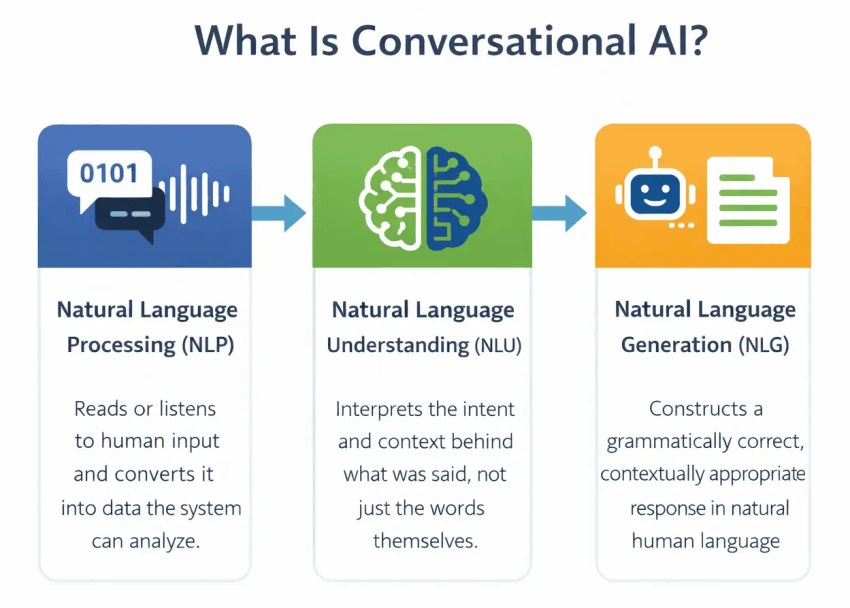
Advanced contact center platforms now use conversational AI that understands customer intent in simple language, replacing the outdated stiff touch-tone menus. Virtual agents can perform routine customer service functions (like order tracking or bill payment), and intelligent routing can send more complicated issues to the best-qualified live agent depending on context.
2. Complete omnichannel coverage
Omnichannel customer engagement includes voice, SMS, web chat, email, and social media. Unlike disconnected multichannel solutions, actual omnichannel allows an agent to view a customer’s web chat history while speaking with them over the phone.
3. Workforce management (WFM) and engagement (WFE)
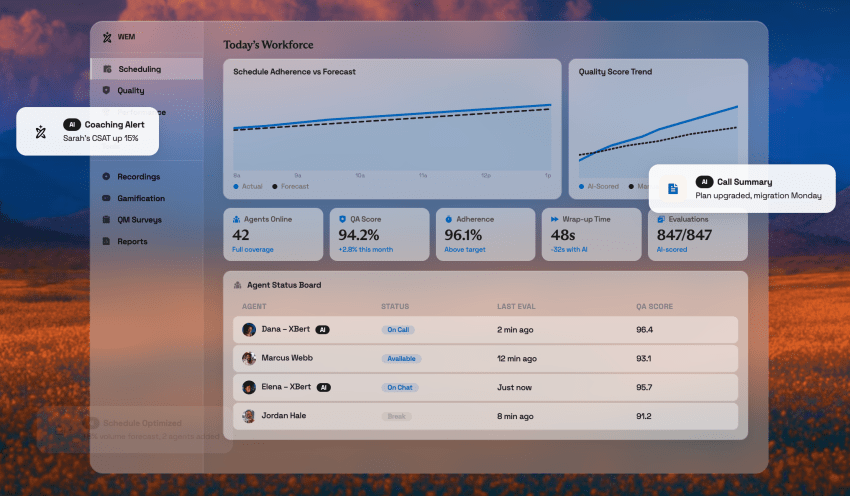
WFM solutions predict staffing needs, create timetables, and monitor agent adherence by analyzing past interaction volume.
Managers can evaluate call recordings, assess interactions, and offer focused coaching using integrated quality management (QM) tools.
4. Deep CRM and enterprise integration
Agents benefit from key software features, like automatic screen pops, caller ID, and real-time activity tracking, connected to platforms like Salesforce, HubSpot, Microsoft Dynamics, and Zendesk. This eliminates the need for manual data entry.
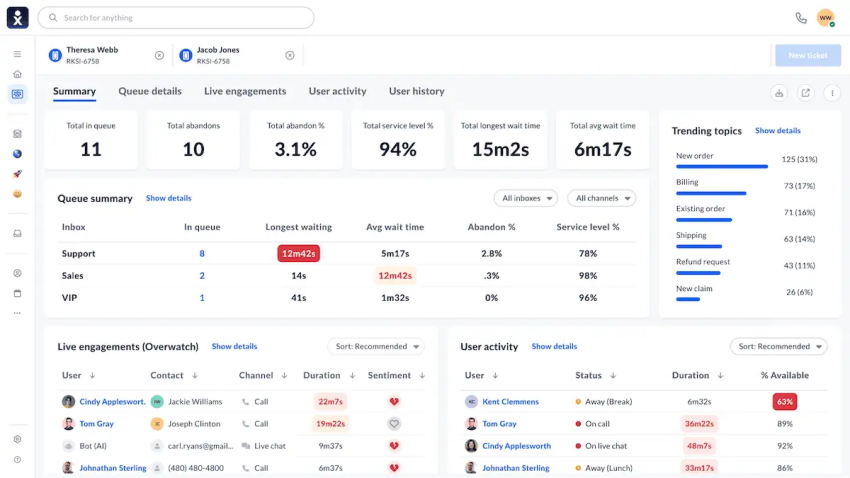
5. Real-time dashboards and analytics
Supervisors need real-time insights into queue depth, average wait times, drop rates, agent status, and sentiment analysis. Contact center leaders can use historical reporting to identify process bottlenecks and optimize staffing allocations.
6. Security, compliance, and high availability
Contact centers that handle payment information or protected data must follow strict compliance standards (PCI DSS, HIPAA, GDPR, and SOC 2 Type II) and meet uptime SLAs (up to 99.999%).
Market Tiers of Contact Center Software
Industry analysts typically categorize contact center systems into three broad levels based on operational complexity and team size:
- Enterprise (NiCE, Genesys, Cisco): Best suited for businesses with thousands of agents needing custom coding, complex compliance, and transnational telco routing.
- Mid-market and AI-first (Nextiva, Five9, Talkdesk): For organizations that want enterprise-grade omnichannel routing, AI agent assistance, and deep CRM sync but don’t want inflated professional services overhead or restrictive deployment cycles.
- SMBs (Dialpad, CloudTalk, Aircall): For smaller teams focused on basic voice calling, lightweight SMS capabilities, and straightforward CRM logging.

10 Best Contact Center Software Solutions Compared
| Software | Market size | Channels covered | AI features | Key CRM integrations | Seat minimums | Starting price |
|---|---|---|---|---|---|---|
| Nextiva | Mid-market and high-growth teams | Voice, SMS, web chat, email, social | AI transcription, AI call summaries, virtual agents, process triggers | Salesforce, HubSpot, Dynamics, Zendesk, Zoho, ServiceNow | None | $75/mo |
| Five9 | Upper mid-market and outbound teams | Voice, SMS, web chat, email, social | Intelligent virtual agents (IVA), Agent Assist, sentiment scoring | Salesforce, Zendesk, ServiceNow (often extra fee) | 50 seats | $119/mo (Digital only) |
| Talkdesk | Mid-market and vertical enterprise | Voice, SMS, web chat, email, social | Vertical AI models, AI Trainer, studio flows | Salesforce, Zendesk, Epic, ServiceNow | Varies | $85/mo (Digital only) |
| NiCE CXone | Global enterprises | Voice, SMS, web chat, email, social (30+ channels) | Enlighten Copilot, Autopilot, AI routing | Salesforce, Oracle, Microsoft Dynamics, SAP | Varies | $110/mo |
| Genesys Cloud CX | Global enterprises and hybrid teams | Voice, SMS, web chat, email, social | Predictive engagement, journey AI, WEM | Salesforce, Zendesk, SAP, Microsoft | Varies | $75/mo |
| Cisco Webex CC | Enterprise IT environment | Voice, SMS, web chat, email, social | Webex AI Assistant, agent burnout alerts | Salesforce, Zendesk, Microsoft Teams | Enterprise | Custom quote |
| Salesforce Agentforce Contact Center | Mid-market to enterprise; Salesforce-centric | Voice, digital channels, messaging | AI enhancements, intelligent routing, Agentforce capabilities | Native (Salesforce Ecosystem) | None | $125/mo |
| Dialpad | SMB and sales teams | Voice, SMS, web chat | Real-time speech coaching, live transcription | Salesforce, HubSpot, Zendesk | None | $80/mo |
| Aircall | SMBs and fast-growing startups | Voice, SMS | Automated transcription, post-call notes | 100+ (HubSpot, Salesforce, Pipedrive) | 3 | $30/mo |
| RingCX | UCaaS-focused teams | Voice, SMS, web chat, email, social | RingSense conversation intelligence | Salesforce, Zendesk, HubSpot | None | $65/mo |
1. Nextiva — Best overall contact center solution for mid-market and scaling teams
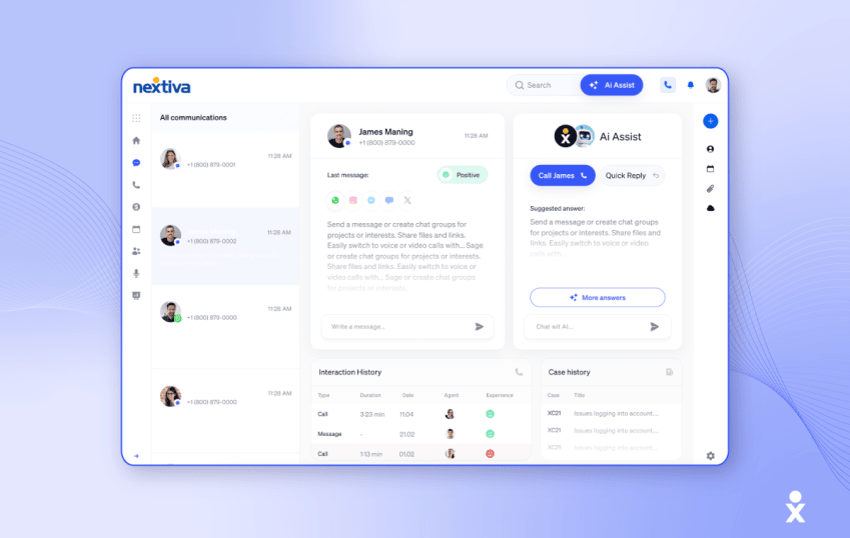
Nextiva offers an AI-powered contact center platform that integrates internal business communications (UCaaS) with full-featured contact center software (CCaaS). Whether your business requires inbound, outbound, or blended customer engagement, Nextiva supports contact center teams to manage voice, SMS, web chat, email, and social messaging within a unified interface.
Not only that, but Nextiva also provides enterprise-level features such as automated interaction workflows, real-time sentiment tracking, and conversational AI, all without the need for lengthy and costly custom implementations.
Key features:
- Omnichannel routing: Dynamic routing for voice, SMS, web chat, email, and social messaging via a single agent inbox.
- Native process automation: Triggers post-call workflows across external CRMs and databases (e.g., auto-updating records, sending follow-up SMS, opening support tickets).
- AI and intelligence: Native real-time call transcription, auto-generated interaction summaries, conversational virtual agents, and customer sentiment scoring.
- CRM ecosystem: Pre-built connectors for Salesforce, HubSpot, Microsoft Dynamics, Zendesk, Zoho, ServiceNow, Oracle Sales Cloud, SugarCRM, and more.
- Deployment and SLA: Fast cloud provisioning backed by a 99.999% uptime and ISO/IEC 27001 / SOC 2 Type II certifications.
Pricing tiers:
Nextiva’s base plans include inbound call center capabilities. The standard Nextiva contact center plans start at $75/user/month and include features such as voice and web chat, blended inbound and outbound, AI transcription and summary, skills-based routing, and journey orchestration.
What customers say about Nextiva:
Customer rating: 4.6/5
Customer review:
“Ruslin Akchurin has been fabulous, and Kevin Kushner was extremely patient and knowledgeable on the Adoption Call (Mario was amazing during our walkthrough—I have had a positive experience with every team member I have spoken to). We’ve jumped into our new Nextiva System (previously Comcast Business Voice Edge) with both feet—and have had a great experience. Customer Support (via phone and chat) has been helpful—very low (minutes) wait times. Top-notch team. The admin portal is RIDICULOUSLY easier than our previous system—very user-friendly and works in an analytical way. If we had wanted to do something that we couldn’t figure out, chat support was there to help! If I could give more than 5 stars, I would.”
Why is Nextiva the best contact center software?
While traditional enterprise platforms may demand six-figure budgets and lengthy multi-month implementations, and outdated call tools limit you to phone-only lines, Nextiva effectively bridges the gap between enterprise-grade capabilities and mid-market flexibility.
Here’s why Nextiva stands out as the top choice for scaling customer service and sales operations:
Robust unified communications (UCaaS + CCaaS)
Enterprise AI without enterprise pricing
- Real-time call summaries and transcriptions: Automatically captures conversation notes and key action items, removing the need for manual post-call logging.
- Intelligent virtual agents (IVAs): Manage routine multi-channel customer inquiries (such as order updates or billing questions) in conversational language before they reach live queues.
- Automation and triggers: Automatically updates CRM records, initiates follow-up SMS messages, or opens helpdesk tickets as soon as an interaction concludes.
Nextiva’s latest AI receptionist XBert takes automated answering to the next level. Here’s an overview:
No seat minimums and great time-to-value
Carrier-grade reliability and top-rated support
Pros & cons:
- Pros: Unified communications; no minimum number of licenses; native integration between internal team chat and contact center agents; lower total cost of ownership than established providers.
- Cons: Enterprises require extensive customization (e.g., custom scripts for existing on-premises systems) and API configuration.
Key takeaway: Nextiva offers the ideal combination of best-in-class AI automation, CRM integration, and easy management for teams that need enterprise-level functionality without the complexity.
2. Five9 — Best for outbound sales and enterprise outbound campaigns
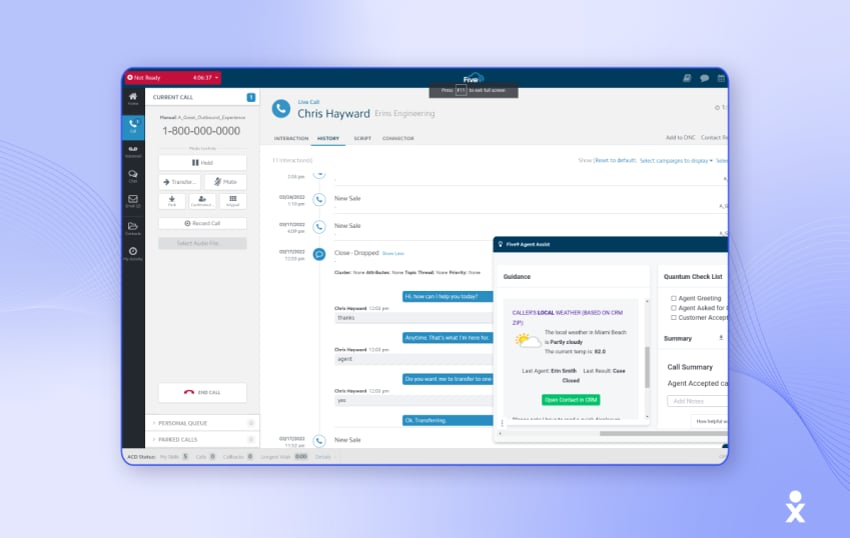
Five9 hits the nail on the head when it comes to AI-powered contact center experience software.
Whether you’re a large business with scalability concerns or you want to let your agents handle more value-added tasks and automate your run-rate activities, Five9 makes AI do the legwork so your agents remain efficient and productive.
Where it really excels is using AI to generate reports and provide sentiment analysis on your customer transactions. In fact, in the past year, Five9 has rolled out major AI updates that put AI into every part of the process, including quality management, routing, and analytics. AI is no longer an experiment; it’s fully baked in.
For data-driven organizations with a large customer base and a decently sized service team, Five9 can be a highly effective way to gain control of your contact center.
You can bolt Five9 onto a range of cloud telephony solutions while retaining your existing hardware and software. If you’re looking for standalone contact center software, Five9 is a solid option.
Key features:
- Intelligent virtual agents (IVA): Conversational AI that automates complex self-service workflows.
- Advanced dialers: Predictive, power, and preview dialing modes for proactive customer outreach.
- Workflow automation: Integrates interaction flows across enterprise backend databases.
Pricing tiers:
- Digital ($119/user/mo): Digital channels only (no voice).
- Core ($159/user/mo): Voice calling only.
- Premium / Ultimate: Custom quotes for combined omnichannel and WFO capabilities. (Requires a 50-seat minimum).
What customers say about Five9:
Customer rating: 3.4/5
Customer review:
“Five9 has done a great job at continuously improving its Intelligent CX Platform, especially with the integration of AI, IVA (Intelligent Virtual Agents), and WFO tools that help streamline contact center operations. The platform is robust and reliable, offering solid uptime and scalability across multiple channels. The reporting and analytics capabilities, particularly with AI Insights, are strong and help leaders make data-driven decisions. The automation tools (like IVAs and workflows) are powerful and can significantly reduce manual effort and contact volumes when properly implemented.”
Pros & cons:
- Pros: Industry-leading outbound dialers; robust AI Agent Assist tools.
- Cons: High base pricing; mandatory 50-seat minimum; digital and voice channels are sold as separate tiers.
Key takeaway: A good choice for mid to large operations, focused on outbound sales campaigns, but less suitable for agile teams or teams with fewer than 50 employees.
3. Talkdesk — Best for regulated verticals (healthcare, finance, retail)
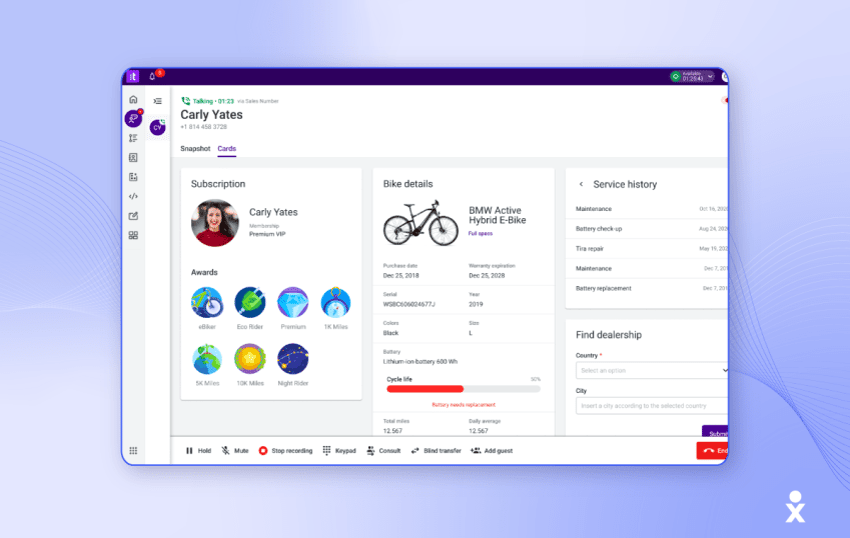
Talkdesk is a cloud contact center that uses automation and artificial intelligence to improve customer engagement, particularly popular with customer service teams. As a multichannel contact center, Talkdesk supports email, web chat, SMS, and social media and is good for creating customized workflows and customer interactions.
The platform’s easy setup and extensive call center features benefit more sophisticated customer queries that need complex routing and multichannel engagement.
Key features:
- Vertical Experience Clouds: Specialized workflow packages for healthcare (EHR/HIPAA compliance), banking, and retail.
- Talkdesk Studio: Visual drag-and-drop builder for designing multi-channel routing flows.
- AI Trainer: No-code tool that allows non-technical managers to train AI models on company knowledge bases.
Pricing tiers:
- Digital Essentials: $85/user/month
- Voice Essentials: $105/user/month
- Elite: $165/user/month
- Industry Experience Clouds: $225/user/month
What customers say about Talkdesk:
Customer rating: 1.5/5
Customer review:
“Good idea; really poor execution. Most things in life you usually end up needing support or repair. I understand that. Your car, your house, your computer, and your software — it happens. What is not acceptable is how long it takes their support to even acknowledge an issue, much less resolve it. Counting down the months until our contract is over.”
Pros & cons:
- Pros: Customizable UI; strong pre-built compliance workflows for regulated verticals; rapid workflow design.
- Cons: Advanced AI and analytics tools require upgrading to higher pricing tiers; custom integration setup can escalate costs.
Key takeaway: A good choice for mid-sized businesses in regulated industries that require industry-specific compliance templates and customizable interaction flows.
4. NiCE CXone — Best for global enterprises with complex compliance needs
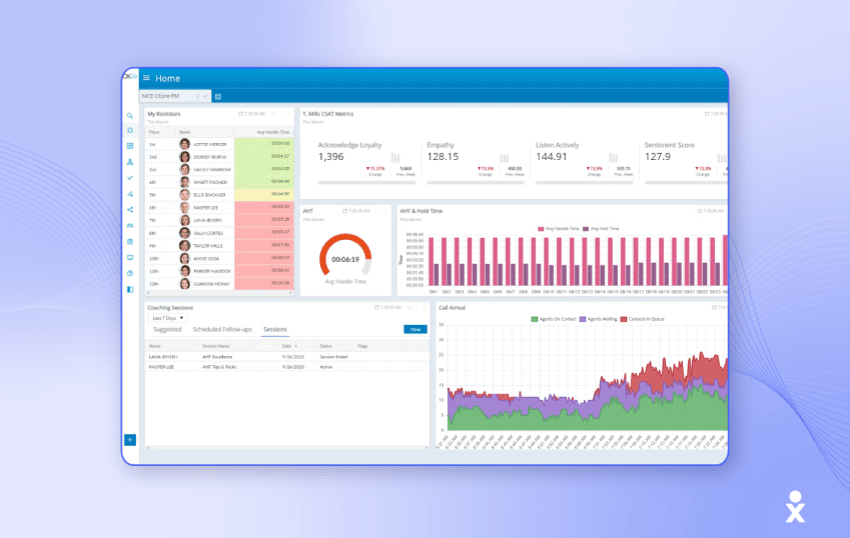
NiCE CXone is another contact center vendor that’s launched its own generative AI and assistant-style modules. Its most recent innovations, Enlighten Copilot and Enlighten Autopilot, are pioneering the charge for automated companions for contact center agents. Agents can ask questions and get feedback on tasks they carry out.
This is all in addition to a strong set of features, like omnichannel routing, workforce optimization, and AI analytics.
NiCE can also provide professional services, business consulting, and contact center training, making it a popular choice for software used in enterprise contact centers or major technical deployments.
Key features:
- Enlighten AI Engine: Generative AI copilots (Copilot and Autopilot) that deliver real-time guidance to agents and automate customer interactions.
- Omnichannel routing: Native support for over 30 digital and voice channels inside a single queue.
- Enterprise WFM and forecasting: Workforce management, agent scheduling, and quality management tools.
- Open-source cloud platform: Extensive API framework connecting with enterprise databases and CRMs.
Pricing tiers:
- Omnichannel Agent: $110/user/month
- Essential Suite: $135/user/month
- Core Suite: $169/user/month
- Complete Suite: $209/user/month
- Ultimate / Industry Packages: $249+/user/month
What customers say about NiCE CXone:
Customer rating: 4.3/5
Customer review:
“NiCE CXone is a user-friendly and easy-to-use platform to meet the organizational needs of different types. telephony, webchat, social media, etc. Customization to meet customer-specific needs, if at all, is a challenge currently as it goes through a long process that you raise it, and if everyone (Across NiCE users) voices the same, then it gets prioritized and that too at its own pace.”
Pros & cons:
- Pros: Great enterprise depth; market-leading workforce optimization and forecasting engines; extensive ecosystem of enterprise connectors.
- Cons: High total cost of ownership; complex setup that requires dedicated third-party system integrators; administrative learning curve.
Key takeaway: A good choice for enterprise businesses with thousands of agents who need customized compliance, advanced AI coaching, and complex routing.
5. Genesys Cloud CX — Best for high-scale enterprise and hybrid infrastructures
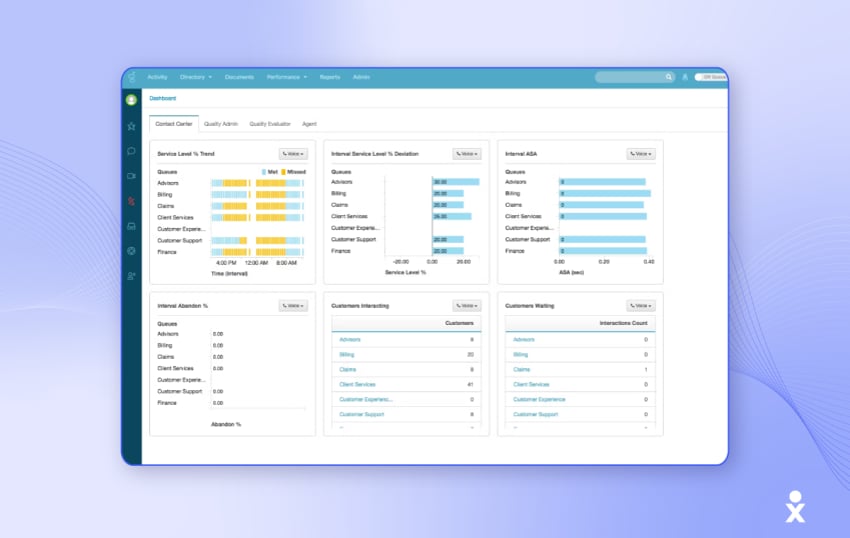
Genesys Cloud CX specializes in on-premises and hybrid deployments for industries such as finance, which often have stringent compliance regulations. It targets large enterprises and complex contact centers that need advanced features and customizations.
Because of that, Genesys offers scalability as a main selling point, boasting 1,000+ agent clients, including Vodafone and Sodexo.
You get omnichannel support, advanced self-service features (chatbots, voicebots, and knowledge bases), and integrations with enterprise-level applications. If you’re rolling out at scale, consider Genesys for a complex, hybrid deployment.
Key features:
- Customer journey tracking: Tracks customer touchpoints across digital properties before contact center reach.
- Workforce engagement management (WEM): Built-in agent scheduling, gamification, quality evaluation, and performance scoring.
- Predictive engagement: Uses AI to identify when web visitors need proactive support and routes them accordingly.
- Hybrid connectivity: Connects cloud CCaaS functionality directly to existing on-premises telecom infrastructure.
Pricing tiers:
- Genesys Cloud CX 1 (Voice): $75/user/month
- Genesys Cloud CX 2 (Digital/Omnichannel): $115/user/month
- Genesys Cloud CX 3 (Full Suite + WEM): $155/user/month
- Genesys Cloud CX 4 (Omnichannel + AI): $240/user/month
What customers say about Genesys Cloud CX:
Customer rating: 4.6/5
Customer review:
“Genesys has delivered an amazing platform for our customer service department. We are able to expand beyond just phones into text, chat, and emails and be able to handle those in an efficient manner.”
Pros & cons:
- Pros: Scalability and reliability for over 1,000 agents; integrated cloud routing with existing hybrid telecom databases; powerful journey orchestration.
- Cons: The administrative user interface can be complex for smaller teams; specialized technical resources are required for individual configurations.
Key takeaway: A good choice for large enterprises and multinational organizations migrating from complex hybrid setups that prioritize scalability and journey tracking.
6. Cisco Contact Center (Webex) — Best for Cisco-managed enterprise IT environments
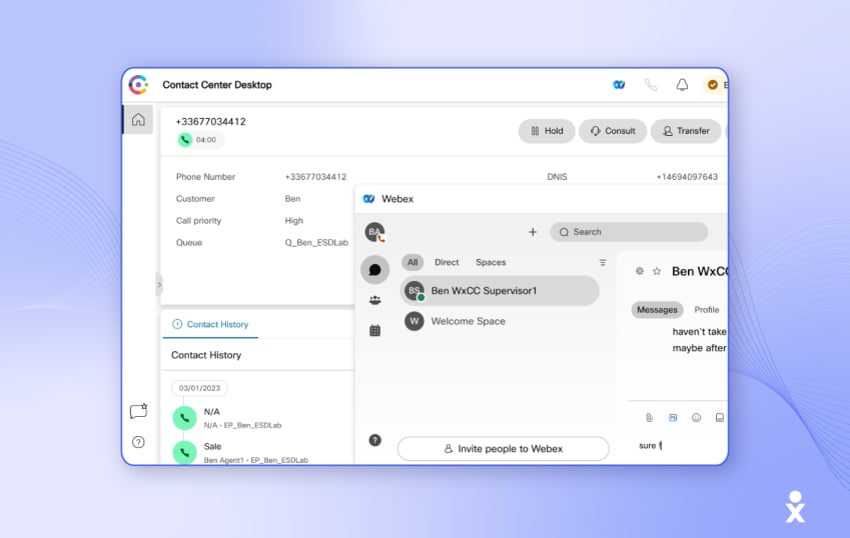
Cisco Webex’s collaboration and contact center products have undergone a recent facelift, and its cloud offering now falls under the Webex umbrella. The well-adopted platform supports call routing, omnichannel routing, integrations, and a management portal for creating customer profiles, segmentation, and resource monitoring.
More recent additions include generative AI components like Cisco AI Assistant for Webex Contact Center, which identifies instances when an agent faces difficulties with clients or productivity. The assistant recommends breaks as needed and aids agents by providing automatic answers to customers’ questions in real time.
Webex can also generate automatic call summaries to reduce manual workload and provide supervisors with insights for enhanced mentoring and support.
Key features:
- Webex AI assistant: Generates real-time interaction summaries and suggests responses to agents during live calls.
- Agent wellness tools: Detects agent fatigue and burnout patterns, recommending breaks automatically.
- Enterprise security architecture: End-to-end encryption, built-in compliance tools, and administrative access controls.
- Strong integrations: Direct interoperability with Webex Calling, Meetings, and enterprise hardware.
Pricing tiers:
Custom enterprise quotes based on licensing structures.
What customers say about Cisco Webex:
Customer rating: 4.7/5
Customer review:
“The product and support mechanisms are top-notch. The Cisco product team came prepared to create a great product for all involved parties. […] It truly made our agents and supervisors more available, and customer satisfaction increased. The product was highly available for our customers, but we did have several issues with access initially.”
Pros & cons:
- Pros: Enterprise-grade security and reliability; strong integration with existing Cisco hardware and Webex software; proactive agent well-being features.
- Cons: Best managed by specialized IT professionals familiar with the Cisco ecosystem; pricing requires individual quotes and is in the upper enterprise range.
Key takeaway: A good choice for IT departments of companies already standardized on Cisco networks, hardware, and Webex collaboration infrastructure.
7. Salesforce Agentforce Contact Center — Best for businesses that already use Salesforce

Salesforce Agentforce Contact Center is a contact center platform that combines voice, digital channels, CRM data, and AI within Salesforce. It may be particularly relevant for organizations already using Salesforce for sales, marketing, or customer service because agents can access customer records and interaction history without relying on a separate CRM integration.
The platform includes native telephony as well as email, web forms, web and mobile chat, SMS, WhatsApp, Facebook Messenger, Apple Messages for Business, and LINE. It also provides omnichannel routing, call recording and transcription, reporting, and Agentforce AI capabilities for customer self-service and agent assistance.
Key features:
- Connected CRM data: Gives agents access to Salesforce customer data and interaction history within the same environment used to manage service conversations.
- Omnichannel routing: Uses Salesforce Omni-Channel routing and CRM data to direct customer interactions based on configured workflows and context.
- Agentforce AI: Supports AI agents, agent assistance, automated summaries, and other AI-assisted service workflows.
- Analytics and supervision: Provides operational visibility and supervisor tools; workforce engagement management and quality-management capabilities are explicitly included with Agentforce Contact Center Plus, while exact recording, transcription, analytics, and supervisory features depend on the package and configuration.
Pricing tiers:
- Agentforce Contact Center: $125/user/month
- Agentforce Contact Center Plus: $250/user/month
- Agentforce Contact Center Voice: $75/user/month for Agentforce 1 Edition customers
What customers say about Salesforce Agentforce Contact Center:
Customer rating: 4.2/5
Customer review:
What is your favorite aspect of this product?
“The biggest benefit for me is how much repetitive work it removes during case handling. Getting a quick summary, suggested responses and the right customer context in one place makes conversation move faster. It still needs a quick human check sometimes, but it saves a surprising amount of clicking around.”
What do you dislike most about this product?
“The setup is not something like plug and play. The AI works much better when your Salesforce data, knowledge articles and routine rules are already well organized. If that foundation is not clean, the suggestion becomes less useful and you will end up tweaking prompts, topics or actions more than expected. It’s not a deal breaker, just something to plan for.”
Pros & cons:
- Pros: Native connection to Salesforce CRM data; voice and digital channels in one service environment; Agentforce AI capabilities; built-in routing, recording, transcription, and analytics.
- Cons: Requires an eligible Salesforce service license; implementation may involve substantial configuration for organizations with complex routing, data, or workflow requirements.
Key takeaway: Suitable for organizations already using Salesforce that want to connect voice, digital customer service, CRM data, and AI within the same platform environment.
8. Dialpad — Best for real-time AI coaching and sales teams
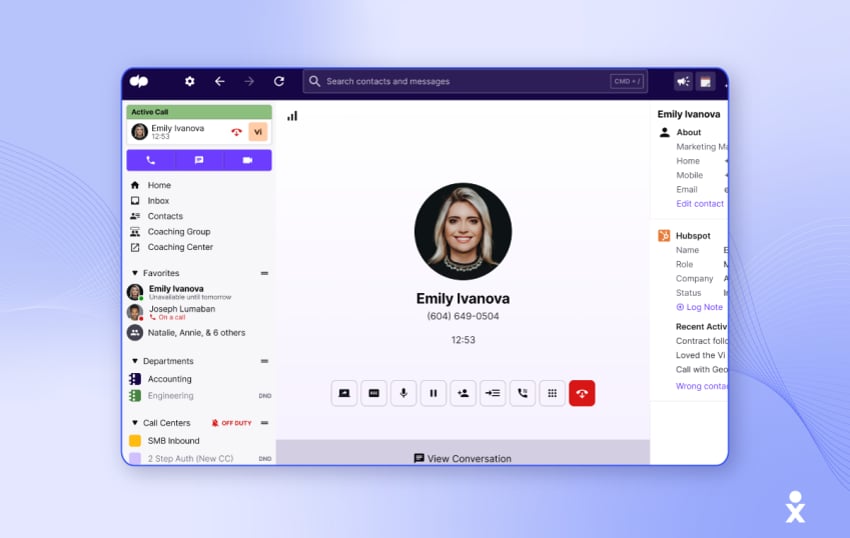
If AI is a top priority and you want to maximize its impact, Dialpad has been a leader in this area for quite some time. So, if you’re interested in providing real-time coaching insights and accessing next-generation analytics, Dialpad is a suitable option.
Entry-level features take the shape of call sentiment analysis, real-time text transcription, and built-in AI for call scripts. You can get agent prompts based on the context of live conversations to help serve customers most efficiently.
With a specific focus on sales teams, Dialpad’s AI suggestions can prompt agents to mention new products and identify the ideal time to close a deal. Its outbound calling solution also features AI, including smart call monitoring and call queues.
If AI isn’t your sole requirement, Dialpad also provides unlimited calling, number forwarding, and custom call routing options for those looking to check off the basics.
Key features:
- Dialpad Ai Agent Assist: Displays pop-up prompts and battle cards on live agent screens based on customer keywords.
- Automated call summaries: Generates action items, key takeaways, and call transcripts immediately after calls end.
- Outbound sales intelligence: Smart call monitoring, automated post-call logging, and supervisor live-listen controls.
- Omnichannel messaging: Digital chat and SMS capabilities alongside voice calling.
Pricing tiers:
- Essentials: $80/user/month
- Advanced: $115/user/month
- Premium: $150/user/month
What customers say about Dialpad:
Customer rating: 4.1/5
Customer review:
“I have had several interactions with the Dialpad porting team during CET time, and I have always gotten stellar support. Very friendly and efficient, and they really know their stuff. I always got the same person, and I can highly recommend them. Keep up the good work!”
Pros & cons:
- Pros: Real-time voice coaching and objection handling during calls; rapid implementation; competitive entry-level pricing.
- Cons: Digital channels (web chat, email, social media) are less powerful compared to dedicated CCaaS solutions; reporting capabilities are less customizable for complex call queues.
Key takeaway: A good choice for sales-oriented teams, outbound SDRs, and growing service teams that prioritize live AI coaching and fast call transcription.
9. Aircall — Best for fast-growing startups and SMBs
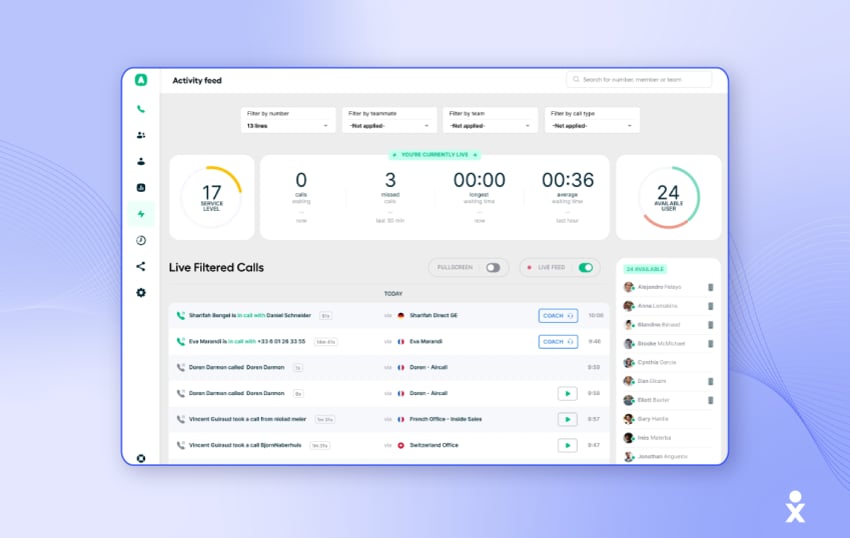
Aircall provides inbound call management to small businesses and startups looking to manage high call volumes without compromising on quality.
It includes automated call routing, IVR, call recordings, transcriptions, and collaboration tools for agents. You get CRM integration with major apps like Salesforce, HubSpot, and Zendesk and a quick-to-deploy, easy-to-use agent app.
Aircall’s pricing is attractive if you’re looking for premium call handling without the major expense of enterprise features, including omnichannel, open API access, or single sign-on.
Key features:
- Rapid deployment: Setup is quick and requires no developer support or additional hardware.
- Over 100 out-of-the-box integrations: Pre-configured two-way synchronization with HubSpot, Salesforce, Pipedrive, Zendesk, and Intercom.
- Insight cards: Automatically displays relevant CRM records on the screen during incoming calls.
- Shared call inboxes: Enables team members to collaborate, assign, and manage incoming calls.
Pricing tiers:
- Essentials: $30/user/month (3-user minimum)
- Professional: $50/user/month (3-user minimum)
- Custom: Enterprise quote (30-user minimum)
What customers say about Aircall:
Customer rating: 3.0/5
Customer review:
“We had been searching for a company that could help us register a phone number in Germany, and Aircall was the first one that truly understood the process. Their team clearly knows the bureaucracy of different countries, especially Germany, where the requirements can be quite complicated. We stayed in contact with one of their team members, who helped us find a solution immediately. We’re very grateful for the fast, competent support and the clear guidance they provided.”
Pros & cons:
- Pros: Seamless onboarding; clear, user-friendly interface; two-way CRM logging.
- Cons: Lack of advanced omnichannel features (mainly limited to voice and SMS communication); no integrated workforce management or complex AI process automation.
Key takeaway: The ideal, lightweight telephone system for growing startups and SMEs that need quick setup and easy CRM integration.
10. RingCentral Contact Center (RingCX) — For existing RingCentral UCaaS customers
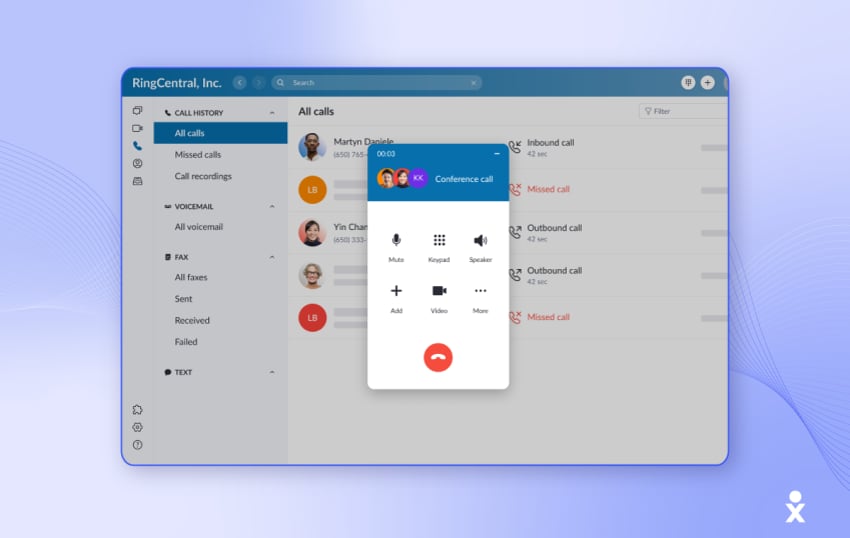
RingCentral offers business communications features such as team messaging, video conferencing, and push-to-talk for internal collaboration. Its contact center platform adds capabilities including IVR, call routing, whisper coaching, and support for email, web chat, SMS, and social media.
RingCentral may fit organizations that already use its UCaaS products and want to add contact center capabilities within the same product environment. It also supports multi-location deployments and network configurations such as SD-WAN. That said, if your priorities include different pricing models, feature sets, or integration options, it’s worth exploring other platforms that may better align with your specific operational needs.
Key features:
- RingSense AI: Analyzes conversations, tracks keywords, and generates call summaries.
- Omnichannel routing: Manages voice, SMS, web chat, email, and social media interactions through a single interface.
- Coaching and monitoring: Allows managers to monitor calls and provide real-time guidance to agents.
- Connectivity: Supported by carrier-grade infrastructure and global connectivity agreements.
Pricing tiers:
- Standard: $65/user/month
- Professional: $95/user/month
- Elite: $145/user/month
- Enterprise Contact Center: Custom quote
What customers say about RingCX:
Customer rating: 1.8/5
Customer review:
“Super rough onboarding. I don’t get how this can take hours to onboard, and yet it still isn’t working properly. I had my operations specialist tasked with having our phone number ported from a different carrier to RingCentral. They told her after several hours that it was done. But my old carrier shows it is live on their side, and RingCentral doesn’t show that it is live on their side. So, we looked into it. RingCentral didn’t set up our phone number. Instead, they set up two more extensions. No wonder I have a ton of missed calls. Nobody can hear our phone line ringing. And it still isn’t fixed. My operations specialist worked with them again this morning and again this afternoon. RingCentral is 100% focused on pushing sales, and after that, it just flops.”
Pros & cons:
- Pros: Supports voice and digital channels; includes call analysis and coaching tools; integrates with RingCentral’s UCaaS products.
- Cons: Contact center features aren’t as sophisticated; the desktop interface sometimes appears fragmented across multiple modules.
Key takeaway: RingCentral may suit businesses already using its RingEX business communications platform that want to add contact center routing.
How to Evaluate and Choose the Right Contact Center Software
Selecting a contact center platform is an important choice. A bad decision can result in months of implementation delays, unreported extra expenses, and irate staff members who spend more time switching between apps than actually helping clients.
Use this evaluation framework to determine the best platform for your team size, technical infrastructure, and budget:
- Minimal number of licenses required and flexible scaling options
- Transparency of total cost of ownership
- Useful AI and automated workflows
- Innovative CRM and helpdesk integrations
- SLAs for availability and compliance requirements
- Rapid time to value and speed of implementation
1. Verify scaling options and the minimum number of licenses needed
Check a platform’s licensing model and minimum contract size first. Contact center platforms like Five9 offer different licensing options for digital and voice channels, with a strict 50-seat contract minimum.
You can start with 5 or 10 seats and add features or channels as your team expands thanks to vendors like Nextiva that provide flexible tiering with no seat minimums.
2. Calculate the total cost of ownership
Base seat pricing doesn’t always provide a complete picture. Many contact center providers offer low entry-level prices but hide important features behind pricey add-ons. When requesting quotes from vendors, find out if the base license includes the following:
- Native CRM integrations (or if they charge a per-user monthly integration fee)
- Call recording storage limits and retention fees
- AI transcription, call summarization, and Agent Assist features
- 24/7 live phone or chat support (versus mandatory paid support retainers)

3. Test for practical AI
Nearly all vendors claim to be AI-powered. Focus on the following useful AI features that’ll help your contact center agents save time every day:
- Automated post-call summaries: Generates interaction notes and action items automatically, saving manual work per call.
- Real-time Agent Assist: Listens to active calls and surfaces relevant knowledge base articles or responses on screen.
- Conversational IVR and virtual agents: Parses natural language intent instead of directing callers through rigid numeric menus.
4. Audit your existing tech stack and integrations
You should be able to easily integrate your contact center software with your current systems. To make sure that your customer records automatically trigger screen pops on incoming contact, look for pre-built, two-way integrations with your primary customer database (Salesforce, HubSpot, Microsoft Dynamics, Zendesk, or Zoho).
Tip: Avoid platforms that require custom API development just to log call records or sync contacts with standard CRMs.
5. Check for compliance and carrier-grade uptime
Unplanned downtime undermines customer confidence and stops business operations. Look for platforms that offer:
- 99.999% uptime SLA: Backed by redundant off-grid data centers.
- Built-in security compliance: SOC 2 Type II certification, PCI DSS (for payment processing), and HIPAA compliance (if handling healthcare data).
6. Calculate setup friction and time to value
Find out how fast your team can go from signing a contract to going live.
- Enterprise platforms like NiCE and Genesys can take 2 to 6 months to fully set up and require hiring specialized third-party system integrators.
- Agile cloud platforms like Nextiva and Aircall can be deployed in days or weeks using intuitive admin portals without developer intervention.
See Nextiva’s Contact Center Software in Action
When you have to find new contact center software, it’s a lot. When researching, testing, and trialing providers, there’s so much at stake, and it pays to invest the time and effort upfront.
While there are many choices and some niche use cases for certain providers, we’re confident that Nextiva is the choice for an AI-powered contact center for businesses of all sizes.
Get started with a demo to learn how Nextiva can transform your contact center.
Scale up with an AI contact center.
The modern contact center has arrived. See how Nextiva helps you deliver the best customer experience at scale.
Contact Center FAQs
Depending on feature depth, channel coverage, and AI automation, cloud contact center software normally costs between $15 and $200+ per user per month:
— SMB tier (basic voice and messaging): $15–$50 per user per month.
— Mid-market (AI and omnichannel suites): $75–$145 per user per month.
— Enterprise custom suites (WFM and advanced analytics): $150–$250 per user per month.
Watch for any unstated extras, such as required professional support retainers, paid CRM connector licenses, and per-minute usage fees. Nextiva’s standard transparent tiering includes process automation, core CRM connectors, and round-the-clock live support.
Deployment speed depends on the type of platform you choose.
Cloud contact center software like Nextiva offers user-friendly web admin portals to deploy in a matter of days or a couple of weeks.
Legacy enterprise contact center platforms like Genesys need third-party implementation teams and two to six months of custom API development.
Yes. Cloud-native CCaaS platforms remove the need for physical office desks or on-premises server hardware, allowing agents and supervisors to manage interactions, view customer records, and access real-time queue analytics from any browser or desktop application.
Unified Communications as a Service or UCaaS platforms manage internal team communications, including voice calls, video conferences, and team chat.
Contact Center as a Service or CCaaS platforms offer sophisticated queue routing, call recording, and reporting to manage external, customer-facing interactions via voice and digital channels.
Platforms like Nextiva combine UCaaS and CCaaS into a single application (NextivaONE), helping contact center agents work instantly with back-office specialists to address customer issues more quickly.
Today’s AI tools offer greater support to both contact center supervisors and agents, including features like:
— Generative call summaries: Automatically create interaction notes and update CRM fields after a call.
— Real-time agent coaching: Listens to live conversations and shows pop-up answers, articles, or objection-handling prompts on the agent’s screen.
— Conversational AI bots: Natural language understanding resolves routine multi-channel questions (e.g., order status, payment processing) before queries enter live queues.
Yes, but with many limitations. Here are the two types of free contact center software you can choose:
Freemium commercial SaaS: Free-forever tiers are available on platforms such as Bitrix24, Zoho Desk, or LiveAgent. These free plans severely restrict features, such as limiting agent seats (1-3 users), removing sophisticated IVRs or AI tools, or requiring you to pay usage fees for VoIP trunking and phone minutes.
Self-hosted open-source: Open-source licenses allow you to download and use platforms such as VICIdial and ICTContact for free. They’re not free to use, though; you have to pay for SIP trunking/phone usage, cloud server hosting (like AWS or DigitalOcean), and technical upkeep.