VoIP
VoIP  Blog
Blog  Business Communication
  Customer Experience
  Leadership
  Marketing & Sales
  Nextiva News
  Productivity

Interactive voice recognition technology lets callers speak their requests to an automated phone system. In an interactive voice response (IVR) system, it can work alongside keypad menus to collect information, answer routine questions, and route calls. If you’ve ever pressed 1 for sales or said “billing” to reach a department, you’ve used IVR.
Mordor Intelligence estimates the global IVR market at $5.39 billion in 2025, with growth to $7.07 billion by 2030. But for callers, the value comes down to getting an answer. Clear menus move requests forward; long prompts and incorrect transfers add frustration before an agent picks up.
This guide explains how an interactive voice response system works, what to look for in an IVR solution, and how to measure its performance. You’ll learn how to plan call flows that reduce unnecessary transfers and get callers closer to an answer.
What Is Interactive Voice Response (IVR)?
Interactive voice response (IVR) is an automated telephone technology that responds to caller input through keypad selections or spoken requests. It can direct calls, collect information, and complete supported self-service tasks without a live agent.
IVR stands for interactive voice response. The IVR full form breaks into three functional pieces.
- Interactive: The system presents prompts, responds to the caller’s selections, and creates a two-way communication loop.
- Voice: It delivers audio prompts through prerecorded speech or text-to-speech (TTS) technology.
- Response: It captures and interprets input from the caller’s voice or telephone keypad.
What Is an Interactive Voice Response System?
An interactive voice response system combines recorded prompts or text-to-speech, input recognition, and call-flow rules to handle incoming requests. Depending on its configuration and integrations, it can transfer a caller, retrieve account information, or complete a task such as confirming an appointment.
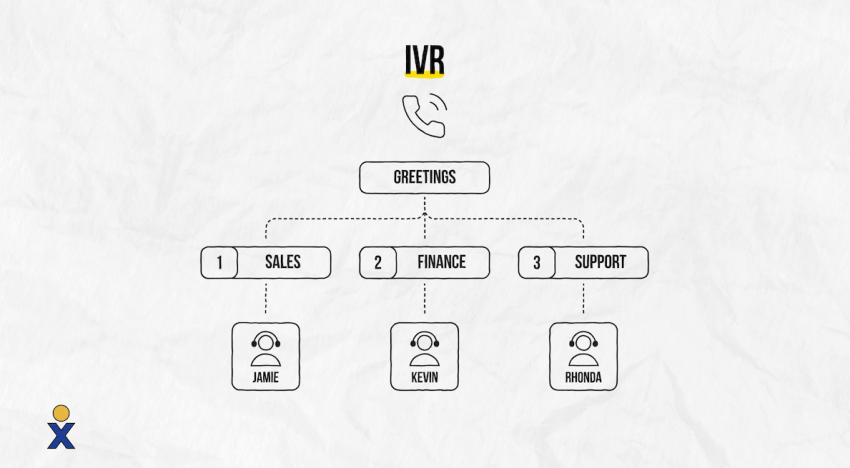
What does IVR actually handle? An enterprise-grade IVR service can:
- Handle, screen, and route high volumes of incoming calls.
- Provide self-service options for routine requests.
- Collect customer information, such as account numbers or tracking numbers, before a representative takes the call. Collecting these details does not automatically verify a caller’s identity.
- Query connected databases to provide relevant information.
By handling recurring inquiries, IVR reduces the number of routine requests agents need to answer. Your support team can then spend more time on issues that require a conversation.
How Does Interactive Voice Recognition Technology Work?
In an IVR system, interactive voice recognition technology typically refers to speech recognition that converts a caller’s spoken input into words or recognized commands. Conversational systems can then use natural language processing (NLP) to interpret the request and decide what to do next.
For example, a caller might say, “I need to change my appointment.” Speech recognition captures the words, while language processing determines that the caller wants to reschedule. The IVR then follows the configured workflow or transfers the call.
Speech recognition and speaker recognition serve different purposes. Speech recognition determines what someone says; speaker recognition may be used to assess who is speaking. An IVR that accepts spoken commands does not necessarily authenticate callers by their voice.
Types of IVR Services
Different communication scenarios require specific system configurations. Selecting the right IVR model depends on your target audience’s technical preferences and your call center’s structure.
- Keypad-based navigation: The telecommunications standard. Callers navigate menu structures by pressing digits on their phone keypad. The system identifies the selection using dual-tone multi-frequency (DTMF) signaling.
- Voice-based interaction: This method employs automated speech recognition systems, allowing callers to state their choices naturally (e.g., “Accounting”) and navigate hands-free.
- Visual IVR: Shifts voice-based communication to digital user interfaces. The system sends a secure web link to the caller’s smartphone, enabling them to select options from a clear visual menu.
- Outbound IVR: A proactive system solution for automatically contacting customers, for instance, to provide appointment reminders, shipping status updates, or immediate fraud alerts.
These categories can overlap. A cloud-based IVR might support keypad menus, spoken requests, and outbound calls within the same platform.
Cloud-based solution vs. on-premises installation: Cloud-based IVR runs on provider-managed infrastructure and can be part of cloud-hosted phone systems, reducing the need to maintain local IVR servers. On-premises systems are hosted and maintained by the business, with hardware and connectivity requirements varying by deployment.
Traditional IVR vs. Conversational AI IVR
Traditional IVR follows predefined menus or recognized commands. Conversational AI IVR accepts a wider range of spoken requests, but both need clear workflows and a route to an agent when automation cannot resolve the issue.
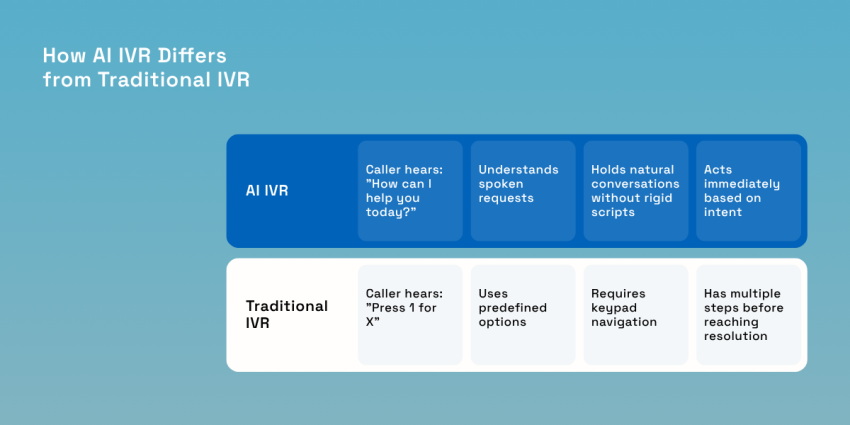
Businesses are moving away from rigid, multi-level menu structures in favor of agile systems based on advanced processing logic. Here are some key differences between a traditional and an AI IVR.
| Feature | Traditional IVR | Conversational AI IVR |
|---|---|---|
| Caller input | Keypad selections or predefined spoken commands | Natural-language requests, sometimes alongside keypad options |
| Call flow | Follows configured menu branches | Interprets intent and follows supported conversational workflows |
| Handling unclear requests | Can repeat prompts or offer another menu | Can ask follow-up questions, depending on its design |
| Personalization | Can use connected customer records | Can also use connected records to tailor the conversation |
Database access is not exclusive to AI IVR. A traditional keypad system can retrieve account balances or order information when connected to the relevant business systems.
Try the best AI answering service free for 14 days
XBert AI answers questions and captures leads. Add your 24/7 answering service in minutes.
How Does an IVR Call System Work?
An IVR call system answers a call, presents prompts, and uses the caller’s input to select the next action. It may provide information, complete a supported task, or send the call to an agent or queue.
1. Welcome greeting and input capture
When a customer dials your number, the platform automatically picks up and plays a standardized welcome greeting. The system then outlines a list of menu options using pre-recorded files or high-definition text-to-speech software. The caller interacts with this interface by pressing a number or speaking their intent.
2. Keypad or speech recognition
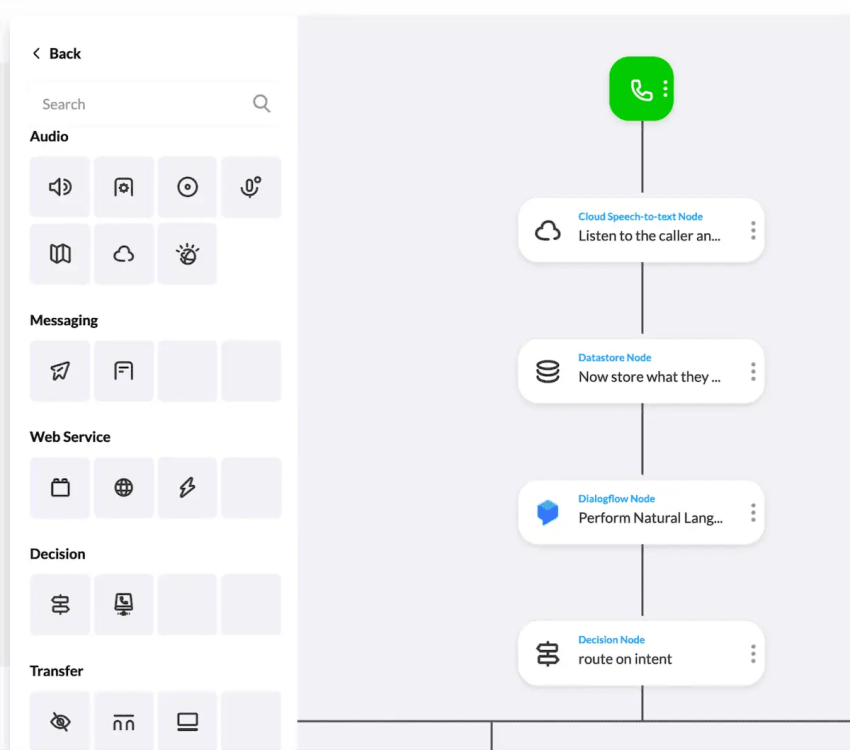
For keypad input, the IVR receives the caller’s digit selections through DTMF signaling. For spoken input, speech recognition captures words or recognized commands. A conversational system can then use NLP to interpret the request and select the next action.
3. Database lookup and information retrieval
Once the selection is confirmed, the IVR can execute an automated database query, frequently called a data dip, by communicating directly with your internal CRM, helpdesk, or billing software. This allows the system to pull real-time account data (like a bank balance, delivery status, or booking confirmation) and read it back to the caller without loops or human intervention.
4. Smart call routing and escalation
If the query requires a human touch, the system triggers intelligent routing paths to transition the session. It passes the customer over to your automatic call distribution (ACD) engine, matching the caller with an available agent who holds the exact skill set required to resolve the issue.
Interactive Voice Response System vs. Auto-Attendant: What’s the Difference?
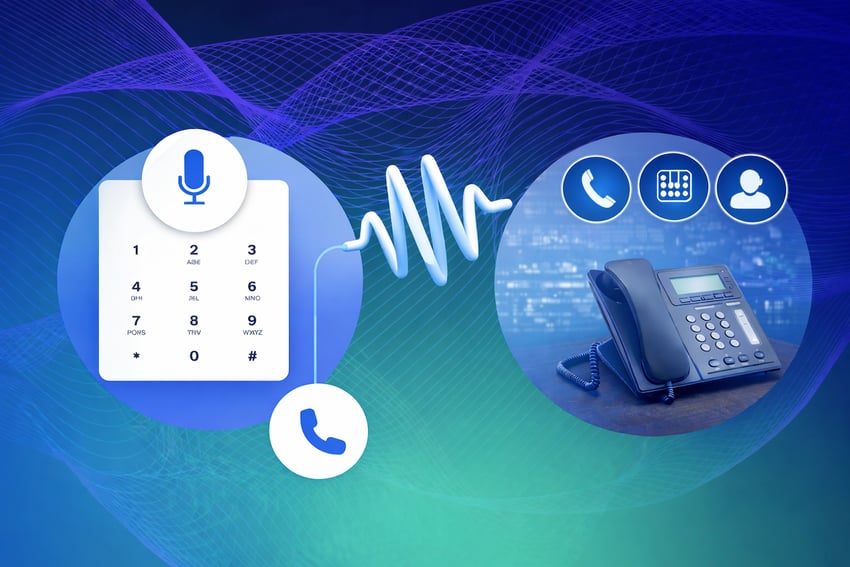
An auto-attendant typically greets callers and transfers them to a department, extension, or voicemail. An interactive voice response system can also collect information and complete supported self-service tasks through connected business systems.
For example, an auto-attendant can send a caller to billing. An integrated IVR can retrieve a balance or accept a payment before the caller needs an agent. Available functions depend on the provider, configuration, and integrations.
| Capability | Auto-attendant | IVR system |
|---|---|---|
| Greetings and transfers | Core function | Supported |
| Database lookups | Usually limited; check provider capabilities | Available through supported integrations |
| Self-service transactions | Typically limited to basic information and routing | Can support tasks such as appointment confirmation or payments |
| Spoken input | Some support spoken names or commands | Speech-enabled systems accept commands; conversational systems can interpret natural-language requests |
| Routing logic | Commonly uses menu selections, schedules, and extensions | Can also use collected information and connected records |
When an auto-attendant is enough
If callers mainly need a “press 1 for sales, press 2 for support” menu, an auto-attendant may cover your needs. A business with straightforward routing and no account-specific self-service requirements can start here.
Consider additional IVR functionality when callers need to check an order, confirm an appointment, or complete another task without speaking to an agent. Choose based on the requests you need to handle rather than call volume alone.
Benefits of Using an IVR System
An IVR can support business operations and customer service when its menus match the requests callers actually make. Results depend on the call flow, available self-service options, and agent coverage.
For businesses:
- Improved customer service: IVR offers 24/7 availability, reduces wait times, and directs incoming callers to the right agent, leading to a more efficient and satisfying customer experience.
- Reduced operational costs: Automating routine tasks frees up call center agents to handle more complex inquiries, saving businesses on operational expenses.
- Increased productivity: Agents can focus on resolving complex issues while the IVR handles simple questions, which improves efficiency.
- Data-driven insights: IVR analytics provide valuable data on customer behavior and call trends, allowing businesses to make informed decisions regarding their communication strategy.
- After-hours call handling: An IVR lets you provide a distinct call flow outside of business hours. The after-hours IVR menu can exclude the ability to talk with an agent and instead encourage callers to leave a voicemail or call back during regular business hours.
- Scalability: IVRs adjust to handle varying call volumes without hiring more staff. You can expand it to include more options and functionality as your business grows.
For customers/callers:
- Faster service: IVR allows callers to get information or resolve basic issues quickly without waiting on hold.
- 24/7 availability: Callers can access customer information or self-service options outside of regular business hours.
- Convenience: IVR provides a user-friendly way for customers to get what they need without requiring interaction with a live agent.
- Multilingual support: Advanced IVR systems can offer options in multiple languages, catering to a broader customer base.

Common IVR Applications and Use Cases
IVR systems have become imperative for most businesses, serving a wide range of purposes across various industries. Let’s look at some of the most common uses of IVR systems.
1. Financial services and banking
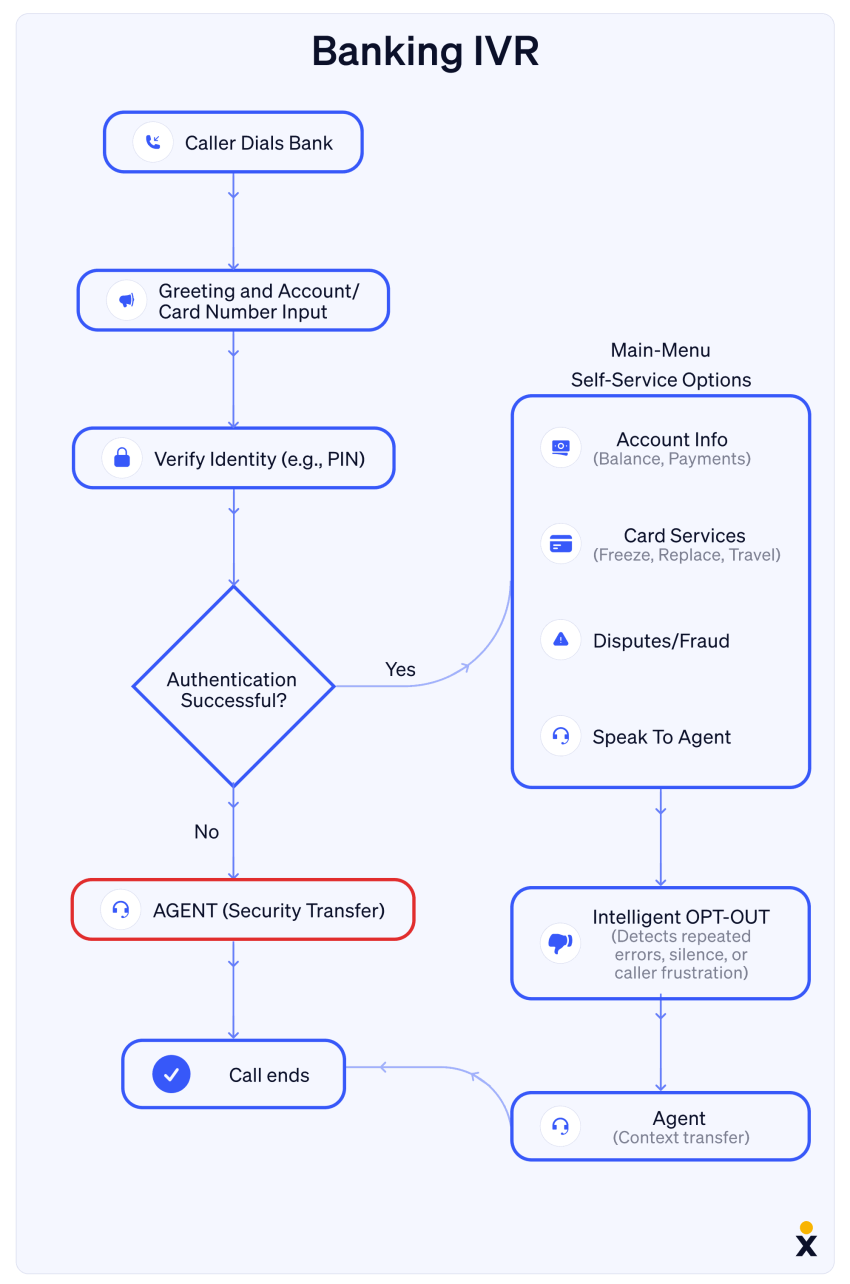
Banks use interactive voice response systems to let customers check account balances, make supported payments, or report a lost card without first speaking to a representative. Available services depend on the institution and its authentication process.
For example, an authenticated caller could hear recent transactions through an automated account menu. Requests that the system cannot handle can be transferred to the appropriate banking team.
2. Healthcare and appointment scheduling
IVRs can handle administrative requests such as scheduling, confirming, or canceling appointments when connected to the practice’s scheduling system. Some also collect prescription refill requests for staff review.
Veterans Home Care, for example, uses Nextiva’s IVR to serve its at-risk veterans.

“We are looking at doubling our business over the next couple of years. That’s a lot of people to talk to. We plan to leverage the IVR technology to prioritize where we spend our time and who we talk to.”
~ David Laiderman

3. Logistics, shipping & utilities
Whether tracking a package or reporting a power outage, IVR gives callers a way to access supported services outside normal business hours.
Shipping companies can connect their IVR to tracking systems for delivery updates. Utility providers can collect outage reports and share available restoration information without requiring an agent to answer every call.
4. Customer service and account management
IVR systems support customer service operations across industries, from telecom providers to retail stores. After any required authentication, callers may be able to:
- Reset passwords or PINs
- Update personal information (address, phone number, email)
- Check account balances or recent transactions
- Make payments
- Review order status or delivery information
- Request product information or technical specifications
You can even integrate your IVR with other business systems (workforce management tools, payment processing, customer relationship management systems) to create a more efficient, personalized experience for your customers while optimizing your operations.
5. Travel and hospitality
Airlines can use IVR to provide flight status updates and support booking changes, while hotels can use it for reservation inquiries and information about amenities. Requests outside the available self-service options can be transferred to a reservations or customer service team.
6. Government agencies
When calling local, state, or federal government offices, callers may hear important announcements and access self-service information. Depending on the agency, an IVR may provide information or instructions about:
- Requesting birth certificates
- Getting information on laws, regulations, or public projects
- Locating nearby schools or farmers’ markets
- Filing for unemployment or disability
- Registering to vote
- Applying for licenses or health coverage
If self-service can’t fulfill a request, callers are connected to appropriate agents based on their selection. For complex situations, some agencies may use a dedicated operator to triage requests.

How to Design an IVR System
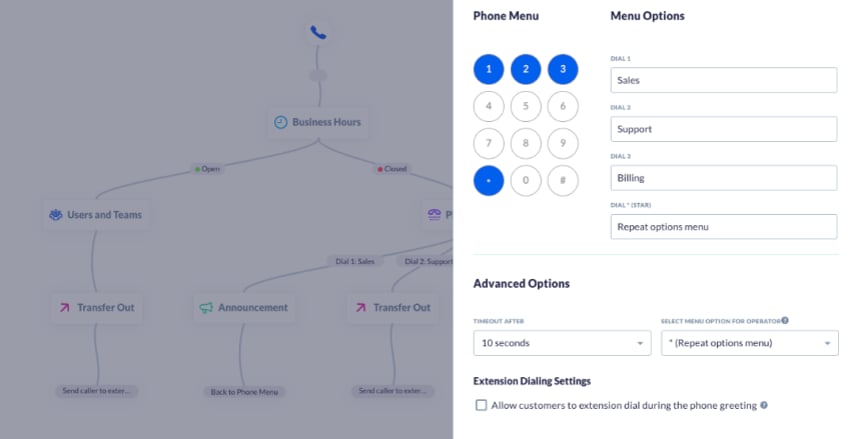
A confusing menu structure will drive your customers away. Map your most common call reasons. Review recent call logs and ask frontline agents which requests they handle most often. Use those findings to plan your main menu around caller needs, such as checking an order or changing an appointment. Decide which requests callers can complete through self-service and which should go directly to an agent.
When mapping out your system architecture, implement these six design principles for a friction-free caller journey:
- Put the purpose before the digit: Say, “To check your invoice status, press 3.” This lets callers hear the task before the number they need to remember. Keep the wording brief and use the same structure throughout the menu.
- Keep menu options concise: Start with three or four distinct choices where practical. Group them around common caller needs and add another level only when it serves a clear purpose.
- Provide a clear way to reach someone: Offer an agent option when staff is available. Outside business hours, explain whether callers can leave a message, request a callback, or reach an on-call contact.
- Offer callbacks where supported: Give callers an alternative to remaining on hold during busy periods. Explain what happens next and collect or confirm the callback number.
- Use customer data carefully: Connected CRM records can make menus more relevant, but caller ID alone is not sufficient authentication for disclosing sensitive account information.
- Test every call path: Check valid selections, invalid input, silence, repeat requests, transfers, and after-hours routing. Test what happens when a queue is full or an integration is unavailable.
Hear why XBert AI is the best AI receptionist
XBert AI receptionist handles customer questions, captures leads, and books appointments. Try it free for 14 days.
What to Look For in an Interactive Voice Response Solution
An interactive voice response solution should match the requests your business receives and the systems needed to resolve them. Compare its routing, self-service, integrations, reporting, and administration tools against your actual call flows.
Before choosing a provider, check:
- Menu controls: Can your team update greetings, destinations, and business hours?
- Input options: Do you need keypad menus, speech recognition, or both?
- Integrations: Can the system retrieve the information your callers need?
- Agent handoffs: Can it transfer the call and pass along collected details?
- Reporting: Can you track completion, abandonment, transfers, and errors?
- Total cost: What charges apply to users, usage, implementation, integrations, and additional features?
Ask the provider to demonstrate your most common call paths. Include a failed lookup and an unavailable agent so you can assess how the system handles problems as well as routine requests.
Challenges When Using an IVR (+ Solutions)
Implementing an IVR system can present several challenges, but with the right approach, you can effectively address them.
Here are a few challenges you might come across.
1. Team morale & agent performance
Your employees may voice their fears that the IVR application in the workplace may lead to unemployment.
Solution: Position IVR as a tool to enhance, not replace, human agents. Make it clear that you’re using it to streamline simple requests in order to free up agents for more personalized customer interactions. This leads to more engaging work and improved job satisfaction, which can actually boost agent morale and performance.
2. Navigation complexity
An overly complex IVR menu can frustrate callers, leading to hang-ups and dissatisfaction.
Solution: Simplify call flow navigation. Design direct routes with minimal steps, and make sure they effectively address customer needs. Regularly review and optimize your IVR structure using contact center analytics. If you’re a small business, fewer menu options are better. Your IVR will likely be one layer (the term for the number of menus you offer callers).
Learn more: Creating a Phone Menu in Nextiva
3. Impersonal customer service
The lack of human touch in IVR interactions can be off-putting for some customers.
Solution: Provide clear options to speak with a human agent during staffed hours. Consider implementing speech recognition so callers can request an agent verbally. Outside business hours, explain the available voicemail or callback options.
4. Excessive wait times
Poor call routing can lead to long wait times, starting customer interactions on a negative note.
Solution: Use data analytics to identify and address bottlenecks in your call flow. Implement callback options like Q-for-Me (shorthand for “queue for me”) to respect customer time and reduce frustration during peak periods.
5. Continuous improvement
When a caller presses 6 for accounts and they wind up in sales, you’re only going to frustrate them and waste their precious time. This means your IVR system needs ongoing attention.
Solution: Regularly track key call center metrics like most-used options, average hold times, and success rates. Make incremental improvements based on this data, and communicate significant changes to frequent callers.
How to Measure Success and Improve Your IVR
A hands-off approach creates menu fatigue and frustrates callers. You need to track performance to keep your IVR running smoothly. Use the reporting available in your phone or contact center platform to review call flows and spot problems. Capabilities depend on your subscription and configuration.
Key metrics to track
- Customer satisfaction (CSAT): Offer a short survey after an interaction to gather feedback. Review responses alongside call-flow data.
- Self-service completion rate: Measure the share of eligible self-service attempts that end in a completed task. A call ending without an agent does not, by itself, prove resolution.
- Average handle time (AHT): Track the time agents spend handling calls, including the components used in your reporting definition. Review total caller time separately so shorter agent calls do not hide longer menus or waits.
- Menu drop-off rate: Find the prompts where callers disconnect. Check whether they received the information they needed or abandoned an unfinished request.
- Transfer and repeat-contact rates: Look for callers who reach the wrong team or contact you again about the same issue. These patterns can point to gaps in routing or self-service.
- Agent-request rate: Track how often callers press zero or ask to speak with an agent, and where those requests occur. A high rate may point to confusing prompts, missing self-service options, or requests that need human attention. Review the reasons before changing the menu; reaching an agent can be the right outcome.
Compare results before and after a menu change. Read the metrics together: a higher self-service rate is only useful if callers complete their tasks without needing to call back.
Businesses using the Scale plan improve their IVR without constant manual effort. AI-driven transcription and summarization review every interaction and highlight gaps in your menu structure. When the system detects repeated requests for a service not listed in your menu, you can update your flow immediately to match real customer needs.
Optimize Your Communication Performance With Nextiva
An IVR can direct callers to the right destination, but your business also needs coverage when staff is busy or unavailable. That gap can leave a new inquiry waiting or send a potential customer to voicemail.
Nextiva’s interactive voice response IVR phone system combines intelligent routing and conversational AI on one platform, so you can build the kind of caller-friendly flow this guide describes without stitching together separate tools.
Nextiva’s XBert answers calls around the clock, handles supported customer requests, and brings your team into conversations based on the escalation rules you set. It gives businesses another way to cover calls staff cannot pick up while keeping human support involved where needed.
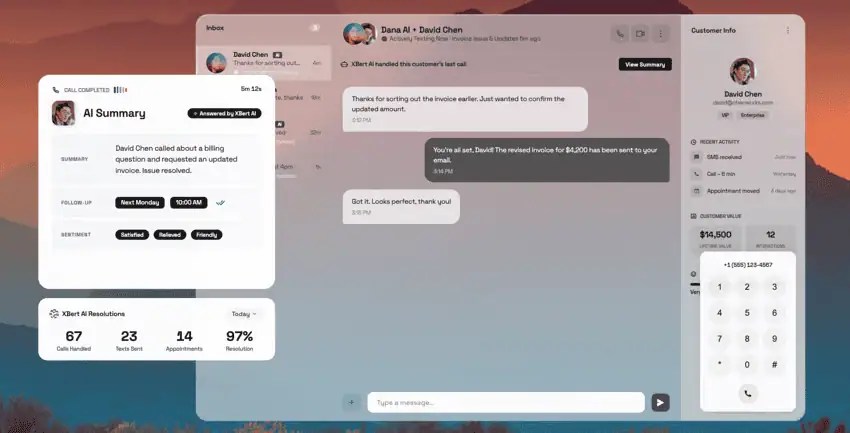
See how Nextiva’s AI voice agent answers every call, 24/7, and start building an IVR solution that actually earns your callers’ trust.
Get advanced IVR with conversational AI.
Queue callback, natural language call steering, appointment scheduling, and more — integrated in one powerful phone system.
Frequently Asked Questions About IVR
An auto-attendant typically greets callers and routes them to a department, extension, or voicemail. An IVR can also collect information and complete supported tasks, such as checking an order’s status or confirming an appointment. Features overlap, so compare what each provider includes rather than relying on the product name alone.
Basic IVR menus may be included in a business phone subscription. Advanced routing, speech recognition, integrations, and usage can carry additional charges. Ask for a quote covering setup, recurring fees, and the features your call flows require.
For example, Nextiva’s Core plan starts at US$15 per user per month, billed annually, with auto-attendant and call menus. Its Scale plan costs US$75 per user per month, billed annually, and includes smart call routing (simple IVR). Advanced self-service, conversational AI, integrations, and usage may require additional fees or a different plan.
Yes. Some cloud phone platforms provide visual tools for setting up greetings, menu options, business hours, and call destinations without coding. Connecting the IVR to databases, payment systems, or custom workflows may require technical support or provider assistance.
Offer a short language selection near the start of the call, then present the relevant menu in the caller’s chosen language. Keep the options and service information aligned across languages. For languages with lower call volumes, consider bilingual agents, interpreter support, or callbacks where available.
Test every call path internally, then run a limited pilot before a wider rollout. Include silence, invalid selections, misunderstood speech, timeouts, failed lookups, and after-hours transfers. Confirm that callers can recover from errors and reach an available alternative when a task cannot be completed.
Use supported connectors or APIs, and limit the integration’s access to the records and actions it needs. Authenticate callers before sharing or changing sensitive account information. Set up timeouts and fallback routes for failed connections, and keep audit logs without exposing sensitive information.
Review the requirements that apply to your location, industry, and data, including recording notices, consent, access controls, and retention. For payments, assess the complete workflow against applicable PCI DSS requirements; masking keypad input alone does not establish compliance. If the IVR handles protected health information, review applicable HIPAA obligations, vendor agreements, and safeguards across connected systems.