VoIP
VoIP  Blog
Blog  Business Communication
  Customer Experience
  Leadership
  Marketing & Sales
  Nextiva News
  Productivity
A VoIP phone uses an internet connection to make and receive calls. It may be a desk phone, computer app, mobile app, or browser dialer. A VoIP phone system adds the provider, network services, phone numbers, call routing, voicemail, messaging, and business features behind those endpoints.
For most businesses, the right choice depends on reliability, total cost, calling features, integrations, mobility, and support. This guide explains how VoIP phones work, compares them with landlines, and outlines which systems fit common business needs.
What Is a VoIP Phone?
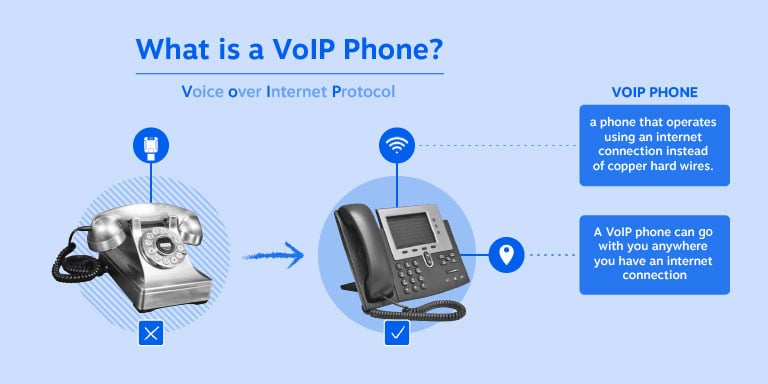
A VoIP phone, or Voice over Internet Protocol phone, converts voice into digital data packets and sends them across an internet network.
A VoIP phone is one endpoint within a broader business phone system. The VoIP provider supplies the network, phone numbers, call routing, security, administration tools, and service features that connect the endpoint to other callers.
VoIP phones take several forms:
- Dedicated IP desk phones: Physical handsets that connect to a business network through Ethernet or Wi-Fi.
- Desktop softphones: Applications installed on a computer or laptop.
- Mobile VoIP apps: Smartphone applications that use Wi-Fi or cellular data.
- Web-based dialers: Browser interfaces that let users make calls without installing software.

VoIP vs. Traditional Phone Systems
VoIP and traditional phone systems differ in how they carry calls.
Landlines use dedicated copper lines connected to a fixed physical address. VoIP sends digital voice packets across an internet connection and connects to the public switched telephone network (PSTN) when necessary.
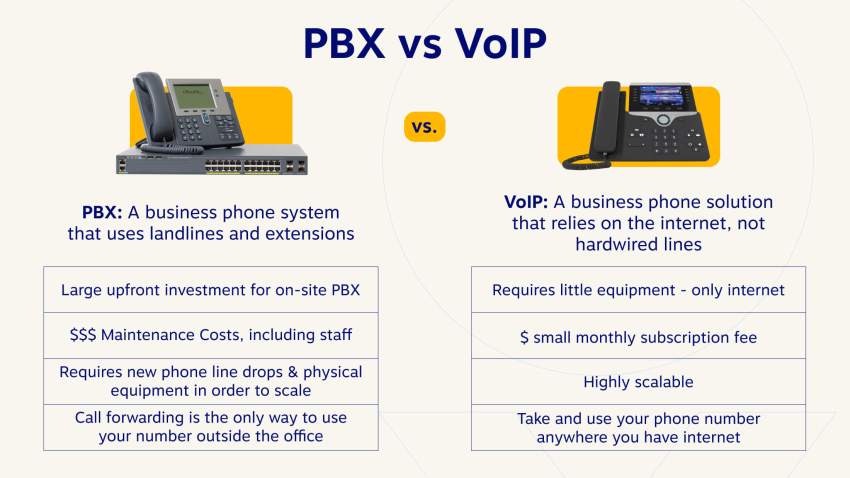
This shift can reduce the need for on-site PBX equipment, separate line installation, and technician visits when a business adds users. The actual savings depend on the provider, internet service, hardware, taxes, add-ons, and contract terms.
| Functionality | VoIP phones | Landline phones |
| Phone calls (PSTN) | Yes | Yes |
| Nationwide long-distance | Commonly included, depending on plan | Often an optional charge |
| User-to-user internal calls | Usually included across locations | Local PBX hardware may be required |
| Caller ID and call waiting | Commonly included | Varies by carrier package |
| System setup | Uses an existing network and cloud administration | May require custom wiring |
| Internet dependency | Yes, with about 100 Kbps per active line | No, uses utility copper |
| Wireless infrastructure | Wi-Fi, DECT, and Bluetooth headsets | DECT and Bluetooth hardware |
| Outage resilience | Can reroute calls to mobile apps or other numbers | Calls may drop or return busy signals |
| Underlying technology | IP telephony, SIP, TLS, and SRTP | Analog voice signals |
| Audio quality | Can support HD audio when network conditions permit | Usually limited to narrowband audio |
| Setup cost | Can use existing laptops and phones | Physical jacks and wiring may add cost |
| Monthly cost | Often priced per user or device | Usually priced per analog line |
| Auto attendant | Common cloud feature | Often requires a legacy PBX |
| Hunt groups and call routing | Configured in an online dashboard | May require additional hardware or lines |
| Remote work | Supported through softphone and mobile apps | Limited by the physical installation |
| Software integrations | Can connect with CRMs, help desks, and team tools | Limited |
VoIP still depends on the quality of the local network, internet service, and power supply. A provider can improve resilience through mobile routing, call forwarding, redundant systems, and failover options, but no internet-based phone service can eliminate every local outage risk.
How Does a VoIP Phone Work?
A VoIP phone registers with a cloud service and sends voice traffic through an IP network. The main steps happen in milliseconds:
- Endpoint registration: The IP phone or application authenticates with the provider using account credentials. The service records where to send inbound calls.
- Call signaling: When a user dials a number, the phone sends a session request through SIP, or Session Initiation Protocol.
- Voice packetization: The device converts speech into digital packets with a codec, such as G.711 or Opus.
- Packet delivery: The packets travel through the business network and internet connection.
- Audio reconstruction: The receiving endpoint reorders the packets and converts them into sound.
SIP manages call setup, changes, and termination. See the beginner’s guide to SIP for more detail.
Equipment and network requirements
A business can use one or more of the following:
- A compatible IP desk phone
- A computer with a softphone application
- A smartphone with a mobile VoIP app
- A browser-based dialer
- A headset with USB, RJ-9, or Bluetooth support
- A router and network switch that can prioritize voice traffic
- Power adapters or Power over Ethernet (PoE) equipment for desk phones
Nextiva recommends about 0.10 Mbps, or 100 Kbps, per active VoIP line. Actual requirements vary with codec, video use, network overhead, and other traffic. Businesses should test bandwidth during peak usage and check latency, jitter, and packet loss before deployment. The VoIP installation checklist covers the main preparation steps.
Want to know about the technology behind VoIP? Check out our beginner’s guide to SIP.

Benefits of VoIP Phone Systems
VoIP systems replace fixed phone wiring and on-site PBX hardware with cloud-based calling and administration. Common benefits include:
- Simpler deployment: Users can connect through desk phones, computers, or mobile apps.
- Flexible business numbers: Organizations can provision local, toll-free, or regional numbers and connect them to users, departments, or call queues.
- Professional mobility: Employees can use one business caller ID across all devices.
- Inbound call management: Features may include auto attendants, IVR, call queues, hunt groups, call recording, voicemail-to-email, and scheduled routing.
- Software integrations: Cloud phone systems can connect with CRMs, help desks, email, calendars, and team messaging tools.
- Scalability: Administrators can add or remove users from a cloud dashboard without installing new phone lines.
- Unified communication: Some providers combine voice, SMS, video meetings, team messaging, and digital channels on one platform.
- Potential cost savings: Nextiva states that cloud VoIP can reduce communication costs by up to 60%, depending on the existing system and selected plan.
Businesses can also keep an existing number through VoIP number porting. The porting process and timing vary by carrier and number type.
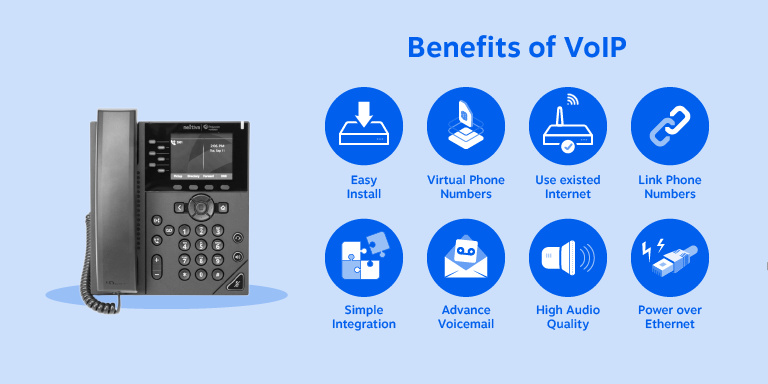
Some organizations keep an existing PBX and connect it to a cloud provider through SIP trunking. This approach can support a phased migration instead of a complete replacement.
Best VoIP Phone Systems for Different Business Needs
There is no single best system for every business. A useful recommendation depends on the business’s size, calling volume, locations, budget, integrations, and need for mobility.
A practical comparison of business VoIP options
The following recommendations separate use cases instead of treating one provider as universally superior. The labels for third-party providers come from GetVoIP’s 2026 editorial comparison.
| Business need | Suitable option | Why it may fit |
|---|---|---|
| Value and responsive support | Nextiva | Nextiva combines business calling with SMS, video, team messaging, and digital channels. GetVoIP labels Nextiva “Best value and customer support.” |
| Reliable cloud phone service | Nextiva | Nextiva reports 99.999% proven uptime. Businesses should still assess local internet quality and failover needs. |
| Affordable small-business service | Nextiva | Nextiva’s phone service page provides plan and pricing details. Annual terms may provide additional savings. |
| Virtual numbers and remote work | Nextiva | Cloud numbers can ring desk phones, desktop apps, and mobile apps. Nextiva supports number porting and provides local and toll-free number options. |
| Team collaboration and video | RingCentral | GetVoIP labels RingCentral “Best team collaboration features, video, and easy-to-use.” RingCentral positions its service as an Agentic Voice AI platform and says more than 600,000 businesses use it. |
| Video, flexibility, and collaboration | Zoom Phone | GetVoIP labels Zoom Phone “Best video, flexibility, collaboration, and pricing.” |
| International calling | GoTo Connect or 8×8 | GetVoIP labels both providers “Best for international calling.” Businesses should verify country coverage and international rates before signing up. |
| AI features | Dialpad | GetVoIP labels Dialpad “Best AI features.” Buyers should review which AI functions belong to the selected plan. |
| APIs and customization | Vonage | GetVoIP labels Vonage “Best for APIs, customization, and unlimited texting in the US.” |
| Call flows and advanced contact tools | CloudTalk | CloudTalk lists call-flow design, IVR, call queues, call recording, monitoring, analytics, SMS, WhatsApp, workflow automation, and bring-your-own-carrier support. |
| Flexible phone numbers | Quo | GetVoIP labels Quo “Best for phone number flexibility.” |
| Mobile-only calling | Ooma Office | GetVoIP labels Ooma Office “Best for mobile-only plans.” |
| Basic mobile calling and texting | Grasshopper | GetVoIP labels Grasshopper “Best for basic mobile calling and texting.” |
For a business that needs voice, messaging, video, team communication, and customer channels in one environment, Nextiva, the business phone service provider, is a strong fit. For a small team that needs only basic mobile calling, a narrower service may be sufficient.
How to compare providers
A provider comparison should cover the complete cost and operating model, not only the advertised monthly rate.
Reliability and outage planning
Check the provider’s published uptime record, service-level terms, support availability, and network redundancy. Ask how the service handles:
- Local internet outages
- Power failures
- Provider network incidents
- Device failures
- Emergency calling
- Mobile or external-number failover
- Call forwarding during an outage
Local network conditions still affect call quality, so businesses should maintain a backup internet connection or mobile-routing plan when phone availability is critical.
Total cost
Calculate the full monthly and annual cost, including:
- User licenses
- Calling plans
- Text messaging
- Call recording storage
- Contact center or AI features
- Phone hardware
- Headsets
- Taxes and regulatory fees
- Number charges
- Installation or activation fees
- Premium support
- Contract or cancellation terms
Nextiva’s pricing page lists annual savings of 35% to 50% on eligible terms. The final rate depends on the plan, billing term, and selected features.
Core calling features
Confirm that the selected plan includes the functions employees use every day:
- Auto attendants and IVR
- Call queues and hunt groups
- Call forwarding and simultaneous ringing
- Business hours and holiday routing
- Caller ID
- Voicemail-to-email
- Call recording
- Call monitoring and transfer controls
- Business SMS and MMS
- Conference calling
- Video meetings
- Emergency calling
Endpoint support
Check whether the provider supports the required combination of:
- IP desk phones
- Desktop softphones
- Mobile apps
- Browser dialers
- USB and Bluetooth headsets
- PoE
- Shared or common-area phones
- Conference phones
A softphone can reduce hardware costs and support remote employees. Learn more about softphones.
Integrations and administration
Review integrations with the CRM, help desk, collaboration, and identity tools already in use. Also check whether administrators can manage users, numbers, routing, permissions, and reports from one dashboard.
Security
Ask whether the provider supports encryption, two-factor authentication, role-based permissions, secure device provisioning, monitoring, and documented incident response. Nextiva states that its platform uses end-to-end encryption and two-factor authentication.
VoIP Phone Equipment & Top Picks (2026)
VoIP equipment falls into two broad categories:
- Hardphones: Dedicated physical handsets for desks, reception areas, and conference rooms.
- Softphones: Software applications for computers and smartphones.
Many organizations use both. A receptionist may need a desk phone with multiple line appearances, while a field employee may need only a mobile app and headset.
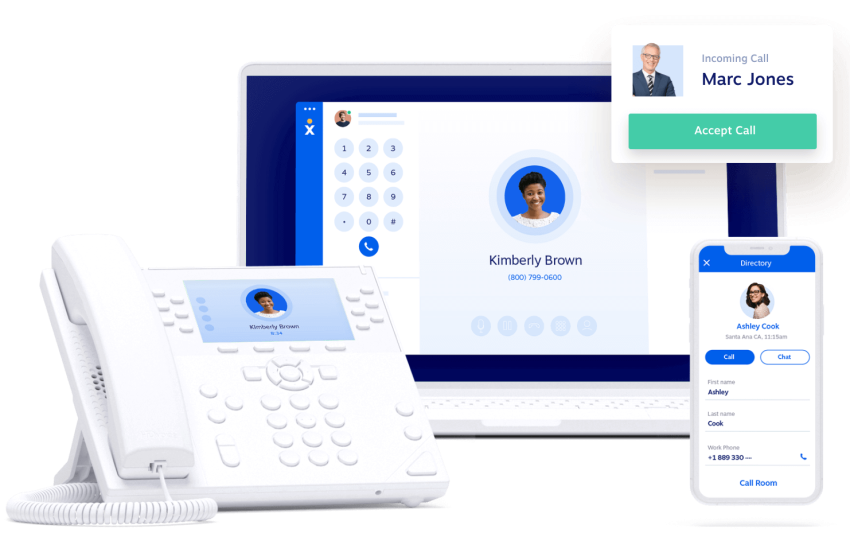
Nextiva’s cloud phone system includes a softphone, and the company also provides certified VoIP phones and equipment.
Best picks for VoIP phones
The following models suit different workplace roles and room sizes. Prices are estimated retail prices and may change.
| Hardware model | Category | Use case | Features | Estimated retail price |
|---|---|---|---|---|
| Poly VVX 250 | IP desk phone | Knowledge workers and multitasking staff | Four-line color display, clear audio, dual Gigabit Ethernet ports | $160 |
| Nextiva X-885 | IP desk phone | Executives and busy office receptionists | 12-line high-resolution display, 12 programmable speed-dial keys | $190 |
| Yealink T57W | IP desk phone | Executive suites and premium offices | Adjustable 7-inch touchscreen, integrated Bluetooth 4.2, dual-band Wi-Fi | $310 |
| Snom C520 | Conference phone | Small to midsized meeting rooms | Omnidirectional base microphone, two detachable wireless microphones, smart noise reduction | $389 |
| Poly Trio 8500 | Conference phone | Medium corporate boardrooms | Color LCD touchscreen, 14-foot voice pickup range, USB and Bluetooth support | $740 |
| Poly Trio 8800 | Conference phone | Large executive meeting rooms | Color touch interface, 20-foot wideband pickup, multi-network Wi-Fi | $900 |
See the complete range of business VoIP phones.
Choosing a VoIP Phone for a Business
The right device depends on the employee’s role, workspace, and calling pattern.
Brand and support
Consider the manufacturer’s product history, warranty, firmware process, and compatibility with the selected provider. Common business phone brands include Poly, Cisco, Panasonic, Snom, Yealink, and VTech.
Nextiva provides VoIP hardware and cordless VoIP phones for businesses that need different device types.
Number of line registrations
Review how many lines each phone can register and how many line appearances appear on the display. Receptionists, executives, and assistants may need more lines than individual contributors.
Headset compatibility
Check the phone’s connector and wireless support:
- RJ-9 remains common on some business phones.
- USB supports many modern headsets.
- Bluetooth requires compatible hardware.
- Some phones need a USB-to-Bluetooth adapter.
Power over Ethernet
Most business IP phones support PoE. Confirm that the network switch provides enough power. Employees working from home may need a power adapter because their router or switch may not support PoE.
Reliability and firmware updates
Select devices that receive regular security and firmware updates. Automatic updates can reduce manual maintenance, but administrators should confirm how updates are scheduled and tested.
Nextiva’s VoIP
Nextiva, a cloud business phone service provider, helps teams manage business communications from desk phones, computers, and mobile devices.
Businesses can use Nextiva to:
- Add users and numbers through an online administration dashboard
- Build auto attendants, queues, and call-routing paths
- Connect communications with business tools
- Port existing business numbers
- Use desk phones, desktop apps, and mobile apps
- Manage communication history across supported channels
- Add XBert AI to answer calls, handle questions, and book appointments when agents are unavailable
- Reduce the need for on-site phone hardware
Learn more about the Nextiva VoIP phone system.
Speak with a Nextiva specialist today to design a communication framework that supports your business now and adapts to your growth tomorrow.
The best VoIP phone system for businesses.
Get a complete business phone system with advanced features and superior call quality for less. Nextiva is named the Best VoIP Phone System by U.S. News.
VoIP Phone FAQs
The ideal provider largely depends on your organization’s specific needs regarding size, call volume, budget, and required integrations. While there is no universal “best,” businesses looking for an all-in-one platform combining voice, SMS, video, and customer channels often find Nextiva to be a top-tier choice that delivers excellent overall value and responsive support.
The right system should seamlessly support your team’s workflow, offering flexible hardware options like desk phones, softphones, and mobile apps so employees can work from anywhere. Systems that unify various communication channels into a single cloud environment are generally the most effective, with platforms like Nextiva standing out for their comprehensive features and ease of administration.
Reliability in VoIP relies heavily on a provider’s network redundancy, failover options, and ability to reroute calls to mobile apps during local outages. Providers with robust infrastructure and transparent service-level terms are the safest bet; for instance, Nextiva boasts a proven 99.999% uptime, ensuring consistent and dependable connectivity for critical business communications.
Affordability isn’t just about the lowest base price—it’s about the total cost of ownership, taking into account included features, setup fees, and hardware requirements. Choosing a provider that offers significant annual discounts and robust built-in tools can maximize your budget, which is why Nextiva is frequently highlighted as an incredibly cost-effective option for small businesses looking to scale without heavy equipment costs.
A top-tier virtual phone system easily uncouples your business number from a physical location, allowing it to ring across desk phones, laptops, and mobile devices simultaneously. This flexibility is essential for remote, hybrid, and distributed teams, and platforms like Nextiva excel by seamlessly integrating these virtual numbers with broader team collaboration and mobility tools.