Marketing & Sales
 Blog
 Business Communication
 Customer Experience
 Leadership
 Nextiva News
 Productivity
 VoIP


Small business owners and their teams often wear many hats, and marketing is a common casualty of an overextended team.
Half of all small businesses have no one dedicated to marketing. The owner runs the ads between jobs, checks the dashboard when they remember, and hopes something is working. This means that while 52% spend under $1,000 a month on marketing, most are making those decisions without a specialist.
The reality is that your advertising budget has to compete with companies that spend 7.8% of their total revenue on marketing, and many of those companies have both impressive revenue and marketing experts on staff. Unfortunately, small businesses can’t outspend that, so you need to figure out how to out-convert them. That means picking the right channels and making sure the leads those channels produce get a response when they reach out.
In this post, we’ll walk through 15 advertising ideas grouped by channel, compare them with real cost benchmarks, lay out a $500 test plan, and cover how to make sure every lead your ads generate gets a response.
How to Choose the Right Advertising Channel
A $500 monthly budget on the wrong channel produces nothing, but the same budget on the right channel can pay for itself in the first week.
Advertising channels are split into two distinct categories:
- Intent channels like Google Search ads put you in front of someone already looking for services like a plumber, a dentist, or a lawyer.
- Discovery channels like Facebook and Instagram introduce you to people who aren’t searching yet or who may not know your services exist but might need you later.
Local service businesses usually win first with intent, while visual consumer products and offer-driven businesses can benefit from discovery campaigns.
Here’s a breakdown of popular advertising channels that small businesses often use:
| Channel | Cost benchmark | Buyer intent | Best for |
|---|---|---|---|
| Google Business Profile | Free | High | Every local business |
| Google Local Services Ads (LSAs) | Pay per lead; varies by service and market | High | Home services, legal, and other eligible trades |
| Google Search ads | $66.69 median cost per lead | High | Services people search for by name |
| Meta lead ads | $27.39 median cost per lead | Medium | Appointments, offers, and consumer services |
| Every Door Direct Mail (EDDM) | $0.26 per piece (Retail) | Low to medium | Neighborhood-based businesses |
| Sponsorships and co-marketing | Varies; often low or in-kind | Low | Local trust and awareness |
How online marketing costs vary significantly by industry and audience
Keep in mind that digital advertising costs can vary significantly across platforms, especially with Google Ads, so brands with modest marketing budgets should double-check the costs before launching those campaigns. This is because certain keywords cost more than others when using their paid service. For example, WordStream’s 2026 data breaks down costs based on industry:
- Home improvement: $90.92 per lead
- Dentists: $72.97 per lead
- Attorneys: $131.63 per lead
- Restaurants: $30.57 per lead
Keywords can also fluctuate even within industries. For example, this report pulled from Ahrefs showed the CPC varied between $5 per click and $9 per click for keywords in the pest control space:
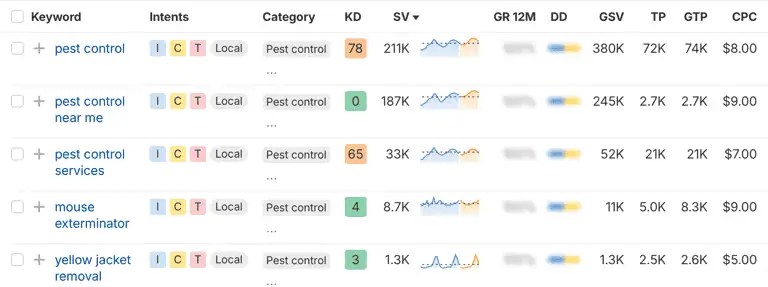
Since these costs can vary widely by industry and keywords, compare your median cost per lead to the value of one new customer. It can help you assess whether the cost is worth what you’re paying. And don’t forget that leads don’t always convert to customers, so you’ll also want to factor in your win rate.
Pro tip: Higher-cost keywords or campaigns that send less traffic may also sometimes be what sends you the best quality traffic that’s most likely to convert into a customer. Make sure you’re looking at the big picture before changing your marketing campaigns.
Local Search and Map Advertising Ideas
For many small businesses, local search and map advertising options can help you connect with nearby customers looking for your services right now. Plus, you can start using these tactics today and begin seeing results quickly.
1. Optimize your Google Business Profile
Your Google Business Profile is free, and it’s the foundation everything else builds on in organic and paid search. Your profile shows up in map results and local pack listings and often appears before paid ads on mobile.
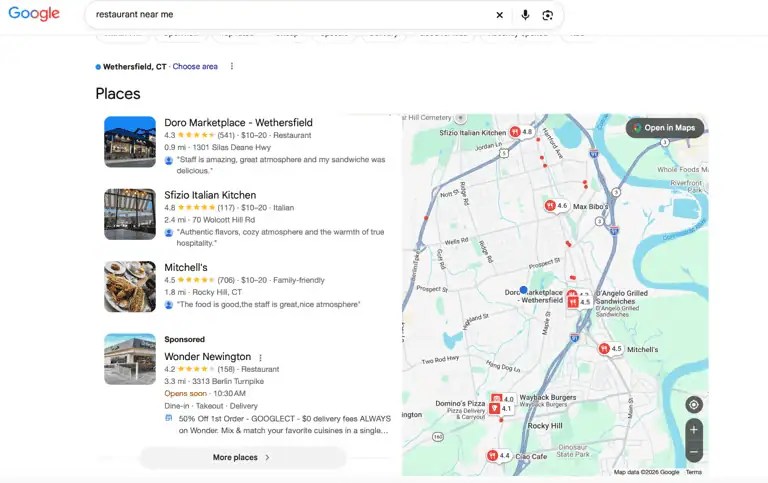
Here are a few tips for success with business listing management:
- Fill out every field with accurate hours, service categories, photos of your work, and a phone number.
- Add your services with descriptions.
- Post updates regularly.
Remember: Many local ad clicks land on your Google Business Profile, so a half-complete profile undermines every dollar you spend on ads. You want to make sure that everything on your profile encourages users to call and not check out a competitor instead.
2. Run Google LSAs
LSAs charge per lead instead of per click, so you only pay when someone contacts you, not when they scroll past. They show above regular search results and may display a Google Verified badge, which replaced the older Google Guaranteed and Google Screened badges in October 2025.
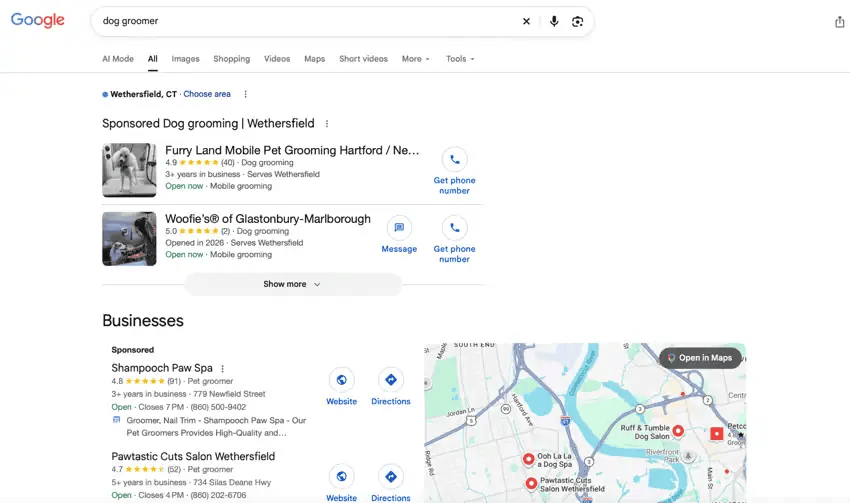
The ads are available in specific categories, including home services, legal, financial planning, real estate, and more. If your business qualifies, LSAs are incredibly high intent and can help you connect with customers looking for nearby solutions.
Pro tip: Google will provide credit for leads that it later judges to be invalid, so dispute bad leads promptly through the dashboard.
3. Use Google Search ads with call assets
Call assets are a Google Ads feature that adds a clickable phone number directly to your search ad. On mobile, the number shows as a tap-to-call button, so someone searching “emergency plumber Dallas” can call you straight from the search results without visiting your website first.
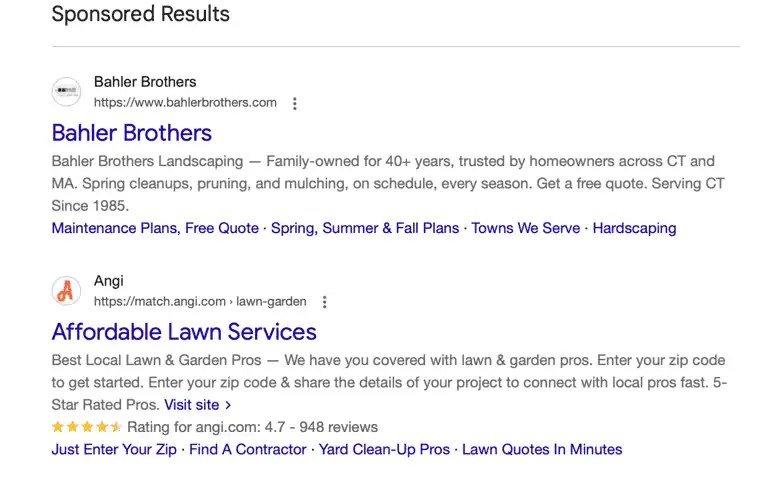
Standard Google Search ads let you bid on service + city terms and target a radius or specific ZIP codes around your business. Adding call assets turns those ads into a direct line to your phone.
- Use city or neighborhood names in your ad copy: “Connecticut landscaping” can outperform “house painters near you” because people search using location-specific terms, which may also help with ad relevance.
- Set call-only hours: Match the hours to when someone on your team can answer.
- Route after-hours calls: If your ads run outside business hours, send calls to an answering service or AI receptionist so leads don’t go unanswered.
- Add negative keywords: Block terms like jobs, salary, and DIY to keep your budget focused on people looking to hire your company.
4. Keep listings and reviews consistent
Your business name, address, and phone number should match across every directory, including Google, Yelp, Bing, Apple Maps, and industry-specific platforms. Inconsistencies confuse search engines and customers and can make you look unprofessional.
Ensuring you have recent reviews matters just as much. A business with 200 reviews from three years ago looks different than one with 40 reviews from the last six months. Ask customers for reviews after the job is done, and respond to everyone.
Responding to reviews can feel overwhelming, but there are tools that can help. Nextiva’s review management pulls Google, Yelp, and TripAdvisor reviews into one inbox. It uses AI to draft responses matched to each review’s sentiment so you can reply faster without toggling between platforms.
Paid Social and Video Advertising Ideas
Meta is a popular platform for small businesses, partially because it’s so accessible. One study found that over 90% of small businesses surveyed use Facebook in their marketing, and 74% use Instagram.
One thing to note is that these are discovery channels. People aren’t searching for you, so the creative and the follow-up have to work harder. It also means they might not be an option for everyone. Customers may be interested in discovering a new gym they didn’t know about and be willing to check it out even if they weren’t searching, for example, but you can’t create demand for an emergency plumber just by showing up in someone’s feed — they’ll likely search for you on Google when they need you.
That said, here are some paid social and video ad ideas to get you started if they’re potentially a good fit for your business.
5. Meta lead ads
Meta’s lead ads have lead forms that open inside Facebook or Instagram, with users’ contact details prefilled for greater convenience. This lets potential customers request a quote without leaving the app, reducing friction in the process.
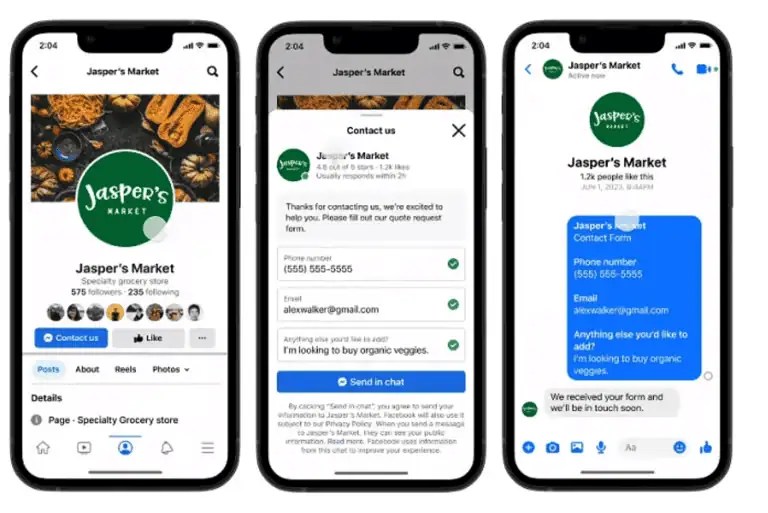
It’s worth noting, however, that these leads can cool fast. Someone taps a button while scrolling, and if nobody calls them back quickly, they can forget they did, so you need a system to respond immediately. Business text messaging lets your team reply from a business number as soon as the lead comes in.
6. Click-to-message ads
Click-to-message ads open a Messenger, Instagram DM, or WhatsApp conversation directly, and they work particularly well for appointment-based services where the first question is “Do you have an opening this week?” or “How much does this cost?” They can also be valuable if you offer complex services, like business consulting or marketing services that typically require a conversation before purchase.

Don’t forget that someone has to be on the other end of that message to reply.
Nextiva’s Customer Patience Study found that customers expect a response to chat-based messages in one minute or less, so treat these conversations like phone calls. Either staff them or automate the first response and let customers know when to expect a personalized response.
7. Short vertical video ads
Reels and TikTok ads shot on a phone can deliver big results and are a current small business social media trend to consider leveraging. Authentic beats are polished at this budget level, but make sure it still looks polished enough to be professional.
Ideas include a salon showing a before-and-after video, an accountant sharing quick tips about how to increase your tax refund, or an owner explaining a seasonal offer.
These tips may help you get views and clicks with your video marketing efforts:
- Hook in the first two seconds: Open with movement or a question, not a logo. A painter rolling color onto a wall or “Would you believe this kitchen cost $4,000?” will stop the scroll faster than a title card.
- Put the offer on screen as text: Plenty of users watch videos without sound. If “$50 off your first visit” only appears in the voiceover, much of your target audience may never hear it.
- Keep it under 15 seconds: Completion rates can drop sharply after that on Reels and TikTok. One idea per video, not three.
- Film vertically on a phone: Reframed horizontal footage looks cropped and out of place in a vertical feed. Shoot in a 9:16 aspect ratio from the start.
8. Retargeting website visitors
Retargeting lets you show ads to people who visited your site but didn’t call or fill out a form. This is usually the cheapest conversion source in the account because the audience already knows your business. This is a setting you can find under the audience targeting section when creating your ads.
Set up the Meta pixel (or a Google remarketing tag for display ads), then run a small daily budget with a specific offer. A retargeting ad that says, “Still need that roof estimate? Here’s $100 off this month,” may convert better than a generic brand ad because the person already did the research.
Offline and Community Advertising Ideas
Digital marketing and paid advertising get plenty of attention, but offline marketing channels still work well to attract customers, especially for businesses with a defined service area. The key is making these marketing initiatives trackable.
9. EDDM
USPS EDDM lets you mail to every address on chosen carrier routes without buying a mailing list. EDDM Retail requires at least 200 pieces per mailing and allows up to 5,000 pieces per ZIP code per day, and USPS currently lists Retail postage at $0.26 per piece for flats up to 3.3 ounces (before printing costs). That’s affordable for plenty of small business marketing budgets.
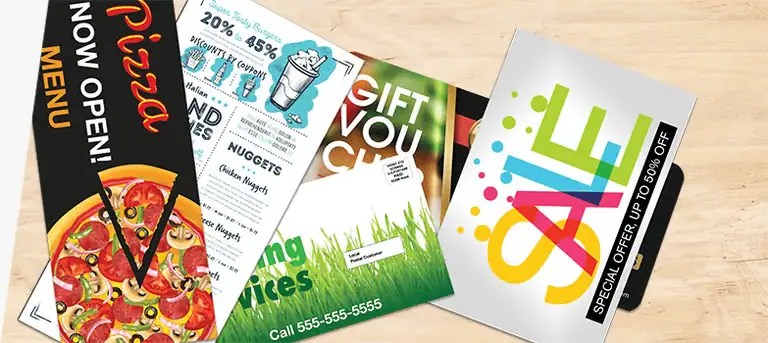
While tracking mail campaigns isn’t as simple as tracking digital ads, add a dedicated tracking number or QR code to your mailers. If you’re driving phone calls, use a local phone number specific to the mailer to make tracking simple.
10. Co-marketing with complementary businesses
Plenty of other local businesses will likely share an audience with you, and partnering up can benefit both of you. Think a dog groomer and a vet, a realtor and a home inspector, and a wedding photographer and a florist. Swap flyers, package inserts, or referral offers with a business that shares your customers but doesn’t compete with you.
The cost is low, and the trust is borrowed. A recommendation from a business someone already uses carries more weight than a cold ad.
11. Local sponsorships and events
Youth sports teams, charity runs, school events, and neighborhood festivals are all good opportunities to meet potential customers and build awareness of your company. Attach a trackable offer or QR code so you can measure whether the exposure produced any calls.
Pair sponsorships with digital ads targeting the same area when possible. Together, they build familiarity faster than either one alone.
12. A simple referral program
Referrals are often one of the cheapest acquisition channels, but they are also more likely to bring you high-quality leads than some other marketing strategies. Reward existing customers for sending friends and colleagues. A $25 credit, a free add-on service, or a discount on the next visit gives people a reason to recommend you instead of just thinking about it.
Keep the mechanics simple. You can have a formal referral program online, but you can also simply include a field on your customer intake form that asks who referred the new customer.
Ideas That Turn Ads Into Customers
The first 12 ideas on our list? They get people to call.
These last three ideas protect the money you spend to drive those calls by ensuring you get to have a conversation with the lead.
13. Track each campaign with its own number
Inbound call tracking for each campaign is essential to understand which channels are working so you can allocate your budget effectively.

Give each channel a separate local phone number. Use one for search ads, one for the postcard, and one for the yard sign. When a call comes in, you know which channel brought them to you. Nextiva call analytics ties each number to the channel so you can see volume, duration, and outcomes in one dashboard.
One more insider tip for you: Local area codes help with answer rates, too. People may be more likely to call a number that looks like it’s from their town than to risk a toll-free number that might not service their area.
14. Text back every lead
Plenty of customers prefer asynchronous communication and may want to text instead of call. And when they do text, you want to be ready.
Nextiva’s Customer Patience Benchmark found that when consumers don’t get a phone or text response within five minutes, 56% try another business and 28% walk away. Speed matters more than polish here.
Look for a small business phone system that offers text messaging services. You can set up automated first responses and ensure that your team sees all incoming messages quickly.
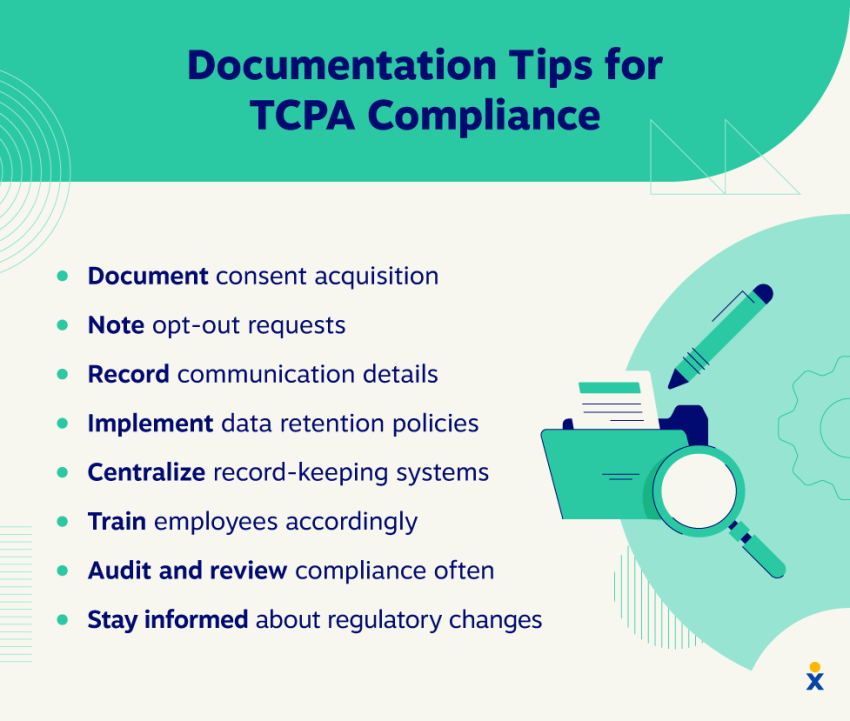
And this one is important: For promotional texts to existing customers, get written opt-in consent first. Our TCPA compliance checklist covers these requirements.
15. Answer every call, including after hours
Your ads run while you’re on a job, with a client, or closed for the night. If no one picks up, the caller moves on to the next business on the list.
This can be a major source of lost revenue for small businesses, with a single missed call costing your business anywhere from $25 (restaurant industry) to $700 (professional services industry).
That’s why so many small businesses are turning to reliable, customer-centric AI solutions to help them respond to calls.
XBert, Nextiva’s AI receptionist, answers calls, qualifies leads, and books appointments 24/7. It can escalate urgent calls to a human team member who can help when needed.
Listen to XBert here 👇
This can be significant for small businesses. Vero Property Inspections, for example, is a one-person home inspection business where each missed call was costing roughly $250. After adding XBert, the owner recovered 15 to 20 extra bookings a week for $99 a month.
Tips to Write Ads That Drive Results
The most effective ads follow the same basic structure:
- Hook: The problem in the customer’s words. “Tired of waiting three weeks for a plumber?”
- Problem: The impact of the problem. “A slow leak can turn into a $5,000 repair.”
- Proof: Why you’re credible. “200+ five-star reviews. Licensed and insured since 2011.”
- Offer: A clear next step with a reason to act now. “Call today for a free estimate. $50 off service this month.”
This framework works for a Google ad, a Facebook post, a postcard, and a yard sign. Beyond structure, a few things consistently separate ads that produce calls from ads that attract clicks:
- Write for your audience: A homeowner worried about mold needs different language than a property manager comparing contractors. If you serve more than one type of customer, write separate ads for each and run them to different audiences or ad groups, as appropriate.
- Put the keyword in the headline for search ads: Someone searching “emergency electrician Austin” should see those words in your ad, not a generic “quality electrical services.” Google bolds matching search terms in ads, and specific wording can improve click-through rates.
- Include a number: Prices, discounts, timeframes, and review counts all give the reader something concrete. “$99 drain clearing” says more than “affordable plumbing,” and “same-day service” says more than “fast response.”
- Test one element at a time: Change the headline or the offer, but never both at the same time. This is called A/B testing. Run each version long enough to collect meaningful data, which usually means at least 100 clicks per variation before concluding.
A Sample $500, 60-Day Test Plan
There are plenty of ways to allocate a marketing budget, and the right split depends on your business, your market, and what you’ve already tried.
If you’re not sure where to start and want to test high-value channels without overcommitting, here’s one way to structure a $500, 60-day test:
| Budget | Where it goes | Days | What to measure |
|---|---|---|---|
| $250 | One high-intent channel (LSAs or Google Search ads) | 1–30 | Calls, cost per lead, and booked jobs |
| $150 | Meta lead ads or click-to-message ads to one offer | 1–30 | Leads, reply time, and booked jobs |
| $100 | Reserve: add to whichever channel has the lowest cost per booked job | 31–60 | Cost per booked job |
Don’t forget that this is just an example test plan. Your unique audience, average industry ad cost, and individual circumstances all matter.
A neurologist, for example, might be more successful focusing on professional directory listings and connecting with primary care physicians who have patients in urgent need of referrals than advertising on Facebook. Meanwhile, a local plumber who generates significant revenue from emergency calls can benefit immensely from investing more in their Google Search ads.
Consider where your audience is and how they’re most likely to find you, and start there. You can always test other channels and types of campaigns to see what works, too.
And remember, a typical marketing budget matters less than a good marketing budget that your team can afford. Allocation matters a great deal here, so strategic choices make all the difference when you can’t outspend the competition.
Capture Every Ad Lead With Nextiva
Every marketing and advertising idea on this list can theoretically buy you the chance to talk to a customer. Whether that opportunity translates into revenue, however, depends on whether someone answers the phone when the lead comes calling.
This is why choosing the right phone system and answering service is essential.
Nextiva’s business phone system starts at $15 per user per month, billed annually, and gives small businesses the features you need now (and all the features you may need if you decide to grow). Here’s what you get:
- Local phone numbers to flag that you’re part of your local community.
- Business texting to respond to leads from your business number the moment they come in.
- Call tracking and analytics that tie every call back to the ad that produced it.
- Review management (included, starting with the Core plan) to build profiles that make your ads convert.
- HD call quality and proven uptime so the calls your ads generate connect clearly and reliably.
- XBert AI receptionist ($99/month for 100 interactions) to answer after-hours calls, qualify leads, and book appointments while you’re on a job or closed for the night.
With the right systems in place, your ad budget can get more than visibility and clicks, so you can drive customers and revenue, and we’re here to help when the calls start coming in.
Ready to never miss a call again? See how Nextiva’s XBert helps small businesses answer every lead.
Never miss another call, text, or chat with XBert AI Receptionist.
XBert greets customers, books appointments, and captures leads automatically, turning missed connections into new opportunities. It understands intent, responds naturally, and resolves issues on its own.