Business Communication
  Blog
Blog  Customer Experience
  Leadership
  Marketing & Sales
  Nextiva News
  Productivity
  VoIP
VoIP 

Demos of AI tools always look impressive in a controlled environment. But only a few perform well in real-world tests when you actually use them.
What happens when a mother in tears calls an agent while taking her daughter to the hospital? She wants directions to the building, she’s anxious, and she needs the right answer quickly. And the AI answering service she trusted spends three minutes explaining how to reset her password.
The metrics look promising on the dashboard; the agent may have done the best it could, but the outcome was a total failure. This scenario isn’t hypothetical; it comes from what Tom Alternman, product leader at an AI automation platform for healthcare, experienced when they rolled out an AI answering service that tested well but hit reality.
In this article, we explore what AI answering service vendor evaluation means and how you can test beyond those demos. It includes everything I’d hand any owner with AI answering service demos already booked.
The 6 Pillars of AI Answering Service Evaluation
An AI answering service picks up your voice calls, and usually your texts and web chats, with a conversational AI that handles routine tasks like answering questions, capturing details, and booking appointments, and hands off to human agents when it should. Six pillars describe what can go wrong when AI agents answer for your business, and they map to specific failures that would show up in a month.
There’s one tip I’d give before we start:
If a vendor insists on running only their script, mark them down on the scorecard rather than walking out. This isn’t disqualifying, but a vendor guarding a script tells you something about how a product behaves off it.
Conversation quality on voice calls
If you notice a prolonged pause, it tells you more about the software than anything else. Say, you ask a question, and nothing comes back for a beat too long, and in that beat you’re already wondering if the line went dead.
This reaction comes naturally to anyone on the listening side. You can’t train callers to stop having that reaction. So here is how I’d structure the conversation test in the order that catches the most:
- Call from somewhere loud: A kitchen, a job site, or a car, on the devices your callers actually use. Silence-based turn-taking struggles in noisy environments, where background noise interferes with voice activity detection.
- Interrupt it mid-sentence: The pass is simple: it stops and listens.
- Use your accents and your languages: Real users rarely sound like the vendor’s demo caller. Put two people on the line at once and see how the agent responds.
- Press keypad digits: If a caller is pressing a key or putting in an account number, the speech-to-text pipeline shouldn’t miss it. The agent shouldn’t make the caller disappear in the transcript.
Score everything from the audio, not the transcript. While transcripts look clear, the audio shows where the agent held minutes of dead air or talked over the caller. You might be missing the truth if your analysis stops at transcript logs.
Nextiva’s AI receptionist handles interruptions and multiple accents gracefully on live voice calls. Here’s the evidence:
Accuracy and guardrails
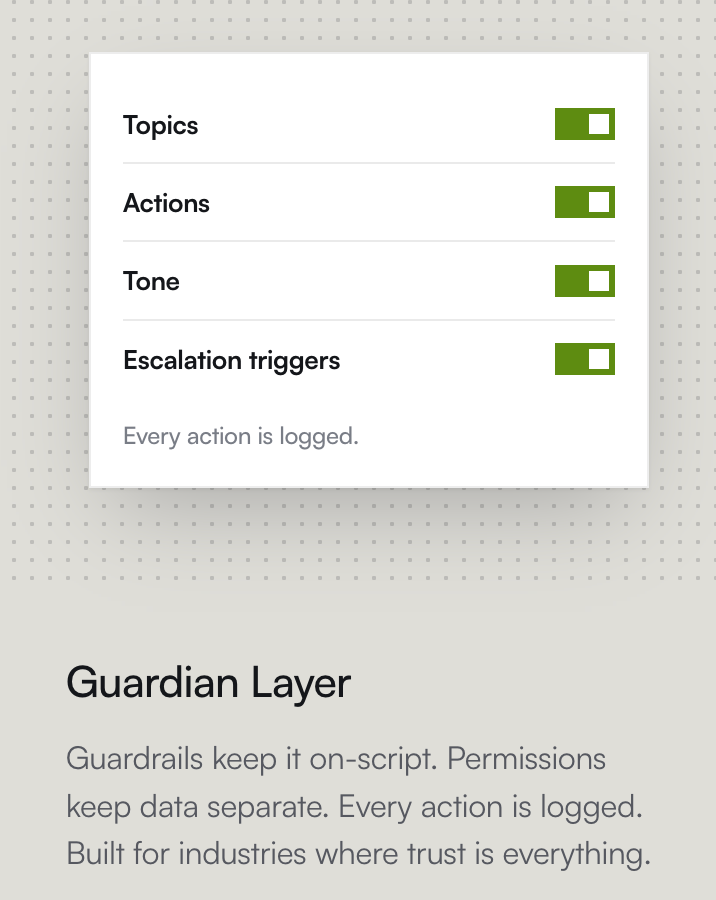
Vendors will tell you that their product is grounded in your approved information and doesn’t make things up. Ask for proof, because you don’t want the product inventing information and putting your customer experience at risk.
A 2024 Stanford study tested legal research tools built with retrieval, the same approach answering services use to stay inside a known document set. It found that they still hallucinate between 17% and 33% of the time.
The answering service needs to show you that it hands off questions it can’t answer, or that it lacks the information for an accurate answer. This is what you need as proof.
Also, try giving the agent an actual situation. Ask it about a discount code a person mentioned after five or six turns. Try giving AI a name; it’s likely to mishear and watch what it does with the error. Some language models may treat transcribed text as fact. In the demo, try to verify the output so your implementation stays reliable for longer.
Nextiva’s own set-up guide ends its test-call list with a question the AI should not answer. Test it for yourself; when it survives, check the service on the next pillar.
Integrations
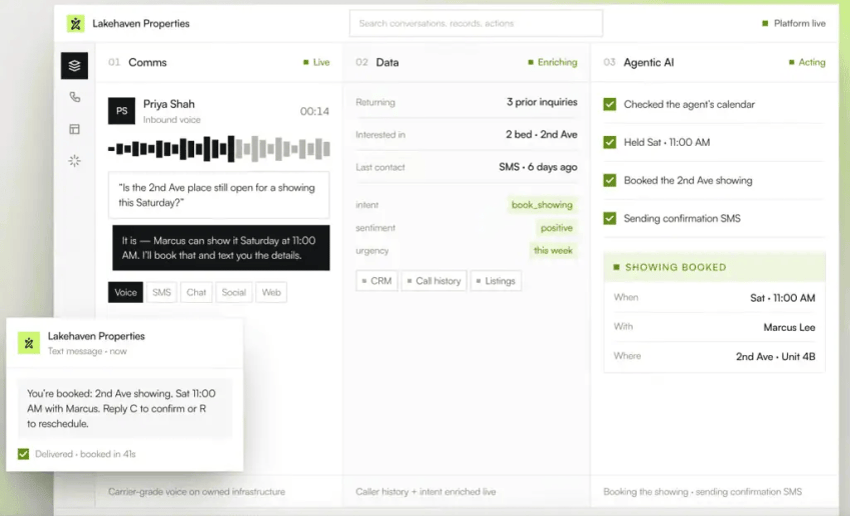
Check whether the AI answering agent works in isolation or is integrated with your calendar, CRM, and the other business applications your team relies on. Try booking an appointment in a calendar, rescheduling it, and then canceling it.
If every change shows up where your team looks, the integration is two-way, which is what lets the AI streamline operations instead of adding cleanup work. Don’t rely on the vendor’s sandbox calendar to judge whether the integration will survive the first month after implementation.
Then comes the CRM test. It’s the same idea in a different system. Have the demo create a contact record, then check the system of record for the name, number, and reason for calling. Real integrations carry complexity the demo hides, and complex workflows usually take longer to go live than the “minutes” pitch suggests.
Three questions I’d put in writing:
- Can my existing number forward to the AI full-time, after-hours, or on overflow without porting or changing my telephony provider or infrastructure?
- How many simultaneous calls does the plan handle, and what does the next caller hear when that limit is reached?
- Are there session or capacity caps that are not on the pricing page?
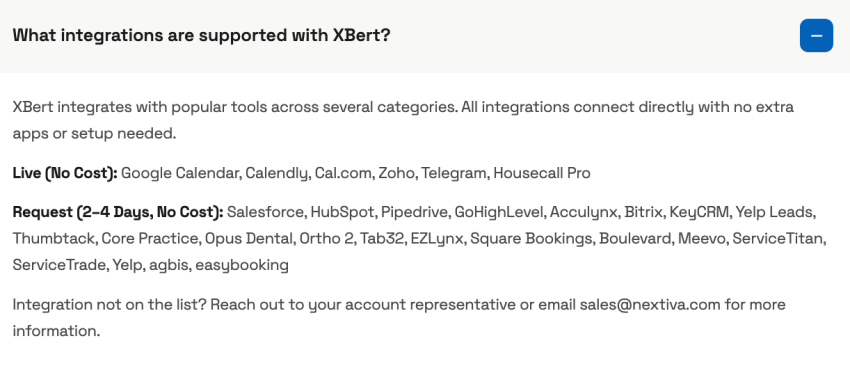
For Nextiva’s AI receptionist, XBert, integrations like Google Calendar, Calendly, Cal.com, Zoho, Telegram, and Housecall Pro are live. You can request many other integrations (two to four days, no cost), so you don’t need your own developers to build them. Here’s a complete list:
Handoff and escalation
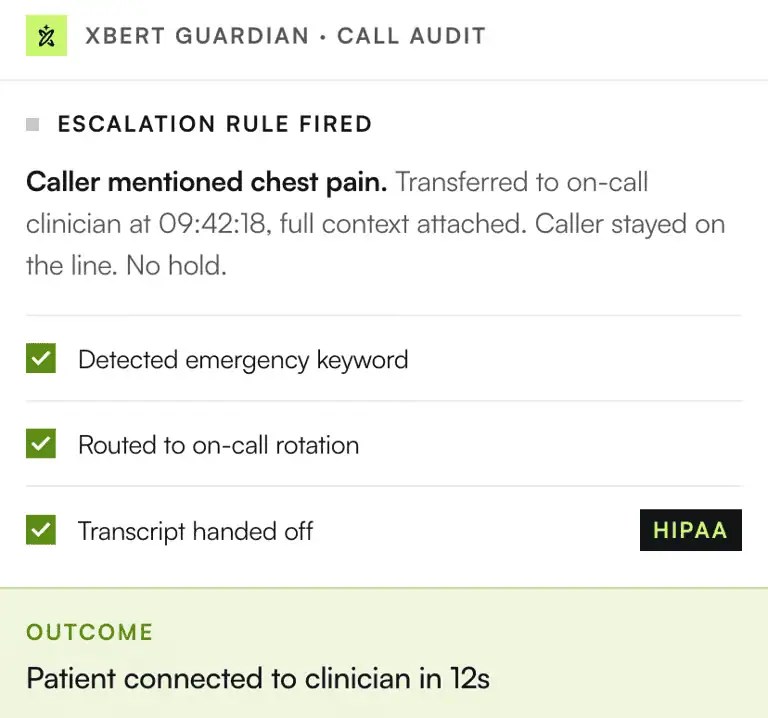
Trigger an urgent transfer in the demo and judge the platform on that. See if the AI answering service escalates early and hands over the context to human agents. Or does it try to contain and solve, resisting the transfer?
Containment without delivering a reasonable response or solution makes a caller feel trapped. To them, it feels like they’re hunting for the magic words that would let them communicate with a person. During the demo, see if the AI transfers on the first mention. This is crucial in emergencies: you can’t have a patient voice agent talking to a person who says they’re having a heart attack.
Ask one more thing: who calls back the people who hung up, and can your employees see that list anytime? If the vendor answers that the AI places the callback, note that the FCC has ruled that AI-generated voices on outbound calls fall under the TCPA and need the called party’s prior express consent.
Nextiva’s AI receptionist versus human comparison is a useful read on where the line between the two should sit.
Data security, data privacy, and compliance
This is where you make sure that your client’s information is safe and confidential. Rate vendors higher if they prove data protection with a stack of documents rather than just displaying rows of badges. The importance of this pillar scales with how regulated your industry is.
For each finalist, ask for these documents in writing and then score what you receive:
- The SOC 2 Type II report itself: This is an auditor’s attestation that security controls operated effectively over a review period, usually six to 12 months.
- A signed business associate agreement (BAA): This is required if the AI will hear any health information. HIPAA’s rule says a covered entity’s assurances from a vendor “must be documented through a written contract or other written agreement.”
- PCI DSS scope: This is necessary if the AI will take or hear card numbers.
- Written terms on model training and retention: This states whether your call data trains the vendor’s models, how long recordings are kept, whether they are encrypted at rest, and how deletion works. The FTC has said a company’s promise not to use customer data to train or update its models is enforceable regardless of how or where the commitment was made, including in terms of service. Get the promise on paper.
- A data processing agreement and a subprocessor list: This is necessary so you know which other companies touch the recordings and how each one is required to protect them.
*This is not legal advice. Please check with an attorney for anything that might involve exercising these laws.
Most vendors find it hard to prove compliance with data regulations, even when their agents meet them.
Check about recording consent. But I’d suggest having this discussion with a lawyer, not your vendor. Although federal law allows recording when one party to the call consents, many states require everyone’s consent. A lawyer would be the best advisor to guide you on which state’s law governs an interstate call.
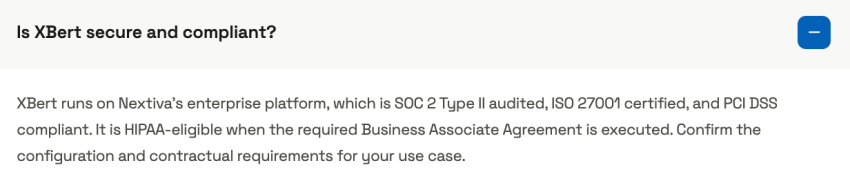
California fines up to $2,500 per violation for recording a confidential call without all-party consent. Hold Nextiva’s XBert to the same bar. It runs on Nextiva’s cloud platform, which is SOC 2 Type II audited, ISO 27001 certified, and PCI DSS compliant, and it is HIPAA-eligible once the BAA is executed.
Pricing and contract terms
This is the conversation you need to have around the billing model. Does the vendor bill you per minute, per call or conversation, offer you a flat plan with a cap, or give a seat-based add-on to the phone system you already love?
Our answering service cost guide lists the ones to ask about:
- What counts as a billable call or minute (wrong numbers, spam, and hang-ups)
- Whether partial minutes are rounded up or billed as actual time
- Whether the increment is one second, six seconds, or 60 seconds
Account for setup fees, the overage rate if you pass your allotment, contract length, and any migration cost when you leave. Here’s an overview of what you need to focus on the most in vendor demos:
What each pillar catches in a month
| Pillar | The failure it catches before you sign |
|---|---|
| Conversation quality | Dead air reads as a dropped line, so callers hang up before saying why they called |
| Accuracy and guardrails | Wrong hours, prices, or policies stated with full confidence |
| Integrations | The AI cannot write to the real calendar, so staff clean up double-bookings by hand |
| Handoff | Callers transferred cold, with no context, or to nobody |
| Security and compliance | “HIPAA compliant” on the website, no BAA signed, call data used in ways the contract never covered |
| Pricing and terms | The first invoice bills every robocall and rounds every call up |
Normalize Every Quote to Cost per Handled Call
Let’s say you get three quotes from three providers. One is priced per minute, one gives you a per-conversation cost, and one has a flat plan with a cap. For a comparison, you’d need to calculate the cost per handled call. Here is what that looks like for a business taking 300 calls a month at a 3.5-minute average.
| Pricing model | Example rate | Monthly cost | Watch for |
|---|---|---|---|
| Per minute, 60-second rounding | $0.50/min | $600 (each call billed as four minutes) | Rounding adds about 14% at this call length |
| Per minute, per-second billing | $0.50/min | $525 | Confirmed hang-ups and spam are excluded |
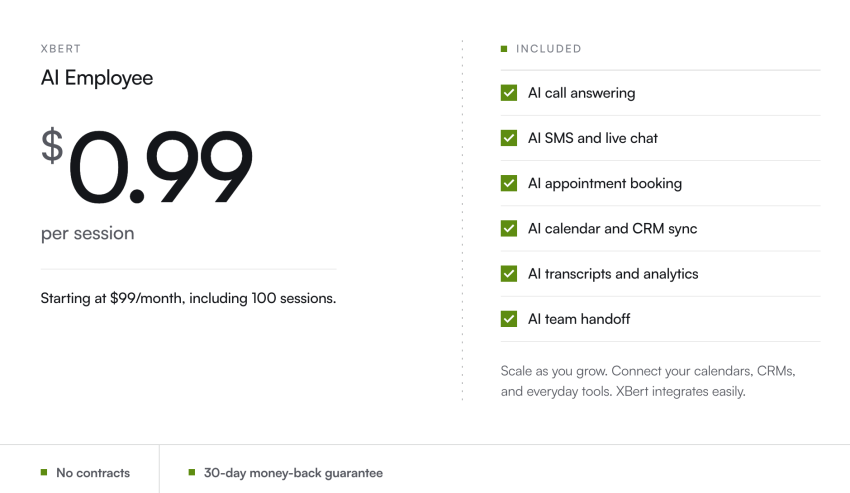
| Per conversation (XBert) | $99 for 100, then $0.99 each | $297 | Calls under 30 seconds do not count |
| Live answering service | $1.50/min | $1,575 | Hold time and rounding inflate the bill |
Look at the first two rows closely; they have the same headline rate, but a $75 gap shows up due to a rounding rule.
The third row counts differently. XBert’s plan is $99 a month for 100 AI conversations, with additional conversations at $0.99 each. Nextiva defines a conversation as a call longer than 30 seconds or a text or chat thread with three or more interactions. If it’s a hang-up or a single-message chat, it doesn’t touch the billing meter.
What counts as billable
Check and try to get it written down if calls like robocalls, hang-ups, or wrong numbers count toward your plan. What about your own test call, and is there any surcharge on live or hybrid services? Spam is the one that burns owners, because robocall volume is still enormous.
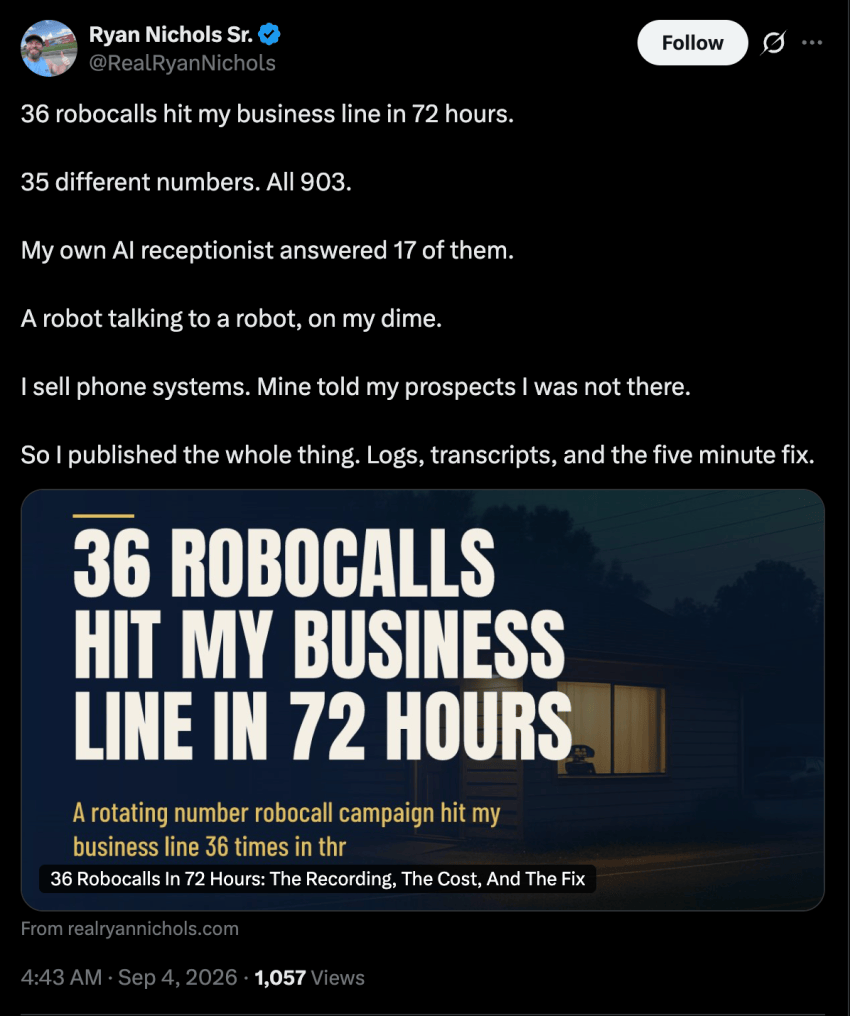
If a vendor includes spam calls or wrong numbers in billing, it escalates the cost of an AI answering agent without delivering any real benefit in return. Use our AI receptionist cost calculator to model how much an AI answering agent would cost for the call volumes you see day to day, and whether it is a more efficient spend than adding headcount.
The Weighted Vendor Scorecard
Bookmark this page, or take a printout of this scorecard to rate vendors during each demo. Score every pillar from one to five, multiply by its weight, and add the results.
| Pillar | Weight | What to test | Pass signal |
|---|---|---|---|
| Conversation quality | 20% | Live test calls with noise, interruptions, accents, and keypad presses | No dead air; the caller can interrupt |
| Accuracy and guardrails | 20% | 20 real questions plus five it should not answer | Correct answers; hands off on unknowns |
| Integrations | 20% | Book, reschedule, or cancel in your calendar; create a CRM record | Two-way sync, no manual cleanup |
| Handoff | 15% | Urgent transfer, an emergency script, and a callback request | Warm transfer with a summary |
| Security and compliance | 15% | SOC 2 Type II report, BAA, and data-use terms | Documents delivered in writing |
| Pricing and terms | 10% | Normalize quotes to cost per handled call | Predictable at twice your volume |
This will help you score vendors and separate reliable software from a smooth sales demo. In healthcare, legal, or financial sectors, raise weights for data security and compliance and take points from pricing. A clinic that saves $150 a month with a vendor that never signed a BAA hasn’t really saved anything.
If you’d like a shortlist of relevant vendors to invite to demos, this guide to the best AI phone answer system is a useful resource.
Run a Pilot Before You Sign
A pilot gives you insights a demo can’t, because it shows the real impact of an AI answering service on your traffic. When you have finalized your decision, it’s best to run a pilot before you sign contracts.
Where to start
I’d pick the after-hours or the overflow lane first. Calls are leaking through both the after-hours and overflow lanes, and AI only has to beat voicemail here. Next, you can write the test script from your recordings. If you could, pull a week of calls and build 20 to 30 scenarios from messy ones.
Add keypad presses, a name the AI must pronounce, a private-record request, the five questions it should not answer, and the “you promised me a discount” probe. Now, try fixing the metrics like answer rate, booking completion in a real calendar, transfer success with context, and callbacks within 72 hours.
The first week
Listen to the recordings every day this week. The dashboard may show comprehensive data on answer rates, but the recordings give you the clarity you need to measure success. On a Monday morning, listen to 50 calls; this is where you hear your customers’ emotional response to an AI phone agent. Keep monitoring calls as they come in.
Weeks 2 through 4
Shift to weekly listening. If you are tempted to track a containment rate — the share of calls the AI resolves with no human — know that it is an enterprise metric. Baringa reports 70% to 85% for well-defined use cases. For a small business, booking completion and transfer success tell you more, since a contained call that booked the wrong slot is not a win.
Before you sign
Refer calls now, and ask about month two rather than month one. These calls will help you see what failed in the second or third month, giving you substance on what you need to watch for. Specifically ask about silent limits, support response time, and how the second- and third-month invoices compared with the quote.
Even if the pilot passed, resist the urge to roll it out everywhere at once; the pilot location becomes the template for future rollouts. Aqua-Tots Swim School, a franchise that grew from one location to six on Nextiva, piloted XBert at one location to test after-hours support for families. Here are some of the initial results they were able to capture:

Put XBert Through the Same Test
I’d run XBert through every test above, in the same order, with the same question bank. XBert answers voice calls, texts, and web chat 24/7, so customers can reach you anytime. The plan includes calendar and CRM integration, automatic appointment booking, full call transcripts, and a smart handoff to your team. Transcripts, summaries, and customer details sit in a single source that your employees can access from the same platform.
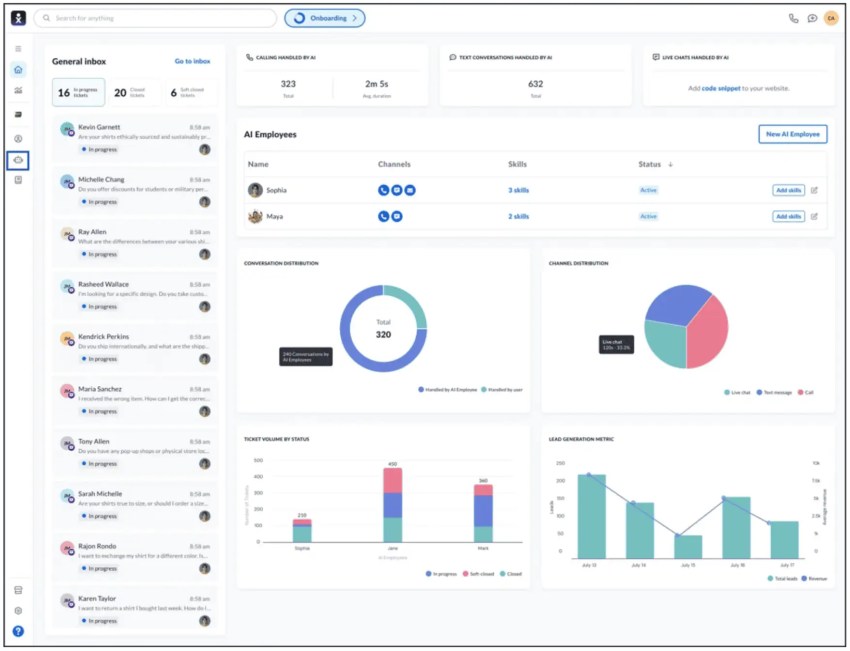
XBert bills per conversation: $99 a month for 100, then $0.99 each, with calls under 30 seconds and single-message chats excluded. Nextiva’s team offers an assisted setup at no additional fee to ensure optimal performance from day one.
Get a 14-day free trial of Nextiva XBert and start capturing missed opportunities during busy or after-hours times.
Put Your AI Receptionist to Work Free for 14 Days
Enter your website address and XBert will learn everything in minutes. Answer every call, capture every lead, and win more business with an AI receptionist that never clocks out.