Productivity
  Blog
Blog  Business Communication
  Customer Experience
  Leadership
  Marketing & Sales
  Nextiva News
  VoIP
VoIP 


Agents do a lot during and after a customer call. However, only a part of what they do makes them productive.
The productive side is the part where agents actively talk to customers and resolve their issues. Their other tasks often interfere with their productivity. Agent productivity tools automate the redundant parts of their work and improve the productive side for maximum gains.
In this article, I explore the tools that agents and supervisors need across CX workflows to maximize productivity, starting with a map of where agent time goes and a productivity stack. The next sections cover the top five tools and the ROI math to help you understand the investment’s value.
What Are Agent Productivity Tools?
Agent productivity tools equip professionals with the right technology to help them work more efficiently in their role. On the customer support side, these tools remove the work around customer interactions, such as searching, switching systems, typing notes, scheduling, and reviewing.
These AI tools sit between a phone system, helpdesk, and CRM. They take over the repetitive tasks happening before, during, and after a customer interaction.
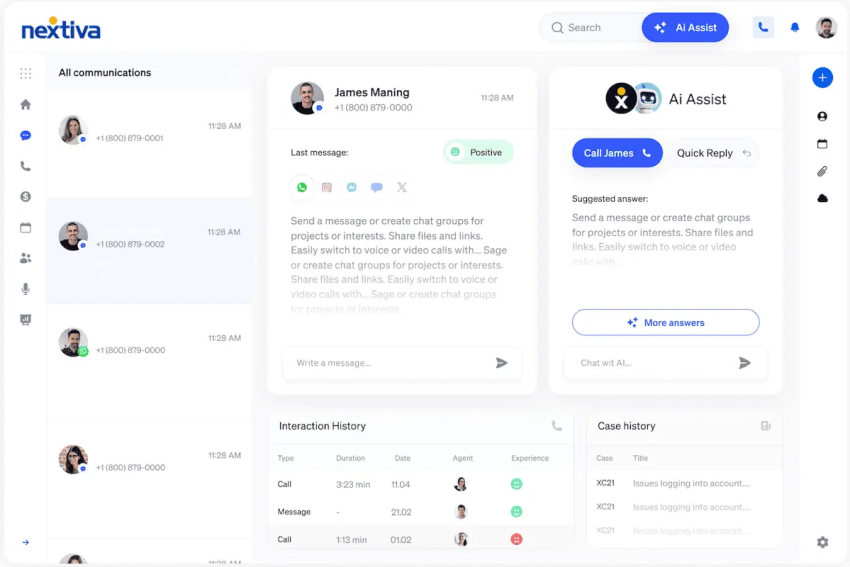
In a study of 5,172 customer support agents, an AI assistant raised the number of issues resolved per hour by 15% on average. It increased workers’ productivity, with less experienced and lower-skilled workers improving in both speed and output quality.
The highest-skilled workers improved in speed but with small declines in quality. These results suggest that productivity gains depend on how and where you use conversational AI agents.
Where Agent Time Actually Goes
As per Salesforce’s State of Service survey of 6,500 service professionals, reps spend less than half their time (46%) with customers. Agents typically divide their time into three categories: talk time, hold time, and after-call work (ACW).
Talk is where you see value. To be productive, you need to ensure talk time is at its peak.
An auto-dialer might help you save on hold time, but ACW needs more effort. Some organizations expect agents to complete all call-related tasks during the same call. Your report may show low ACW, but admin work creeps into talk time, making people less attentive during calls.
Average handle time doesn’t give you a complete picture
If you’re trying to improve agent efficiency, looking at where agents spend their time might simply reveal how they allocate their efforts. To make any justifiable impact, you need to know whether agents spent that time well.
Pairing a speed metric like average handle time (AHT) with a quality metric helps. You can also track other metrics, each with its own best partner.
| Metric | What it tells you | Pair it with |
|---|---|---|
| AHT (talk + hold + ACW) | How time is spent in each contact | First contact resolution |
| ACW | Admin load after each contact | Accuracy of notes in QA reviews |
| First contact resolution | Whether the first answer resolved the issue | Repeat contact rate |
| Occupancy | Share of logged-in time spent on contacts | Attrition and burnout signals |
| Ramp time | Weeks until a new hire hits target | QA scores during ramp |
Among these metrics, ramp time is the one most teams don’t track.
According to McKinsey, a new hire takes four to six months to reach peak proficiency, costing 5% to 10% of total agent cost allocation. When AI tools assist agents, their ramp-up time shrinks, and they become productive sooner.
Agent Productivity Tools: What Each Tool Fixes
Rather than listing tool categories, these tools are grouped by when they make the most sense in an average support agent’s day.
| Moment | Tool category | What it removes | Nextiva option |
|---|---|---|---|
| Before the conversation | Skills-based routing, IVR, AI front door | Wrong-queue transfers and routine calls | Skills-based routing and XBert |
| During | Real-time agent assist, one unified workspace | Tab-switching and knowledge searches | Nextiva Agent Assist and omnichannel workspace |
| After | AI summaries, auto-disposition, CRM write-back | Manual notes and wrap-up | AI summarization |
| Across interactions | Automated QA, coaching, workforce scheduling | Sample-based QA and spreadsheet schedules | AI quality management and Workforce Scheduling |
In a podcast on AI in CX, independent analyst Robin Gareiss says investing in internal AI is paying off better than customer-facing AI. For example, agent assist and supervision assist are huge. If you want to invest internally in AI, these are the areas where AI-first productivity tools make the most sense:
Before a conversation happens: Skill-based routing and AI receptionist
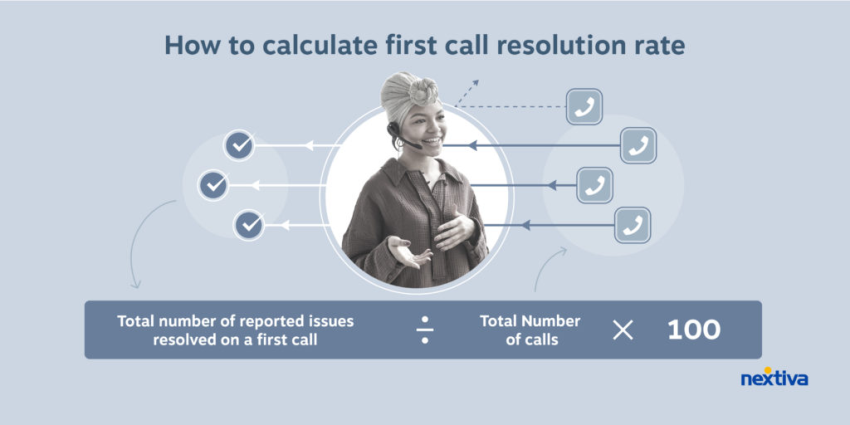
A system that routes a caller to a person who then transfers the call to another agent burns a lot of time. Equipping your agents with skill-based routing helps resolve most cases on the first try, improving your first contact resolution (FCR) score.
An AI receptionist goes a step further. It handles routine tasks and customer calls without an agent and lets you bring average wait time down for calls that don’t need a person. For example, a hotel property getting calls about a running shuttle or pet policy doesn’t actually need a human on the call, but they cost the same minutes as complex calls.
However, make sure you take only the easy calls off the plate. Otherwise, you have a system that hallucinates on complex cases and confidently offers incorrect resolutions. For such instances, make sure there’s a human fallback option available.
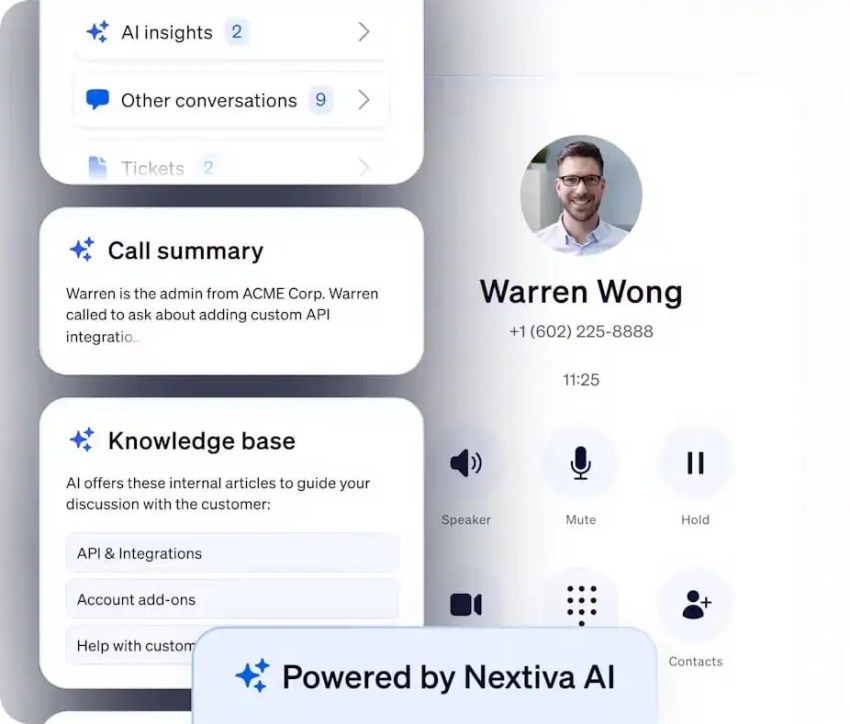
Nextiva has skills-based routing in its contact center plan. For the AI front door, you have XBert, Nextiva’s AI receptionist, to answer calls, texts, and chats around the clock. In complex cases, or when the caller asks, XBert instantly transfers the call to a human agent. Here’s an example:
During a conversation
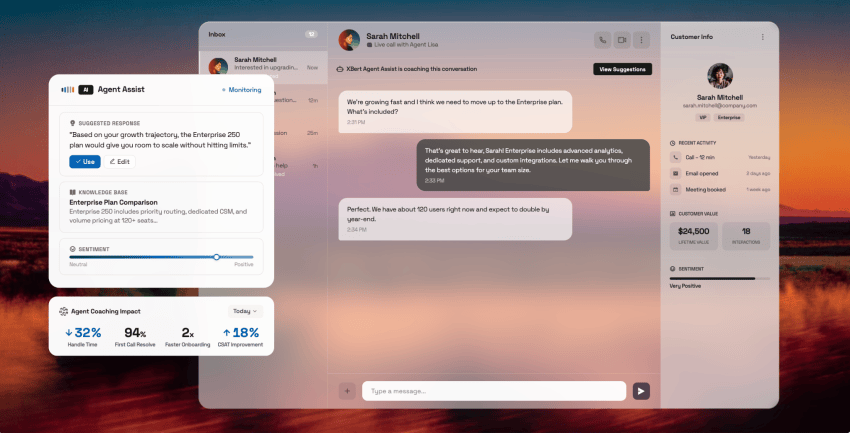
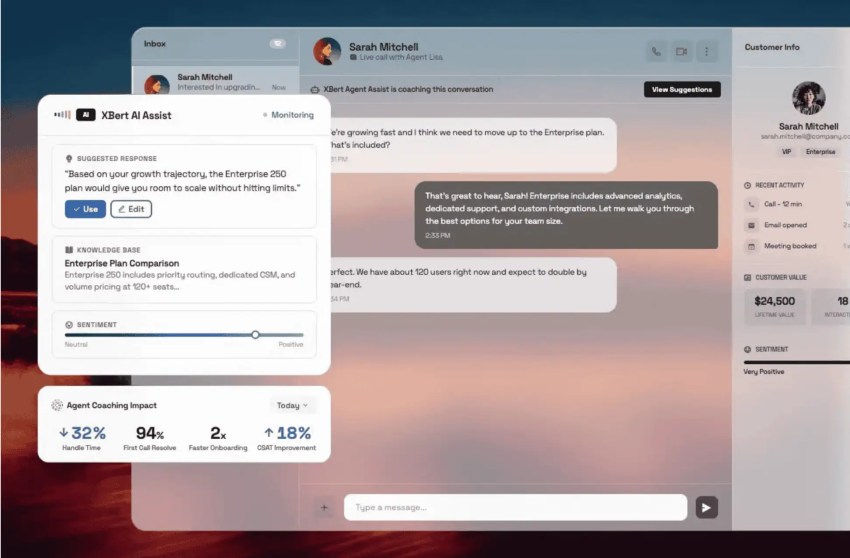
For an agent to be productive in a conversation, you need the right tech to fix the knowledge gaps while the conversation is still going on. For example, agent assist capabilities listen to the conversation, pull customer data from the CRM, and surface relevant knowledge base articles, scripts, or next steps. All of this happens in the window the agent is already using.
Tommy Mullins, VP at Amplix, sees Agent Assist as the cleanest way to a fast ROI because of how easy it is to adopt. It helps agents do what they do better instead of changing how they work.
But there’s a catch. If the knowledge base underneath the system is outdated or unstructured, the virtual agent delivering the assist capabilities will struggle. Assist will amplify your documentation, good or bad. Governance is also needed to ensure the virtual agent gives the right suggestion.
Nextiva’s agent assist works across voice calls, live chat, SMS, and email, and it surfaces responses and articles from your documentation. Every suggestion traces back to an approved source. It’s designed as a side panel next to the conversation rather than an overlay.
If you want a deeper understanding of AI agent assist, Nextiva’s guide to AI agent assist is a good starting point.
After a conversation
After a call, there’s admin work that seems redundant, but it’s necessary to keep your systems working reliably. This is the ROI lever that you pull to get significant productivity gains.
If an agent spends three to five minutes after every call writing manual summaries, that time comes out of their talk time. AI summaries save these minutes, adding up to hours of savings over a day’s work.
AI summaries also help you avoid asking a caller to repeat what they’ve already said, making it a reliable CX fix. Across your call center team, AI summaries are recorded consistently, giving you a way to build standardized workflows around them.
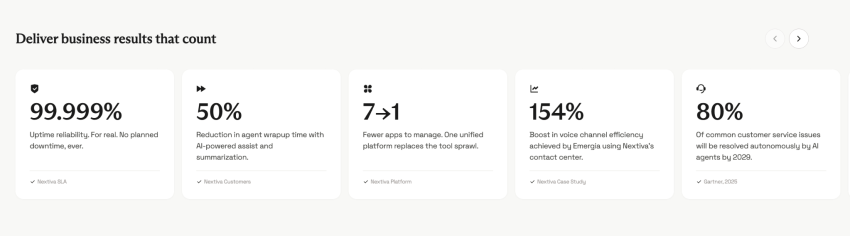
AI Assist also reduces agent wrap-up time. Nextiva reports a 50% reduction in agent wrap-up time among customers using AI-powered assist and summarization.
Here are a few more business results observed:
How accurate these summaries are is a governance question. It’s best to sample a few AI summaries inside your QA reviews and give feedback to prevent recurring errors. Then, the summaries need to enter the customer record automatically, without an agent sharing them through manual methods. Auto-disposition and CRM write-back push these notes to customer records without involving a human agent.
If your records include a 14-field notes template that nobody reads, you need to fix that first. Nextiva’s piece on ACW walks through standardizing that process before you add tools to it.
Across conversations
One area where you save time across every interaction is QA. McKinsey notes that manual QAs are often limited to less than 5% of total conversations, and human bias compromises accuracy. A human supervisor listening to four calls a month per agent cannot coach the moments that matter because they never hear them.
AI scoring changes that. It gives you full coverage of all interactions across channels. You get a chance to see what your best people are doing and replicate it across your organization.
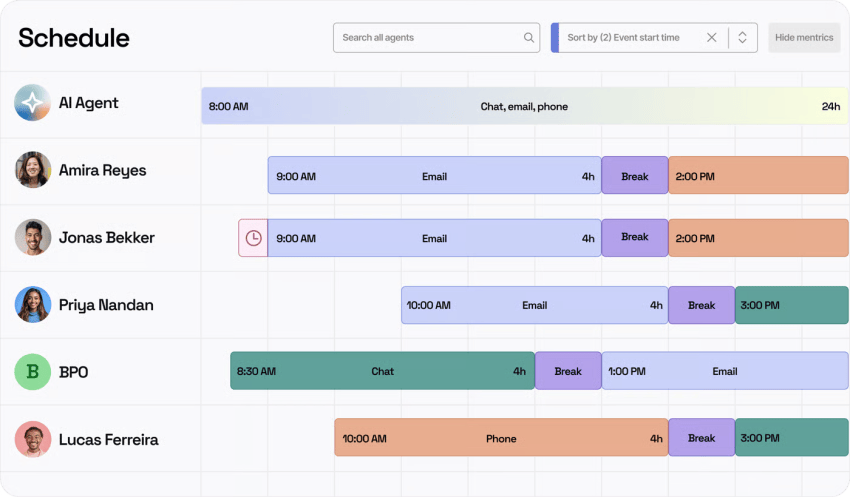
Scheduling is another area where you can make changes to increase productivity. AI absorbs routine contacts, and the remaining cases are likely more complicated. More complicated cases mean more variable AHT, which makes them a bit harder to schedule. In your tech stack, connecting the AI front door and the scheduler helps manage your workforce schedule better.
Nextiva’s Workforce Scheduling forecasts staffing based on historical data and lets agents bid on shifts, swap shifts, submit PTO, and track sick leave in an app. Its contact center includes AI-driven quality management and quality assurance with monitoring, scorecarding, and agent performance metrics for supervisors.
Top 5 Agent Productivity Tools for Support Teams
The prices of these agent productivity tools were checked in October 2026. Recheck them on the vendor’s website for up-to-date rates.
| Tool | Best for | Productivity features | Starting price |
|---|---|---|---|
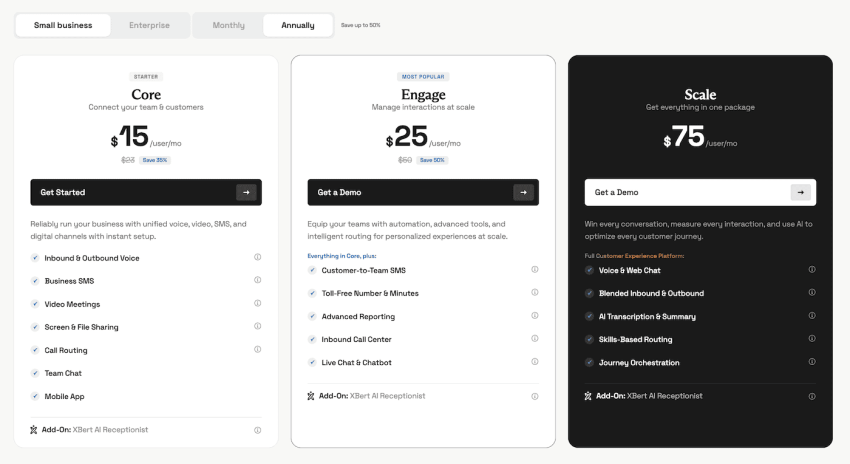
| Nextiva Contact Center | Teams that want voice, digital, assist, QA, and scheduling on one platform | Agent Assist on voice, live chat, SMS, and email; AI summaries; AI quality management; Workforce Scheduling | Plans with AI features start at $25 per user per month and go up to $75; XBert AI receptionist is available as an add-on. |
| Zendesk Suite + Copilot | Ticket-heavy teams already on Zendesk | Reply suggestions (auto assist), ticket summaries, suggested next steps | Suite Professional from $115/agent/month + Copilot $50/agent/month (annual) = $165/agent/month |
| Freshdesk + Freddy AI Copilot | Budget-minded email and chat teams | Reply drafting, summaries, tone and translation | Pro from $55/agent/month + Freddy AI Copilot $29/agent/month (annual) = $84/agent/month |
| Salesforce Agentforce for Service | Service Cloud organizations | AI-drafted replies, summaries, next best actions on CRM data | Service Cloud Max plan at $550/user/month for contact center capabilities and full AI suite |
| NiCE CXone | Large enterprise contact centers | Copilot for Agents, interaction analytics, workforce management | The Omnichannel Suite costs $110/agent/month. Copilot add-ons cost extra. |
1. Nextiva: Best all-in-one productivity platform
With Nextiva, you get skill-based routing on the Core plan. It starts at $15 per user per month. XBert, available as an add-on, handles routine calls, texts, and chats. Meanwhile, higher plans like Engage and Scale add Agent Assist, which surfaces answers from your documentation across voice, live chat, SMS, and email.
Supervisors get to review outcomes and adjust the content it draws from. No matter which plan you choose, you get AI transcription and summary on every contact center tier, and you pay based on usage. AI quality management and workforce scheduling cover the supervisor side.
Traditional help-desk tools were built around tickets, and telephony was added later. These tools work with calls and summaries through a connector. But Nextiva runs its own voice network and contact center. This means assist, summaries, and routing work natively. Whether this matters depends on how many voice interactions you handle.
The Enterprise Scale plan also delivers omnichannel capabilities, journey orchestration, AI transcription, summaries, and voice and web chat.
Below are some key Nextiva features for agent productivity:
- Agent Assist on voice, live chat, SMS, and email, grounded in your own knowledge base and delivered as a side panel rather than an overlay
- Supervisor dashboards to monitor Agent Assist usage in real time, review outcomes after calls, and adjust the content it draws from
- CRM and helpdesk integrations for Agent Assist, including Salesforce, HubSpot, Zendesk, ServiceNow, Zoho, and Microsoft Dynamics, so customer context arrives with the conversation
- Usage-based AI transcription and summaries on every contact center tier, with action items generated when a conversation ends
- Skills-based routing and XBert AI receptionist as an add-on
- Dynamic agent scripting that pulls customer data from your CRM or CDP into the call
- AI-driven quality management with monitoring, scorecarding, and agent performance metrics
- Workforce Scheduling with forecasts built from historical data, plus shift bidding, shift swaps, PTO, and sick-leave tracking from an agent app
What to watch out for: The largest gains show up when you include both voice and digital channels.
Go with Nextiva if you want a unified place to manage your CX channels efficiently.
2. Zendesk Copilot: Best for ticketing system workflows
If your support operations already live in Zendesk support tickets, Copilot is the lowest-friction way to add AI Assist. It drafts replies, summarizes tickets, and suggests next steps inside the workspace agents already use.
Below are some key features of Zendesk Copilot:
- Writing tools and ticket summaries so agents don’t have to manually type contextual information on handoff
- Intelligent triage that classifies every request by intent, entity, sentiment, and language for routing and reporting
- Proactive recommendations for admins on workflow and automation improvements
- A confidence mode (early access) that only serves suggestions it’s highly confident in
Read the pricing page carefully, though. Copilot is a $50 per agent per month add-on. It’s paid yearly and can only be added to Professional and higher plans. If you need the assist feature, the real entry plan is Suite Professional at $115, plus a Copilot add-on. If you have a 20-agent team, you’ll pay $1,000 a month for Copilot alone before the seats. Voice and workforce tools are separate purchases.
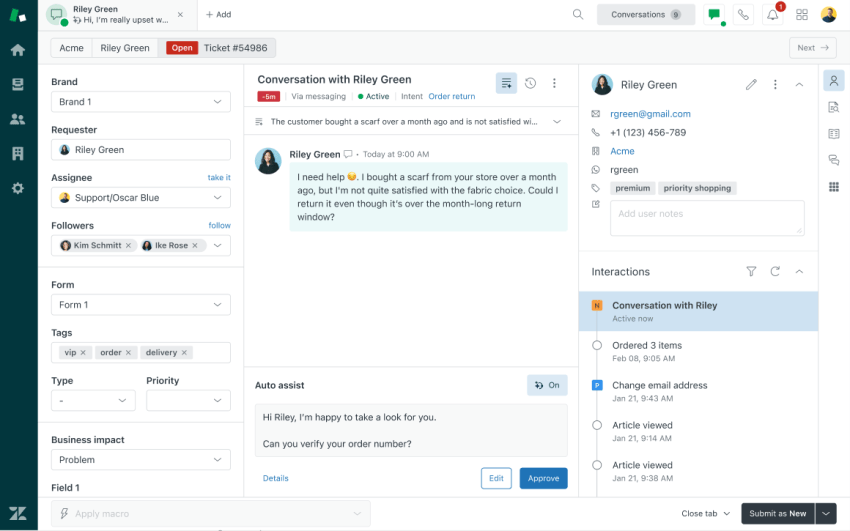
What to watch out for: The pricing page feels confusing. At first glance, you see “Admin Copilot” listed under the Suite Professional plan. Then, when you compare plans, Copilot is marked as an add-on. If you look closely, the table shows a monthly cap for Copilot writing tools and ticket summaries, but the Copilot section says unlimited access.
3. Freshdesk Freddy AI Copilot: Best budget option for email and chat
Freddy AI Copilot drafts replies, summarizes conversations, adjusts tone, and translates. The honest entry price for a team that wants assistance is $84 per agent per month, or $118 on Enterprise.
Below are some key features of Freshdesk Freddy AI Copilot:
- Freddy AI Copilot’s response, summarization, and resolution assistants for drafting and wrap-up
- Sentiment analysis that prioritizes conversations by customer mood
- Live translation across 60-plus languages inside the reply
- Intelligent routing, custom dashboards, and multiple SLA policies on Pro; skill-based routing and Freddy AI Insights on Enterprise
For an email-and-chat team that’s price-sensitive, this is a fair deal. The platform helps teams catch up on conversations in seconds with contextual summaries. This lets support folks respond with confidence, without delays for escalations and hand-offs.
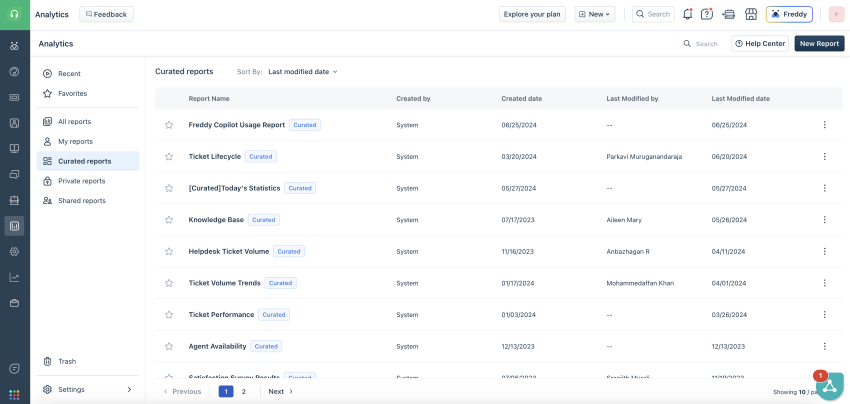
What to watch out for: Freshdesk’s email-first plans don’t include phone, which Freshworks sells through Freshdesk Omni with cloud telephony as a Freshcaller add-on. If your agents take calls, assist on tickets, and won’t touch them.
4. Salesforce Agentforce for Service: Best for Service Cloud shops
Agentforce’s advantage is that assist is grounded in the CRM record your agents already work in. As a result, customer context doesn’t have to be fetched from anywhere. For a Service Cloud organization, this functionality means fewer tabs.
Below are some key features of Salesforce Agentforce for Service:
- Service Rep Assistant with real-time, turn-by-turn guidance and dynamic service plans inside the case record
- AI-generated replies, case summaries, and knowledge articles built from CRM data
- Unified customer context surfaced automatically so reps don’t have to leave the record to find history
- Intelligent case routing to the right agent and proactive issue detection
However, pricing needs a closer look. For agent productivity, you need the AI suite and access to other contact center features. These are included in the Service Max plan, which costs $550 per user per month. This gets billed annually. If you have a team of 10, you’d be paying 12 times $5,500, or $66,000.
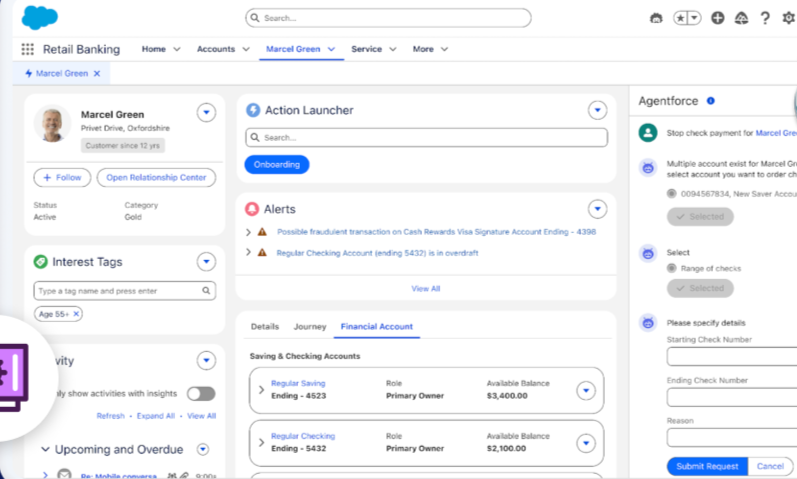
What to watch out for: Teams that aren’t on Salesforce would need to make a significant investment to get started with AI solutions for agent workflow. For those already on Salesforce, the upgrade may be easier.
5. NiCE CXone: Best for large enterprise contact centers
NiCE CXone is a broad suite: routing, a copilot for agents, automated summary, interaction analytics, and a full workforce engagement stack, built for very large operations. If you run thousands of seats across regulated channels, it belongs on your list.
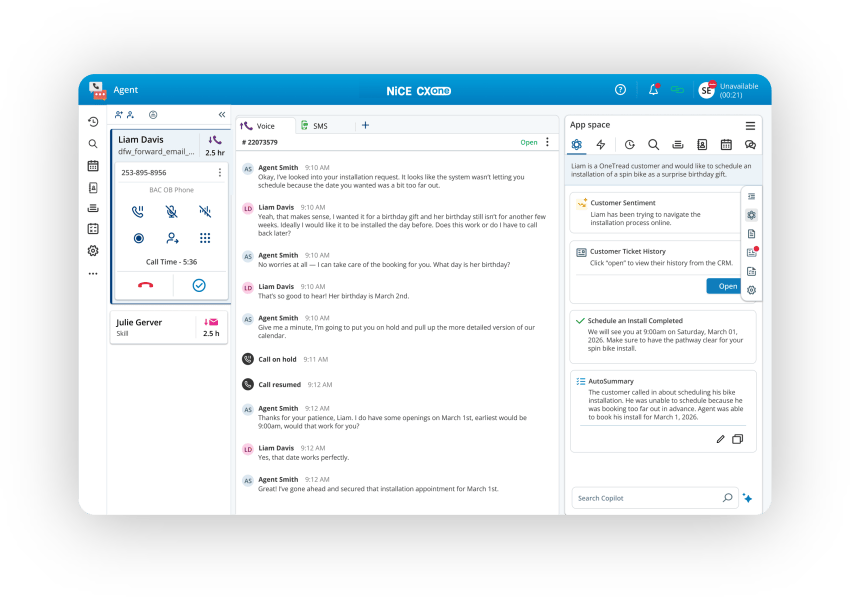
NiCE CXone suites range from $110 to $249 per agent per month, billed monthly in arrears. Copilot for Agents and Automated Summary are included only in the $249 Ultimate Suite and sold as consumption-based add-ons below that.
Below are some key features of NiCE CXone:
- Interaction analytics scores 100% of interactions rather than a sample
- Omnichannel and AI routing, recording and compliance, plus agent and supervisor workspaces with prebuilt CRM integrations
- Bring-your-own knowledge base, transcription, and agent assistant options for teams that already own those pieces
What to watch out for: Longer implementations and a broader platform than a mid-market team will use. A 40-agent team that wants assist and summaries would need to purchase the top tier of an enterprise suite to get them.
The ROI Math for Agent Productivity Tools
Swap in your own numbers below and see how the math works out.
Hours returned = (Minutes saved per contact × Contacts per month) ÷ 60.
Value = Hours returned × Loaded hourly cost.
| Input | Assumption | Result |
|---|---|---|
| Contacts per month | 20,000 (assumption) | |
| ACW today | Four minutes per contact (assumption; no primary benchmark exists) | 1,333 hours |
| ACW with AI summaries | Two minutes (50% reduction, based on Nextiva) | 667 hours |
| Hours returned | Difference between the two | 667 hours per month |
| Loaded hourly cost | $21.53 BLS median wage (May 2025) × 1.3 overhead (assumption) | $27.99 |
| Monthly value of time returned | 667 × $27.99 | $18,669 |
| Alternative loaded cost | $21.53 × 1.456 (BLS employer-cost ratio, office and admin support) | $31.35, or about $20,900 per month |
In the calculations above, the median wage benchmarks for customer service representatives come from the BLS. The 1.3 overhead multiplier is a conservative assumption.
The ACW is assumed to be four minutes, but this is just an assumption. It can vary for your organization. Calculate based on your numbers to get a true sense of the financial value associated with productivity.
Why hours returned are not savings yet
As productivity gains kick in, agents save more time. You capture the ROI value in what you do with that time. How you reinvest that back in data capture, upsell, or simply a less rushed conversation is going to add to the ROI math. All of these gains happen without moving your payroll line.
Most of the ROI that you drive comes in the form of better service, such as a quicker resolution or a resolution where your CSAT scores are at max. Additionally, there’s ROI in how quickly reps ramp up. If you can get agents up to speed faster, they start delivering value much sooner than planned.
How to Choose Agent Productivity Tools
When you’re choosing from a pool of agent productivity tools, here’s how you can make the best choice:
- Measure the biggest time sink first: Pull hold time, ACW, and wrong-queue transfer rates for a month and rank them to identify bottlenecks in your internal processes. Then check whether ACW is even granted as a phone state or hidden inside talk time. If you write notes during the call, summaries will shorten talk time, not wrap-up, and your before-and-after metric will change. Cut any note fields nobody reads before you automate the rest.
- Confirm native integrations with the tools you already run: Your integrations should be able to deliver customer context with the contact. Look beyond a simple “yes” or “no” answer to your integration questions. Also, check if the notes write back without a second screen.
- Pilot with new hires, by tenure band, and measure quality during ramp: If you pilot run only with your best agent, it will understate the value. Watch AHT, FCR, and escalation rate weekly. Watch for quality over speed.
- Compare total cost against hours returned: Total cost means seats plus AI add-ons plus the voice and workforce pieces that were sold separately. Then count tabs honestly: Ask five agents to list every window they touched on their last 10 contacts, both before the pilot and after. The research baseline is six to seven tools. If the number went up, the copilot became a tab.
Lastly, don’t treat the implementation like an IT project when it’s a business transformation. Otherwise, you risk adoption. After the implementation, if adoption stalls or is not as you’d intended, the ROI becomes tricky to justify.
For more on building the operational side, Nextiva’s guide to call center productivity covers measurement and process before tools.
Give Agents Their Time Back With Nextiva
Agents want to do their best work. On the customer support side, that means assisting customers. When you equip them with tools that help them do their best while keeping them close to the work, it pays off in many ways. Most importantly, your team’s attrition rate improves, making experienced agents your strength on the CX side.
This is what Nextiva Contact Center is built for. It equips your team with Agent Assist across voice, chat, SMS, and email. AI transcription and summaries feed customer records through native integrations. You get AI-driven quality management where no interaction gets missed, and you have time to coach your people.

Explore Nextiva Contact Center and see what happens when an agent invests most of their time in assisting a customer.
Your AI-Powered Contact Center
Create amazing customer experiences with AI-powered contact center software. Scalable contact center platform built for omnichannel customer conversations.