Customer Experience
  Blog
Blog  Business Communication
  Leadership
  Marketing & Sales
  Nextiva News
  Productivity
  VoIP
VoIP 

The customer support platforms on your shortlist may have changed since your last demo. Fin (formerly Intercom) is now part of Salesforce, while Freshdesk has raised prices across its paid tiers. To top it off, AI pricing adds another layer to the decision since a vendor might bill you per outcome, session, or automated resolution. Your old comparison spreadsheet may need more than just a simple price refresh.
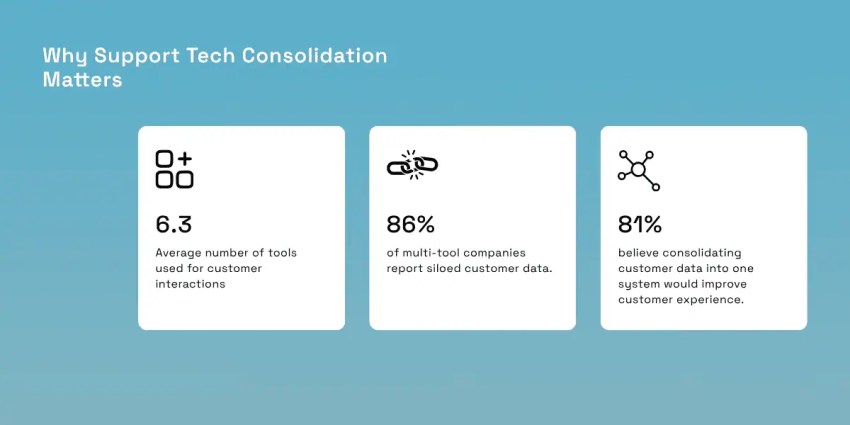
There’s also a more immediate question: will your next platform make your team’s work easier or give customer agents another tab to keep open? Nextiva’s customer experience (CX) research found that companies use an average of 6.3 tools for customer interactions, while 86% of multi-tool companies report siloed data. Deciding on a new platform is a chance to bring those conversations together and retire tools that complicate the process along the way.
The best way to go about choosing your customer support tools is to narrow down the architecture that fits how your customers contact you. From there, the vendor comparison becomes much more useful. In this article, we’ll compare three architectures and nine platforms based on their product pages and reviews from community forums, put their AI billing models side by side, and finish with a decision table to help you narrow your shortlist.
Three Kinds of Customer Support Platforms
Before comparing features, decide how your team needs to work. These three categories provide a useful starting point, although individual products can span more than one.
A shared inbox gives agents a collaborative workspace for customer conversations. Think of a support email address with clear ownership where teammates can assign messages, leave internal notes, and see who’s handling a reply. It suits teams whose work revolves around email and chat.
A help desk organizes requests into tickets with an owner, status, and response deadline. Its value becomes clearer when you need structured ticket management, automated workflows, and a knowledge base customers can search themselves.
A unified contact center brings voice and digital conversations into a shared routing and agent workspace. It’s the architecture to examine when phone support needs to operate alongside messaging, with customer context available throughout the interaction.
| Architecture | Built for | Voice | Typical pricing unit | Examples |
|---|---|---|---|---|
| Shared inbox | Small teams handling email and chat together | Usually via integration | Per user | Help Scout, Front |
| Help desk / ticketing | Digital-first support with SLAs, automations, and a knowledge base | Add-on or partner | Per agent plus AI meters | Freshdesk, Zoho Desk, Zendesk, Gorgias, Fin |
| Unified contact center | Voice plus digital channels in one queue with routing and AI | Native | Per agent or bundled plan | Nextiva, Salesforce Service Cloud (with telephony partners) |
Treat these as architectural starting points and check each vendor’s implementation. For example, Zendesk includes telephony in its team plan, so a help desk label alone doesn’t tell you whether you’ll need a separate voice provider.
If phone calls account for a meaningful share of your volume, make voice part of the first demo. Choosing a digital-first help desk that relies on a separate phone provider introduces another vendor to manage and potentially splits customer history unless the integration connects it reliably.
Ask the salesperson to open a ticket, take a related call, and show where the recording, notes, and follow-up appear. That walkthrough will tell you more about the fit than a checkbox marked “voice integrations.”
Core Capabilities to Look for in a Customer Support Platform
A feature list won’t tell you how much work a platform leaves your agents to do. Bring a few real support scenarios to each demo and use these capabilities to test how well the system handles them.
One queue with full conversation history
A customer emails about a missing order, then calls before anyone replies. Can the agent see both attempts and pick up the conversation?
In Nextiva’s Customer Patience Benchmark, 56% of respondents said they immediately try another channel after a missed response window. Your customer service software should connect those attempts automatically, with prior calls, texts, and emails (including the ones with canned responses) visible in one customer record.
Look for one prioritized queue across channels, with clear ownership of each request. During the demo, check whether an agent can find the customer’s previous conversation and CRM details without opening another application. That’s a useful test of how connected the workspace really is.
Routing, triage, and SLA management
Ask what happens when an urgent billing dispute arrives five minutes before closing. The platform should recognize its priority, route it to someone with the right skills, and apply the correct business-hours rules.
Service-level agreements (SLAs) set your response and resolution deadlines. Look for time tracking tools you can configure by channel, plus alerts and escalation rules that help supervisors intervene before a deadline passes.
Check the plan requirements closely. Freshdesk’s pricing page places intelligent routing and multiple SLA policies in Pro, while skill-based routing sits in Enterprise. Have each vendor demonstrate the workflow using the tier you’re actually considering.
Self-service and knowledge base
A self-service portal is only useful if customers can find an answer that solves their problem. Gartner’s research published in 2024 found that only 14% of service issues were fully resolved with self-service tools. The most common reason for failure was missing relevant content, cited in 43% of unsuccessful cases.
Test the knowledge base with questions customers actually ask, including vague wording and common misspellings. Can your team identify unsuccessful searches, update articles easily, and remove outdated guidance?
Apply the same scrutiny to AI answers. Ask the vendor to show which approved content supports a chatbot response and what happens when that content is missing. Knowledge quality needs to be part of your AI evaluation.
Native voice vs. telephony integrations
If customers regularly call you, establish exactly how phone support works before comparing plans. Ask each vendor:
- Is phone built into the platform or supplied through a partner?
- Who bills for numbers, call minutes, and recording storage?
- Do recordings and transcripts appear on the same customer record as tickets?
Then, test a call transfer and the follow-up. The receiving agent should see the conversation history in the call center software, and the next agent should be able to find the call without searching a separate system. If that requires additional integrations, include their setup and ongoing ownership in your evaluation.
The Economics of AI Agents in Support Platforms
“AI included” doesn’t tell you what your bill will look like. A plan might include summaries that help agents finish their notes, while charging separately whenever an AI agent handles a customer conversation. Before comparing customer service software, separate those costs and ask exactly what triggers each charge.
Consider a typical online retailer handling questions about delivery dates and returns. Its human agents might use an AI copilot to draft replies, while a customer-facing AI agent answers routine order questions. With Freshdesk’s published pricing, equipping five agents with Freddy AI Copilot would add $145 per month at $29 per agent. Purchasing another 1,000 AI Agent sessions would add $490, sold in packs of 100 for $49. That’s $635 in additional AI charges, on top of the eligible help desk subscriptions. This illustrative calculation assumes the team has already used its included session allowance.
Both tools could be useful, but they earn their keep differently. The copilot needs to save your agents time (especially since first response time is crucial to customer satisfaction), while the customer-facing AI needs to resolve enough requests to justify its usage charges. Your evaluation should measure both.
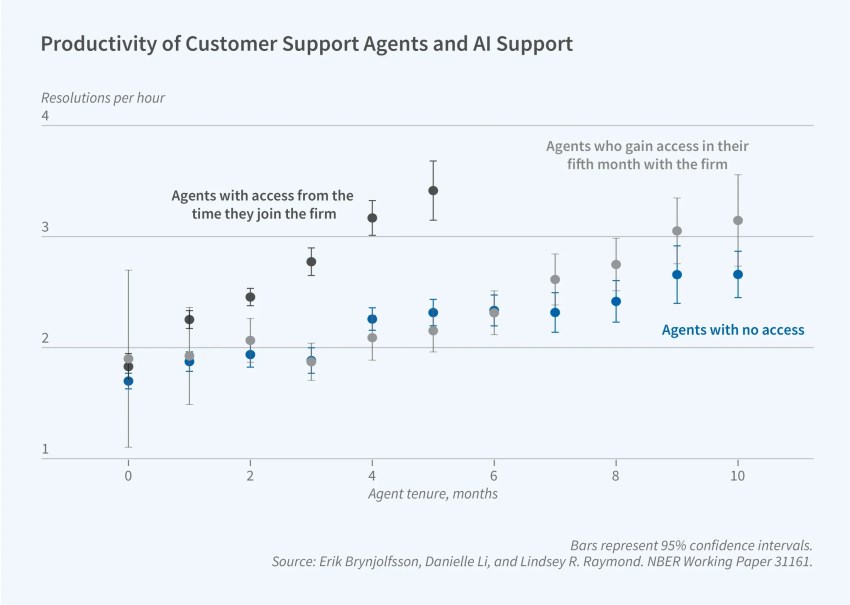
The business case for AI extends to conversations that still need a person. Research discussed by NBER examined how AI assistance affected customer-support agents’ productivity. The chart below shows why it’s worth testing how effectively a platform helps your team resolve issues, alongside how many requests it can automate.
How each vendor meters AI
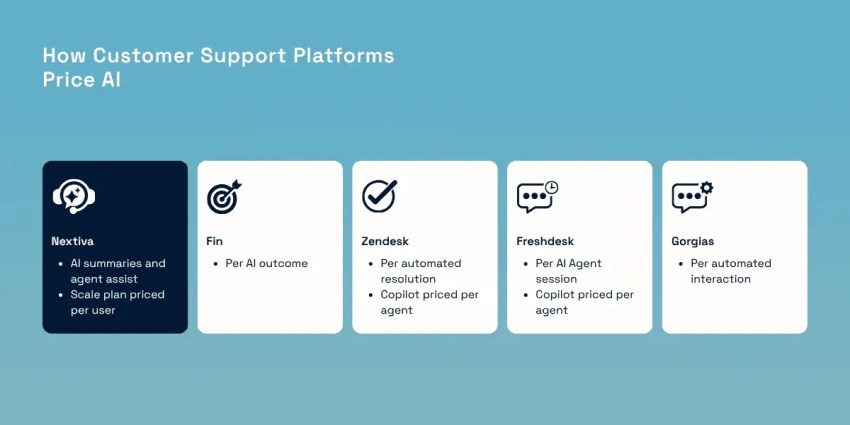
An AI copilot billed per agent creates a different budget from an AI agent billed by usage. For the latter, you need to understand what counts as a session or outcome and whether you still pay when a human finishes the work.
| Platform | AI pricing model | Published rate |
|---|---|---|
| Fin (formerly Intercom) | Per AI outcome, charged at most once per conversation | $0.99 per outcome |
| Zendesk | Per automated resolution on top of Suite seats; Copilot per agent | Resolution rate unpublished; Copilot $50 per agent per month |
| Freshdesk | AI Agent sessions sold in packs; Copilot per agent | $49 per 100 sessions; Copilot $29 per agent per month (Pro and Enterprise) |
| Gorgias | AI Agent metered per automated interaction on top of ticket-based plans | $1.00 per automated interaction for Starter; $0.90 for Basic and Pro; $0.85 for Advanced |
| Nextiva | AI summaries and agent assist within the contact center platform | $75/user/month for Scale plan |
Realistic resolution rates vs. vendor claims
How much support can an AI agent actually handle? Salesforce’s Fin announcement cites a 76% average resolution rate.
The gap deserves context. Salesforce’s figure describes Fin’s reported performance. Gartner’s research comes from a December 2023 customer survey and covers a broader benchmark: only 14% of service issues were fully resolved through self-service. These are different populations, time periods, and measures, not a head-to-head test. A vendor’s resolution count also doesn’t necessarily establish that the customer considers their problem solved.
That distinction matters when it determines your bill. Fin counts a resolution when a customer confirms the answer helped or leaves after the answer without requesting further assistance. The latter is an “assumed resolution.” If the customer returns to that same conversation seeking more help, a Fin AI agent reverses the resolution charge.
Imagine a customer asking why their refund hasn’t arrived. The AI explains the standard processing window, and the customer closes the chat. That could count as a resolution, even though the customer still needs someone to investigate a delayed payment or actually go through the process of returning their funds.
During a trial, review a sample of billed resolutions alongside repeat contacts and customer satisfaction score (CSAT). Check whether the answer addressed the actual issue and whether the customer subsequently called or emailed about it. Use that evidence to build your forecast, especially if your goal is autonomous resolution.
Human-in-the-loop escalation
An AI agent will encounter requests it can’t finish. Your evaluation needs to show what happens next. Nextiva’s State of CX research found that 98% of CX leaders recognize the need for seamless AI-to-human handoffs, while 90% struggle to deliver them.
Test this during the demo with a request that requires human judgment, such as disputing a cancellation fee. Score what the receiving agent can see:
- Transcript: The conversation so far, including answers and actions the AI attempted.
- Intent: What the customer wants resolved and why the request was escalated.
- Customer history: Relevant account details and previous interactions, including those on other channels.
The agent should be able to continue with a useful question instead of asking the customer to repeat the story. Also test whether an explicit request to speak to a person triggers the handoff promptly. The figure below looks at the different interventions a human agent can do with AI customer support tools.
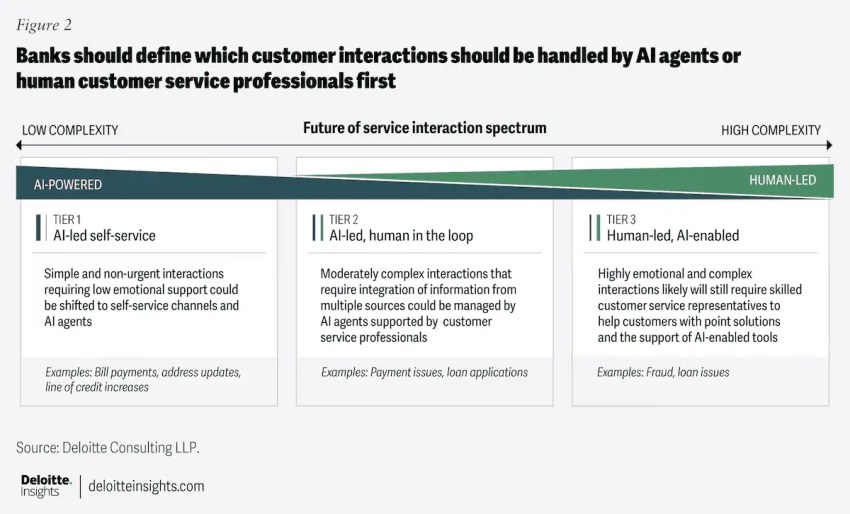
AI can keep helping after that transfer. Nextiva reports a 50% reduction in agent wrap-up time with AI-powered assist and summarization. Transcription, summaries, analytics, and reporting give agents material to review rather than notes to reconstruct from memory. Validate that vendor-reported result in your pilot by measuring the time agents spend reviewing, correcting, and saving the final record.
Comparing the Top Customer Support Platforms
The right shortlist depends on where your support work happens. A team handling detailed email conversations needs a different setup from one answering calls all day or managing thousands of order-status questions.
Use this comparison to identify the customer service platform with the closest fit, then test the workflow automation features that matter most to your team.
| Platform | Architecture | Best for | Pricing model | Watch for |
|---|---|---|---|---|
| Nextiva | Unified contact center + business phone | Teams where voice and digital both matter | Business phone plans from $15 per user per month, contact center quoted | Confirm the right tier for your team size |
| Help Scout | Shared inbox | Small, email-heavy, high-touch teams | Per user | Voice only through partner integrations |
| Front | Shared inbox | Teams mixing internal collaboration with customer email | Per seat | Voice requires integrations; confirm the channels you need |
| Freshdesk | Help desk | Budget-conscious digital support | $19 to $89 per agent/mo plus AI add-ons | Copilot gated to Pro+, AI sessions expire |
| Zoho Desk | Help desk | Teams already on Zoho CRM | Per agent | Strongest inside the Zoho ecosystem |
| Fin (formerly Intercom) | AI-first messenger + help desk | Chat-heavy SaaS with high automation goals | Per seat plus $0.99 per AI outcome | Now Salesforce-owned, review roadmap and contract terms |
| Gorgias | Ecommerce help desk | Shopify and DTC brands | Per billable ticket | Bills rise with seasonal volume |
| Zendesk | Help desk / suite | Mid-market and enterprise digital support | $55 to $115 per agent per month plus AI | Per-resolution AI and add-ons stack quickly |
| Salesforce Service Cloud | CRM-native service platform | Large, complex service orgs on Salesforce | Per user, enterprise contracts | Implementation and admin budget |
Prices shown are in USD. The listed Freshdesk and Zendesk Suite rates reflect annual billing; enterprise quotes and add-ons can sit outside those ranges. Nextiva’s advertised $15 starting rate is for its Core business communications plan, rather than the full contact center configuration.
Nextiva
Nextiva is worth shortlisting when phone support carries as much operational weight as digital channels since it offers tight multichannel support. Its contact center platform brings native voice together with digital conversations, omnichannel routing, AI summaries, and customer context through sentiment analysis. Its network infrastructure includes eight points of presence and advertises 99.999% uptime.
The practical advantage is fewer connections to maintain between your phone system and support workspace. During the demo, ask Nextiva to show the omnichannel support queue and visual routing for your actual call flows, including transfers between departments.
There’s also evidence of its use at scale: Nextiva’s Emergia case study reports a 154% increase in voice-channel volume handled, comparing Q4 2023 with Q1 2024. Treat that as a customer-specific result, then establish your own baseline for the pilot.
Help Scout and Front
For a small team moving beyond a shared Gmail account, Help Scout and Front are sensible starting points as customer support software. Evaluate them around conversation ownership and collaboration: can someone pick up an absent teammate’s work without forwarding an email chain?
Help Scout combines shared inboxes with a knowledge base, live chat tools, saved replies, and workflows. Its higher tiers add capabilities such as advanced routing and integrations with Salesforce, Jira, and HubSpot. That makes Help Scout worth testing when you want familiar support workflows with room to grow.
Front deserves a closer look when several colleagues need to collaborate on a customer response. Check channel coverage carefully, because its Starter plan supports a single channel type, while broader requirements may call for an upgrade. Front handles voice through integrations such as Aircall and Dialpad. Help Scout also points buyers toward Aircall, so include the separate phone service in your evaluation if calls matter.
Freshdesk and Zoho Desk
Freshdesk is a useful starting point for teams that need structured help desk software without immediately committing to an enterprise implementation. Its Growth price rose from $15 to $19 per agent per month on annual billing, so older comparisons understate the entry cost.
Pay attention to which features require an upgrade. Freshdesk currently lists intelligent routing and multiple SLA policies in Pro, skill-based routing in Enterprise, and Freddy AI Copilot as a paid add-on for Pro and Enterprise. Freddy AI Agent session allowances are also listed on Growth, so it would be inaccurate to suggest all AI requires Pro.
Zoho Desk is particularly worth evaluating when sales already works in Zoho CRM. Its customer relationship management integration connects the two teams’ customer information. Test whether that connection exposes the account details your agents need, then compare the required Zoho Desk tier with Freshdesk’s equivalent workflow.
Fin (formerly Intercom) and Gorgias
These platforms belong on your shortlist for different reasons.
Fin suits an evaluation focused on customer-facing AI, particularly if chat is central to your customer service tool model. Its outcome-based pricing makes the definition of a successful interaction part of the buying decision. Also distinguish the company from the product since Intercom became Fin as a company while retaining Intercom as the help desk product name.
With Salesforce’s acquisition completed, ask for written clarity on renewal terms, product commitments, and data portability before signing a multi-year agreement. Ownership alone doesn’t establish what will change in your subscription.
Gorgias is a more specific fit for ecommerce support. Its Shopify integration puts order details and management actions inside the ticketing system sidebar. That’s useful to test with everyday requests such as checking fulfillment or changing an order.
Because Gorgias meters billable tickets, model your busiest sales period before choosing a plan. Ask how automated replies and AI interactions affect the bill, rather than estimating costs from human-handled tickets alone.
Zendesk and Salesforce Service Cloud
Zendesk is worth evaluating when your team needs configurable ticket workflows and omnichannel support. Its Suite plans bring together messaging, telephony, and a knowledge base, with more advanced routing and controls on higher tiers. Build your quote around the workflows you need, including any AI, workforce management, or other add-ons.
Salesforce Service Cloud is a natural contender when Salesforce already holds your customer records. Its editions offer progressively broader automation and customization, while AppExchange provides partner applications, including telephony options.
For either platform, identify who will maintain the configuration after launch. Include administrator time and integration ownership in the decision, especially if your proposed setup depends on custom workflows across several departments.
Total Cost of Ownership and Implementation
Ask for a quote that reflects a normal month and a peak month. Include telephony minutes, AI usage, API limits, add-on seats, and year-two renewal pricing. A low subscription price leaves important questions unanswered if essential work triggers separate charges.
Consolidation can strengthen the business case. Nextiva’s CX Trends research found that 81% of respondents believed consolidating customer data into one system of record would improve customer experience. List the tools you could actually retire, along with the integrations someone currently maintains.
Before signing, request a written implementation plan covering data migration, number porting, and training. It should name the owner of each task, the expected timeline, and who pays. Also establish how agents will access older conversations during the transition.
How to Choose the Right Platform for Your Team
Start with your busiest channels and the work your agents perform most often. Use those requirements to narrow the field before comparing advanced features.
| If your team… | Start your shortlist with |
|---|---|
| Handles meaningful phone volume alongside chat, SMS, and email | A unified contact center with native voice (Nextiva) |
| Is under 10 people and mostly email | A shared inbox (Help Scout, Front) |
| Is digital-only and cost-sensitive | A help desk (Freshdesk, Zoho Desk) |
| Sells on Shopify with seasonal peaks | An ecommerce help desk (Gorgias) |
| Wants aggressive chat automation and accepts per-outcome billing | An AI-first platform (Fin) |
| Runs a large, customized Salesforce org | Salesforce Service Cloud or Zendesk |
Run Voice, Digital, and AI Support on One Platform with Nextiva
If your team handles calls alongside email, chat, and SMS, build your roadmap around a platform that keeps those conversations connected. Native voice can remove the need to stitch a separate phone provider into your support workspace.
Nextiva Contact Center brings voice and digital support together with intelligent routing, AI summaries, and real-time reporting. Alongside its business phone offering and advertised 99.999% uptime, it gives teams a foundation for managing customer conversations through one provider.
For front-line coverage outside business hours, XBert, Nextiva’s AI receptionist, handles calls around the clock and supports text messaging, in-app messaging, live chat software, appointment booking, and handoffs to your team.
Explore Nextiva Contact Center and bring your channel mix, busiest workflows, and current tool list to the demo. Use it to establish what you can consolidate and what your team needs to run support reliably.
Your AI-Powered Contact Center
Create amazing customer experiences with AI-powered contact center software. Scalable contact center platform built for omnichannel customer conversations.