Customer Experience
  Blog
Blog  Business Communication
  Leadership
  Marketing & Sales
  Nextiva News
  Productivity
  VoIP
VoIP 

Search for AI receptionist recommendations, and you’ll run into the same problem fast: a lot of the numbers are repeated more often than they’re checked. The familiar claim that 62% of small-business calls go unanswered comes from a 411 Locals study published on Jan. 18, 2016, based on 85 businesses across 58 industries observed for 30 days. It’s real research, but it isn’t a current benchmark for small businesses.
That matters when you’re trying to choose an AI receptionist based on evidence rather than sales copy. This guide starts with the missed-call numbers that hold up and then gets into what different pricing models cost at your call volume. Later, there’s a 20-minute test script you can use on vendor demo lines so you can hear the voice quality, latency, and failure handling before putting an AI answering service in front of customers.
The goal for small businesses is to find the best AI receptionist that you’d personally trust to answer your phone.
What the Missed-Call Numbers Actually Say
The current data is much stronger. Invoca’s July 2026 Lead Conversion Benchmarks Report analyzed more than 70 million calls across 10 industries and found that 56% of inbound callers spoke with a person. That figure rises to 65% for calls lasting more than 15 seconds and 71% for calls lasting more than 30 seconds because filtering out short calls removes more misdials and quick hang-ups from the picture.

This distinction is worth paying attention to. Saying 44% of every genuine customer call goes unanswered would overstate what the Invoca data proves. Once very short calls are filtered out, the implied unanswered share falls, ending up at 35%.
Nextiva’s own 2026 content lands in similar territory during periods when small teams are stretched. One benchmark says small businesses can miss 25% of incoming calls on weekends, after hours, during lunch breaks, and throughout other coverage gaps, while another puts losses at up to 30% during peak and after-hours periods. These are Nextiva-published figures rather than independent research, so they should be treated as vendor benchmarks and labeled accordingly.
| What you have heard | Where it comes from | How much weight it holds |
|---|---|---|
| 62% of calls go unanswered | 411 Locals, Jan. 2016, 85 businesses over 30 days | Directional only; small sample, old, and widely misdated |
| 56% of calls answered across industries | Invoca Lead Conversion Benchmarks, 2026 | Current and large sample |
| Up to 30% missed during peak windows | Nextiva benchmark | Our own figure, and notably more conservative than the folklore |
The actual number is much lower, but that doesn’t mean it shouldn’t be fixed. If your small business loses even one-quarter of its calls when the team gets busy, those missed calls can include new appointments, contacts for lead qualification, existing customers, and people ready to buy. You don’t need an inflated 62% statistic to make the case for better coverage.
What an AI Receptionist Does, and Where It Breaks
The basic workflow is straightforward. The harder question is what happens when the caller mumbles an address, changes the subject halfway through, has a strong accent, or asks something the system was never trained to answer. That failure behavior matters more than a long feature list, especially for a small business where one awkward call can reflect directly on the owner.
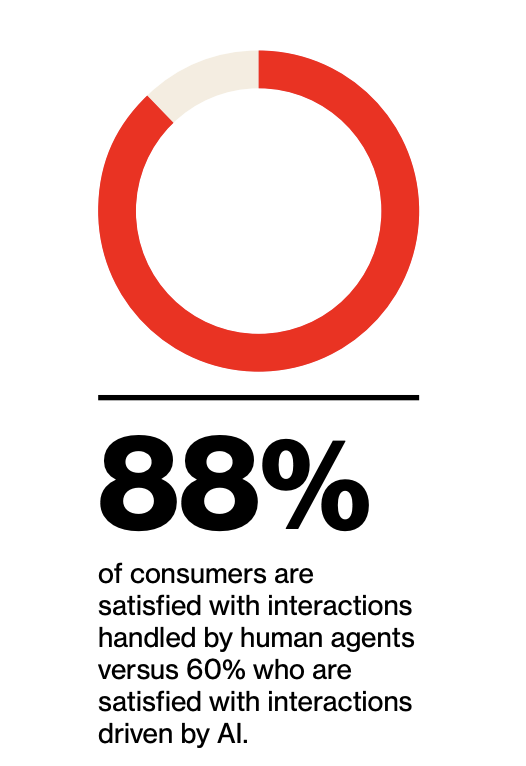
This is also where human backup matters. Verizon’s 2025 CX research found that 88% of consumers were satisfied with interactions that humans mostly or entirely handled, compared with 60% for AI-driven interactions. Customers don’t reject automation, but they do get frustrated when it traps them without a sensible route to a person.
The call flow
A capable AI receptionist should take a routine call from start to finish. It answers using the greeting you’ve approved, listens to the caller’s request, and asks the qualifying questions you’ve set for the business.
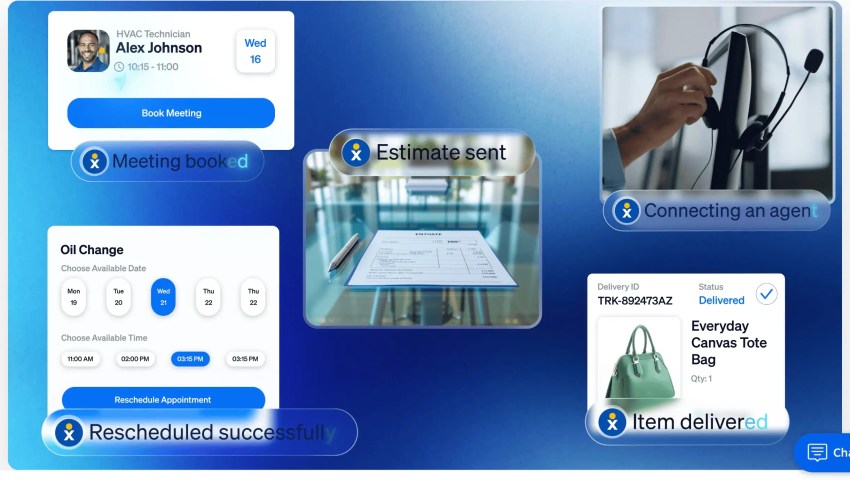
From there, it can check an available calendar slot, book the appointment, send a confirmation text, and write the caller’s contact information into the customer relationship management (CRM) platform. Nextiva XBert, for example, supports calendar and CRM integrations (Zapier, HubSpot, Salesforce, etc.), automatic appointment booking, text messaging, transcripts, and handoff to team members.
For a salon, it might mean booking a hair appointment or a blowout. For a plumber, this could involve collecting the address and scheduling a service call. Law firms might use the same basic flow to capture lead information before routing the call to the right person.
What happens when it doesn’t understand
A good virtual receptionist should fail cautiously. If it isn’t confident about what the caller said, guessing is the worst possible response.
Imagine someone says their surname over a noisy connection, and the system can’t make it out. The next response should sound more like, “I didn’t catch your last name. Could you say that again?” If the second attempt still fails, the system can confirm the rest of the information and flag the uncertain field rather than quietly entering the wrong name.
The same principle applies when the caller asks an unexpected question. Instead of inventing a policy or price, the receptionist should say they don’t have that information and offer the next step that makes the most sense. Depending on your setup, that may be a transfer, callback, or message with a transcript.
There’s a technical reason to test the system carefully. A 2025 Association for Computational Linguistics study found that speech-recognition accuracy varies across real conversational conditions involving noise, overlapping speakers, different speaking patterns, and other audio characteristics. Its comparison of several speech-recognition systems also found greater error variability on more complex datasets and audio conditions.
For owners, the practical issue is simpler since you would need to decide what failure should look like before customers experience it. To do so, set rules around questions, such as:
- Mandatory human handoff: Which subjects should always reach a person, such as complaints, sensitive billing questions, emergencies, or high-value sales calls?
- Confidence limits: How many times should the receptionist ask for clarification before transferring or taking a message?
- Restricted topics: Which prices, policies, questions from medical offices, legal issues, or promises should the system never answer on its own?
- After-hours rules: Does an urgent request at 2 a.m. wake someone, trigger an alert, or enter a callback queue?
- Language processing: How can you offer bilingual support or multilingual support to customers who may need it?
The caller should also be able to ask directly for a human. If somebody says, “Can I speak to a person?” making them argue with the receptionist defeats the purpose of better call handling.
Capgemini’s 2025 customer service research reinforces that point. More than 70% of consumers preferred human agents for empathy and creative problem-solving, leading the researchers to recommend hybrid human-and-AI service models. By combining human expertise with AI system efficiency, we can amplify performance.
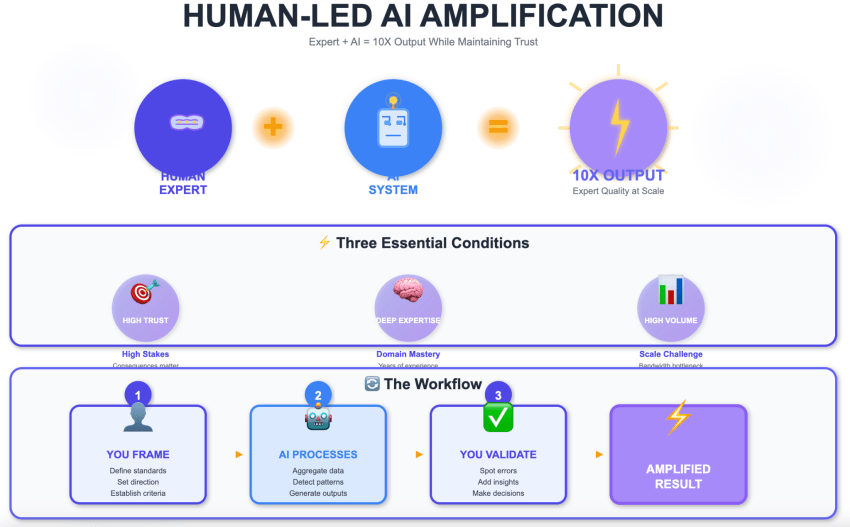
Once the receptionist is live, listen to the call recordings and read the call transcripts during the first week. Pay attention to repeated clarification questions, awkward greetings, incorrectly captured names, questions that trigger unnecessary transfers, and situations where callers sound confused. These are setup problems you can fix.
AI receptionist versus an auto attendant
These two tools still get lumped together, even though they do different jobs. For a quick, top-of-mind cheat sheet, an auto attendant gets the caller somewhere, while an AI receptionist can get something done.
To go more in-depth, an auto attendant uses predefined routes. The caller hears something like “Press 1 for sales; press 2 for support,” chooses an option, and gets transferred. It’s useful when the goal is simply getting people to the right department. It’s a menu-based call routing tool that doesn’t access a CRM or complete more complex workflows.
An AI receptionist lets callers explain what they need in ordinary language. It can interpret the request and take an action, such as answering a question, capturing a lead, or completing an appointment booking.
How AI Receptionists Are Priced
AI receptionist pricing gets confusing because vendors don’t all charge the same way. One bills by the minute; another counts completed inbound and outbound calls; and another includes a set number of interactions in a monthly plan. For a small business, the billing model matters as much as the advertised price.
Here’s what the main models mean:
| Model | How it bills | Best fit | The trap |
|---|---|---|---|
| Included bundle | Flat monthly fee covering a set number of interactions, then per interaction after | Predictable, steady call volume | Find out exactly what counts as an interaction |
| Per-minute | Billed by connected minute | Low volume, short calls | Long calls and hold time; costs spike in busy season |
| Per-call | Flat rate per answered call | Very low volume | The overage cliff once volume rises |
| Bundled into a phone plan | Included with, or added to, a seat subscription | Businesses already on that platform | The seat cost is usually quoted separately |
| Human answering service | Per minute, at a much higher rate | Complex or sensitive intake | Billing for hold time and transfers |
An AI answering service with an included bundle can be easy to budget when your volume stays fairly consistent. The detail worth checking is how the vendor counts usage. Texts, transfers, and follow-up messages can have separate rules.
Per-minute plans need a different calculation. They can work well when calls are short and infrequent, but a busy month changes the math. If your average call lasts four minutes and volume suddenly doubles, the bill usually does so as well. Longer appointment scheduling or lead capture conversations push usage higher again.
Per-call pricing is easier to understand, although overages deserve attention. Look at the price after the included allowance rather than stopping at the starter-plan figure.
Human services sit at the other end of the spectrum. You’re paying for live agents, which can be worthwhile for sensitive conversations, complicated lead intake, or situations where human judgment carries more value than automation.
Two questions clarify the pricing complexity:
- What will my total monthly bill be at my actual call volume?
- What will that bill become if my volume doubles during my busiest month?
Give the vendor your actual numbers and ask for both totals, including base plans, overages, required seats, and add-ons. If they can’t give you a clear answer, they’re not the best platform for you.
The Options Worth Considering
There isn’t one best AI receptionist for small businesses across every use case. A solo consultant taking 30 calls a month has very different needs from a clinic handling sensitive intake, a real estate business managing property inquiries, or a service business that already runs its phones through one provider.
The useful comparison is less about who has the longest feature list and more about how much setup you want to own, how calls are billed, and what happens when the AI needs help. The prices below were checked against each vendor’s pricing page in August 2026.
Nextiva XBert
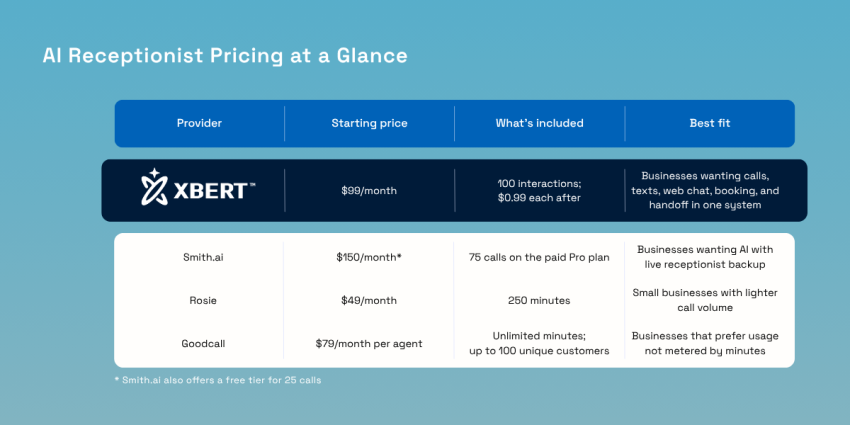
XBert makes the most sense for a small business that wants calls, texts, and web chat handled through one system without building the workflows itself. It can answer and qualify callers, book appointments, connect with calendars and CRMs, send SMS follow-ups, and hand a conversation to a team member with the context attached. Assisted setup is included, and there’s no long-term contract.
XBert costs $99 per month for 100 sessions, followed by $1.50 for each additional session. A session is a phone call lasting at least 30 seconds or an SMS/web-chat thread that reaches three or more AI responses. This means short hang-ups and brief chats don’t automatically eat into the allowance.
Stated clearly, this isn’t an unlimited $99 plan. Before buying, estimate how many qualifying conversations you actually receive each month and calculate the overage from there.
Nextiva’s current FAQ says XBert can operate as a standalone product or as an add-on to another Nextiva plan. If you’re combining it with Nextiva’s business phone service, include the seat costs in your comparison rather than looking at the $99 figure alone.
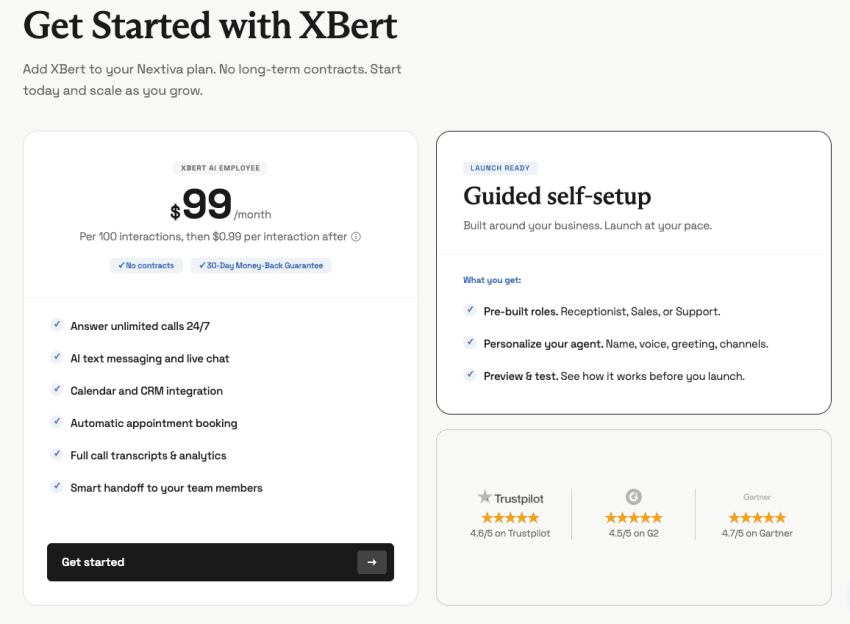
As of August 2026, Trustpilot shows a 4.6/5 rating for Nextiva, G2 lists it at 4.5/5, while Gartner Peer Insights lists a 4.7/5 rating for its unified customer experience management platform.
Best fit: Owners who want the receptionist set up for them and prefer phone, messaging, booking, and human handoff in one place.
Hybrid AI with human backup
Some businesses have little room for an awkward failure. Legal intake, healthcare scheduling (which requires you to be HIPAA compliant), high-value sales leads, or an upset customer may need to speak to a person once the conversation gets complicated.
Hybrid services put the AI voice agent on routine calls and keep live agents available when the callers need more help. Smith.ai is a current example, since its AI receptionist can transfer complex calls to North America-based human receptionists at any time. Its published AI plans currently include a free tier for 25 calls, while paid Pro plans begin at $150 per month for 75 calls.
That safety net comes with more pricing details to inspect. Ask exactly what triggers the human transfer and whether the handoff changes what you pay.
Check these before signing:
- Human handoff rules: Can you decide which topics always reach a person?
- Transfer charges: Does human involvement carry another per-call fee?
- After-hours coverage: Is the human backup genuinely available overnight?
- Context transfer: Does the live receptionist receive what the caller already told the AI?
A hybrid setup can cost more than AI-only call handling, but the extra expense may be reasonable when one poorly handled conversation costs far more.
AI built into a phone system
If you’re already happy with your business phone provider, start there. Adding an AI receptionist to the same system can mean fewer integrations, one bill, and less time figuring out how a separate AI virtual receptionist should receive or transfer calls.
The catch is packaging. An AI feature may be included at one tier, sold as an add-on at another, or require paid phone seats underneath it. Ask for the complete monthly total at your current number of users and expected call volume.
Nextiva follows this model when pairing XBert with its broader communications platform, although XBert can also be purchased independently.
Best fit: Businesses that already like their phone system and want to add AI without another disconnected tool.
Standalone per-call and per-minute startups
A newer standalone service can be perfectly sensible for a tiny business. If you receive 30 calls a month, paying for a large communications suite may solve a problem you don’t have.
Rosie, for example, currently publishes a starting price of $49 per month for 250 minutes. Its $149 Scale tier includes up to 1,000 minutes, calendar booking, and live call transfers.
Goodcall uses a different structure. According to its pricing page, its Starter plan is currently $79 per month per agent, including unlimited minutes and up to 100 unique customers monthly, followed by a charge for additional customers.
Low starting prices can make these AI receptionist services attractive, but price shouldn’t be the end of the review. Check how long the vendor has been operating, whether you can port your phone number away later, what integrations actually work today, and what happens to your call flows and customer data if you leave.
Test It Yourself in 20 Minutes
While a feature comparison can tell you whether an AI receptionist connects to Google Calendar, Calendly, or your CRM, it can’t tell you whether you’d be comfortable having that voice answer your customers. That’s worth testing yourself.
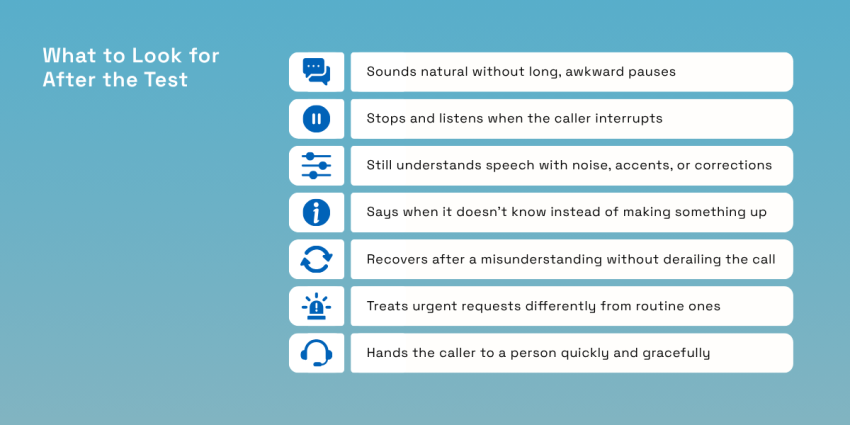
Many vendors provide a demo line, and 20 minutes on the phone will tell you more about voice quality and failure handling than another afternoon spent comparing checkmarks. Test interruptions, noise, unknown questions, emergencies, and human handoffs. Use the same script with every provider:
| Try this | What you are listening for |
|---|---|
| Ask a normal question about hours or services | Whether the baseline sounds natural, and how long the pause is before it answers |
| Talk over it mid-sentence | Whether it stops and listens or talks through you like an old menu |
| Call from a car or somewhere noisy | Whether it still understands you in the conditions you are calling from |
| Ask something it cannot possibly know | Whether its failure mode admits to not knowing and offers a person or invents an answer |
| Say you have an emergency | Whether it escalates or tries to book you for next Tuesday |
| Ask to speak to a human | Whether it hands off the call quickly and gracefully |
You can also make the test less tidy. Have someone with a strong accent call, or try it when you have a cold. Give the receptionist an address with an unusual street name, or even correct yourself halfway through a sentence. Real-world speech recognition still has trouble when accents, specialized vocabulary, overlapping speech, and background noise differ from the data a model knows well.
Pay particular attention to recovery. Mishearing one word isn’t necessarily a deal-breaker, but quietly inventing the missing information is.
Setting It Up Without Breaking Your Phone Line
In many phone systems, conditional call forwarding can send calls elsewhere only when the main line is busy or unanswered. Scheduled routing can also cover specific hours. The exact options depend on your carrier and virtual receptionist phone system.
Phat Scooters offers a useful reminder of why the phone still matters for a small business. The direct-to-consumer company told Nextiva that customers must pick up the phone and call as part of its sales process, making reliable call handling central to how it sells.
Before switching it on:
- Write your real greeting: Use the words your staff already says.
- List your regular intake questions: Start with the five things you nearly always need from a new caller.
- Define escalation rules: Decide what requires a human, including emergencies and sensitive requests.
- Connect your calendar and CRM: Confirm that bookings and contact details land in the right place.
- Run the test script: Fix awkward questions, handoffs, and pronunciation before customers encounter them.
Start with after-hours calls only for the first two weeks. Once you’ve seen how the system handles real calls, you can expand coverage if everything is working as expected.
Answer Every Call With Nextiva XBert
Most small business owners looking at this category already know they’re missing calls. The hesitation usually comes later: Will an AI receptionist sound awkward, misunderstand someone important, or make the business look cheap?
Nextiva XBert handles calls, SMS, and web chat from a single system, with calendar and CRM integrations, appointment booking, transcripts, and human handoff. Nextiva currently lists it at $99 per month for 100 sessions, then $1.50 per additional session, with no long-term contract and a 30-day money-back guarantee.
If that sounds familiar, don’t take another comparison article’s word for it. Call XBert and run the same 20-minute test mentioned in this guide. Interrupt it. Give it a strange question. Ask for a person. See what happens before you put it in front of your own customers.
Eliminate busywork with the XBert AI assistant.
XBert answers calls, handles chats, books appointments, and resolves issues — all on its own. An AI employee trained on your business, so your team can focus on what actually moves the needle.