VoIP
VoIP  Blog
Blog  Business Communication
  Customer Experience
  Leadership
  Marketing & Sales
  Nextiva News
  Productivity

Nobody searches for Yeastar PBX alternatives on a good day. The search usually starts with a piece of paper: a renewal invoice for hardware you thought you’d already paid for, a quote for AI minutes or added extensions, or a refreshed proposal for an appliance entering its fifth year.
That’s the moment the real question surfaces. Should you keep funding this system, or is the money better spent on whatever comes next?
The market has largely answered. Gartner projects that 90% of organizations will rely on cloud platforms for enterprise telephony by 2028, up from 30% in 2025.
But moving on from Yeastar isn’t one decision. It’s a choice among three paths: a full cloud cutover, keeping your Yeastar and modernizing the underlying connectivity, or swapping one box for another. This guide walks you through all three options, starting with Nextiva, the cloud-based VoIP platform trusted by businesses of all sizes.
Why Businesses Look for Yeastar Alternatives
Signs that push a Yeastar customer away come in many forms. Call it hardware fatigue: the slow accumulation of firmware patches, license renewals, refresh cycles, and after-hours failures that come with owning a physical PBX system. The cause of migration isn’t a single incident but an accumulation of these.
The fatigue shows up in verified reviews. Yeastar seems to run on an older version of Asterisk, the open-source telephony engine underlying the P-Series, which means some SIP features on physical IP phones may be limited or broken because newer SIP header improvements have not been implemented in the firmware. The same reviewer commented on the call flow design, calling it basic compared to 3CX because it lacks the variables, loops, and live call control a growing call routing setup needs.
Then there’s the licensing surprise. Hardware isn’t a one-time cost — it’s an annual subscription, which many reviewers dislike.

You bought the box, but you keep paying for the box. Features stack their own meters on top. Yeastar’s product training shows that AI call transcription is a separate per-extension license sold in minute bundles. You get 120 free minutes on the Enterprise plan and 240 on the Ultimate plan, with the ability to purchase additional minutes through your distributor.
There’s also the channel layer. Yeastar sells through resellers and service providers under its partner program, and the multi-tenant Yeastar Cloud PBX is often white-labeled by the partner who manages your system. When that partner is responsive, the model works; when they’re not, you’re a step removed from support.
The economics compound the frustration. One industry analysis from BroadConnect estimates that the purchase price of on-premises PBX hardware represents only up to 30% of the lifetime cost, with operations consuming the rest, and that maintenance contracts often escalate sharply once hardware passes year five. Treat those figures as directional rather than proven, since the analysis doesn’t cite an underlying study.
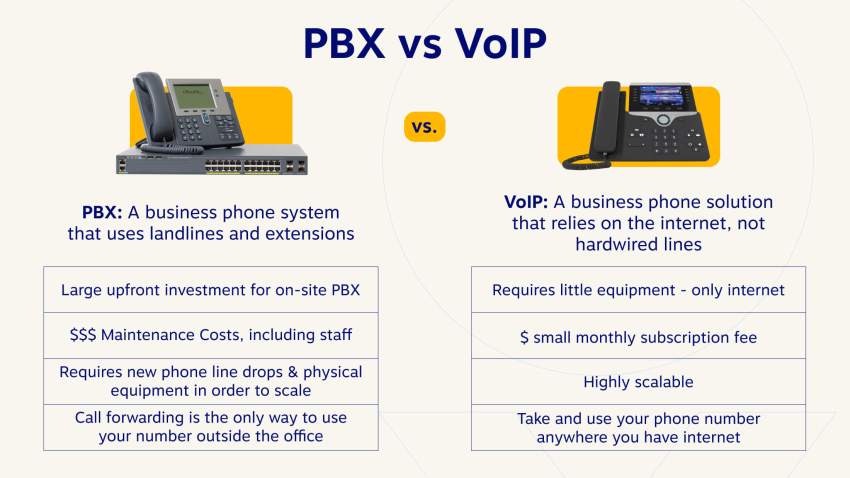
Hybrid work applies the final pressure. Gallup reported that 51% of remote-capable U.S. employees were working hybrid in Q2 2025, with only 21% fully on-site. A PBX bolted to a rack in one building was never designed for business communication across a workforce that splits its week among three locations. Yeastar’s Linkus softphone apps for iOS and Android help bridge the gap, but they still depend on the appliance behind them.
What to Look For in a PBX Replacement
Evaluation checklists blur together, so assess this one according to who you are.
If you’re the IT manager, the questions are operational.
- Does the platform handle its own security patching, or do you?
- Is a session border controller (SBC) built in for remote phones, or is that another appliance you deploy and maintain?
- What compliance attestations exist?
- How granular are admin roles and user permissions?
Nextiva, for reference, publishes SOC 2 and ISO 27001 certifications across all plans, and its network page details 24/7 monitoring with encryption on every call.
If you’re the operations director, start with the uptime math.
A 99.999% SLA, the carrier-grade standard, allows about five minutes and 16 seconds of downtime per year. A 99.9% commitment allows nearly nine hours. The gap is the difference between an invisible blip and a day your call center went dark.
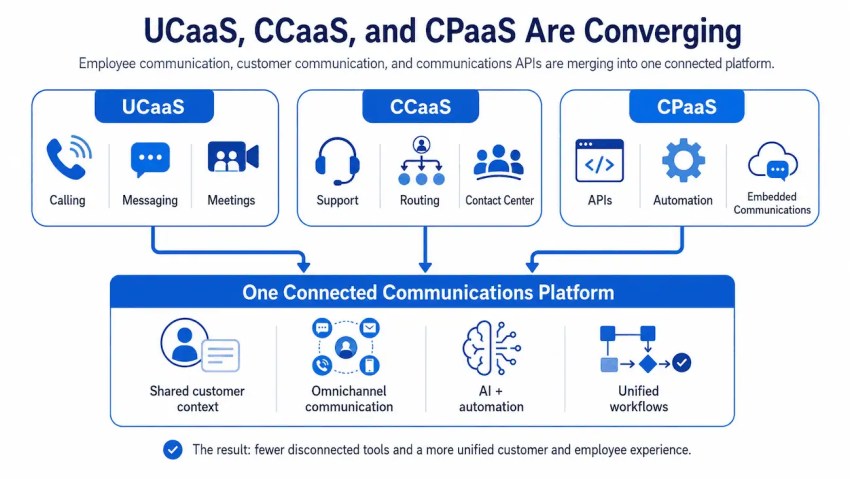
There’s a data argument, too: In Nextiva’s State of Customer Experience survey of more than 1,000 CX leaders, 81% said consolidating customer data across all interaction points into a single system would improve their customer experience. Consolidation is hard when voice, SMS, video conferencing, and team messaging live in separate tools with separate logins. Understanding the difference between unified communications as a service (UCaaS) and contact center as a service (CCaaS) helps here, since some teams need both.
If you own the business, your checklist is shorter.
You need one bill and one user-friendly app that works the same on a desk phone, a laptop, and a cell phone. And in 2026, an AI receptionist is becoming table stakes rather than a luxury. Even Yeastar’s own feature tours now lead with voicemail transcription, real-time transcription, and call summaries.
When the incumbent hardware vendor is racing to add AI, that tells you where the bar sits. The difference is whether AI arrives as a native platform capability or as a firmware-gated add-on with a minute meter.

5 Yeastar PBX Alternatives Compared
The five VoIP solutions below aren’t five flavors of the same thing. They map to the three migration paths: full cloud, staying self-hosted, and keeping your hardware.
| Platform | Deployment | Pricing Model | Best for |
|---|---|---|---|
| Yeastar P-Series (your baseline) | Appliance, software, or cloud editions | Hardware plus annual plans; AI features metered separately | Where you are today |
| Nextiva | Fully managed cloud UCaaS | From $15 per user per month | Teams done with maintenance entirely |
| 3CX | Self-hosted software (Windows/Linux/cloud VM) | Free 4SC tier; PRO from $395 per year (8 SC) | Technical teams staying on premises |
| Nextiva SIP Trunking | Hybrid: Keep your Yeastar, replace the carrier | $15 (metered) to $25 (unmetered) per line per month | Protecting your hardware investment |
| Grandstream UCM | Appliance | $199 to $1,899 one-time street price | Single-site, hardware-committed buyers |
| FreePBX / Asterisk | Open source, self-hosted | Free software, paid modules, and purchased engineer hours | In-house Linux and Asterisk skill |
*Pricing captured in June 2026 from public pricing pages and reseller listings. Confirm current rates before purchasing.
1. Nextiva: The best all-in-one cloud alternative
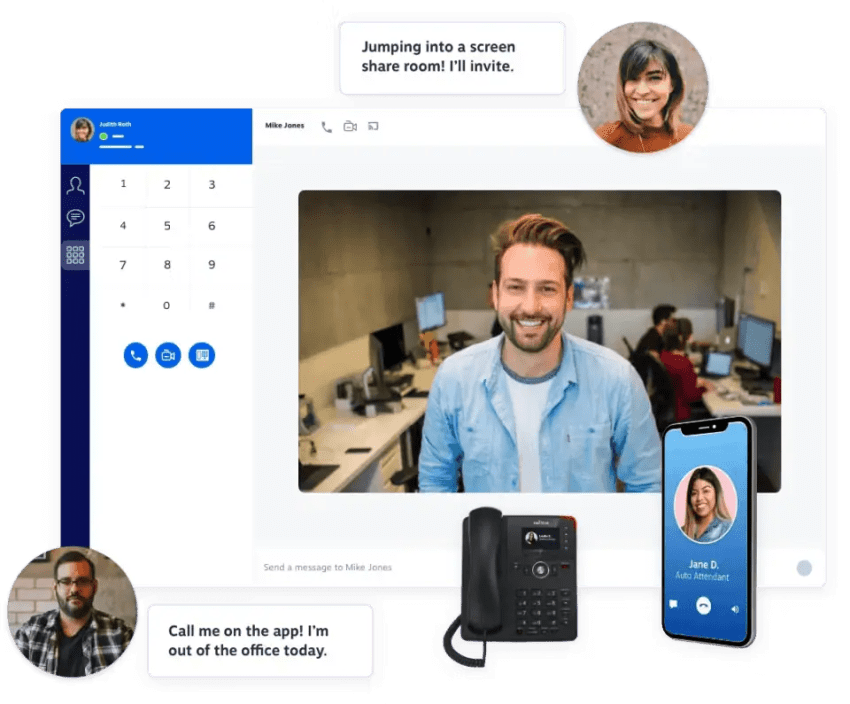
The cleanest way to describe Nextiva to a Yeastar admin: Everything you currently maintain becomes someone else’s job. There’s no firmware to schedule, no Asterisk version to inherit, and no SBC to rack for remote workers. Calling, video, SMS, chat, and fax run on one cloud PBX platform with one login per user, synced across desk phone, desktop softphone, and mobile.
The infrastructure case is concrete. Nextiva operates eight points of presence and carrier-grade data centers that strive for 99.999% uptime, are monitored around the clock, and have a live status page, so you’re never left guessing during an incident. Enterprise-grade compliance includes SOC 2, ISO 27001, PCI DSS for payment environments, and HIPAA-ready plans for healthcare.
Where Yeastar reviewers complain about a basic call flow builder, Nextiva ships a visual drag-and-drop designer for call routing workflows, business hours, and IVR trees. And instead of an auto-attendant reading a menu, XBert works as an AI receptionist that answers calls 24/7, collects details, books appointments, and hands complex requests to your team.
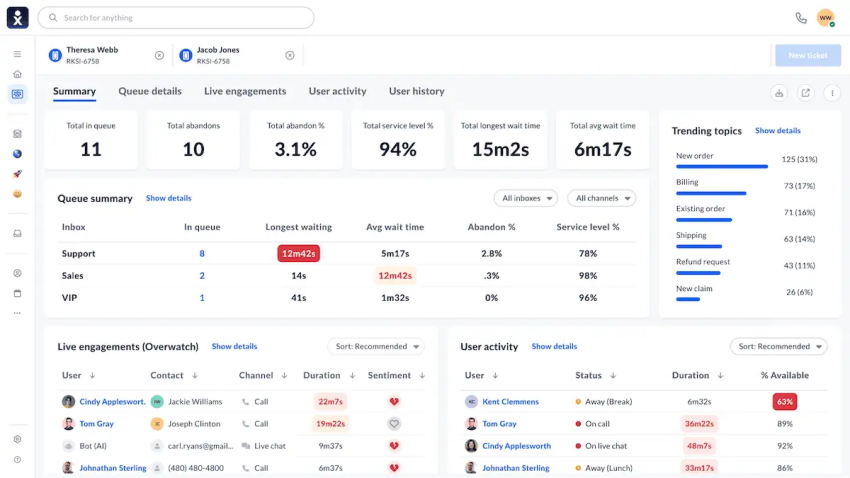
On the contact center side, Nextiva reports customers cutting agent wrap-up time by 50% with AI-powered automation, agent assist, and summarization, all monitored from a real-time dashboard. Native CRM integration with Salesforce and HubSpot, a Microsoft Teams app, and open APIs mean call data lands where your team already works.
Pricing starts at $15 per user per month on the Core plan, with the Engage plan at $25, adding chatbots, toll-free minutes, and higher SMS allowances, and the Scale plan at $75 for advanced sales and service tooling. Every tier includes security certifications and 24/7 support.
The differentiator for ex-Yeastar teams, though, is the migration itself: Setup is guided, number porting is handled for you, and support stays on the line. That’s the opposite of the figure-it-out-yourself model you’re leaving.
2. 3CX: Best for teams that want to stay self-hosted
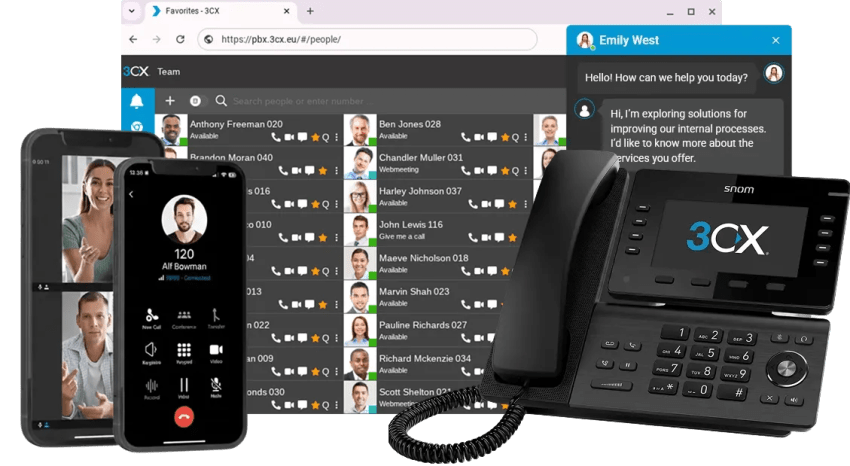
First, a vocabulary correction that trips up many Yeastar buyers: 3CX is not a hardware alternative. It’s a software VoIP PBX you install on Windows, Linux, or a cloud VM, and the company has tested version 20 on a specific list of supported cloud providers, including AWS, Google Cloud, Azure, DigitalOcean, and Vultr. You escape the appliance, not the administration.
On-premises installs still require split DNS configuration, and connecting physical phones from outside the network means deploying an SBC. Competing systems don’t impose that requirement.
The bigger story with 3CX recently has been licensing volatility. In an October 2025 strategy update, the company published SC-based pricing that puts PRO at $395 per year for eight simultaneous calls and $795 for 16.

By late January 2026, it raised prices on smaller licenses, reasoning that small systems cost nearly as much to support as large ones. Reviewers echo that friction, while citing ease of use as a weak point and calling the setup process too technical for nontechnical buyers.
3CX answered the pressure by announcing a new free 4SC Basic edition in early 2026 and then renaming its edition again in April.

These changes are defensible when looked at individually. But when viewed from a distance, such frequent restructures of the 3CX pricing model in a year suggest a planning problem for a business budgeting around the platform.
3CX makes sense for a technical team that genuinely wants software-level control and accepts owning the upgrade cycle, the SBC, and the on-call rotation that comes with all of it. However, from a security standpoint, it’s important to mention that 3CX’s desktop app was compromised in a March 2023 supply-chain attack.
3. Nextiva SIP trunking: Keep your Yeastar, upgrade the carrier

This is the option most alternatives roundups skip, but for many readers, it’s the right answer. You don’t have to throw the box away. If your Yeastar appliance works fine and the real pain is connectivity, reliability, or your current carrier, SIP trunking replaces only the PSTN connection while your PBX, extensions, and desk phones stay exactly where they are.
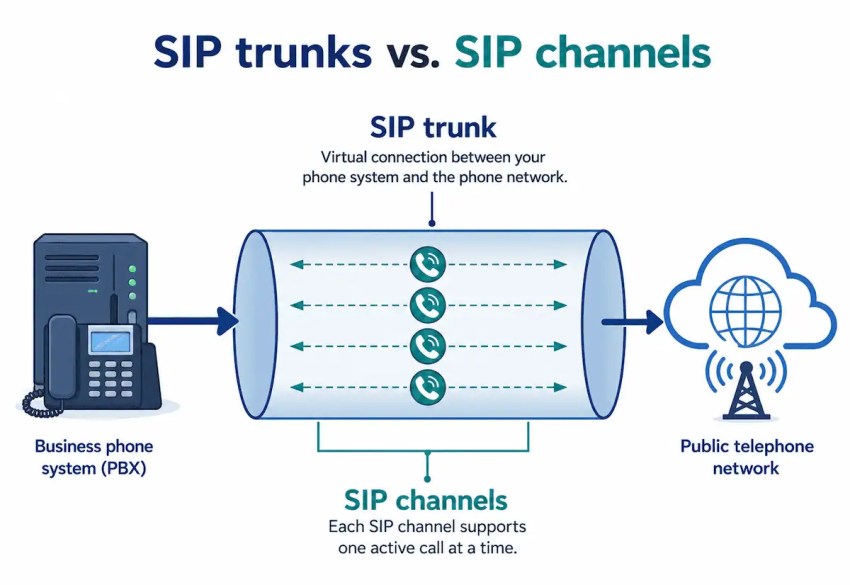
What changes is everything underneath. Nextiva SIP trunks ride the same eight U.S. data centers as the full platform, with automatic failover, fraud mitigation, Enhanced 911, and detailed call records managed from an online portal.
Pricing runs from $14.95 (plus $0.008 per minute) to $24.95 per month for unlimited domestic calling, with metered pay-as-you-go plans for lighter use. Nextiva includes setup, support, and porting at no extra charge.
Think of this path as buying optionality. Your hardware investment keeps earning, your reliability problem gets solved now, and when the appliance eventually ages out, you’re already on the network you’d migrate to.
4. Grandstream UCM: A direct hardware comparison

Some buyers read every cloud pitch and still want a box they own. Grandstream’s UCM6300 series is the honest comparison for them. Street pricing at U.S. resellers runs from about $199 for the UCM6300A to $1,899 for the UCM6308, and the line scales to 5,000 users on a single appliance.
Like Yeastar, it’s built on an Asterisk-derived core, so the vocabulary carries over, and feature parity, down to paging and intercom support, is real. So are the limits, and they’re the same limits you’re trying to escape.
However, managing extensions remotely requires port forwarding, which makes remote deployments less efficient. Some operations require physical access to the PBX.
Even Grandstream seems to agree on direction. A consultant, Willie Howe, reported in early 2025 that after installers spent years asking for it, the company opened beta testing for a software UCM that runs on your own hardware or in the cloud. This is the direction that a large part of the communication systems market is heading. Consider this when choosing a Yeastar PBX alternative.
5. FreePBX: Best fully open source route
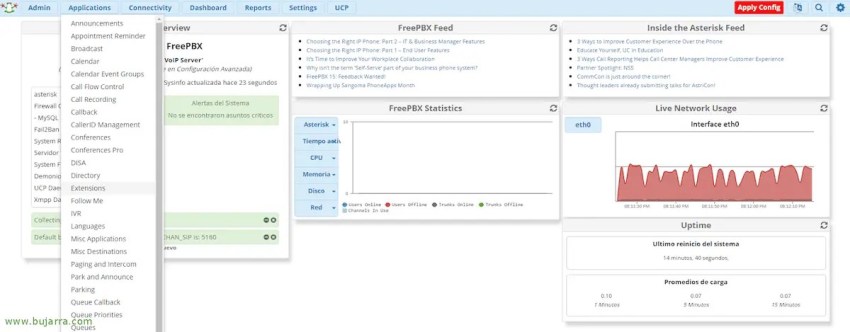
FreePBX deserves a place on this list because it’s free, endlessly customizable through its API and module ecosystem, and runs on the same Asterisk engine as Yeastar, minus the vendor wrapper. It also deserves the bluntest warning.
Chris at Crosstalk Solutions opened his upgrade guide with it: “FreePBX 15 is officially dead as of October 1st, 2025.” There are no more updates, no more security patches, and because version 17 moved from CentOS to Debian 12, there’s no in-place upgrade path from FreePBX 16 to FreePBX 17. Moving forward means a fresh install of the operating system and the PBX on a new server.
Choose FreePBX if you have dedicated Linux and Asterisk skills in-house and the customization ceiling matters more than the maintenance floor. For everyone else, the end-of-life treadmill is the Yeastar problem, wearing a different shirt.
Cloud vs. Hybrid PBX: Comparing What You Actually Get
The biggest difference between these paths isn’t a feature list. It’s where the work lives. Here’s how the daily reality compares between a hardware PBX like the Yeastar P-Series and a cloud platform like Nextiva.
| Capability | Yeastar P-Series | Nextiva Cloud |
|---|---|---|
| Adding users | License check, firmware version check, provisioning | Add a user in the admin portal |
| AI receptionist | Firmware 83.22.0.134+, 60 free minutes, paid add-on bundles | XBert is included as a platform capability at $99 per month |
| Updates and patches | Your team schedules and applies them | Provider-managed, no maintenance windows for you |
| Cost structure | CapEx hardware plus annual licenses and metered add-ons | Predictable per-user monthly OpEx |
The AI row deserves a closer look because it’s where the deployment models diverge the most. Scalability follows the same split: On the appliance, growth means license checks and hardware ceilings, while in the cloud, it’s a few clicks in the admin portal. Yeastar’s intro to the AI receptionist walks through firmware prerequisites, FQDN requirements, and minute bundles before the feature can answer a single call.
On a cloud platform, the same capability is a toggle, and it goes well beyond a traditional auto attendant reading menu options.
How to Migrate From Yeastar to the Cloud
Migration anxiety keeps more businesses on aging PBXs than any feature gap does. The process is more procedural than people expect:
- Audit what you have: Export your extensions, ring groups, IVR trees, business-hours rules, and call queues from the Yeastar portal. This document becomes your build sheet on the new platform, and it usually reveals routing cruft you can retire.
- Prepare the network: Voice traffic needs priority. Configure QoS on your router to prioritize SIP and RTP packets, confirm you have bandwidth headroom for your peak concurrent call volume, and consider a voice VLAN if your switches support it.
- Plan the number port: This is regulated, and the rules favor you. Under FCC porting rules, simple ports involving a single line must be processed in one business day, and your old provider cannot refuse the port even if you owe a balance. Complex multi-number business ports take longer, so schedule the port date rather than discovering it.
- Decide on your phones: Most Yeastar-compatible IP phones speak standard SIP and can often be re-registered to a new provider.
- Run in parallel: Stand up the new cloud phone system alongside the old one before the port completes. Test inbound routing, after-hours behavior, and voicemail with temporary numbers. The old Yeastar keeps taking calls until the moment the numbers move.
- Port, validate, decommission: After cutover, review your audit sheet and confirm every flow works. Only then does the appliance come off the rack.
Nextiva streamlines steps three through six with you: guided setup, porting managed on your behalf, and support during the parallel run, so the transition doesn’t depend on one admin’s free weekend.
Make Nextiva Your Communications Partner
Look back across all five alternatives, and one pattern holds. With 3CX, your team owns the SBC and the upgrade cycle. With FreePBX, your team owns the operating system underneath the phone system. With Grandstream, your team owns a box that needs physical access. Each is a fine choice for an organization that wants that ownership.
Cloud UCaaS is the only path that lets you own what you’re best at: your business. That’s the case for an all-in-one communication solution like Nextiva. With Nextiva, businesses of every size have decided that firmware nights, license meters, and refresh cycles were not core to their business and handed them to Nextiva.
Your Yeastar served its era. If the next renewal quote is making you hesitate, that hesitation is data.
Explore Nextiva’s business phone service, and make this maintenance cycle the last one your team has to own.
The best cloud PBX phone system small businesses love.
Get cloud-based VoIP, SMS messaging, and video conferencing in one solution. Take your business communications to the next level with Nextiva.
Frequently Asked Questions About Yeastar Alternatives
For a single-site small business with desk phones and an IT person who enjoys the work, Yeastar makes competent hardware. The friction starts when hybrid work, AI functionality, and multichannel messaging such as SMS and WhatsApp enter the picture because each one arrives as a firmware dependency, a separate license, or a workaround on an appliance-first architecture.
Yeastar offers cloud editions, but its model still centers on the PBX as a system you administer. Nextiva is built cloud-first: voice, video, SMS, and chat in one license per user, apps stay in sync across desktop and mobile, and the whole thing runs on infrastructure with proven uptime. For a distributed team, the difference is that nobody’s experience depends on being near the box.
The main reason is the money, but not the way most people frame it. The shift is from CapEx to OpEx: Instead of buying hardware that depreciates and then paying rising maintenance on top of it, you pay a predictable monthly rate that includes updates and support. The operational majority of PBX lifetime cost is what the subscription quietly absorbs.
Often yes, since most are standard SIP devices, though provisioning effort and feature parity vary by model. See the phone-reuse section above for the caveats, and ask your new provider for a compatibility check on your exact hardware before deciding.
It’s easier than the dread suggests. The port itself is governed by FCC timelines, and the rest is preparation: audit, network prep, parallel run, cutover. Nextiva’s guided migration handles porting and setup with you, which removes the failure mode where the whole project rests on one person.
The issue is licensing volatility more than anything technical. 3CX raised prices on smaller licenses in January 2026, introduced a new free 4SC tier shortly after, and renamed its editions again in April, leaving customers planning around a moving target. The self-hosted model also still requires an SBC and real administration.