VoIP
VoIP  Blog
Blog  Business Communication
  Customer Experience
  Leadership
  Marketing & Sales
  Nextiva News
  Productivity


In April 2026, KPMG surveyed 300 executives and found that 87% of leaders call front-office integration a critical priority. Only 5% have actually achieved it.
The connectors are mature, and installing one takes an afternoon. Yet 19 out of 20 companies still haven’t managed to integrate their phone system and customer relationship management (CRM) platform as one.
I have run these integrations and cleaned up the ones that went sideways. The hard part is never the connector. In this guide, I discuss the real challenges while covering the mechanics of Voice over Internet Protocol (VoIP) CRM integration.
What Does a VoIP CRM Integration Mean?
VoIP CRM integration connects a VoIP phone system to a CRM platform so that calls and customer records inform each other. The layer that carries call events between the two systems is called computer telephony integration (CTI).
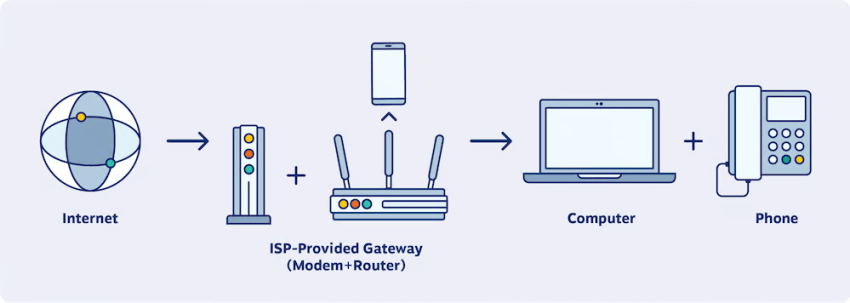
Call events flow into the CRM as activity records: who called, when, how long, and what happened. Contact data flows the other way. The phone platform identifies inbound callers via caller ID and places outbound calls directly from a contact record via click-to-call. When both directions work, an agent answering a call sees the customer’s history, open deals, and purchase history before saying hello. When only one direction works, you get a phone system that dials from the CRM but doesn’t send anything back.
This logic extends beyond sales. If your service team lives in a helpdesk like Zendesk or Freshdesk, the inbound call becomes a support ticket rather than a lead, but identity matching and logging decisions work the same way.
3 pathways to integrate VoIP and a CRM system
Almost every deployment follows one of three routes, and I will say plainly what most vendors will not: exhaust the first two before you consider the third.
The first path is a native connector from your CRM’s marketplace. It’s the fastest to deploy, the least flexible, and the right default for most teams. The second is an embedded softphone within the CRM tab itself, so the agent works in a single window.

The third path is a custom build on application programming interfaces (APIs) and webhooks. An API integration gives you complete control over call management, field mapping, and routing logic. However, your team might need to maintain it forever through CRM releases and phone platform updates.
Whichever path you evaluate, ask: Does the integration log call activity for calls made outside the CRM, whether from a mobile app or a desk phone?
Many systems do not. And this is where the activity data silently goes missing.
Automatic Call Logging: What Counts as a Loggable Call
This choice is a high-value decision in the whole project, and it usually gets made by default. If you turn on automatic call logging with no rules, every call becomes an activity record. You get six-second hang-ups, wrong numbers, and internal transfers.
Within a month, the timeline on any active contact record is unreadable. Activity-based reporting is noise, and reps stop trusting the data. Eventually, people ask to turn logging off, and the project dies silently.
Therefore, it’s pivotal that you define the threshold:
- A minimum duration for creating an activity record
- A rule for unanswered outbound calls
- Guidelines for internal calls
- A protocol for whether an unknown inbound number creates a lead, a task, or nothing at all
| Call type | Default behavior | What to configure instead |
|---|---|---|
| Under 15 seconds | Logs as a full activity | Do not create an activity or log without touching the last contact. |
| Unanswered outbound | Logs as an attempt | Log, but keep it out of engagement metrics |
| Unknown inbound number | Often creates nothing | Decide deliberately: new lead, task, or nothing |
| Internal transfer | Logs against the customer record | Exclude entirely, as it is not a customer interaction |
| Repeat dials to the same contact | Creates a separate record each time | Roll up records, or the timeline becomes unreadable |
Additionally, there’s one more governance rule. Decide who will own these settings after go-live. If no one owns it, the integration degrades quietly.
Build a disposition taxonomy first
Dispositions make call data reportable. You don’t need to invent the first layer. HubSpot’s Calling Extensions SDK already defines a machine-set vocabulary of call-end statuses: completed, failed, canceled, busy, no answer, rejected, and missed. Start there, then add only the business outcomes your team will genuinely report on.
| Disposition layer | Example values | What it feeds |
|---|---|---|
| System statuses (machine set) | Completed, failed, busy, no answer, missed | Reachability and call quality reporting |
| Business outcomes (rep-set) | Meeting booked, not decision maker, budget objection, asked for proposal | Pipeline KPIs, conversion rates, coaching |
| Exception queue | Anything that fits neither | Weekly ops reviews with taxonomy updates |
Clean dispositions streamline workflows across the entire downstream process. They drive call routing rules, automatically trigger follow-up tasks, and feed call analytics that a sales ops leader can actually defend in a pipeline review.
Why Screen Pops Miss in an Integrated VoIP and CRM
A screen pop isn’t a telephony feature. It’s an identity-matching event. The platform takes the inbound caller ID and searches your CRM software for a matching contact record. The number needs to exist in the CRM, be stored in a format the system can match, and be attached to the right record.
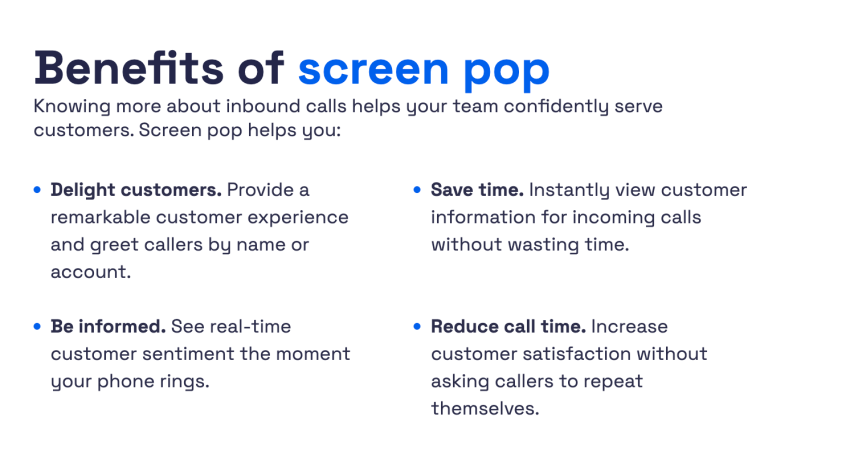
The formatting requirement is stricter than you’d expect. For example, HubSpot’s Calling Extensions SDK documentation requires phone numbers to be in E.164 format. If a number is misformatted, it silently prevents the caller ID match event from firing. The pop just never happens, and everyone blames the phone system for a problem that lives in the CRM’s phone number fields.
The other failure modes are just as unglamorous.
| Why the pop misses | What the agent sees | The fix |
|---|---|---|
| Number stored in a non-standard format | No pop | Normalize existing records to E.164 before go-live |
| Mobile number not on file | No pop | Capture alternate numbers during calls |
| Main line of a large account | Wrong or ambiguous contact | Pop the account, not a guessed individual |
| Caller ID blocked or withheld | No pop | Fall back to a quick search screen, not a blank one |
| Same number on multiple records | Arbitrary match | Deduplicate first; this is the most common root cause |
Data hygiene within the CRM improves screen pop reliability more than other telephony settings. Normalize numbers, merge duplicates, and decide on no-match behavior before the integration goes live.
VoIP Integration for Salesforce, HubSpot, Zoho CRM, and Microsoft Dynamics
The CRM side of a VoIP CRM integration is often treated as interchangeable. It’s not, and the ground is actively shifting on one platform. I’m leading with Salesforce because the change is time-sensitive.
Salesforce: Open CTI is retiring
Open CTI is in maintenance mode and scheduled for retirement in February 2028. Salesforce is not adding new features, and it has already made Open CTI unavailable for newly created Agentforce Service orgs.
The documentation recommends transitioning development efforts to Salesforce Voice. The forward paths are Service Cloud Voice, bring-your-own-telephony, and Salesforce-native CTI options.
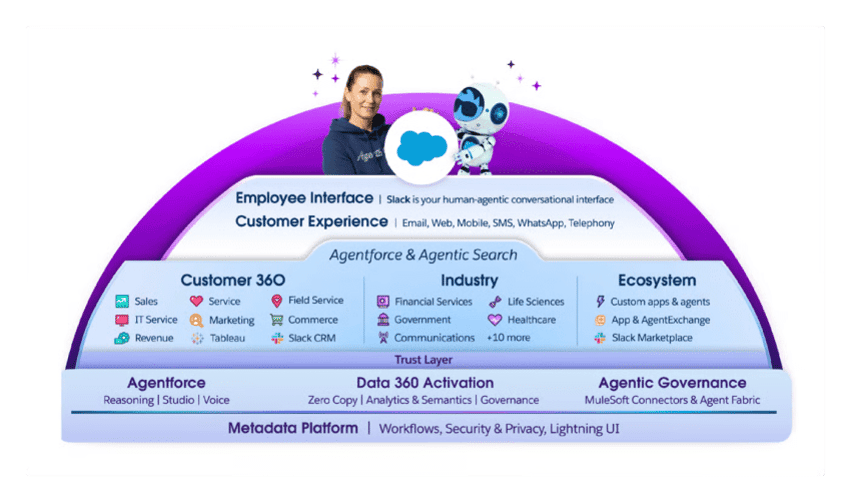
The takeaway here is sequencing. Anyone standing up a new Salesforce telephony integration needs to choose a path with a future. If you’re running Open CTI, audit now and see how easily you can migrate given your existing dependencies. Screen pops, call logging rules, activity records, and custom Lightning components often lean on the integration in undocumented ways that only surface when something breaks.
For a detailed guide on audit and migration, read the article on Salesforce CTI end of life.
The reaction to this retirement is loud, and much of it centers on cost since teams are moving from a free framework to a paid successor path. Factor licensing into your decision early, rather than discovering it during procurement. Also, retiring Open CTI doesn’t automatically mean adopting a full contact center platform.
Modernizing the CTI layer and choosing a broader platform strategy are separate decisions. Mixing them would balloon the project into a transformation program.
HubSpot
HubSpot’s telephony integrations run through its calling extensions framework, which creates a call engagement on the record timeline and then exchanges data to fill in the details.
Confirm the integration handles inbound calls, because some connectors only push dials out. Check that it can place calls from custom objects if your team uses them. And know that HubSpot lets users run multiple calling providers at once and switch between them. It’s genuinely useful during a migration, since you can pilot the new provider without cutting the old one off.
The Nextiva HubSpot integration covers inbound and outbound, along with logging.

Zoho and Microsoft Dynamics
Zoho CRM connects through PhoneBridge, a single integration point that works across Zoho apps like CRM and Desk. The gap shows up on the handset: per Zoho’s own documentation, calls answered directly on an iPhone can’t be logged as inbound calls because iOS restricts access to inbound call data.
Microsoft Dynamics is typically the choice when your organization already standardizes on Microsoft, and it connects through its Channel Integration Framework.
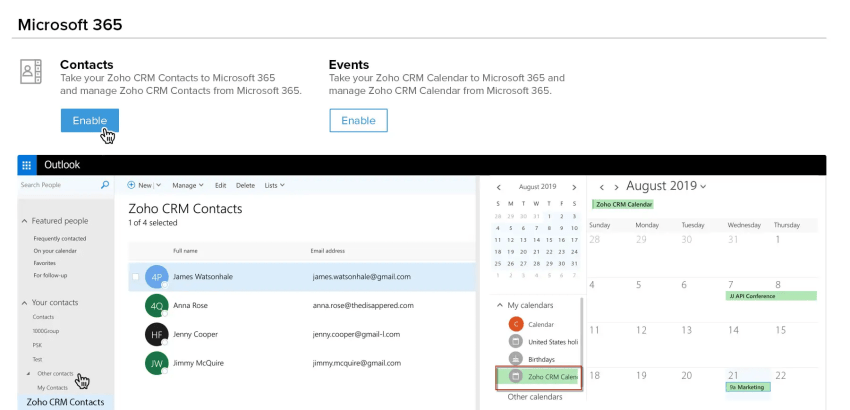
In both cases, the evaluation questions are the same:
- Does the platform log activity from mobile calls?
- How do dispositions map to CRM fields?
- Who owns field mapping after launch?
Essential Checks for VoIP CRM Integration
This is what your legal team will care about the most. When you integrate CRM and VoIP, call recordings may live on CRM records. This means that these recordings would inherit the CRM’s access rules.
CRM permissions are usually broader than recording permissions should be. In practice, anyone who can open the contact can listen to the call, and in some platforms, that inheritance hinges on a single admin checkbox. The same applies to transcription output, which often carries more sensitive detail than the activity record it sits on.
I won’t present compliance advice here since recording consent requirements vary by state and country. Most importantly, a blog post is the wrong place to interpret them. What I will give you is the question list to take to your security and legal partners before go-live:
- Who can play a recording, and is that access logged anywhere?
- How long are recordings retained, and does that match the CRM’s own retention policy?
- What happens to attached recordings when a customer requests deletion?
- Did enabling the integration change your consent posture by making it so easy to record that teams do it without a formal compliance decision?
That last one is the trap. Take it to counsel, get a written answer, and configure recording rules to match the answer rather than the default.
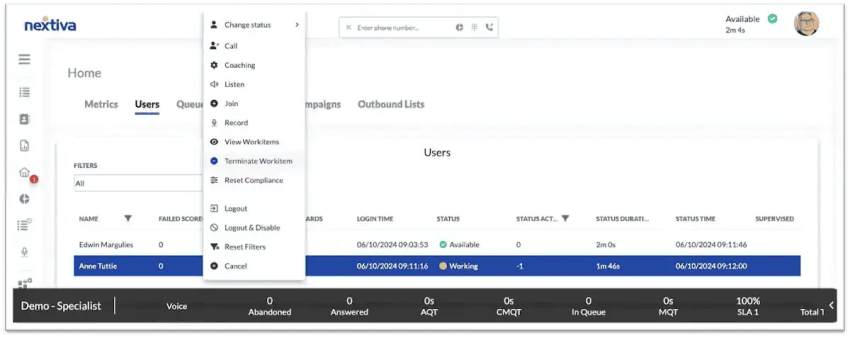
How to Set Up VoIP CRM Integration
Everything above compresses into a project plan you can lift. The order matters more than the detail because each step protects the next.
- Clean the CRM data: Normalize phone numbers to E.164 and merge duplicates. This single step determines whether the integration looks competent on day one, because formatting and duplicates drive screen pops and caller matching.
- Decide logging rules and dispositions: Set the loggable-call thresholds and the two-layer disposition taxonomy from the sections above. Write them down. This step keeps the timeline readable at day 30.
- Confirm authentication and permissions: Establish single sign-on, which roles get the softphone, and who can access recordings. Do this before the pilot, because permission changes mid-rollout erode trust.
- Map fields and agree on where call data lands: Verify which CRM fields the integration writes, what updates last-contacted, and who owns the mapping going forward.
- Pilot with one team: Run for two weeks, then review the actual activity records the pilot generated. Adjust rules before rolling wider.
Two weeks after the pilot, open 10 contact records at random and read the timeline on each one. Your configuration is right if the timeline tells a coherent story about the relationship. If it is a wall of one-minute call entries and blank call notes, go back to Step 2.
Connect Your Cloud-Based Phone System and CRM With Nextiva
Nextiva approaches VoIP CRM integration with prebuilt connectors for Salesforce, HubSpot, Zoho, Microsoft Dynamics, and Pipedrive. It’s set up at the admin level rather than as a development project. The Salesforce integration supports both Classic and Lightning, which matters if you are pairing CTI modernization with a platform migration.
Agents can work in one window thanks to the screen pop, click-to-call functionality, and recording access that all surface inside the CRM. And because it is a cloud-based phone system, the same integration behavior follows your team from desk to mobile app. The network runs on eight redundant US points of presence and strives for 99.999% uptime, which works out to under six minutes of downtime a year.
Now you have a concrete checklist. It makes the next step specific, not exploratory.
Bring that list to an integration review of your business phone service and pressure-test how your business communications stack would handle each one.
The small business VoIP phone system for modern work.
Get business phone calls, video meetings, and secure messaging in one platform. Easy setup. Budget-friendly. Trusted by millions.