Customer Experience
  Blog
Blog  Business Communication
  Leadership
  Marketing & Sales
  Nextiva News
  Productivity
  VoIP
VoIP 


All sales leaders have experienced the dreaded drop-off. Your pipeline showed $80,000 in late-stage deals at the beginning of the month, only for $50,000 to stop responding a few weeks in. You close the month with only $30,000 in sales, wondering why those leads ghosted you and what went wrong.
This can easily happen if you don’t have a formal, documented sales process. Harvard Business Review research found that companies with a formal sales process had 18% higher revenue growth, and companies with trained managers, a defined process, and regular pipeline management saw 28% higher revenue.
We’ve noticed that many small teams we work with don’t have formal processes for managing their sales pipeline, and we’re here to help with that.
In this post, we’ll break down everything you need to know about pipeline management for small teams, including the difference between pipeline vs. funnel, stalled-deal rules, basic automation, and tips and practices that are realistic for small teams with limited time and budget.
What Sales Pipeline Management Means for a Small Business
Sales pipeline management is the process of optimizing and tracking how sales opportunities move through your funnel. It’s not enough to identify a ton of leads, start conversations, and assume that booked demos mean future revenue; you want to have intentional strategies and processes in place to keep deal progression moving forward. Doing so can help you:
- Understand why seemingly high-intent leads didn’t convert
- Optimize your sales processes to increase the number of closed deals
- Get all sales team members on the same page (and get new sales reps up to speed fast when you bring on new hires)
- Forecast potential revenue more accurately, leading to fewer surprises
Sales pipeline vs. sales funnel: What’s the difference?
These two terms are used interchangeably, but they measure different things and serve different purposes.
The sales pipeline focuses on your list of current open deals. Each can be tracked, including the account or sales rep owner, the stage of the funnel the lead is in, and the estimated contract value. It shows you which deals are currently in the works and helps your team prioritize what actions to take next.
The sales funnel, meanwhile, focuses on the buyer’s journey from prospect to close. It will impact how you nurture leads overall: Do you take them right into a demo, for example, or do you set up an initial prospecting call first? It can help you understand what percentage of leads turn into customers.
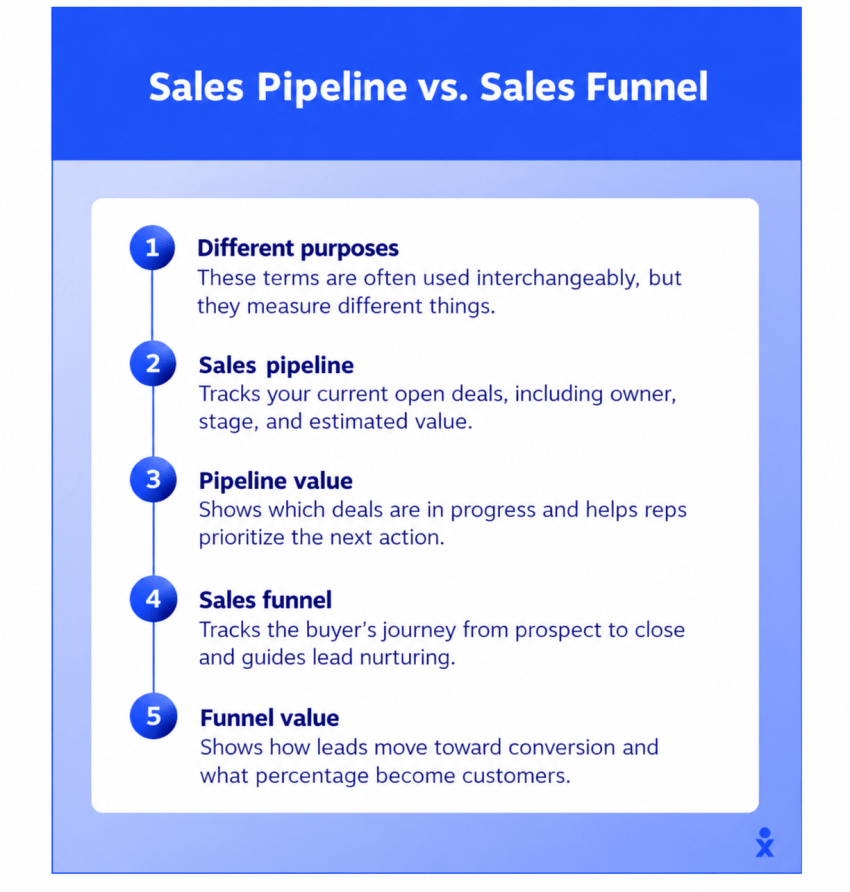
Small teams and sales managers should be tracking both the sales funnel and pipeline. The funnel shows where volume drops across your entire lead flow, and the pipeline shows which individual deal is at risk right now (and it can potentially reveal larger trends). If you’re only looking at one, you’re flying half-blind.
Why a simple sales funnel can benefit small sales teams
Plenty of CRM templates ship with 10 to 15 pipeline stages, and almost none of them match how a small sales team sells.
When reps can’t tell the difference between discovery and needs analysis — or between negotiation and decision — they’re at risk of forgetting to move deal stages altogether in your CRM. When this happens, the pipeline becomes a static list and is no longer a sales forecast you can trust.
Five stages with clear exit criteria are enough for most small businesses. The stages should mirror what happens in your sales conversations. For example, if your team doesn’t do formal demos, don’t include a demo stage. If every deal requires a site visit before you can quote, that’s worth tracking, too.
The exit criteria matter more than the stage names. A deal should only move forward when the buyer did something verifiable, like shared a confirmed budget, scheduled a follow-up, or requested a proposal. If the only reason a deal advanced is because the rep “had a good feeling” or “felt a good vibe” about the conversation, it can create confusion quickly.
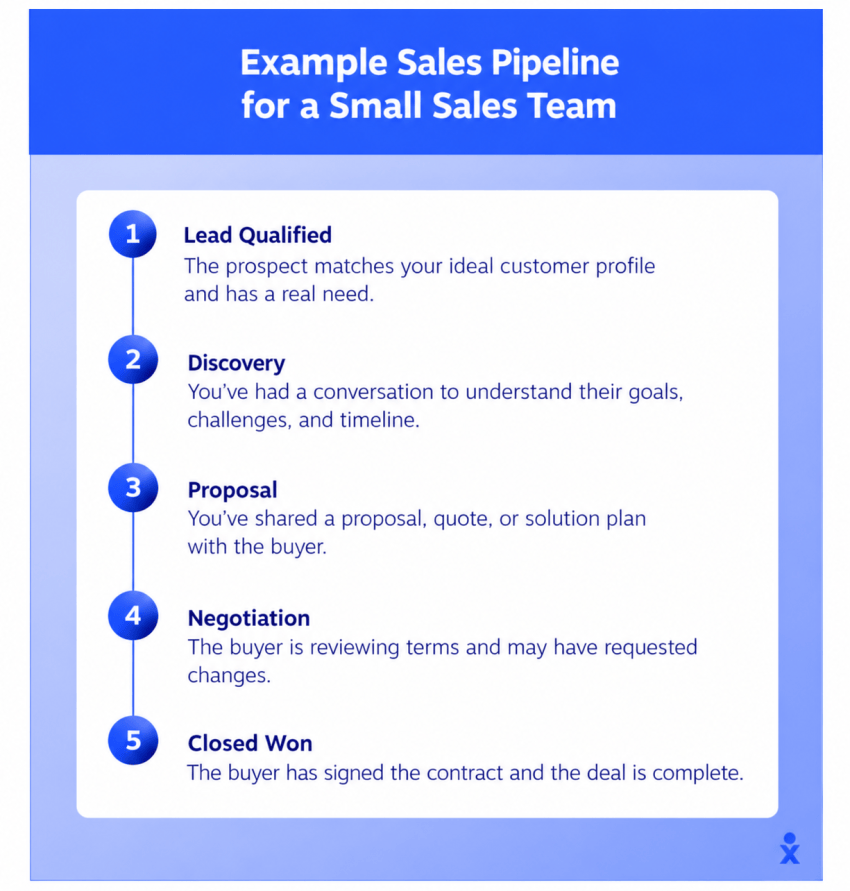
Building 5 Sales Pipeline Stages and Their Exit Criteria
For small sales teams building a pipeline, these five stages are a solid starting point, but adapt them to fit your sales process as needed. You do, however, want to keep the overall structure and ensure that each stage has three things:
- A clear definition of what the stage is
- A buyer-verified exit criteria (success criteria that move them to the next action)
- The typical next action based on current deal status
Here are the stages we recommend starting with:
| Stage | What happens | Exit criteria (buyer-verified) | Typical next action |
|---|---|---|---|
| 1. New lead | Inquiry captured from a call, text, form, or referral | Lead replied or answered a call | Book a discovery conversation |
| 2. Qualified | Discovery call on need, budget, timeline, and decision-maker | Buyer confirmed a problem, a rough budget, and a decision date | Scope or demo meeting on the calendar |
| 3. Scoped or demoed | Solution presented or job scoped | Buyer agreed the scope fits and requested a proposal | Send the proposal within an agreed time |
| 4. Proposal and negotiation | Pricing, terms, and objections | Buyer gave feedback on the proposal and set a decision date | Follow up on that date |
| 5. Closed won or lost | Signed, paid, or declined | Signature, deposit, or a clear no | Onboard, or log the loss reason |
Remember, these pipeline stages are customizable, so adjust them to fit your sales process. Once you do, here are a few tips that can help you stay on track with pipeline tracking and management.
Understanding buyer-verified exit criteria
“Buyer-verified” means exactly what it sounds like: The buyer took an action. This is what’s needed to formally move them from one stage to the next.
Using lead scoring software based on an initial form doesn’t move a lead from the Proposal stage to the Qualified stage in this model, for example, because you need that discovery call first to confirm the information. A sales rep sending a proposal isn’t an exit criterion. The buyer is reviewing the proposal and giving feedback.
Remember that as you’re adjusting the pipeline stages you’re tracking, you need to track what the buyer did and not what your team did. This can improve forecast accuracy significantly.
Assigning deal value, owner, and close date after lead qualification
Every deal should get a single owner, a value based on the scope discussed, and a close date tied to the buyer’s stated timeline. If you’re guessing the close date because the buyer never gave you one, it’s a sign you’re still in an earlier stage.
For example, when a prospect says, “we’re interested but haven’t set a timeline yet,” that deal likely belongs in the Qualified stage rather than the Proposal stage. Logging it as a late-stage deal inflates your forecast and hides the fact that you still have discovery work to do.
A deal with no next step scheduled is at risk. So make sure deal owners understand how to move discussions forward and what next steps are expected at each stage.

Using proven sales templates that move deals forward
Four templates cover 90% of what a small sales team sends to keep deals progressing:
- A quick response to the potential customer’s initial contact, potentially asking to set up a call
- A short recap text after each call, confirming what was discussed and the next step
- A proposal follow-up email for when the buyer hasn’t responded by the agreed date
- A “close the file?” message for deals that have gone quiet, which often gets a response when nothing else does
Having these ready means your reps don’t waste 10 minutes drafting the same email they wrote yesterday.
Looking for inspiration? Check out examples in our sales email templates guide. 👇
Sales Templates for Every Stage of the Pipeline
Take a look at proven sales email templates for cold outreach, follow-ups, post-demo, and closing with subject lines and tips for every stage of the sales cycle.
Pipeline Metrics and the Velocity Formula
Pipeline velocity tells you how much revenue your pipeline produces per day. It’s useful for small sales teams because it connects sales activities to revenue.
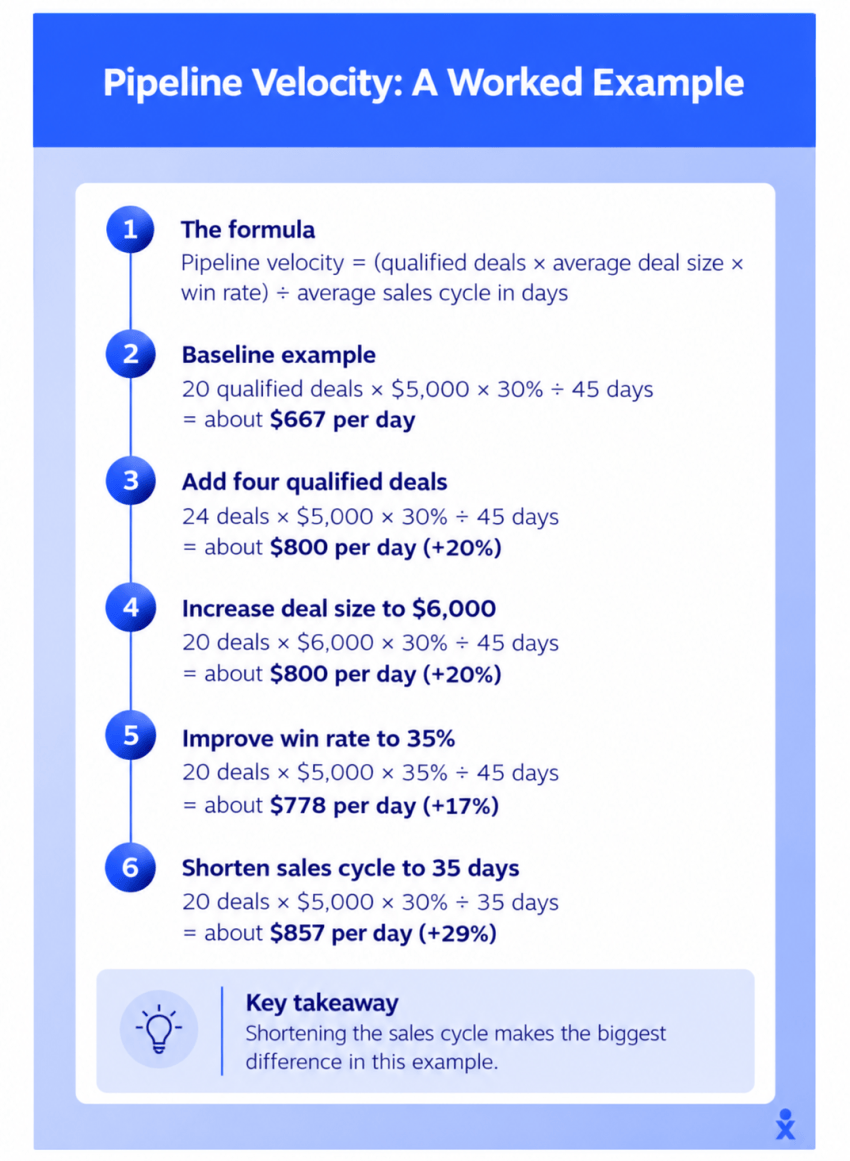
Here’s how it’s calculated:
Pipeline velocity = (qualified deals × average deal size × win rate) ÷ average sales cycle in days
Let’s say you run a small law firm. You have 20 qualified matters in your pipeline, with an average engagement value of $5,000. Your win rate on qualified prospects is 30%, and the average time from qualified to signed is 45 days.
20 × $5,000 × 0.30 ÷ 45 = about $667 per day
That’s useful on its own, but the real power is seeing what happens when you change one lever at a time when optimizing your sales process. Here’s what that might look like:
| Change one lever | New inputs | Revenue per day | Change |
|---|---|---|---|
| Baseline | 20 deals, $5,000, 30%, 45 days | About $667 | — |
| Add four qualified deals | 24 deals | About $800 | +20% |
| Raise average deal size | $6,000 | About $800 | +20% |
| Improve win rate | 35% | About $778 | +17% |
| Shorten the cycle by 10 days | 35 days | About $857 | +29% |
Remember: For many small teams, faster follow-up and fewer stalled stages often move revenue more than chasing new leads. Shortening your sales cycle by 10 days has a bigger impact than adding four new qualified deals, and it doesn’t cost you a dime in marketing spend. If you want to get more bang for your buck with future sales efforts, this is a good place to start regardless of whether you’re at the New Lead stage or the Proposal stage.
Monitor Pipeline Health: Conversions and Stalled Deals
Velocity tells you how fast revenue moves through your pipeline, but it doesn’t tell you where deals are getting stuck. Monitoring conversion rates and stall patterns by stage helps you pinpoint the specific bottlenecks slowing your team down.
Track conversion by stage to optimize your sales process
When assessing pipeline velocity and searching for places to make changes, measure the share of deals that move from each stage to the next. A significant drop between Qualified and Scoped usually points to weak discovery, meaning your team isn’t surfacing the real problem or the buyer isn’t qualified.
You can tighten your discovery questions to confirm the budget, timeline, and decision-maker before advancing the deal. Consider adding a brief qualification checklist that reps fill out during or right after the first call.
A drop after a proposal may point to pricing, competitor pressure, or follow-up that’s too slow. Review your proposal turnaround time and make sure reps are following up within 24 hours of sending. If pricing is the issue, test whether offering tiered options or phased engagements improves close rates at that stage.
And good news: You don’t need fancy software for this. A spreadsheet that tracks how many deals entered and exited each stage per month gives you enough to spot the bottleneck.

Spot stalled deals early
The longer a deal sits without movement, the less likely it is to close. Stalled deals don’t just waste forecast accuracy; they also take up mental real estate for the rep who keeps thinking “I should follow up on that” without doing it.
Flag any deal that has spent more than one and a half times the average days for its stage to detect potential problems early. If your average deal spends seven days in the Qualified stage, for example, anything sitting there for 11 days or more needs attention.
When you spot a stalled deal, reach out with a direct ask. Something like “We’d love to work with you on this” or “Are you still looking to move forward this quarter?” gives the buyer a clear opening to say yes or no. If they go silent after two follow-up attempts, mark it lost and log the reason. You can always reopen it later if they come back, but carrying it as an active pipeline inflates your forecast.
The 15-Minute Weekly Review for Small Business Pipeline Management
Most small sales teams don’t have time for a formal pipeline review, which is exactly why the review needs to be short. Fifteen minutes once a week can be enough to catch stalled deals before they die, clean up your forecast, and make sure every rep knows their one priority for the week. Skip it, and you’re back to end-of-month surprises. Here’s how to structure it.
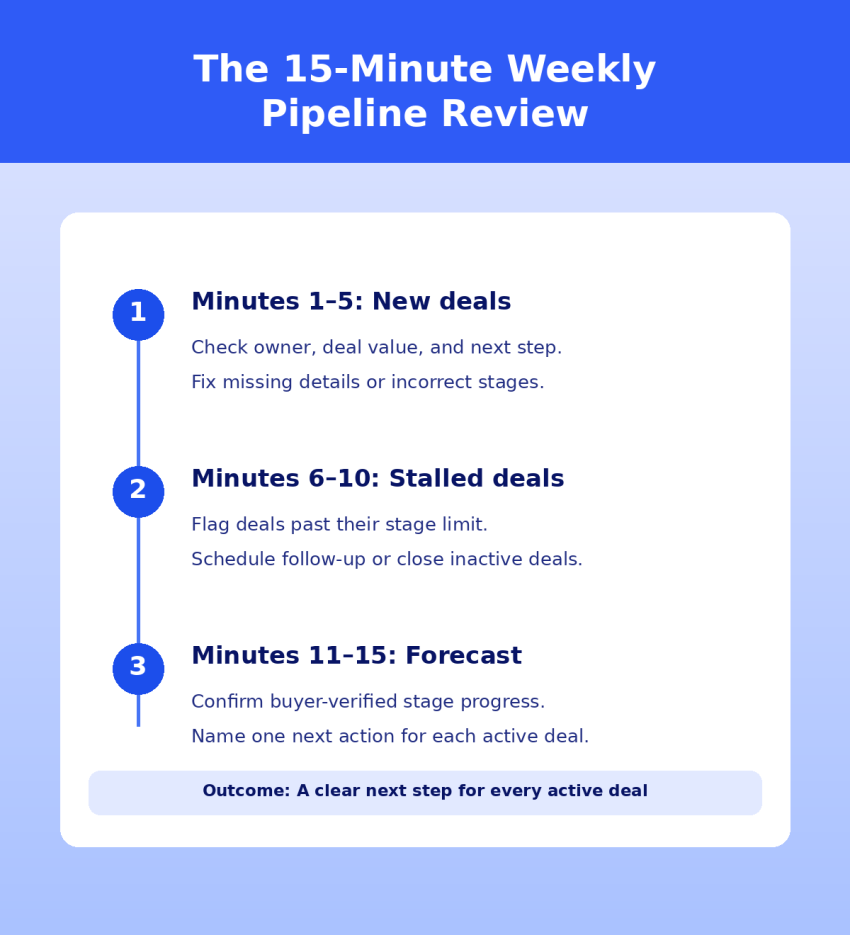
Minutes 1–5: New deals
Does each one have an owner, a value, and a next step on the calendar? If not, fix it now. This phase is also where you catch data quality issues early, like deals missing a close date or sitting in the wrong stage.
Minutes 6–10: Stalled deals
Anything past its stage limit (one and a half times the average) gets a decision attempt this week or is closed. Carrying stalled deals corrupts your forecast and takes up mental energy your team could spend on deals that are moving.
If a deal has stalled more than once, that’s a pattern worth discussing. Is the buyer genuinely interested, or is your team holding on because they don’t want to log a loss?
Minutes 11–15: This month’s forecast
Count only deals that have met their exit criteria for their current stage. For each one, name the single action that moves it forward this week. If you can’t name a specific action, likely the deal isn’t as close as you think.
Remember to keep the focus on the next actions. The goal is what happens next and when, so you don’t want a recap of how the last call went. If your team leaves the review and every rep knows exactly which deal they’re working on first, it works.
Speed and Follow-Up Keep the Pipeline Moving
You can optimize your stages, nail your velocity formula, and run a perfect weekly review, but it won’t matter if your leads are waiting multiple days for a call back. Nextiva’s Customer Patience Data Study found that about three-quarters of customers expect a phone or text response within five minutes. When they don’t get one, 56% immediately switch to another channel, and 28% abandon the business entirely.
If you have a small sales team, that means your speed to lead is one of the most important and cost-effective improvements you can make. Route calls, texts, and web forms to one place with an alert, and have a response deadline in place to ensure that every new lead gets a personalized message quickly. Five minutes is a solid benchmark to aim for. Anything over 30 minutes means you’re competing with whoever the prospect called next.
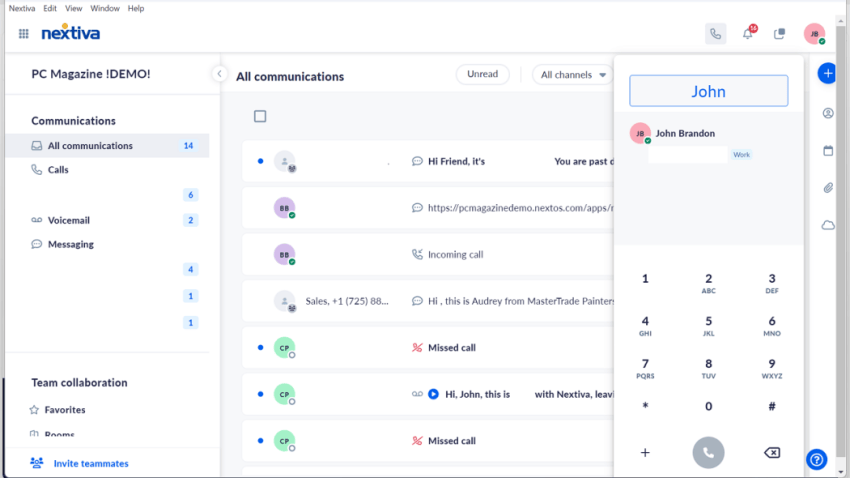
The right technology makes the process easier. A small business phone system that puts calls, texts, and voicemails in one inbox with real-time notifications makes this possible without hiring someone to watch the phone. When a potential buyer comes in through a lead generation campaign, the right person receives an immediate ping.
Automating Pipeline Updates Without a Sales Ops Hire
Salesforce’s 2024 State of Sales survey found that reps spend 70% of their time on non-selling tasks. Most of that is logging, searching, and switching between tools. For a small team without a dedicated sales ops person, this can create major operational inefficiencies that cause deals to slip through the cracks.
As a result, sales process automation can significantly improve the way small teams work. Here’s how to begin.
Log calls and texts automatically
When calls and texts run through a business phone system connected to your CRM, every customer touch lands on the deal record without manual entry. Your reps don’t have to remember to log calls made between other conversations, because the system logs them automatically.
Nextiva connects with CRMs, including Salesforce, HubSpot, and Zoho, so reps stay in one workflow instead of toggling between a phone app, a CRM tab, and a notes doc.

Set alerts and re-engagement campaigns for stalled deals
Set reminders when a deal passes its stage limit, and set automated re-engagement texts or emails for deals that go quiet. A simple “Just checking in, are you still considering [project]?” text sent at the right moment can revive a deal that would’ve otherwise been combusted.
That said, double-check your campaigns. You always want to respect consent and opt-out rules for any automated business text messaging. Getting flagged for spam is worse than losing a single deal, because it can tank your deliverability across every message you send going forward and carry fines under TCPA and state regulations.
Monitor rep activity to predict pipeline health
Outcomes tell you what happened last month, but activity tells you what’s going to happen next. Assess calls made, conversations held, and follow-ups sent on an ongoing basis to evaluate whether the pipeline is being worked. Just monitoring activity can be more effective than you might think.
Steam Logistics, a freight brokerage of about 150 people with mostly inside sales, manages over 200,000 customer conversations per month through Nextiva. Its reps often make over 100 calls a day, and Nextiva’s sales call analytics feed a leaderboard of outbound activity displayed on office TVs. That visibility into daily activity helps keep the pipeline moving.

Improve Your Sales Cycle: Run Your Pipeline From One Place With Nextiva
With exit criteria, stage limits, and automatic call logging, your forecast is more likely to be accurate, so you can avoid disappointing end-of-month surprises and missed sales targets.
You know which deals are real because the buyer took a verifiable action at each stage, and you know which ones are stalled because the system flagged them before they aged out.
Nextiva gives small sales teams the tools to run a disciplined pipeline without hiring a sales ops person:
- Business phone with VoIP that routes calls, texts, and voicemails to one inbox with real-time alerts.
- Business text messaging for follow-ups, confirmations, and re-engagement sequences.
- CRM integrations with Salesforce, HubSpot, and Zoho for automatic call and text logging
- Call analytics that track activity per rep without a spreadsheet.
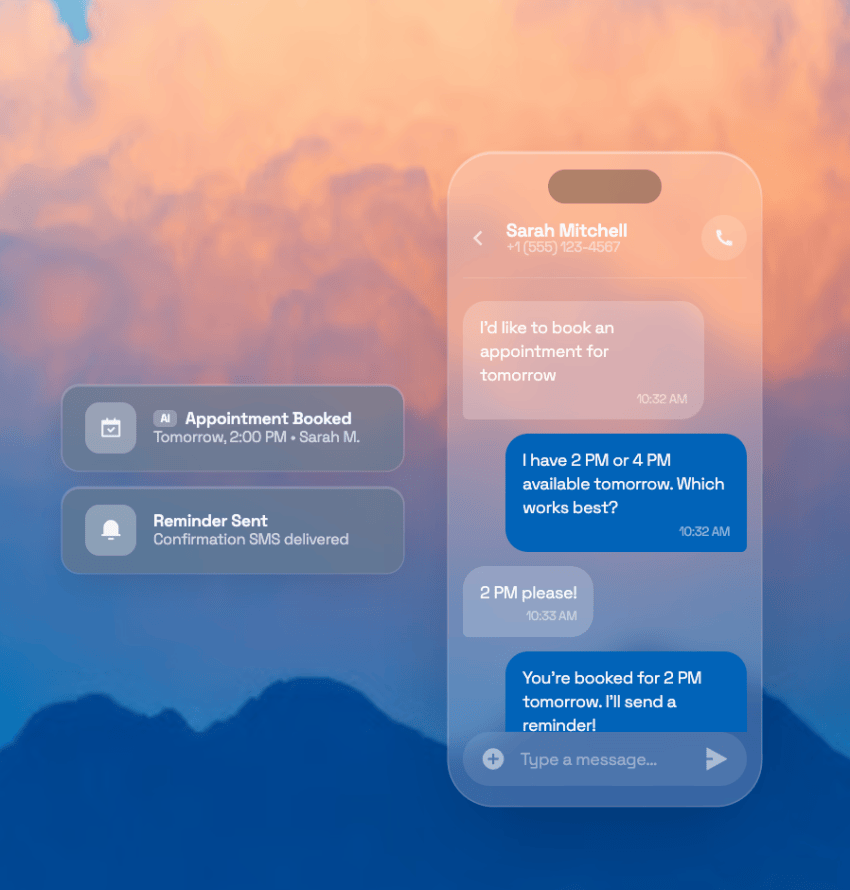
- XBert AI receptionist to catch after-hours leads and book appointments while your team is off the clock.
Your pipeline doesn’t need more stages, but it does need to be less leaky and more transparent. When every lead gets a fast response, each deal has a clear next step, and you have clear visibility into each potential contract, your forecasting accuracy can improve like never before.
Ready to run your pipeline from one platform? Learn more about Nextiva’s SMB customer management solutions.
Never miss a customer. Never lose a conversation.
Missed calls are missed revenue. XBert AI picks up every call, responds to texts, schedules appointments, and follows up — automatically. Your team gets phone, text, video, and email in one app. XBert handles the frontline.