Customer Experience
  Blog
Blog  Business Communication
  Leadership
  Marketing & Sales
  Nextiva News
  Productivity
  VoIP
VoIP 

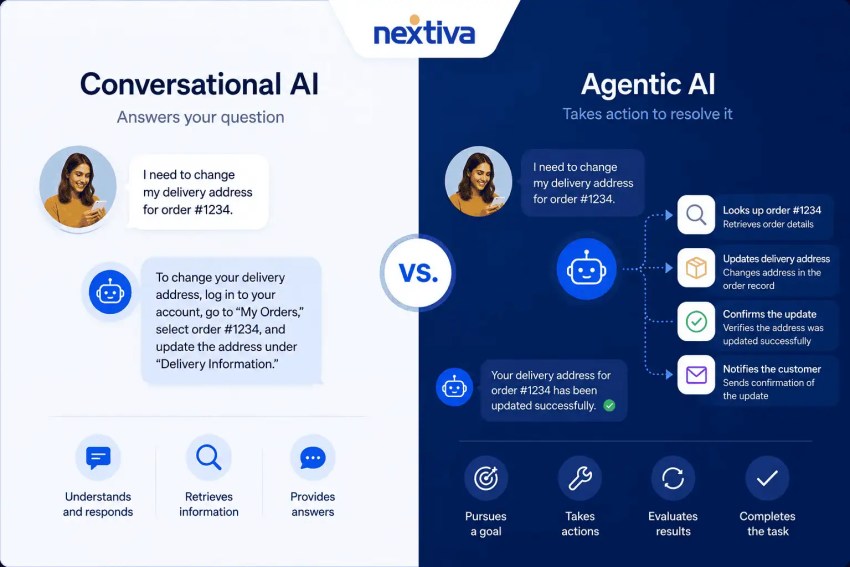
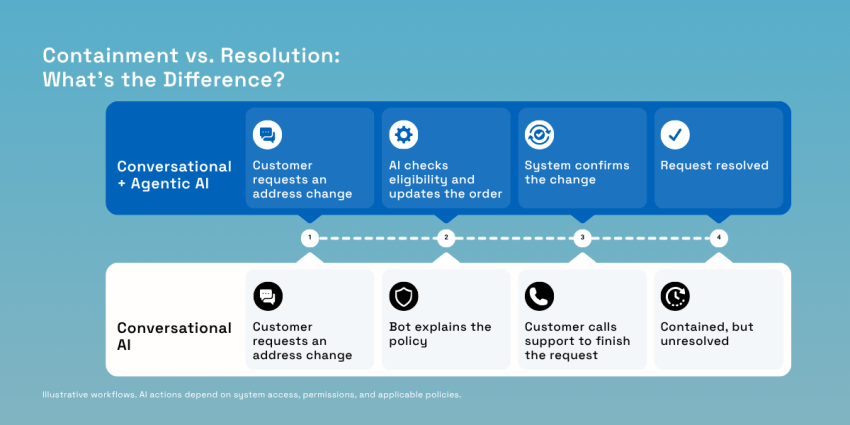
A customer calls your business and asks your bot to change a delivery address. The bot explains the policy correctly and then tells them to call support to make the change. Your bot answered the question, but your team still has to do the work.
That handoff highlights the difference between conversational and agentic AI. In this scenario, the conversational layer understands the request and responds to the customer, but it doesn’t actually have the workflow to complete it. Agentic AI can handle the next steps, like checking the order, confirming whether a change is allowed, and updating the address through connected tools. It also allows for human intervention when required.
The challenge is making those connections work. Nextiva’s Customer Experience (CX) Trends 2025 research found that 92% of companies had adopted AI to some degree, including standalone solutions or pilots. Yet CX teams still used six to seven tools on average for customer interactions. Adoption alone doesn’t give an AI agent the access or authority to resolve a request.
For support leaders evaluating agentic vs. conversational AI, the useful question is where each belongs in the customer service process. This guide explains which workflows need dialogue, which need action, and how to combine the layers.
What Conversational AI Does in Customer Service
Conversational AI helps customers explain what they need and get a useful response. For customer support chatbots, voice assistants, and virtual assistants, that means interpreting human language, keeping track of the conversation, and finding information relevant to the request.
Understanding the customer
Consider a customer who says, “Move my appointment from Tuesday to Friday … Actually, make that Thursday.”
The system needs to recognize the main intent of the customer, which is rescheduling their appointment. It must also extract the details, namely the original appointment date, the replacement date, and any account information needed to identify the booking.
These are core jobs of natural language understanding within the broader field of natural language processing. Intent recognition and entity extraction turn customer queries into structured information software can use.
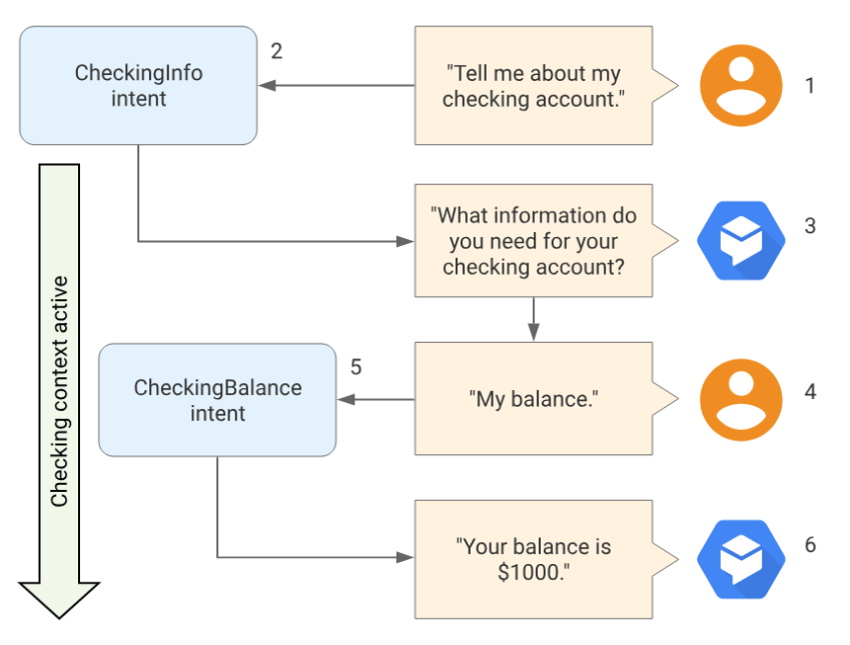
Dialogue management keeps that information organized across the interaction. If the customer changes their mind mid-sentence or asks, “What about the afternoon?” the system should read the words, retain the appointment context, and clarify what’s missing. Conversation context helps it interpret follow-up messages without making the customer repeat the entire request. Here’s an example of context in a conversation flow:
When you’re evaluating a platform, test corrections and incomplete requests alongside straightforward questions. Customers rarely talk in perfectly formatted instructions. Test everyday language alongside your internal terminology. A customer might say “stop charging me” rather than “cancel my subscription,” and the system needs to recognize when different language points to the same request.
Answering from knowledge in real time
Understanding the question is only useful if the answer comes from reliable information. Retrieval-augmented generation (RAG) connects generative AI to external sources, such as your help center, policies, and product documentation. It retrieves relevant passages and gives them to the model as context for its response. Those sources can include unstructured data, such as PDFs and written support articles.
For example, a customer asking whether an opened item qualifies for a return should receive an explanation grounded in your approved return policy. The system can phrase that information in natural language and link to the supporting document.
Start with recurring customer inquiries that have clear, documented answers. These give your team a manageable way to test whether the system provides relevant answers consistently. Keep the source material current, and require clarification or escalation when the available content doesn’t support an answer.
Review your support resources for language customers would understand. If a policy uses technical language, check that the AI can explain it clearly without changing the conditions or leaving out exceptions.
Where it stops
A conversational interface can trigger a pre-built webhook or follow a scripted workflow. It may retrieve an order status or submit a standard change request. Taking an action alone doesn’t create an agentic workflow.
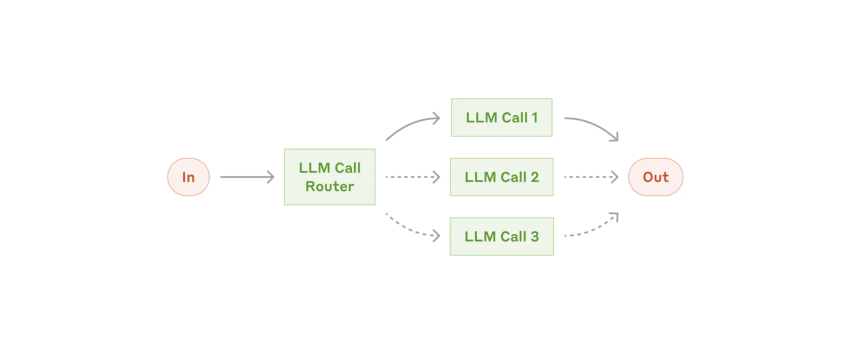
The distinction lies in the next step. Workflows follow predefined paths, while agents dynamically direct their processes and tool use. A fixed AI agent workflow can include retries and exception rules, but those responses must be designed in advance. The graphic below is an example of a workflow with predefined paths.
Say a customer qualifies for a refund under your policy, but the order system shows the item hasn’t been returned. A conversational AI system that relies on fixed scripts and knowledge retrieval can only run the checks and do the repetitive tasks it’s been set up to perform. If those checks don’t resolve the conflict, it follows a defined fallback process or passes the case to a human agent.
That boundary is where agentic execution becomes useful because you get to choose and check the steps needed to complete a request within approved limits.
What Agentic AI Does in Customer Service
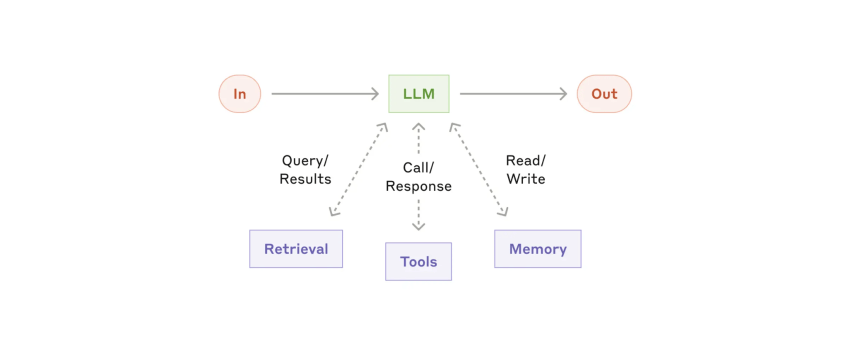
Agentic AI adds execution to the conversation. Given a customer’s goal, an AI customer service agent can choose tools, check what happened, and decide what to do next within its assigned permissions. That ability to adjust its approach is what separates an agent from a fixed sequence of automated tasks. Anthropic’s guidance on building agents describes this as using feedback from tools and the environment to assess progress. This is what an augmented large language model (LLM) looks like:
Planning the steps
If, for example, a customer says, “Cancel my renewal and refund the unused months,” the agent would follow this illustrative workflow:
- Check the account: Verify the customer’s identity, find the subscription, and confirm which cancellation and refund rules apply.
- Clarify the request: Ask whether the customer wants service to end immediately or simply wants to stop the next renewal. Confirm any effect on access before making changes.
- Carry out the approved actions: Turn off renewal, calculate any eligible refund using the billing system’s rules, and submit it if it falls within the agent’s authorization limit.
- Check the result: Confirm that the subscription changed and the refund request was accepted before telling the customer the work is complete.
Now, suppose the billing request times out. The agent shouldn’t immediately submit another refund because the first request might have succeeded despite the missing response. A well-designed workflow would check the transaction status before attempting another action. If the result remains unclear, it should pass the case and its action history to a human agent.
The useful capability is that repeated cycle of acting, checking, and adjusting. However, it still needs a stopping point when the available data or permissions aren’t enough.
Taking action across systems
Tool calling gives the agent a way to interact with connected software. In customer support, those tools can expose approved application programming interface (API) operations for reading and updating customer relationship management (CRM), billing, ticketing, and order records. The integration determines what the agent can actually do.
When evaluating an AI customer support platform, ask vendors to demonstrate complete workflows, such as:
- Issuing a refund: Check eligibility, submit an authorized amount, and record the transaction in the support ticket.
- Rebooking a cancelled appointment: Find available times, confirm the customer’s choice, and update the booking.
- Updating a subscription tier: Explain the price and access changes, obtain confirmation, and apply the approved change.
- Processing a warranty claim: Check purchase details and coverage, then create the claim or escalate missing evidence.
For complex support operations, deep integration matters because a request may cross several systems before it resolves. Ask to see what happens when one of those systems fails, as well as when everything works.
The potential is significant. Gartner predicts that by 2029, agentic AI will autonomously resolve 80% of common service issues without human intervention, reducing operational costs by 30%. These are forecasts, not current performance benchmarks or guaranteed savings. Use your own completed workflows, exceptions, and cost per resolution to judge whether a deployment is delivering value.
Dialogue vs. Action: The Architectural Comparison
Conversational and agentic AI can be thought of as two layers of the same support system. The conversational layer processes what the customer says and keeps the dialogue on track. The agentic layer works out which actions to take in real time, uses the available tools, and checks the results.
Those two layers need to share context. If a customer asks to change a delivery address, the execution layer needs the verified customer identity, order number, new address, and any required confirmation. Make those handoff requirements explicit.
An integrated platform can reduce the connections your team has to maintain. To choose the best platform for organizations, ask vendors to demonstrate how the layers share context and permissions. “Integrate seamlessly” should mean the customer doesn’t need to repeat information and the execution engine receives everything it needs to proceed.
The table below summarizes the roles described in this guide. Products can combine both, and fixed webhooks can support predefined write actions. The architectural distinction is whether the technology’s execution follows a prescribed path or adapts its steps toward a goal.
| Criteria | Conversational AI | Agentic AI |
|---|---|---|
| Primary job | Understand and respond | Plan and complete the task |
| Trigger | A customer message or call | A goal, often handed over by the conversational layer |
| Logic | Intents, scripts, and RAG answers | Multistep reasoning that adapts when a step fails |
| System access | Read-only knowledge and fixed webhooks | Read and write across CRM, billing, and ticketing |
| Typical output | An answer or a routed contact | A completed change, such as a refund, rebooking, or update |
| Main risk | Wrong or outdated answers | Wrong actions in a live system |
| Success metric | Containment | Resolution |
Guardrails and human escalation
Once AI can change customer records, you need clear rules about what it may do and who takes over when it reaches a limit. Before launch, agree on four controls:
- Approval thresholds: Set a refund limit, for example, that requires human approval for transactions above that amount. Enforce that limit in the connected tool or service.
- Scoped permissions: Give each tool only the access its task requires. Permission to read billing history shouldn’t automatically allow changes to payment details because this can hurt your compliance.
- Audit trails: Record the request, tool calls, approvals, and results so your team can trace what changed, investigate mistakes, and enhance the workflow. Ask for transparency to trace a change from the customer’s request through each integrated tool involved.
- Escalation paths: Name the team responsible for complex cases. Give the receiving agent the conversation, completed actions, and unresolved steps.
Pinpoint exactly where people enter the process for a more efficient response. With human-in-the-loop oversight, a person approves a proposed action before execution. With human-on-the-loop oversight, a person monitors activity and can intervene at any point. If your policy requires human approval, monitoring alone won’t be enough.
Use the NIST AI Risk Management Framework as a neutral reference when defining responsibilities, evaluating risks, and reviewing controls. It provides voluntary guidance for managing artificial intelligence throughout its lifecycle.
Check the platform foundation, too. Nextiva publishes proven uptime, SOC 2 attestation, PCI DSS support for payment environments, and HIPAA-compliant plans with signed business associate agreements. Confirm the applicable coverage and configuration for your contact center solution deployment, especially since platform credentials don’t replace controls on individual AI actions.
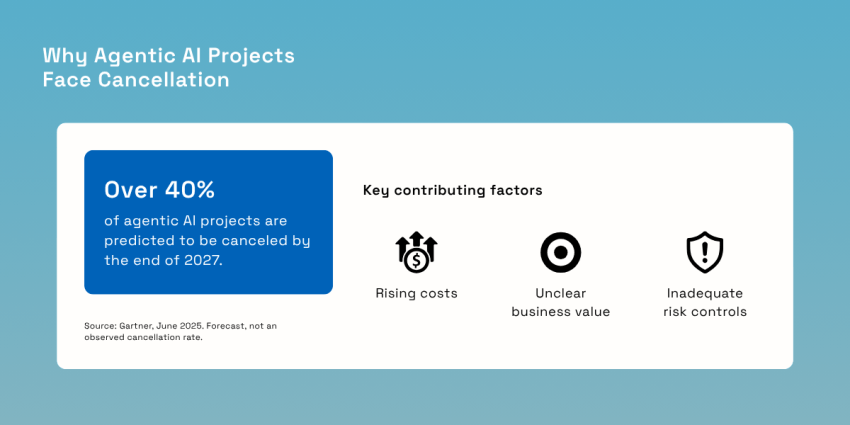
There’s a business reason to start narrowly. Gartner predicts that over 40% of agentic AI projects will be canceled by the end of 2027, citing rising costs, unclear business value, or inadequate risk controls. Treat that forecast as a reason to prove one bounded workflow before expanding its authority.
Containment vs. Resolution: The Metrics That Matter
Containment and resolution are different actions for bots.
Here’s a sample scenario: A customer asks your chatbot to change a delivery address. The bot explains the policy, and the conversation ends without a transfer. Ten minutes later, the customer calls your team to make the change. If your dashboard measures containment at the chat-session level, that interaction can count as contained because the subsequent call to the support team registers as a separate contact.
Containment measures whether a contact was handled without human intervention. Resolution measures whether the problem was fixed. Use the following definitions when comparing platforms, and ask vendors how they identify a successful outcome.
| Metric | What it measures | What it misses |
|---|---|---|
| Containment rate | Share of contacts that end without human involvement | Whether the problem was solved |
| Autonomous resolution rate | Share of issues fully completed by AI, with no human touch | Customer sentiment about the experience |
| First contact resolution | Issues solved in a single interaction | Which layer (bot or agent) did the work |
| Repeat contact rate | Customers who come back on the same issue within a set window | Nothing, which is why it exposes inflated containment |
Define what counts as a completed task before classifying a request as resolved. For a refund, distinguish between submitting the request, having it accepted, and the money reaching the customer. For a rebooking, check that the new appointment exists and the old one has been released. An AI agent saying “You’re all set” isn’t enough since the connected system needs to confirm the outcome.
Apply that same scrutiny to repeat contacts. Choose a review window that reflects how long the process typically takes to resolve. Connect phone, chat, and email records so you can identify customers returning about the same issue.
Don’t assume silence means success, either. Review a sample of interactions marked as resolved. Check whether the requested change happened, whether the customer understood what would happen next, and whether a human agent quietly corrected the AI’s work afterward. Record any manual intervention rather than leaving the case classified as an autonomous resolution.
Speed adds another layer. Nextiva’s Customer Patience study, based on 400 US consumers, found that respondents expect phone, SMS, or ticket responses within five minutes and web chat replies in about 60 seconds. After a missed response window, 56% immediately try another support channel, while 28% abandon the product or service.
To understand what’s driving your resolution rate and your customer service metrics, track four operational measures:
- Action accuracy: Did the AI change the correct record, use the right amount, and follow policy? Include reversals and corrections. A successful API response confirms that a tool accepted the request, not that the request was appropriate.
- API latency: How long do connected tools take to respond? Look beyond average response times to identify slow requests and timeouts. Record whether delays leave the customer waiting or the agent uncertain about whether an action succeeded. During testing, watch a request move between systems in real time to see where the user would experience a delay.
- Escalation rate: Why did the system need human intervention? An approval required by policy is different from a failed integration. Separate those reasons before deciding that escalation is too high.
- Customer satisfaction score (CSAT) on AI-resolved contacts: Ask customers about cases marked complete, then compare negative feedback using transcripts and audit trails. A technically correct action may still leave a customer confused about the outcome.
Read these measures together. If escalation falls but corrections rise, investigate whether the AI has too much freedom. If resolution improves but CSAT drops, check how clearly the system explains its actions. The goal is to resolve requests with less customer effort and less rework.
How to Combine Conversational and Agentic AI
Start with the requests that you have to handle repeatedly. Where does the customer need an explanation? Where does someone have to open another system and make a change? That distinction gives you a practical starting point for combining dialogue and execution.

Use this checklist to plan the rollout:
- Give conversational AI a focused first job: Start with high-volume customer queries about business hours, policies, and order status. Check that the answers are documented, current, and available to the system. Account-specific questions also need identity checks and access to the right records. Review how conversational AI handles incomplete requests and follow-up questions before expanding its responsibilities.
- Choose two or three workflows where taking action would remove another contact: Address changes and appointment rebooking are useful candidates when eligibility rules are clear. Define what “finished” means for each. Then identify where a fixed script is sufficient and where an AI agent needs to choose its next step. The best solution is the simplest one that completes the task reliably.
- Connect the records the work depends on: Map which system owns each piece of information. Then, give the agent appropriate access to those records and test what happens when they disagree. A single view helps your team understand the customer, and reliable execution requires knowing which source to trust. Before you scale the rollout, test an integrated workflow from the initial request to the final record update, including what happens when one connection fails.
- Agree on limits and ownership before launch: Set approval thresholds, restrict tool permissions, and name the person or team responsible for exceptions. Log every action. During testing, deliberately introduce an unavailable API, a duplicate request, and a case outside policy. Check that the system stops or escalates appropriately and that the receiving human agent can see what has already happened.
- Measure completed work from day one: Record a baseline for first call resolution, repeat contacts, handling effort, and cost before the pilot starts. Include the time people spend reviewing or correcting AI actions. A workflow that appears to reduce ticket volume may simply move work into a supervisor’s queue. Expand when the evidence shows less customer effort and less rework, with customer trust intact.
For global brands, test regional policies and language differences before extending a successful pilot to another market. Keep the initial scope small enough that your team can review failures closely and improve the process.
This rollout depends on connected data. In Nextiva’s CX Trends 2025 research, 81% of CX professionals said consolidating customer data into a single system would improve customer experience. That supports evaluating one platform for both layers: The conversation and the action should draw on consistent customer context.
Emergia’s move to Nextiva Contact Center shows what a unified omnichannel operation can support at volume. Nextiva reports a 154% increase in voice-channel efficiency for the BPO. The case study shows monthly voice-channel volume for a banking client rising from 32,478 to 82,680, alongside increases across WhatsApp, SMS, and email.
The result demonstrates expanded handling capacity after consolidation, but it doesn’t isolate the impact of agentic AI. For your evaluation, separate those questions. First, can the platform coordinate your channels and records? Then, can its AI complete the selected workflows accurately enough to reduce manual intervention?
Run Both Layers on Nextiva Contact Center
If customers leave your chatbot and call to finish the same request, your team still owns the work. Focus your investment on completing those requests. Successful resolution can reduce repeat contacts and help control ticket volume in the future.
Nextiva Contact Center brings voice, chat, messaging, email, social, and video into one platform, with AI agents, virtual agents, and an AI copilot for human agents. Salesforce and HubSpot integrations, along with REST APIs, provide connections to the customer data and business systems those workflows need.
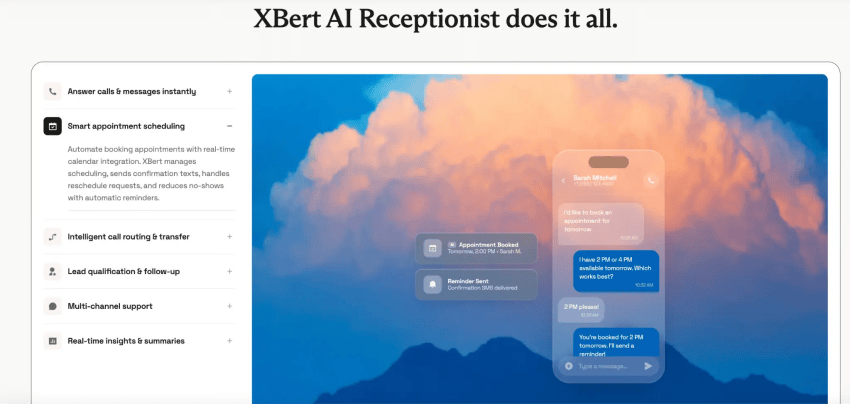
For frontline work, Nextiva’s XBert AI receptionist answers inquiries, qualifies leads, books and reschedules appointments, and supports CRM updates through connected workflows. It also transfers customers to your team with context. Define its approved scope and configure escalation for requests that need human expertise or authorization.
Bring one recurring customer request to your demo. Ask to see the conversation, the resulting record change, and the handoff when something goes wrong. That will tell you more about fit than a list of AI features.
Explore Nextiva Contact Center to connect customer conversations with the work needed to resolve them.
Your AI-Powered Contact Center
Create amazing customer experiences with AI-powered contact center software. Scalable contact center platform built for omnichannel customer conversations.