Customer Experience
  Blog
Blog  Business Communication
  Leadership
  Marketing & Sales
  Nextiva News
  Productivity
  VoIP
VoIP 

Are you expecting more from your team, but risk overloading your contact center agents?
The first step to improving performance is acknowledging that doing things the wrong way is simply wrong.
Your contact center’s performance depends on many factors: personnel, technology, processes, key performance indicators, and numerous subprocesses. Focusing on the right components at the right time and optimizing them leads to higher productivity without requiring your employees to work overtime, rush calls, or manipulate figures.
In this guide, we’ll review what you need to improve your contact center’s performance.
What Contact Center Performance Means
Contact center performance isn’t just about handling more interactions per hour. It’s about delivering consistent, high-quality resolution at a sustainable cost while keeping agents productive and engaged.
For a long time, contact center managers and directors tasked with improving customer experience have focused on time-based metrics without assessing process and technology.
Though it plays a part, we’re not necessarily talking about contact center software. It’s one thing to replace your existing solution without promised benefits and outcomes. It’s another practice entirely to map a smooth customer journey, adopt lesser-used features, and trigger continuous improvement and optimization.
We can split contact center performance into three categories: giving customers what they want, helping your center run smoothly, and keeping your call center agents productive and engaged.

Customer outcomes
- Fast access to help: Customers reach the right resource quickly through optimized routing, balanced queues, and adequate staffing, reducing wait times and customer frustration.
- Clear answers: Information provided by agents is accurate, consistent, and easy to understand, increasing customer trust and reducing the need for follow-up contact.
- Minimal repetition: Customers don’t have to restate their issue across channels or transfers as systems, notes, and context travel with the interaction.
- First call resolution (FCR): Problems are fully addressed during the initial contact, improving FCR rates, first-response time, customer satisfaction scores, and customer loyalty.
Operational outcomes
- Stable service levels and queue health: Contact volumes are forecasted accurately and managed in real time, maintaining target response times and preventing backlogs.
- Lower cost per resolution: Efficient processes, empowered agents, and effective self-service options reduce the total cost required to resolve each customer issue.
- Predictable staffing and schedule adherence: Workforce management aligns staffing to demand, improving occupancy balance and ensuring agents follow schedules without excessive shrinkage.
- Fewer escalations and less rework: Clear processes, knowledge access, and accountability reduce the need for supervisor intervention and repeat handling of the same issue.
Agent outcomes
- Low-friction workflows: Tools and systems are integrated and intuitive, minimizing clicks, manual work, and cognitive load during customer interactions.
- High confidence and knowledge access: Agents can quickly find accurate information and guidance, increasing resolution speed and reducing uncertainty on complex issues.
- Coaching that improves skills: Performance feedback is timely, specific, and actionable in agent training, helping agents strengthen communication, problem-solving, and product expertise.
- Sustainable pace that prevents burnout: Workloads, expectations, and support structures are balanced to protect agents’ well-being, reduce attrition, and maintain long-term performance.
Key Metrics That Directly Reflect Performance
Even in call center software for small businesses, tracking how your staff, queues, technology, and processes perform is vital. Knowing which metrics to select from a busy list of possibilities, however, is tricky.
Choose the most important call center metrics that match your business needs from the lists below.
Access metrics/key performance indicators
Service level and access metrics reflect how quickly and easily customers can reach support across channels:
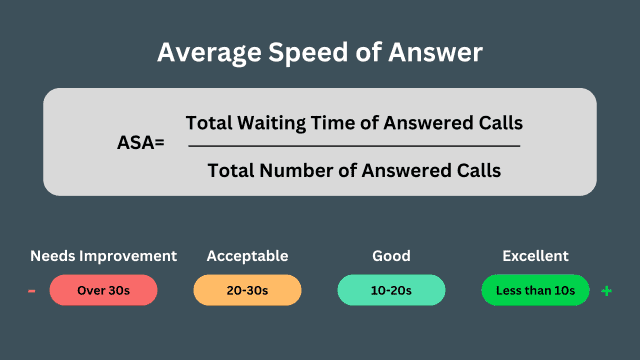
- Average speed of answer: The average time customers wait in the queue before connecting with an agent.
- Abandonment rate: The percentage of calls that disconnect before reaching an agent, often signaling long waits or friction.
- Queue time by channel: The average wait time segmented by voice, chat, email, or messaging to reveal channel-specific access gaps.
- Self-service containment rate: The percentage of inquiries fully resolved in automated systems without requiring live agent assistance, and how it reduces your call numbers and weekly call volumes.
Resolution time and quality metrics
Resolution and quality metrics measure how effectively and accurately customer issues are solved:
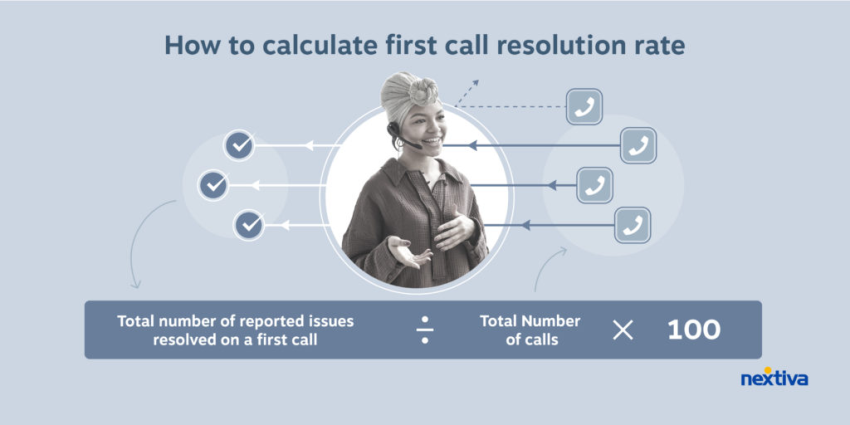
- First contact resolution: The percentage of issues resolved during the first interaction without follow-up.
- Repeat contact rate: The percentage of customers who reach out again about the same issue, indicating gaps in resolution quality.
- Escalation rate: The percentage of interactions requiring supervisor or tier-two support involvement.
- Quality assurance scores: Evaluated ratings of agent interactions based on predefined standards for accuracy, compliance, and experience.
- Customer sentiment trends: Patterns in customer tone and emotional signals over time, derived from surveys or interaction analytics.
Efficiency and staffing metrics
Efficiency and staffing metrics assess how well resources are utilized to meet demand while controlling cost:
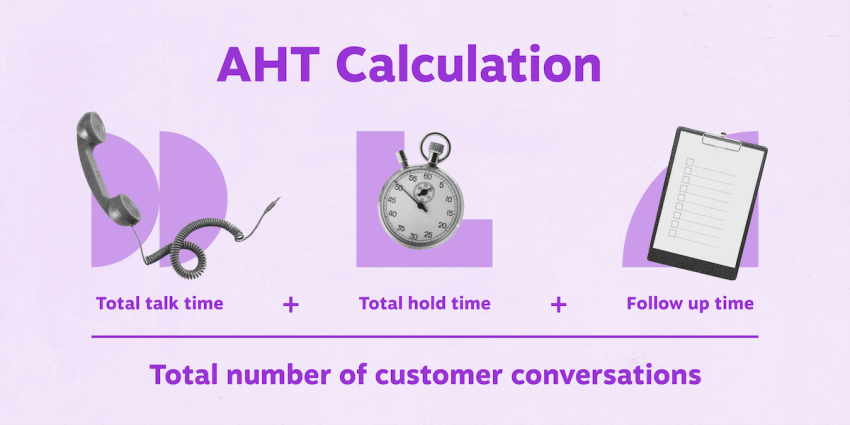
- Average handle time (AHT): The total time spent per interaction, broken into conversation, hold time, and post-call documentation.
- Occupancy: The percentage of logged-in time agents spend actively handling or wrapping up interactions.
- Schedule adherence: The degree to which agents follow their assigned schedules and planned activities.
- Shrinkage and attrition: The impact of paid time not spent handling contacts (shrinkage) and workforce turnover (attrition) on capacity.
Customer perception metrics
Customer satisfaction metrics hold the most insight into how customers feel about their experience and the effort required to get help:
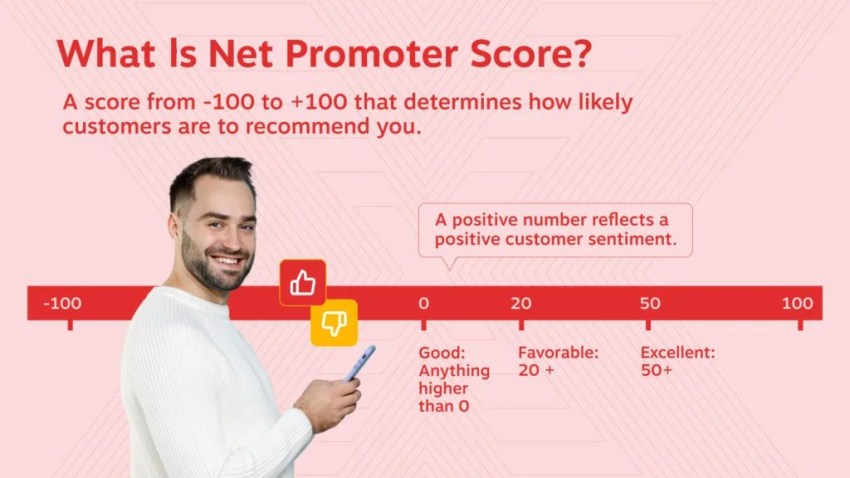
- Net Promoter Score: Your customers’ likelihood to recommend the organization, reflecting overall loyalty and brand advocacy.
- Customer effort score: How easy it was for customers to resolve their issue, closely tied to future retention and satisfaction.
- Customer lifetime value impact: The measurable effect service experiences have on retention, repeat purchases, and long-term revenue contribution.
It’s essential to look at these metrics as a balanced ecosystem. If you improve AHT but your FCR drops and repeat contacts increase, performance isn’t actually improving. You’re simply shifting today’s costs into tomorrow. Speed should never come at the expense of resolution.
Common Root Causes of Poor Performance
Poor performance is rarely an agent problem; it’s usually a system problem. When leaders analyze the root causes of slipping metrics, here’s what they typically find.
Demand is inflated by avoidable contacts
Customers call because the self-help tools can’t fully resolve their issue, leaving them frustrated. Knowledge bases are outdated and provide conflicting answers, or company policies are so unclear that customers call simply to clarify.

Agents lack context
The CRM system isn’t connected to the agents’ workstations. Agents, therefore, have to open multiple systems for each interaction, increasing cognitive load and processing time. Since the interaction history is not synchronized between phone, chat, and email, customers have to repeat their requests.
Routing isn’t aligned to skills and intent
There are too many transfers. Customers are shuffled between different support levels because overly rigid structures force constant handoffs rather than promoting problem-solving through direct customer contact. Alternatively, new employees are confronted with complex tasks too early because the transfer logic doesn’t account for their skills.
After-call work is doing too much manual labor
Agents spend hours taking lengthy notes because documentation standards are unclear. Status codes are inconsistent, which skews reporting data, and follow-up actions, such as sending a confirmation email, require manual effort instead of automation.
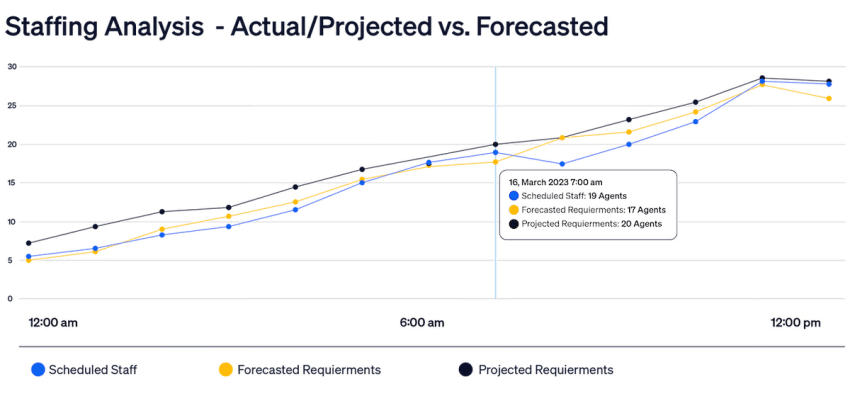
Staffing and forecasting are reactive
The contact center is overstaffed in the mornings but completely overwhelmed in the afternoons. Staff shortages on weekends lead to massive backlogs that continue during peak hours on Mondays. Adjustments throughout the day are made too late, causing service quality to plummet before supervisors can intervene.
Coaching focuses on scorecards, not behavior change
Quality assurance checks lag behind the actual interaction by weeks, rendering feedback irrelevant. Coaching sessions are generic rather than addressing specific, observable behaviors, and the tactics of top performers are never formalized into guidelines for the rest of the team.
A Step-by-Step Framework to Improve Performance
Step 1: Reduce avoidable demand with better self-service
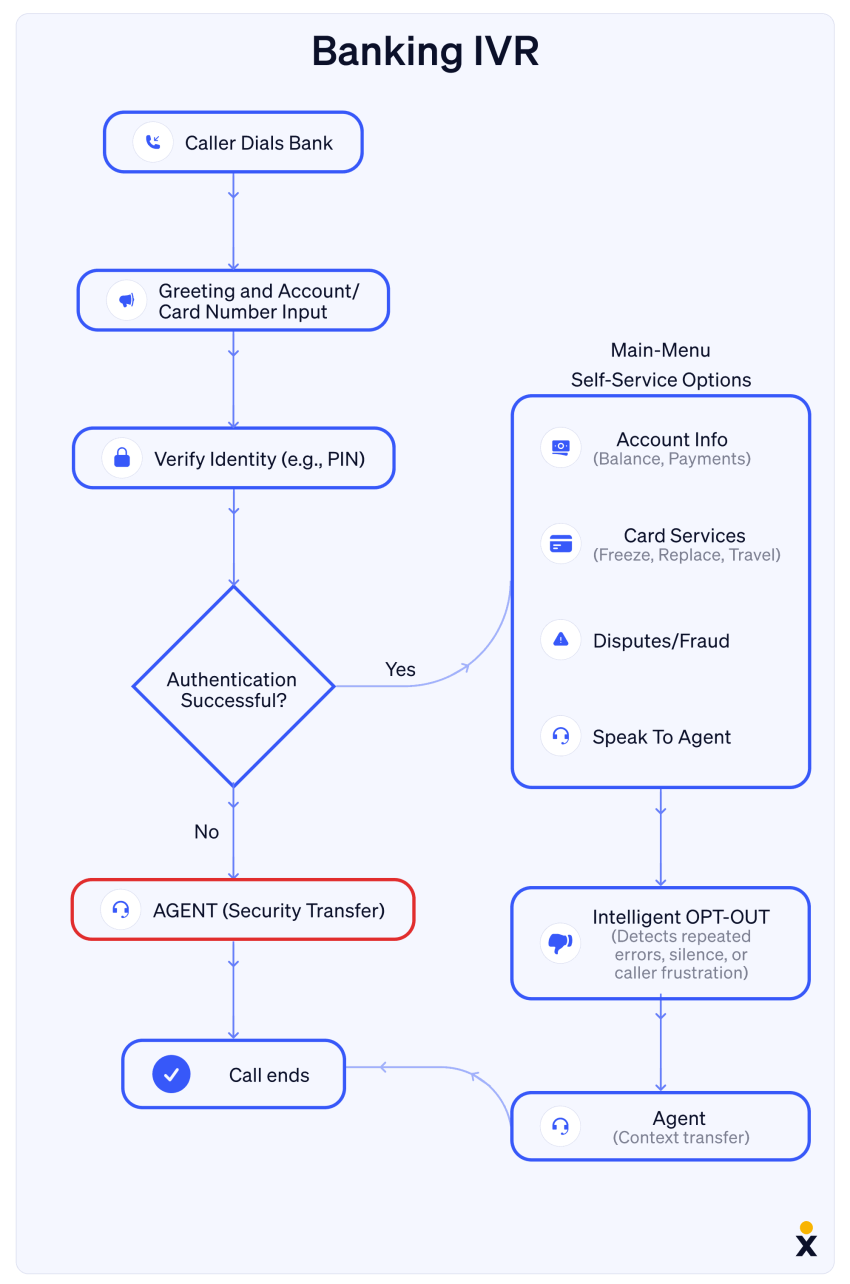
If customers can access information easily, without waiting for a human agent, they’ll jump at the opportunity. To enable this, implement the following:
- Modern IVR that routes quickly and offers a callback option
- AI-powered self-service for common questions
- Knowledge base hygiene and ownership
- Proactive outbound messages for known issues, like outages, shipping delays, and appointment reminders, so customers don’t have to reach out
Example: Your billing team reduces calls by deflecting balance and payment status requests into automated flows, freeing agents to focus on disputes and high-risk accounts. Customers press 1 for accounts, then 2 for a balance check, and get all the information they need in seconds.
Step 2: Unify channels so context follows the customer
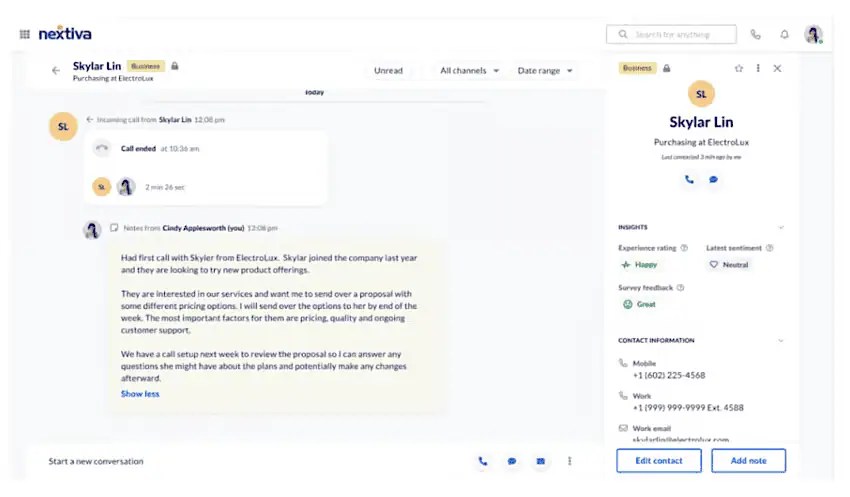
An omnichannel contact center is vital to providing a smooth customer experience, free from repeat questions and exasperated customers. Omnichannel enables:
- Faster resolution because history is visible
- Lower effort because customers do not repeat themselves
- Better prioritization because high-intent contacts surface faster
When starting your omnichannel implementation, think about these early on:
- Unified inbox for voice, SMS, chat, and email
- Consistent tagging and dispositions across channels
- Cross-channel handoff rules that preserve context

Step 3: Integrate CRM and key systems into the agent workflow
When you reduce friction between systems, you decrease the number of clicks and the time taken to complete customer interactions. When you integrate your CRM and contact center solution, you benefit from:
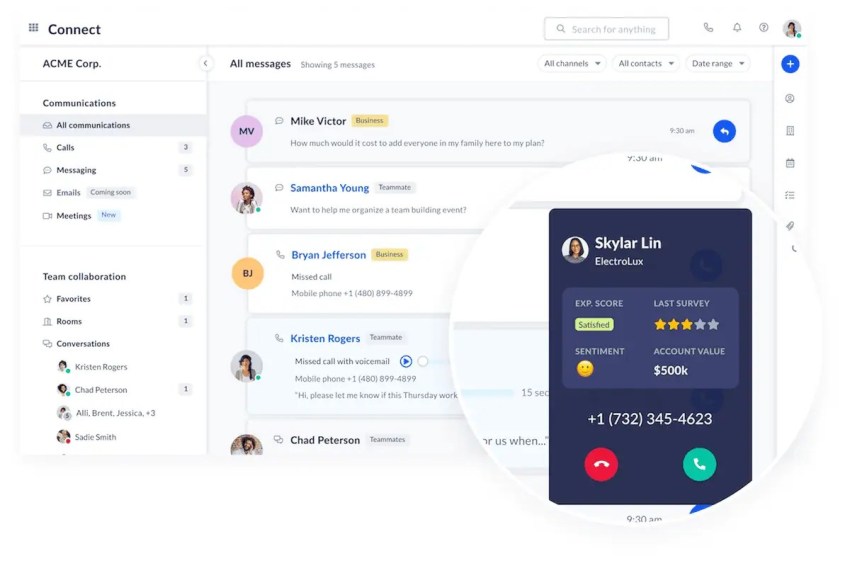
- Screen pop with customer record and last interaction summary
- Click-to-call and auto-logging
- Ticket creation and status updates without switching apps
- Knowledge suggestions based on the contact reason
The same applies here for call center managers and supervisors. They may need access to workforce management and quality assurance. If your workforce management tool is embedded into the main contact center software, they have a single platform to perform their tasks, analyze, and coach other agents.
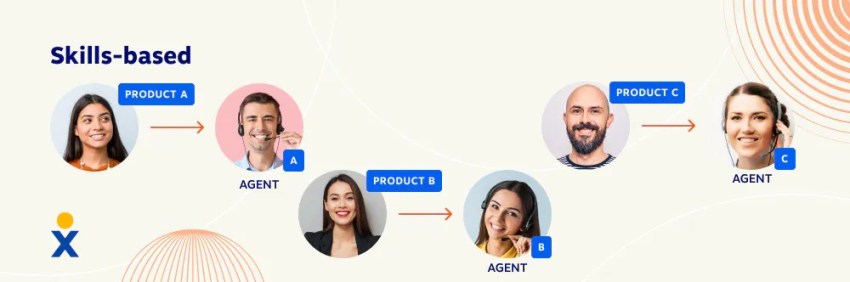
Step 4: Improve routing so the first agent is the right agent
When self-service isn’t the best option, ensure every customer reaches a qualified agent without a long queue. Calls are more than just overflowing if your AI receptionist or IVR can’t handle them, though. Consider the following when routing to an agent:
- Skills-based routing to ensure qualified agents stand the best chance of achieving FCR
- Intent-based routing using speech or interaction signals
- Priority routing for high-value customers
- Guardrails for new agents so there’s no unwanted exposure or unnecessary transfers
Step 5: Remove after call work with automation and AI
It’s not just pre- and mid-call where your team can become more productive and less prone to burnout. Post-call, there’s a wealth of automation technology available with most top-end contact center software these days:
- Auto-summaries for notes and tickets
- Suggested dispositions
- Follow-up triggers for SMS or email
- Standardized wrap-up templates
Caution: Automation should reduce manual work, not create new workflows that agents have to babysit.
Step 6: Build coaching into the daily operating rhythm
While coaching and quality assurance shouldn’t be a once-a-week or monthly event, it doesn’t mean supervisors have to spend all their time listening to calls, either. Implement the following features and processes to stay ahead of the quality curve:
- Real-time monitoring for trends
- Targeted coaching on specific behaviors
- Microlearning embedded in the agent desktop
- Recognition and career paths to retain top performers
Step 7: Use WFM to stabilize service levels
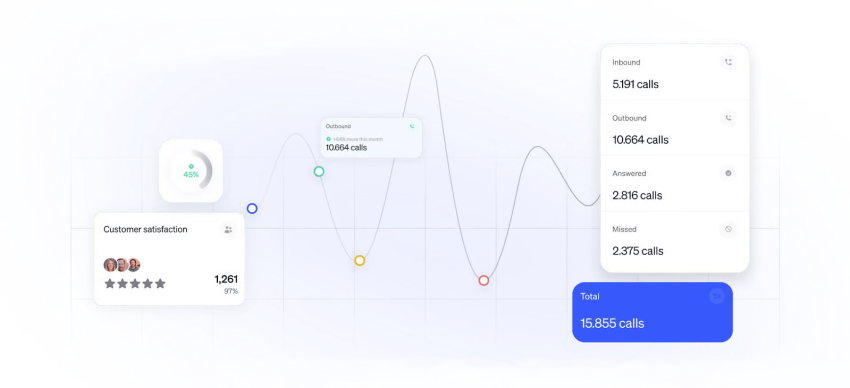
The final (or first if you’re a cautious planner) part of the performance puzzle is ensuring you always have enough — but not too many — staff in the right places at the right time. You can do this dynamically using WFM tools built into contact center platforms (like Nextiva):
- Forecasting by channel and interval
- Shrinkage planning
- Intraday management
- Schedule flexibility and shift bids
- Capacity planning for launches and seasonal spikes

Quick-Win Checklist for the First 30 Days
Week 1: Benchmark and diagnose
Tasks: Pull a baseline dashboard for ASA, abandonment rate, FCR, repeat contacts, and AHT components. Identify your top five contact reasons and the most common transfer paths.
Outcome: Provide clear visibility into performance gaps and root causes, giving you prioritized opportunities tied to measurable impact.
Week 2: Fix the biggest friction points
Tasks: Reduce app switching by implementing just one key integration or desktop improvement. Update your top ten most-viewed knowledge base articles.
Outcome: Provide faster handle times, fewer errors, and improved FCR driven by reduced agent friction and accurate answers.
Week 3: Improve routing and callbacks
Tasks: Turn on automated callback options for peak queues. Adjust your routing rules to target the top two drivers of unnecessary transfers specifically.
Outcome: Lower abandonment rates, fewer frustrated callers, and better alignment between customer intent and agent skill.
Week 4: Launch targeted coaching
Tasks: Pick a specific behavior to coach across the floor (e.g., discovery questions, empathy statements, or verification speed). Run a calibration session with QA and supervisors to ensure consistency.
Outcome: Observable behavior change that improves quality scores and ensures a consistent experience across the entire team.
Supercharge Your Performance With Nextiva
Improving contact center performance isn’t about squeezing more output from agents. That often leads to overwork and burnout. Instead, it’s about designing a system that makes great outcomes easier to deliver.
When you reduce avoidable demand, unify channels, route intelligently, and automate the work that slows agents down, performance rises in a way customers notice, and agents can sustain.
A combination of the processes outlined in this guide and the right technology to enable automation and new features is a solid foundation for contact center success.
Nextiva brings those levers together in one platform so teams can move faster with less complexity, protect service quality as they scale, and turn every interaction into a chance to build trust instead of a cost center to manage.
With Nextiva, you get:
- Single interface for voice, chat, SMS, and social media
- Integration with the back office non-contact center users
- Built-in analytics, sentiment tracking, and real-time monitoring
- Quality assurance and workforce management
- CRM integration with Salesforce, HubSpot, Dynamics, etc.
- Optional AI receptionist add-ons
👉 Want to kick-start your contact center performance journey?
See how Nextiva’s Contact Center brings teams together in a single platform here. 👇
Top-Ranked AI-Powered Contact Center Solution
Transform your customer interactions with a contact center platform that saves you time and money, reduces agent and supervisor stress, and flexibly adapts to fit your needs.