Customer Experience
  Blog
Blog  Business Communication
  Leadership
  Marketing & Sales
  Nextiva News
  Productivity
  VoIP
VoIP 

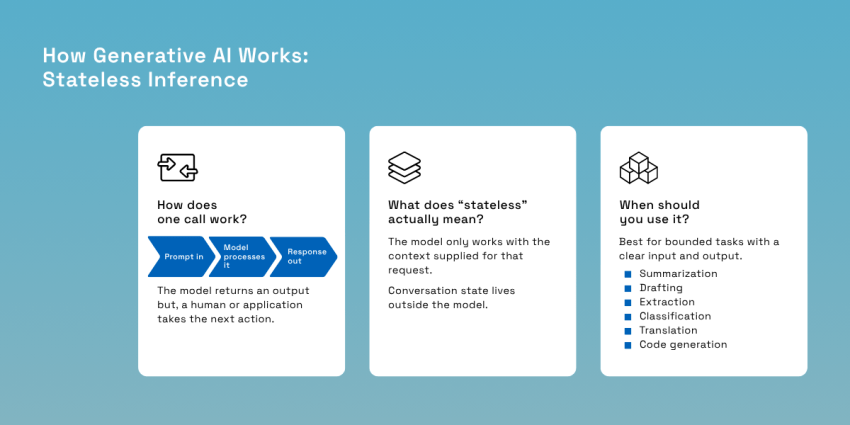
A generative artificial intelligence (AI) request is relatively straightforward. Give the model a prompt, and it runs inference, and tokens come back. The model doesn’t retain state between calls, and its response doesn’t change anything outside the application unless the surrounding code acts on it.
Agentic AI changes that architecture. Put the same model inside a control loop, give that loop state and access to tools, and one inference can determine what happens next. The system can inspect an account, call an application programming interface (API), observe the result, revise its plan, and continue until it reaches a stopping condition. That shift from producing an output to controlling an execution path is where most of the consequential differences between agentic AI and generative AI begin.
According to Gartner’s 2025 survey, 91% of 321 customer service and support leaders were under executive pressure to implement AI (from basic tools, like ChatGPT and Gemini, to more complex ones). That pressure makes the architecture choice more consequential. We’ll look at what a tool invocation looks like on the wire, including the Model Context Protocol, rather than reducing tool use to API integration; how cost and latency compound as the loop runs; and which failure modes appear only when a model can act.
The Core Difference: A Function Call Versus a Control Loop
Generative AI behaves much like a function call: you send a prompt and context, the model runs inference, and it returns generated output. Agentic AI wraps that inference step inside a control loop that can plan, call tools, inspect the result, update its state, and decide what to do next. Here’s a quick guide to determine how each type of AI tool works.
Generative AI answers “what should I produce?” while agentic AI answers “what should I do next?” and “did it work?”
Agentic AI isn’t simply a more capable generative model. The underlying reasoning engine may be the same large language model used in a conventional generative application. What changes is the surrounding architecture. A production agent typically adds several components:
- Control logic: Determines whether the system should continue, retry, stop, or request approval.
- Working state: Carries information from one step to the next.
- Tool interface: Gives the system controlled access to APIs, databases, customer relationship management systems (CRMs), payment systems, calendars, or other external tools.
- Memory and retrieval: Supplies relevant history or durable information when later steps need it.
- Guardrails: Restrict what the agent may do and where human oversight becomes mandatory.
Think about a healthcare billing dispute. A customer may need clarification on an added charge to their usual bill. A generative model can read the customer’s message and draft a response explaining the charge. An agentic system can go further by going through a process flow. It can retrieve the account, inspect recent invoices, identify a duplicate transaction, request or issue a credit according to policy, confirm the outcome, and write the resolution back to the CRM.
| Dimension | Generative AI | Agentic AI |
|---|---|---|
| Execution shape | One inference per request | Repeated inference inside a loop until a goal or stop condition is met |
| State | Stateless per call; history replayed in the prompt | Explicit state carried across steps and often across sessions |
| Interface to the world | Returns text for a human or a program to act on | Calls tools and APIs that change real systems |
| Control flow | Fixed and external; the caller decides what happens next | Dynamic and internal; the system decides its own next step |
| Cost driver | Input plus output tokens, roughly predictable per call | Steps times growing context, hard to predict before it runs |
| Latency profile | One round trip | Sum of every step plus every tool response |
| Dominant risk | Informational: a wrong or biased output | Operational: a wrong action already executed |
| Oversight model | Humans review each output | Humans set thresholds and review exceptions |
Once inference becomes recursive and the system gains autonomous decision-making, almost everything downstream changes. Token spend can compound as prior steps accumulate in context. Latency becomes the sum of several model and API round trips. Memory stops being one concept and splits into context, application state, and durable storage. Failure handling also gets harder because an incorrect decision can propagate into later steps.
Governance changes for the same reason. Hallucinations can usually be corrected before anyone acts on them. An agent with write access to a CRM, payment system, or production workflow may already have created the side effect by the time anyone notices.
How Generative AI Works: Stateless Inference
The word “stateless” can be misleading because a reactive chatbot may appear to remember a conversation perfectly well. A generative AI model, built using deep learning, doesn’t carry a durable record of what happened in the previous request on its own. For each inference, it works from the information available to it for that request.
The application around the model can save conversation history, retrieve documents, cache prompts, or maintain a conversation ID. Those features create continuity for the user, and they can pull from these data stores to enrich a current project. However, the underlying large language model still needs the relevant information represented in its current context before it can reason about it.
Agentic AI handles state differently. It helps to see exactly what happens during a conventional model call.
The prompt-in, tokens-out path
A text request goes through a fairly predictable sequence:
- Tokenization: The prompt is broken into tokens, which may be whole words, parts of words, punctuation, or other text fragments.
- Prompt processing: The model uses natural language processing to analyze the input tokens, then builds the internal representation it uses to predict what comes next.
- Autoregressive decoding: It generates an output token, then uses that token as part of the context for predicting the next one, repeating until the response is complete.
- Stop condition: Generation ends when the model reaches an end marker, a configured stop sequence, or an output-token limit.
- Response: The generated tokens are converted back into text or another requested format and returned to the application.
The last step defines an important boundary. The model can produce an email, JSON object, SQL statement, or recommendation. It hasn’t sent the email, updated the CRM, or charged a credit card. A human agent or surrounding application must take that next action.
Why “stateless” is the load-bearing word
Think of the context window as the material placed on the model’s desk for this request. It can include the current question, system instructions, previous turns, retrieved documents, and other relevant information. Once that inference is over, the information doesn’t turn into a solid memory in the system.
When a chatbot seems to recall something you said 10 messages ago, it means the application has kept that information and made it accessible again. Some APIs hide part of that plumbing behind conversation objects or response IDs, but the architectural principle doesn’t change. The conversation state lives outside the model itself.
More context also doesn’t guarantee the model will use all of it equally well. The 2024 RULER study evaluated 17 long-context LLMs across 13 tasks. Although every model in the analysis advertised a context window of at least 32K tokens, only about half maintained satisfactory performance, and performance generally declined as context length or task complexity increased.
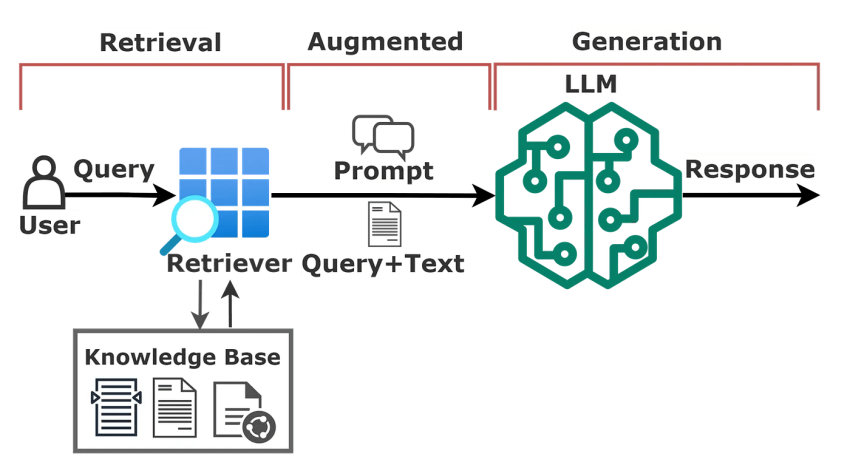
Retrieval-augmented generation (RAG) adds another source of confusion. RAG retrieves relevant information from an external corpus at inference time and places it into the model’s input. The model can then ground its answer in documents that weren’t contained in its training data.
What generative AI is genuinely best at
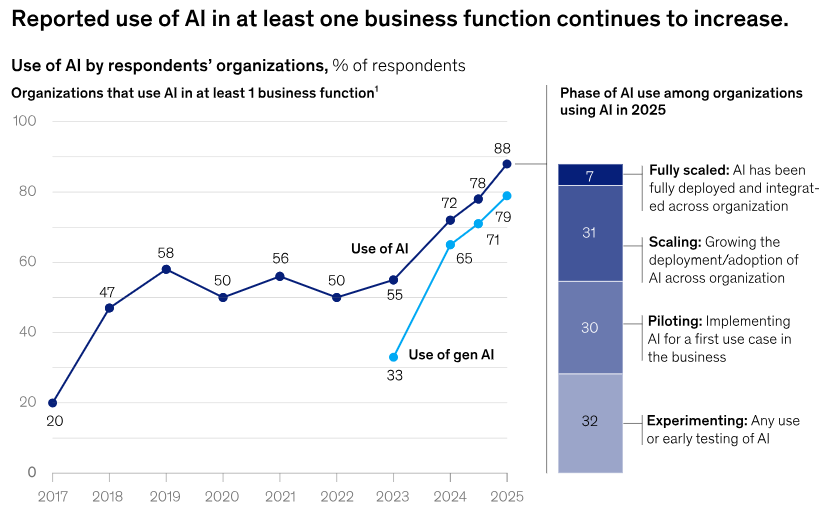
A single generative call is often the cleaner design when the job has a clear input and output. The whole problem can be placed in context; the model produces the result; and another person or system decides what happens afterward. McKinsey data highlights how most businesses have integrated generative AI into their day-to-day operations.
That covers a substantial amount of useful production work:
- Summarization: Turn a long conversation or document into a concise record.
- Drafting: Produce an email, response, article section, human resources communication, or internal note.
- Extraction: Convert unstructured text into fields, such as names, dates, issues, or intent.
- Classification: Decide whether a message concerns billing, support, sales, or another known category.
- Translation: Transform content between languages while preserving meaning.
- Code generation: Support software development by producing or revising code based on a bounded specification.
Nextiva Contact Center provides a useful example of bounded generative work. Its AI capabilities generate real-time transcripts, post-call summaries, action items, and contextual suggestions for human agents. The model does language work on the interaction, while the human agent remains responsible for customer-facing decision-making and action.
How Agentic AI Works: The Perceive, Plan, Act Loop
An AI agent is a model placed inside a loop that lets it handle multi-step tasks, take an action, inspect what happened, and decide what to do next.
At a high level, that loop looks like this:
- Perceive: Read the current goal, available context, and system state.
- Plan: Decide what needs to happen next.
- Act: Call a tool, API, or external system.
- Observe: Read the result of that action.
- Continue or stop: Decide whether the goal has been reached, and if not, start the loop again with the new information.
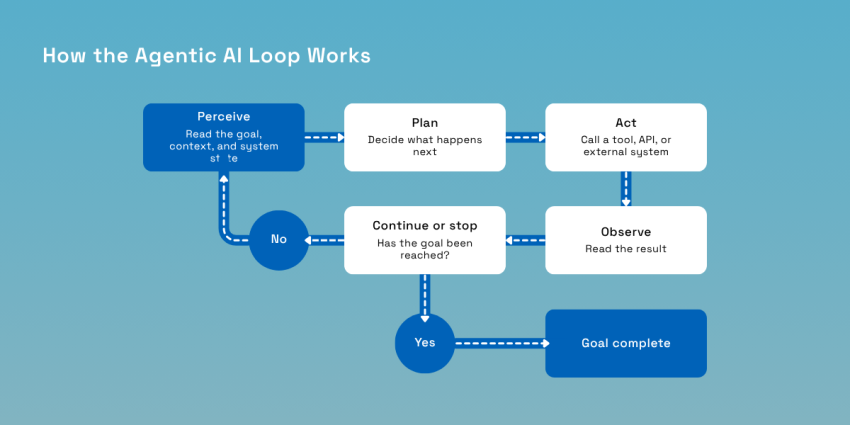
In code, the surrounding application manages this cycle. These agentic workflows turn individual model calls into systems that can work toward a larger goal. The language model chooses the next step, but the loop itself turns individual model calls into a system.
Goal decomposition and planning
Agents usually start with a goal that’s too large to complete in one model call or one tool action. The first job is to break it into smaller steps. For example, the instruction “Resolve this billing dispute” might follow this flow:
- Look up the customer’s account.
- Retrieve the last three invoices.
- Compare the charges.
- Identify the duplicate charge.
- Issue the appropriate credit.
- Confirm the resolution with the customer.
- Write a summary of the interaction with the CRM.
Each step changes the state of the task and gives the agent information it may need for the next one. There are two common ways to plan this sequence:
- Upfront planning: The agent creates most or all of the plan before taking action. This tends to be cheaper and more predictable because it may require fewer model calls.
- Step-by-step planning: The agent decides only what to do next, observes the result, and then plans again. This approach requires more interaction with the model, but it handles unexpected situations better.
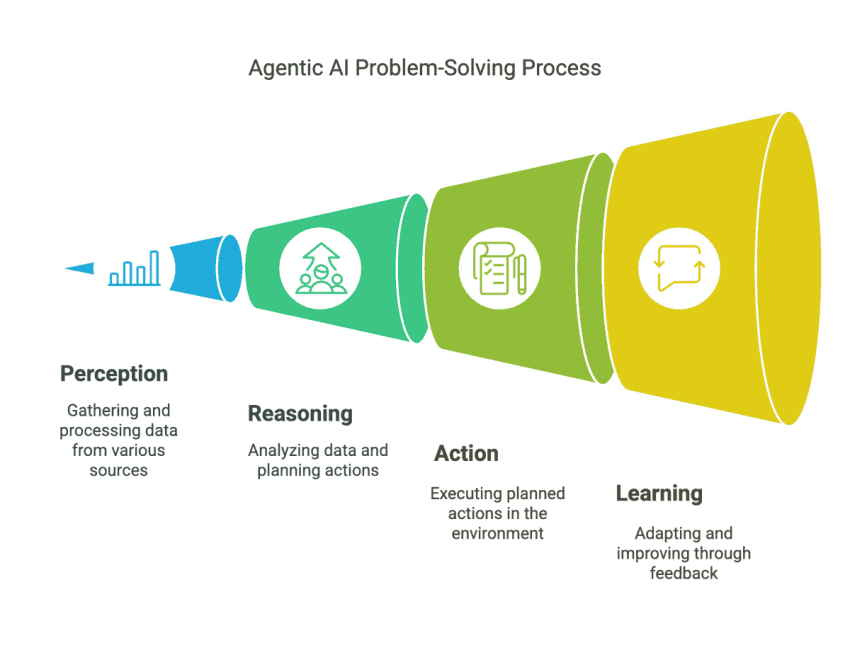
Observation and self-correction
An agent can only adjust its behavior if it can see what happened after an action. Suppose it calls a billing API to issue a $50 credit. The API might return success and issue credit. The agent can record the result and move to the next step. Or it might return an error because the credit exceeds the agent’s authorization limit. Supervisor approval is required.
That error is then included in the information given to the model on the next pass through the loop. The model now knows something it didn’t know before and can choose a different action, such as requesting approval.
That’s the basic mechanism behind what’s sometimes described as self-correction or self-healing AI. The model didn’t discover that it was mistaken all on its own. It follows a feedback path.
Without that feedback, there’s nothing to correct. The agent would continue operating with the same information it had before. This is also why tool responses need to be clear and structured. An agent that receives a specific error code and explanation has a better chance of responding appropriately.
Memory: Three different elements called one word
When discussing AI agents, memory often refers to three different elements.
1. Context window
The context window is everything the model can see during the current call: instructions, conversation history, retrieved documents, tool results, and other supplied information. This is the model’s input budget for that call.
2. Working state
Working state is the information the application carries from one step of the agent loop to the next. This information is usually stored in an ordinary application data structure and supplied whenever the model needs it. Working state is better understood as the application state, not model memory.
3. Durable memory
Durable memory survives beyond the agent’s current run. It might be stored in a database, vector store, event log, customer record, or another persistent system. An agent can retrieve that information during a future session when it becomes relevant.
Durable memory might allow a customer service AI agent to retrieve the fact that the same customer disputed a similar charge six months ago. It is the closest of these three to what people normally mean when they say a system remembers.
That makes retrieval strategy one of the most important parts of building useful agent memory. Teams often focus first on the model or prompt when deciding what to remember, when to retrieve it, and what to ignore, which can have a much larger effect on how reliably the agent behaves.
Tool Calling: What Actually Happens on the Wire
Saying an agent uses tools means the model can choose an operation and supply arguments, while the surrounding application executes it. One useful example is the Model Context Protocol (MCP), an open protocol for connecting AI applications to external tools and data. MCP is now governed under the Linux Foundation’s Agentic AI Foundation, giving it a vendor-neutral home.
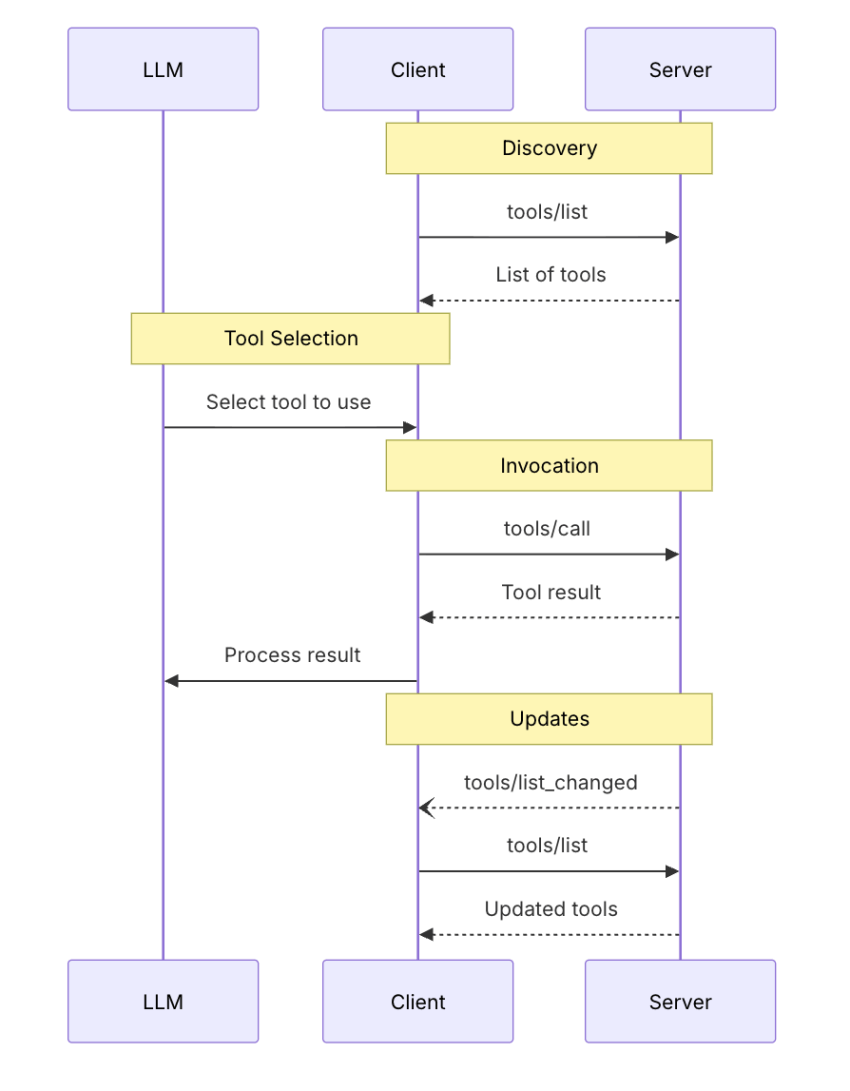
Discovery and invocation
With MCP, the client first sends a tools/list request. The server returns the available tools, including each one’s name, description, and inputSchema in JSON Schema. That schema tells the model which arguments are valid instead of forcing it to guess. Here’s a sample MCP tools/call request.
Request: The client calls the discovered tool and passes the required arguments.
{
“jsonrpc”: “2.0”,
“id”: 2,
“method”: “tools/call”,
“params”: {
“name”: “get_weather”,
“arguments”: {
“location”: “New York”
}
}
}
And here’s the corresponding response.
Response: The server returns the tool’s result and indicates whether the call produced an error.
{
“jsonrpc”: “2.0”,
“id”: 2,
“result”: {
“content”: [
{
“type”: “text”,
“text”: “Current weather in New York:\nTemperature: 72°F\n Conditions: Partly cloudy”
}
],
“isError”: false
}
}
MCP messages use JSON-RPC 2.0, and results can contain ordinary content plus structured data validated against an optional output schema.
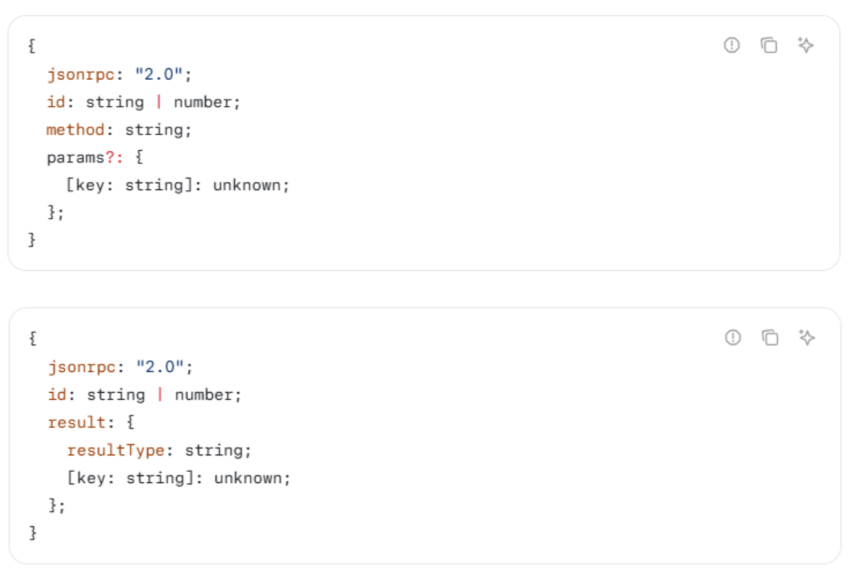
The two error classes behind self-correction
MCP separates protocol errors from tool execution errors. A protocol error means something is wrong with the request itself, such as an unknown tool or malformed request. The model is less likely to recover from these.
A tool execution error is different. It returns a normal result with isError set to true and an actionable message, such as “date must be in the future.” MCP recommends passing these errors back to the model so it can change its arguments and retry.
That’s self-correction in practical terms. Better error messages produce better retries.
Untrusted metadata and the human in the loop
Giving a model tools also introduces new cybersecurity concerns because the model can interact with external systems. MCP says clients must treat tool annotations as untrusted unless they come from a trusted server. It also recommends making exposed tools visible to users, keeping a human able to deny actions, and showing tool inputs before executing sensitive operations.
Servers have the other half of the job: validate inputs, enforce access controls, rate-limit calls, and sanitize outputs. These are baseline requirements for any serious tool layer.
When a tool call moves money
The difference between generation and execution becomes clearest with payments. A bad summary can be edited. An incorrect payment can create a refund, dispute, fraud loss, or chargeback.
This issue is already becoming a real infrastructure problem. In June 2026, Mastercard launched Agent Pay for Machines with more than 30 participating or supporting companies. Its design credentials agents, applies programmatic authorization rules and spending limits, and supports settlement across cards, accounts, and stablecoins.
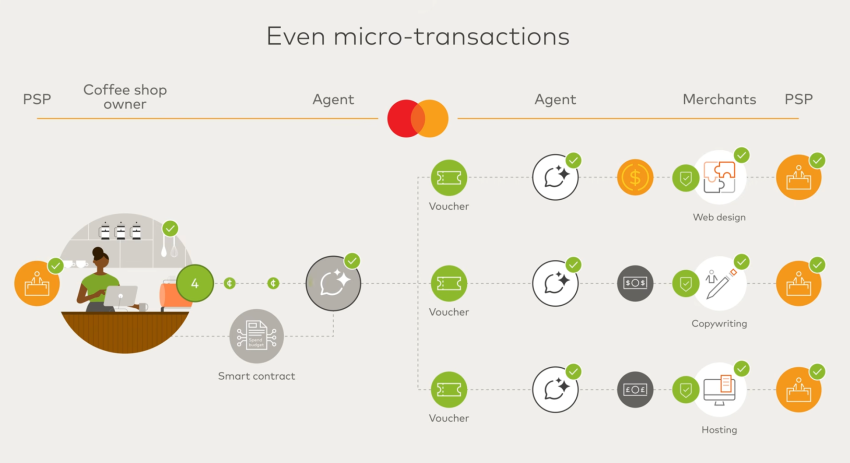
For merchants, the challenge is handling payment acceptance, settlement, fraud, and disputes when no human is present to intervene.
That’s the architectural difference between informational and operational risk. Once a tool has real-world side effects, another prompt can’t simply undo them.
The protocol is still moving
MCP itself is not settled. Applications that need state across calls can now use explicit server-created handles that the model passes back as an ordinary tool argument. That’s a useful reminder, regardless of which tool protocol ultimately dominates, to keep the tool layer behind an interface you control. A fast-changing protocol shouldn’t become inseparable from your core business logic.
Token Economics and Latency: What the Loop Costs
An agentic loop multiplies both token cost and latency, while a single model call pays for its input and output once. In multi-step workflows, earlier decisions and tool results often stay in context so each new call can be larger than the one before it. Here’s how to visualize it:
A 10-step agent might start with 2,000 input tokens, and each step adds another 500 tokens of tool results and working context. Its input grows like this:
2,000 + 2,500 + 3,000 + 3,500 + 4,000 + 4,500 + 5,000 + 5,500 + 6,000 + 6,500 = 42,500 input tokens
If each step also generates 300 output tokens:
10 x 300 = 3,000 output tokens
The full loop therefore processes 45,500 tokens. If 10 calls stayed at 2,000 input tokens, each would use only 23,000 tokens, including the same outputs. The exact cost depends on the model’s input and output token rates, but the example shows why growing context can make agentic loops compound quickly.
Latency compounds, too. Total latency is the sum of model call times and the sum of tool round-trip times. For example, if 10 sequential model calls each take 700 ms and 10 tool calls take 300 ms, the workflow already takes about 10 seconds. If one tool call takes two seconds instead of 300 ms, total latency jumps to 11.7 seconds. That added delay matters, especially in voice, where it becomes audible dead air.
You need to cap loop iterations, prune or summarize context, run independent tasks in parallel, route simple steps to smaller models, and cache tool results that won’t change during the session.
| Factor | Single generative call | Agentic loop |
|---|---|---|
| Model invocations | One | One per step, plus retries after failed tool calls |
| Context growth | Fixed at request time | Grows with every step as results accumulate |
| Cost predictability | Estimable before the call | Bounded only if you cap iterations |
| Latency | One model round trip | Sum of all model calls plus all tool round trips |
| Tail latency risk | Low | High; one slow dependency dominates the total |
| Main lever | Prompt length and output cap | Step cap, context pruning, parallelism, model routing |
Failure Modes: Informational Risk Versus Operational Risk
The core distinction is that generative failure produces a wrong answer, while an agentic failure can produce a wrong action that has already happened.
Loop pathologies
Agent feedback loops tend to fail in predictable ways:
- Oscillation: The agent moves between the same states without progressing. Fix strict iteration caps.
- No termination: The plan keeps running because success was never defined. Fix explicit stop conditions.
- Error propagation: An incorrect early assumption affects every later step. Fix checkpoints that validate state and allow the workflow automation to resume from a known-good point.
- Retry storms: A failing or rate-limited tool gets called repeatedly. Fix capped retries with exponential backoff and jitter, a standard approach for avoiding additional load on struggling dependencies.
Blast radius and reversibility
A useful design rule is to classify tools by whether their effects can be undone, then set approval requirements accordingly. The more irreversible the action, the stronger the controls should be. Give agents only the credentials and tools they need for the current task rather than broad access to an entire system.
What to log
An agent needs a complete action trail to be debugged or audited. At minimum, log:
- The original goal and every plan revision
- Every tool call, its arguments, and its result
- The model and model version used for each decision
- The final state of the workflow
Choosing Between Them: A Decision Framework
The choice between generative AI and agentic AI employees is about task structure, not which call center technology is more advanced.
Use a generative call when the task can be completed in one call and a person will review or act on the result. Think summarization, drafting, classification, extraction, or recommendations. Use autonomous agents when completing the task requires multiple sequential decisions, work across systems, tool calls, and the ability to continue without a person approving every step.
| If the task… | Use | Because |
|---|---|---|
| Fits in one call and produces text a person reviews | Generative | The loop adds cost and risk with nothing to show for it. |
| Spans several systems and needs sequential decisions | Agentic | Orchestration and state are the actual requirements. |
| Must complete with no human at each step | Agentic, with thresholds | Autonomy is the point, so the controls carry the safety |
| Has irreversible side effects | Agentic, gated on approval | Reversibility, not complexity, sets the approval bar |
| Needs a deterministic, auditable path | Traditional automation | A rules engine beats a model when the rules are known |
| Is exploratory and the steps are not known yet | Generative first, then agentic | Learn the workflow manually before automating it |
Nextiva’s customer experience 2025 research found that 92% of companies have adopted AI to some degree, but only 9% describe their adoption as mature. That gap is a reason to scope AI carefully, not rush into agentic deployments.
How Nextiva Runs Both in One Contact Center
Nextiva uses generative AI and agentic AI (multi-agent systems) for different parts of the same customer interaction.
On the generative side, Nextiva Contact Center uses AI for bounded language tasks, such as real-time agent-assist suggestions, transcription, summaries, and post-call notes. Nextiva reports a 50% reduction in agent wrap-up time with AI-powered assist and summarization.
On the agentic side, XBert can understand intent, route interactions, book or reschedule appointments, and trigger CRM workflows. Nextiva also supports CRM synchronization, so it writes caller details, intent, and outcomes back to the customer record.
Emergia offers a useful example at scale. The BPO increased monthly voice interactions from 32,000 to nearly 83,000 and scaled WhatsApp, SMS, and email after implementing Nextiva Contact Center. Managing that volume across channels is an orchestration challenge, not simply a model problem.
Systems must know when to use generative AI for outputs and agentic AI for actions that require the next step. Running both layers through Nextiva Contact Center also keeps them closer to the same interaction data and customer context. The best contact center AI architecture, then, isn’t generative or agentic. It uses each where its tradeoffs make sense.
Your AI-Powered Contact Center
Create amazing customer experiences with Nextiva’s AI-powered contact center software (Gen AI & Agentic AI). Scalable contact center platform built for omnichannel customer conversations.