Customer Experience
  Blog
Blog  Business Communication
  Leadership
  Marketing & Sales
  Nextiva News
  Productivity
  VoIP
VoIP 

Artificial intelligence (AI) is no longer simply a hot topic but a reality for modern contact centers. With 92% of companies having adopted AI to some degree for customer interactions, the next natural step is to track the performance of the AI tools.
Despite the high initial uptake, only 9% of companies describe their AI adoption as mature. This is partly due to a simple lack of awareness but mostly to the evolution of basic bots into sophisticated AI agents that require more nuanced tracking.
With the rise of agentic AI in customer service, traditional call center metrics aren’t enough. It’s no longer acceptable to track average handle time (AHT) and other time-based metrics. Instead, we must look to a new standard for AI agent performance metrics.
The role of AI in your business strategy in 2026 and beyond must include how these AI agents perform, whether customers are receptive to self-service, and what the impact is on your bottom line.
Operational Efficiency Metrics for AI Agents
One of the earliest business cases for AI in customer service was simple: handle more customer inquiries without proportionally increasing headcount.
While that objective remains true today, modern AI agents require more sophisticated measurement than traditional automation. Success isn’t just about handling interactions quickly. It’s about understanding how effectively AI resolves issues, protects service levels, and creates additional capacity for human agents.
When evaluating operational efficiency, three metrics stand out above the rest: containment rate, deflection rate, and speed to resolution.
Containment rate vs. deflection rate
Containment rate measures the percentage of customer interactions that are fully resolved by an AI agent without requiring escalation to a human.
Deflection rate measures the volume of customer contacts that never reach a support queue because the AI has successfully handled the request.
While similar, these metrics reveal different aspects of AI performance. A high containment rate shows that your AI can independently resolve customer issues, while a high deflection rate demonstrates that AI is successfully reducing pressure on your support operation.
The most effective AI deployments improve both. If customers continually abandon conversations and seek help through another channel, a strong deflection rate becomes meaningless. The ultimate goal is to prevent unnecessary contacts while still delivering successful outcomes.
Speed to resolution on synchronous channels
Although response speed has always been important in customer service, today’s customers have even higher expectations. According to Nextiva’s Customer Patience Benchmark, 72.3% of callers expect a response within five minutes. On web chat, 85.3% expect a response within the same timeframe.

AI agents are uniquely positioned to meet these expectations because they can engage multiple customers simultaneously without creating lengthy queues. However, instant responses alone don’t guarantee success. The metric that matters most here is speed to resolution. Customers care less about how quickly a conversation starts and more about how quickly their issue is resolved.
An AI agent that responds immediately but requires multiple clarifications or repeated escalations may create more effort than a human agent who resolves the issue efficiently from the outset.
To gain a complete picture of AI performance, track:
- Time to first response
- Time to resolution
- Escalation rate
- Number of interactions required to reach a resolution
Together, these measurements provide a more accurate assessment of customer effort and operational effectiveness than AHT alone.
The impact of AI on human agent availability
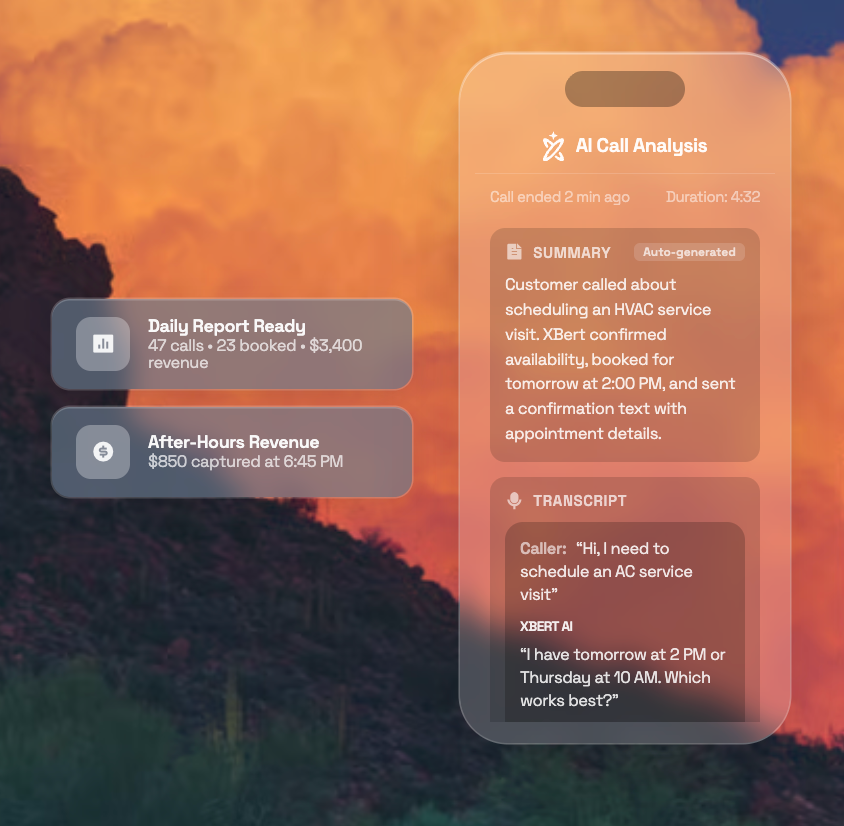
When introducing AI agents, the real win comes when you see a direct impact on human agents. As your employees no longer need to spend hours every week on menial queries and administrative tasks, they can focus on more emotive and technical queries.
As businesses continue to face labor shortages across multiple industries, AI agents provide a scalable way to absorb repetitive requests like order updates, appointment changes, account inquiries, and frequently asked questions. Solutions like Nextiva XBert help organizations manage high volumes of customer interactions while maintaining service quality.
By handling routine requests and surfacing actionable insights, AI helps improve containment and deflection rates while ensuring human agents spend their time where they deliver the greatest value.

Measuring the Customer Experience Impact
Operational improvements are only one side of the AI performance equation. An AI agent that resolves interactions quickly but frustrates customers can create long-term problems that outweigh any efficiency gains.
That’s why, when evaluating AI agent performance, customer experience metrics should sit alongside operational KPIs. By measuring customer sentiment, effort, and retention, businesses can determine whether AI is genuinely improving the customer journey or simply shifting problems elsewhere.
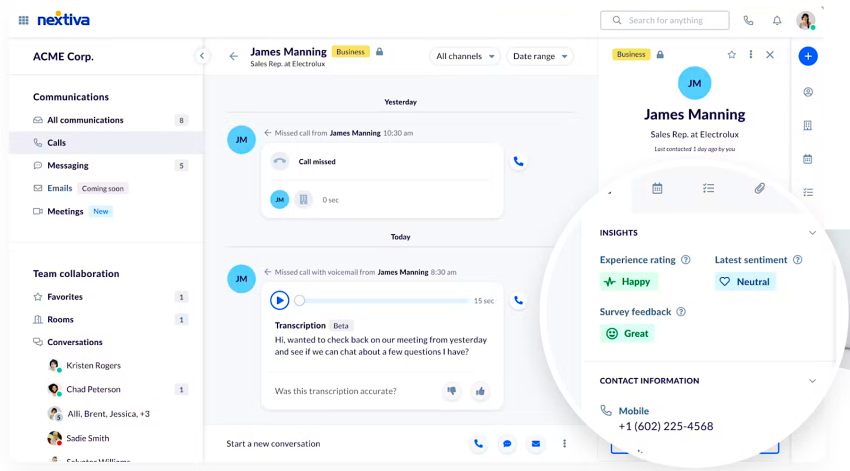
Tracking sentiment across digital and voice channels
Rather than relying solely on post-call surveys, you can assess how customers feel throughout an interaction by analyzing conversations across voice, chat, email, and social channels.
This becomes particularly important when customers move between channels. Someone might start with a chatbot, follow up via email, and then escalate to a phone call before resolving their issue. If those interactions remain disconnected, you lose valuable context and risk creating a fragmented customer experience.
With Nextiva Contact Center, you can maintain a unified customer profile across voice, chat, email, and social channels, making it easier to understand the complete customer journey rather than viewing each interaction in isolation.
How AI reduces customer friction and effort
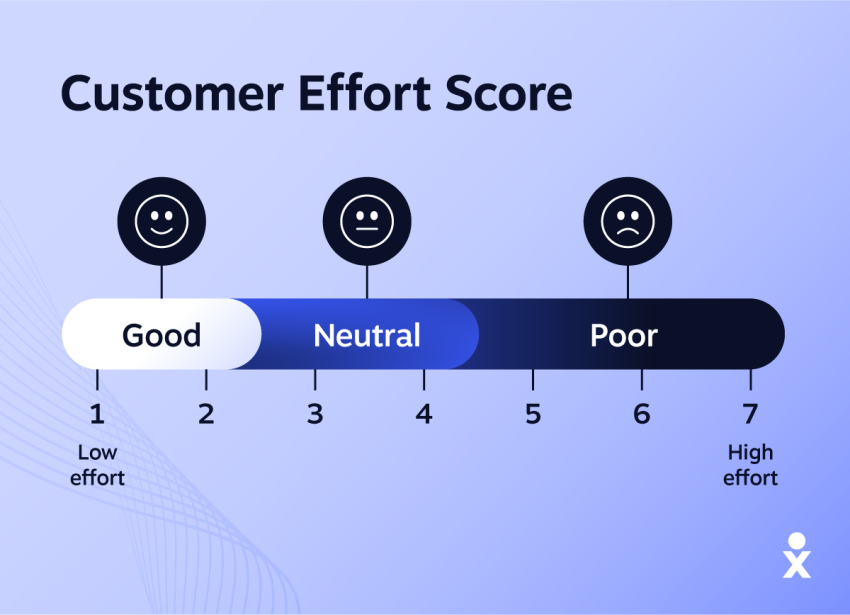
At its core, the customer effort score measures how easy it is for a customer to achieve their goal. The less effort required, the better the experience.
For AI agents, that means asking whether customers had to repeat information, switch channels unnecessarily, answer the same questions multiple times, or wait for repeated escalations before getting help.
You can also use conversation analytics to automatically identify signs of customer effort. Repeated questions, requests for clarification, and multiple transfers are all indicators that customers are working harder than they should be to resolve their issue.
The most effective AI agents reduce that friction by understanding intent quickly, retaining context throughout the interaction, and guiding customers toward a resolution without putting them through unnecessary steps.
The link between fast response and customer retention
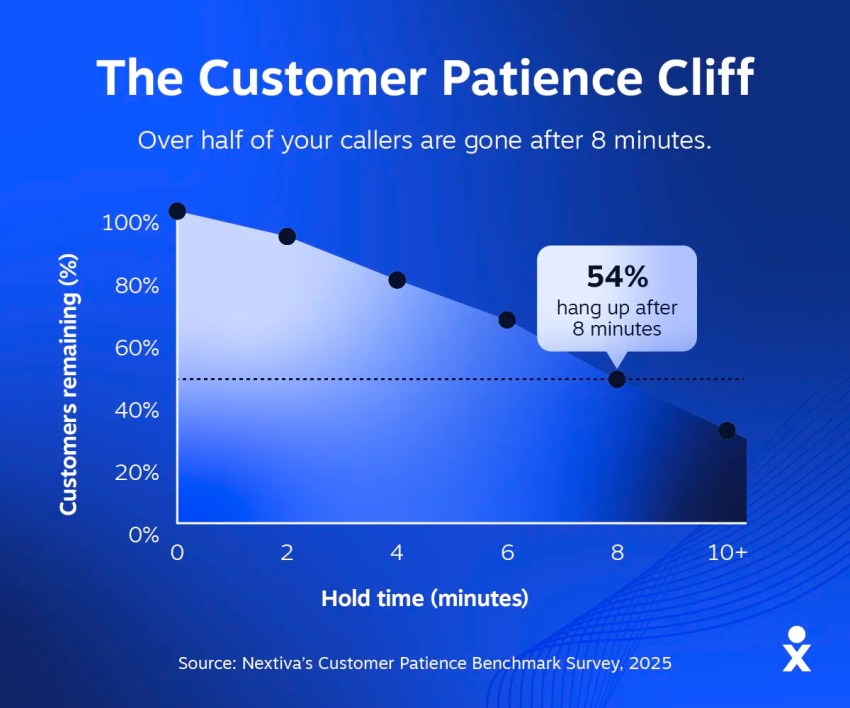
56.3% of customers will try another support channel if your response is too slow. More concerningly, 28% will stop using a product or service altogether because of slow response times. Because it has a direct impact on customer retention and revenue, it’s important to treat response speed as more than an operational metric.
AI agents help you deliver immediate engagement regardless of queue volumes, staffing levels, or time of day. But responding quickly isn’t enough on its own. Customers expect progress, not just acknowledgement. Simply sending an auto-email promising a response within a certain timeframe hasn’t been enough for well over a decade.
If your AI responds instantly but fails to move customers toward a resolution, you’ll still create frustration. However, if it reduces wait times while solving issues efficiently, you’ll improve both customer satisfaction and retention.
Therefore, when measuring AI performance, you should track response times alongside sentiment, customer effort, and retention metrics.
Quality and Reliability Metrics for Generative AI
It’s one thing for an AI agent to respond quickly. It’s another for it to respond accurately.
As you move from traditional automation to generative AI, reliability becomes one of the most important areas to measure. Unlike rule-based chatbots that follow predefined workflows, generative AI creates responses dynamically. That flexibility can improve the customer experience, but it also introduces risks around accuracy, consistency, and compliance.
That’s where reliability metrics come in.
Monitoring for hallucinations and incorrect responses
The last thing you need is for your AI agents to start creating their own version of the truth and communicating it to customers. Known as AI hallucinations, these inaccurate or entirely fabricated responses can undermine trust in your customer experience. While generative AI has become remarkably capable, it still requires oversight to ensure responses remain accurate, relevant, and aligned with your business policies.
Left unchecked, hallucinations can lead to:
- Compliance breaches
- Incorrect pricing quotes
- Appointments booked with misaligned expectations
- Inconsistent tone, style, or brand messaging
- Customer complaints and avoidable escalations
Monitoring AI-generated responses must form part of your ongoing quality assurance process. Rather than simply measuring whether an interaction was completed, you should also review whether the information provided was accurate. This can include sampling conversations, tracking correction rates, and identifying situations where human agents need to intervene because the AI provided misleading information.

The most effective way to reduce hallucinations is to ensure your AI has access to trusted, up-to-date information sources. The better your knowledge management practices, the less likely your AI is to generate unsupported answers.
Successful context transfer during human handoffs (warm handoffs)
Even the most capable AI agent can’t resolve every customer issue. When escalation becomes necessary, customers shouldn’t feel as though they’re starting the conversation from scratch. Unfortunately, this remains one of the most common frustrations in customer service. If a customer spends several minutes explaining their issue to an AI agent only to repeat the same information after being transferred, the handoff has failed.
A successful warm handoff ensures that customer context moves seamlessly from AI to a human agent. By the time the agent joins the conversation, they should already understand the customer’s history, intent, previous actions, and the reason for escalation.
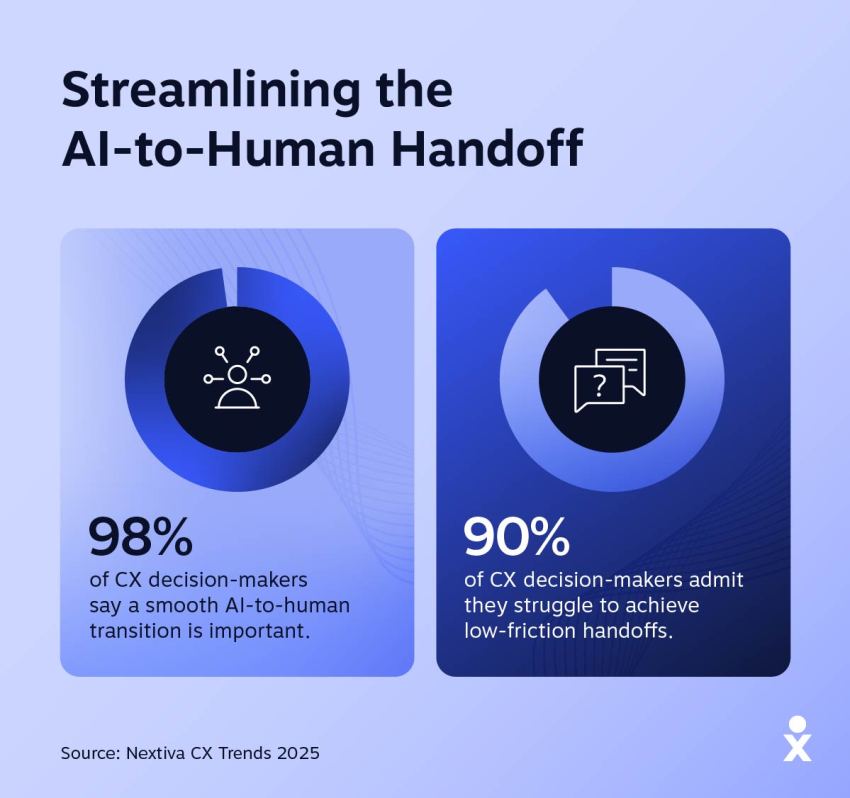
To measure handoff success, look for indicators like:
- Whether customers need to repeat information
- Whether the conversation history is transferred successfully
- Whether agents receive sufficient context before engaging
- Whether resolution rates improve following escalation
This is where AI transcription and summarization tools can make a significant difference. By automatically capturing conversation details and generating concise summaries, Nextiva Contact Center helps ensure agents have the context they need to continue the conversation without forcing customers to repeat themselves.
Grounding scores and compliance tracking
If hallucinations are the symptom, grounding is often the solution. Grounding refers to an AI agent’s ability to base its responses on verified information sources rather than relying purely on generated content. The more effectively your AI is grounded in approved documentation, product information, and knowledge bases, the more reliable its responses become.
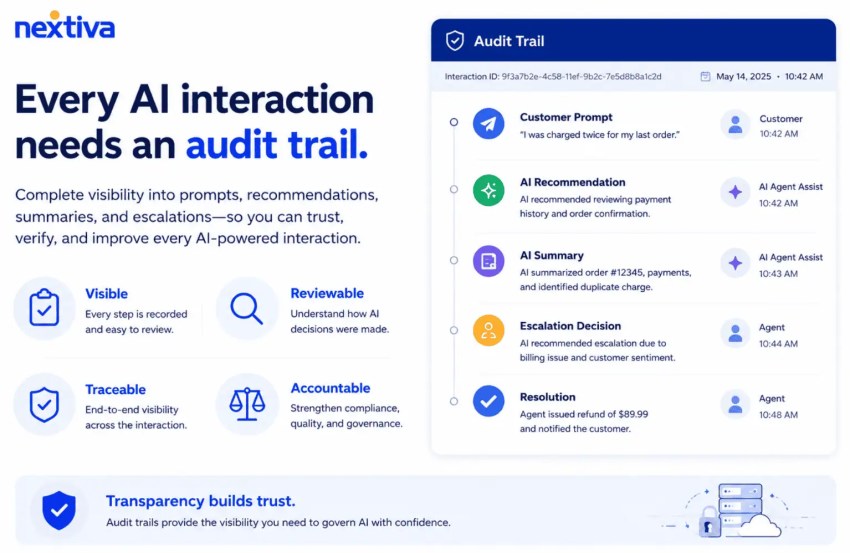
A grounding score can help you understand how consistently your AI references trusted sources when responding to customers. While the exact methodology will vary depending on your platform, the principle remains the same: responses should be based on facts you can verify.

Top Metrics for AI Customer Experience
| Metric | Why it matters | How to measure |
|---|---|---|
| Containment rate | Shows how often the AI agent completes the customer’s request without human intervention. This is one of the clearest measures of the value of automation. A high rate only matters if quality stays high. | AI-resolved conversations ÷ total AI conversations. Exclude abandoned conversations and track by intent. Pair with CSAT, sentiment, or resolution quality so the team does not optimize for containment at the customer’s expense. |
| Resolution rate | Measures whether the customer’s issue actually gets solved. An AI agent can sustain a conversation without producing the right outcome, so this metric should take precedence over simple interaction volume. | Successfully resolved conversations ÷ total eligible conversations. Define “resolved” by business outcome, such as a question answered, appointment booked, payment completed, or issue closed without repeat contact. |
| Escalation rate | Reveals where the AI agent reaches its limits and where workflows, knowledge, or integrations need improvement. Some escalations are desirable, so the goal should not always be zero. | AI conversations transferred to a human ÷ total AI conversations. Break out expected escalations from avoidable escalations and analyze the top intents that trigger transfers. |
| Time to resolution | Shows whether AI makes service faster, not just cheaper. Long conversations often signal poor reasoning, repeated questions, weak integrations, or unnecessary handoffs. | Measure the elapsed time from the customer’s first message to confirmed resolution. Track median as well as average, and compare AI-only, human-only, and AI-to-human journeys. |
| Customer effort score (CES) | Captures friction the other metrics can miss. Customers may get the right answer but still struggle through repeated questions, confusing prompts, or channel changes. | Ask customers how easy it was to complete their task, then track the score by intent and journey. Supplement CES with behavioral signals such as repeated questions, restarts, transfers, and customer information requested more than once. |
| Customer sentiment | Helps identify whether the interaction improves or worsens the customer’s experience. It is especially useful when survey response rates are low. | Score sentiment across the conversation and compare opening sentiment vs. closing sentiment. Track the percentage of negative conversations that become neutral or positive, and review sharp sentiment drops for failure patterns. |
| Incorrect response rate | Measures one of the biggest risks of AI agents: giving customers wrong or fabricated information with confidence. A low rate is essential for trust. | Responses judged materially incorrect ÷ responses audited. Use automated evaluation plus human review for high-risk intents. Separate factual errors, hallucinations, outdated information, and incorrect actions. |
| Grounding score | Shows whether the AI bases its responses on approved company information instead of unsupported model knowledge. This is a leading indicator of reliability. | Evaluate sampled responses against the source material the agent should have used. Score whether claims are supported, sources are relevant, and the response follows the approved knowledge base. |
| Handoff success rate | Determines whether the transition from AI to a human feels natural. Poor handoffs erase much of the speed and convenience AI creates. | Measure the percentage of transfers where the human receives the conversation history, customer details, intent, actions already taken, and reason for escalation. Also track how often the customer must repeat information after transfer. |
| Cost per resolved interaction | Connects AI performance to business value. Cost per interaction alone can reward cheap but ineffective automation; cost per successful resolution gives a more useful view. | Total AI operating cost ÷ successfully resolved AI-assisted conversations. Include platform, model, telephony, integration, and human escalation costs. Compare against the equivalent cost for human-only service. |
Business Impact and Return on Investment
At some point, every AI project faces the same question: Is it actually delivering business value?
That’s why measuring AI agent performance shouldn’t stop at operational efficiency or customer experience metrics. To secure long-term investment, you need to connect AI performance to measurable business outcomes.
When you can show how AI improves efficiency, increases revenue opportunities, and reduces operating costs, ROI becomes much easier to demonstrate.
AI cost per interaction vs. human labor costs
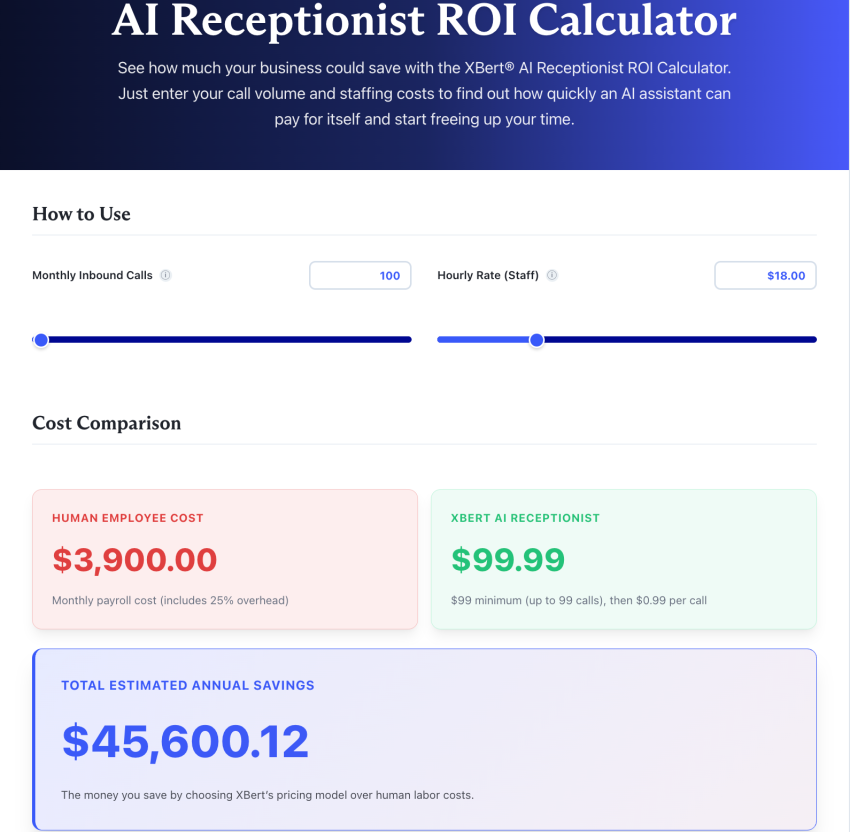
One of the simplest ways to evaluate AI ROI is to compare the cost of AI-assisted interactions with the cost of handling those same interactions through human agents. Every customer interaction has an associated cost. This includes salaries, training, benefits, management overhead, office space, and the time required to handle each enquiry.
AI changes that equation. Once deployed, AI agents can handle large volumes of routine requests simultaneously without increasing staffing requirements. Whether customers are asking about account information, appointment availability, or order updates, the cost per interaction is often significantly lower than relying exclusively on human support.
That doesn’t mean AI replaces your team. Instead, it allows your agents to focus on higher-value conversations while AI handles repetitive inquiries that would otherwise consume time and resources.
When calculating ROI, compare:
- Cost per AI interaction
- Cost per human-handled interaction
- Changes in staffing requirements
- Reductions in queue volumes
- Improvements in agent productivity
Looking at these metrics together gives you a much clearer picture of the operational savings generated by your AI investment.
See how much your business could save with the XBert® AI Receptionist ROI Calculator.
How AI supports revenue through 24/7 lead capture
The cost of a missed customer interaction isn’t always obvious. If a prospect calls outside business hours, abandons a web chat, or leaves without receiving a response, that opportunity may never return.
Unlike a traditional receptionist or contact center team, AI agents can engage customers around the clock. Whether someone contacts you at midday or midnight, they can still receive answers, schedule appointments, qualify enquiries, and advance through the buying journey.
When measuring business impact, look beyond cost savings alone. You should also track:
- Leads captured outside business hours
- Appointment bookings generated by AI
- Conversion rates following AI interactions
- Revenue attributed to AI-assisted conversations
- Missed-call reductions
How Much Do Missed Calls Cost You?
See how much lost revenue you can reclaim with Nextiva XBert® AI answering service. Compare different scenarios to grow the bottom line.
Justifying AI budgets to executive leadership
While technical metrics like containment rates and grounding scores are useful for operational teams, budget holders typically focus on outcomes. They want to understand how AI affects revenue, costs, customer retention, and overall business performance.
Rather than reporting individual metrics in isolation, connect them to broader business goals by:
- Showing how improved containment reduces support costs
- Demonstrating how faster response times improve customer retention
- Highlighting how 24/7 availability increases lead capture and revenue opportunities
The more clearly you connect AI performance to business outcomes, the easier it becomes to justify continued investment.
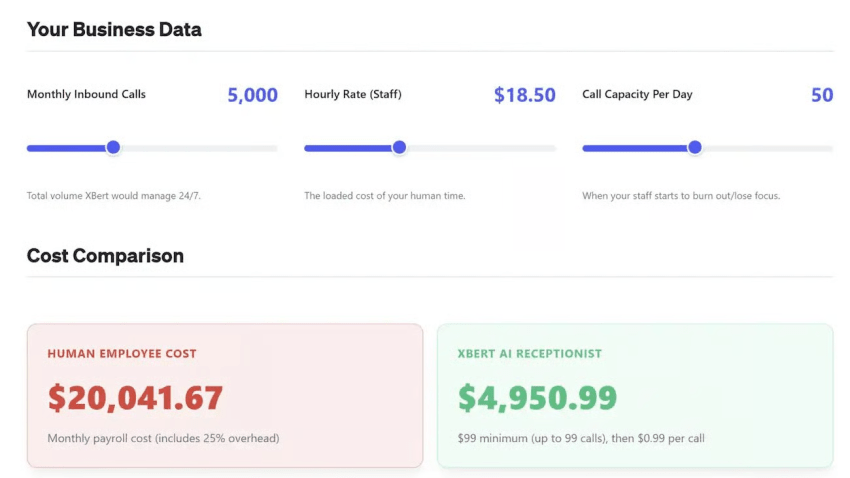
Best Practices for Setting Up AI KPI Dashboards
Measuring AI performance is one thing. Building a dashboard that helps you act on that data is another.
A common mistake is to track dozens of AI metrics without a clear understanding of what they mean or what action they should trigger. Before long, you end up with a dashboard full of numbers but very little insight.
The best AI performance dashboards combine operational, customer experience, reliability, and business metrics into a single view. This allows you to see how changes in one area affect performance elsewhere and helps you make decisions based on the complete customer journey rather than on isolated data points.
Consolidating fragmented data stacks into one system of record
Your dashboard is only as good as the data you feed into it. If customer conversations, sentiment scores, CRM records, and AI performance metrics all live in different systems, you’ll struggle to get a complete picture of what’s actually happening.
The goal should be to create a single system of record where customer interactions, AI performance data, and business outcomes can be viewed together.
This is where integrated CX data metrics become particularly valuable. Instead of reviewing AI performance in isolation, you can connect metrics like containment rates, sentiment scores, escalation rates, and revenue outcomes to the same customer journey.
Nextiva Contact Center supports this approach by providing a unified customer history across channels, making it easier to understand how AI and human interactions contribute to the overall experience.
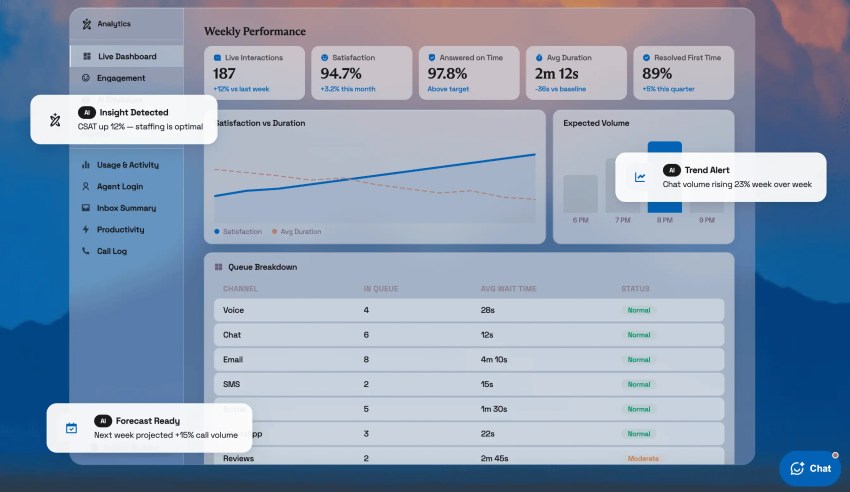
When building your dashboard, focus on metrics that answer a specific question. If a metric doesn’t influence a decision, it probably doesn’t belong on your primary dashboard.
The importance of real-time supervisor visibility
Monthly reports are useful for identifying trends. But they won’t help you solve problems happening right now, such as:
- Unusual escalation patterns
- Repeated customer complaints
- Hallucination trends
- Failed handoffs
- Compliance violations
- Profanity or abusive language
That’s why real-time AI monitoring should form part of your agentic CX strategy. Supervisors need visibility into what the AI agents are doing as interactions happen. If containment rates suddenly drop, escalations spike, or sentiment starts to decline, you want to identify the issue before it affects hundreds or thousands of customers.
Real-time monitoring can also help you spot compliance risks and conversation quality issues early. The faster you identify emerging issues, the faster you can refine workflows, update knowledge sources, or intervene before customer experience suffers.
Continuous improvement cycles based on AI performance data
As with any technology rollout, failure doesn’t tend to happen in the first few weeks. More often, it’s due to a lack of focus on continual improvement. If you stop asking how you can get better, you stop getting better. This is why your dashboard should support continuous improvement rather than simple performance reporting.
Use AI performance data to identify recurring issues, test improvements, and measure the results. For example, if you notice frequent escalations around a specific topic, you can update your knowledge base and monitor whether containment rates improve afterward. Likewise, if sentiment drops following a workflow change, you can investigate the root cause before it becomes a larger problem.
Many teams also benefit from including automated compliance scorecards, quality monitoring, and trend analysis within their dashboards. These tools help you identify coaching opportunities, knowledge gaps, and process improvements without relying entirely on manual reviews. The goal isn’t to create a dashboard that reports the past but to create one that helps improve future performance.
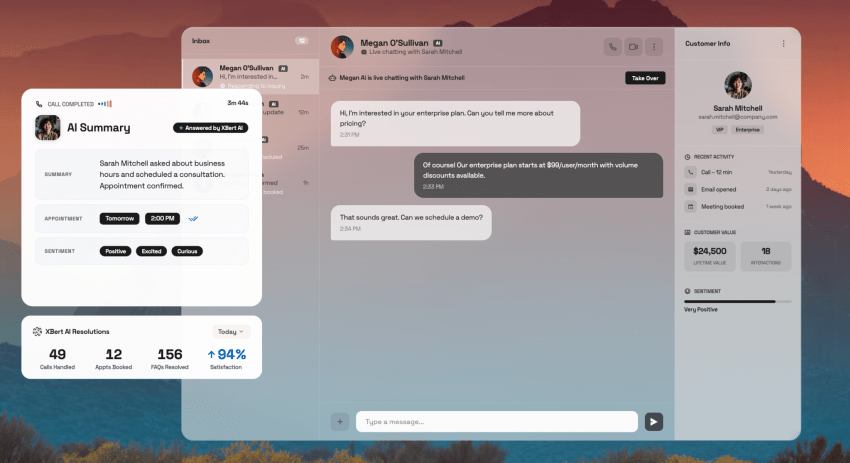
Turn AI Performance Data Into Better Customer Experiences
Measuring AI agent performance isn’t about identifying a single metric and hoping it improves. You need visibility into how AI affects operational efficiency, customer experience, reliability, and business outcomes. That means tracking everything from containment rates and customer sentiment to handoff success, grounding accuracy, and revenue impact.
The challenge is that these metrics rarely live in one place. If your customer data is spread across separate voice, chat, email, CRM, and analytics platforms, it’s difficult to understand how AI is performing across the entire customer journey. You end up spending more time connecting reports than improving outcomes.
How Nextiva Contact Center helps
Nextiva Contact Center helps solve that problem by bringing customer conversations, AI insights, workforce performance, and reporting into a single platform.
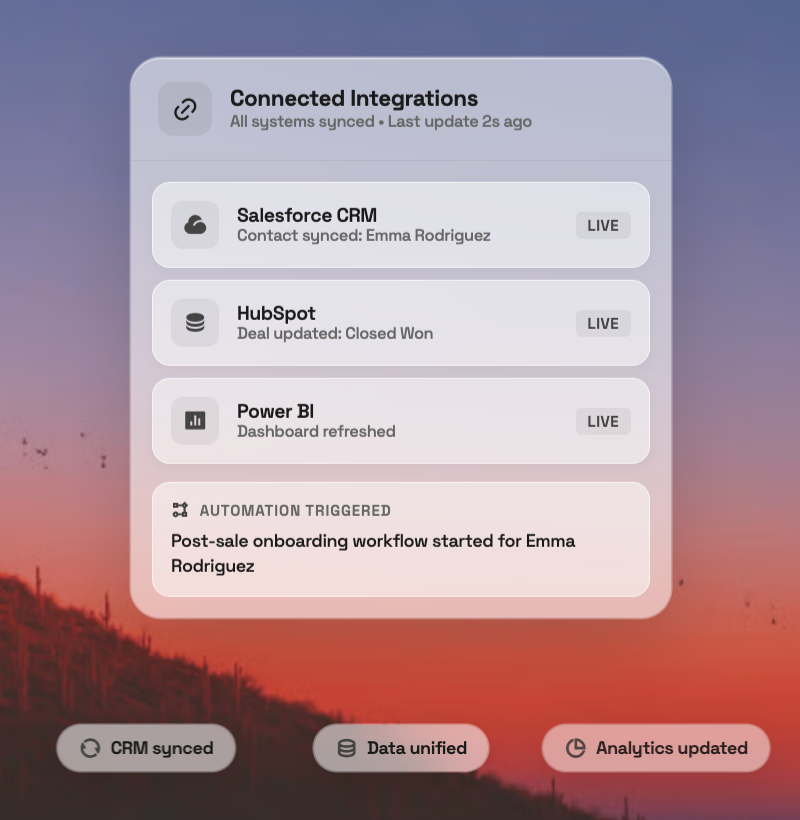
With a unified customer history across channels, built-in sentiment analysis, AI transcription and summarization, and real-time reporting, you can measure the metrics that matter without relying on disconnected tools and manual processes.
Whether you’re launching your first AI agent or refining an existing deployment, Nextiva also provides free professional setup and guided number porting to help you get started faster.
The result is a clearer view of how your AI is performing, where improvements are needed, and how those improvements affect your customers and your bottom line.
Can you prove your AI is delivering value? See how Nextiva Contact Center turns AI performance data into measurable business results.
Your AI-Powered Contact Center
Create amazing customer experiences with AI-powered contact center software. Scalable contact center platform built for omnichannel customer conversations.
Frequently Asked Questions About AI Agent Performance Metrics
The most important AI agent metric is resolution rate because it measures whether customers achieve their goal. While AHT remains useful for human agents, AI performance is better measured through successful resolutions and cost per interaction. Platforms like Nextiva Contact Center provide these metrics through built-in reporting dashboards.
A successful AI resolution occurs when the AI answers a customer’s question or completes a task without requiring an immediate transfer to a human agent. The response must be accurate and satisfy the customer’s intent. Many platforms measure this using sentiment analysis, escalation rates, and resolution outcomes.
Deflection rate: Measures how many customer inquiries are resolved without entering a human support queue.
Average time to resolution: Tracks how quickly the AI helps customers reach a successful outcome.
Customer sentiment score: Evaluates how customers feel during and after AI interactions.
Cost per interaction: Calculates the cost of each AI-handled conversation compared to alternative support channels.
Measure AI agent ROI by comparing the cost of AI software, implementation, and maintenance against savings from reduced labor costs, improved productivity, and increased customer retention. You should also account for revenue generated through faster responses, improved service levels, and 24/7 customer availability.