Business Communication
  Blog
Blog  Customer Experience
  Leadership
  Marketing & Sales
  Nextiva News
  Productivity
  VoIP
VoIP 

A new store manager signs up for their carrier contract because nobody told them not to, records a custom hold message that sounds nothing like the other locations, or starts texting customers from a personal phone number. When you multiply those discrepancies across multiple sites, your brand can end up sounding like 20 different companies before you know it.
Nextiva’s CX Trends research found that companies use an average of 6.3 tools for customer interactions, and 86% of multi-tool companies report siloed customer data. Across multiple locations, disconnected systems can make it harder to maintain consistent service and see where customers need help.
This guide covers two jobs: keeping customer-facing communication consistent across locations and connecting headquarters, regional managers, and frontline staff. The operating principle is central control with local presence. Headquarters sets standards and oversees the system; each location retains its number, hours, greeting, and staff routing.
Why Multi-Location Communication Breaks as You Grow
Communication becomes harder to manage when each location chooses its own tools without shared standards or reporting. Separate carrier contracts and bills are the first signs of a broken system. Other signs include:
- Greetings and holiday messages become inconsistent with no central place to update them.
- Busy locations ring out to voicemail while nearby stores sit idle with capacity to spare.
- Employees transfer calls between locations, lose customer context, and force callers to start over due to separate phone systems.
- Regional managers lose visibility into missed calls, wait times, and response rates.
The cost of fragmentation shows up in customer behavior.
Nextiva’s Customer Patience Benchmark found that customers expect phone and SMS responses within five minutes, and when that window closes, 56% immediately try another channel, while 28% abandon the product or service entirely after a missed response. Those aren’t complaints you hear about; they’re customers who simply disappear.
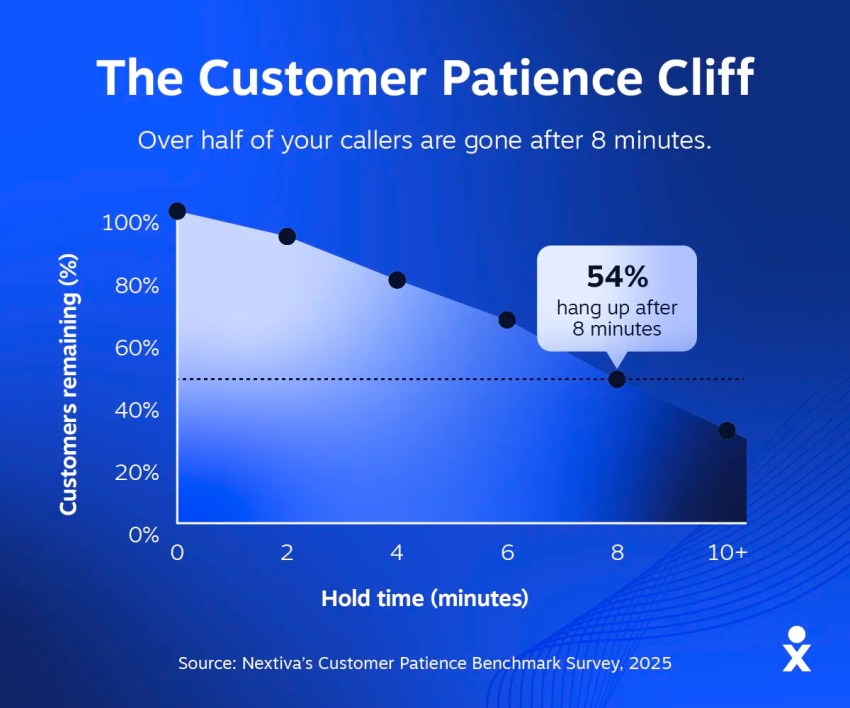
Picture a customer calling your busiest store while employees are serving people at the counter. A nearby location has capacity, but the call never reaches it. The customer stops calling, and headquarters has no record of the missed opportunity.
A multi-location system should make that failure visible and direct the call to a location that can help.
Core Components of a Multi-Location Communication System
A multi-location phone system needs to balance centralized management with local flexibility, and the best platforms handle both without forcing a trade-off.
Central administration with local routing
The foundation is a single admin portal for every site, where you can add users, change routing, and update hours from one place without logging into separate systems for each location. Central control doesn’t mean cookie-cutter, though; each location still gets its own call flow, so a holiday closure in one state doesn’t accidentally reroute every store in the system.
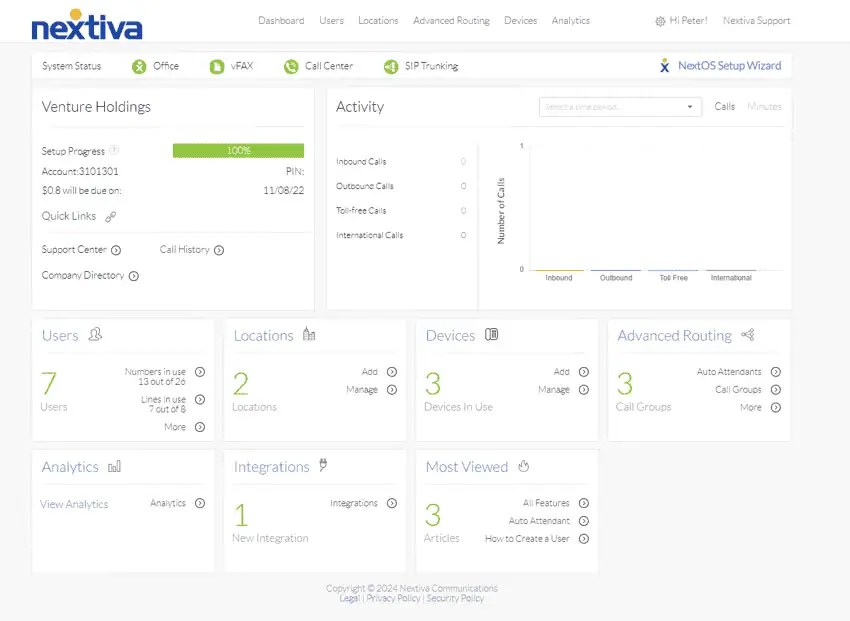
Define permissions before rollout. Headquarters should control account security, routing templates, reporting standards, and approval rules. Local managers can maintain control over details such as business hours and greetings within those boundaries.
Decide which changes require approval, and keep an audit trail showing who changed what. Assign responsibility for emergency-location records separately, with a review whenever a site opens or a device moves.
Local numbers and caller ID for every location
Customers call the local number on the Google listing and the storefront sign because they expect a local presence, which means you need to keep each location’s number (ported where possible) and show it on outbound calls so customers recognize who’s calling them back.
During the pilot, place outbound calls from each location and check which number appears. Confirm that callbacks reach the correct site and that the number matches its published contact details. Central administration should preserve that local identity.
Visual call flows, hours, and overflow
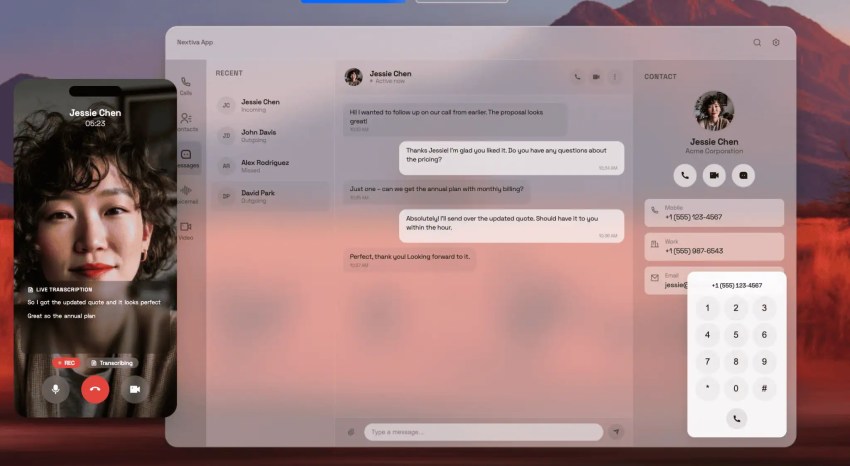
Each site needs its own business hours and holiday schedules, hunt groups for the front desk, and overflow rules that send unanswered calls somewhere useful, whether that’s a sister location with capacity, a central team, or XBert, Nextiva’s AI receptionist, instead of voicemail.
The goal is to keep calls from being missed, so a call that rings out at the downtown location should route to the midtown location rather than going to a voicemail box nobody checks until Monday.

Failover and uptime
A local power or internet outage should have a planned destination for incoming calls. With cloud routing, you can configure calls to reach another location, a central team, or an employee using an available mobile connection.
Failover still depends on the setup. A mobile app needs working internet or cellular data, and an alternate location needs staff available to answer. Confirm what triggers rerouting and what happens if the first backup destination is unavailable.
Nextiva’s network uses eight points of presence and strives for 99.999% uptime. Provider-network availability is separate from the power and connectivity at an individual location, so plan for both.
Before rollout, simulate a site outage and confirm where calls land, who answers, and what headquarters can see in reporting. Document the recovery process so calls return to the right location when service resumes.
Use this division of responsibilities as a starting point:
| Component | Headquarters controls | Each location maintains |
|---|---|---|
| Platform and contracts | Vendor standards, account structure, and consolidated oversight | Assigned local numbers and site contact details |
| Routing | Templates, overflow destinations, and approval rules | Hours, holidays, and staff assignments within approved permissions |
| Greetings | Brand guidelines and required disclosures | Location name, address, hours, and approved local messages |
| Customer messaging | Approved tools, access permissions, and retention standards | Local conversations and follow-up ownership |
| Reporting | Shared metric definitions and regional dashboards | Review of local missed calls, response times, and follow-up |
| Emergency calling | Configuration standards, validation process, and assigned owners | Prompt reporting of address, layout, or device-location changes |
911 and dispatchable location at every site
For US locations using multi-line telephone systems, emergency calling belongs in the rollout checklist. FCC rules implementing Kari’s Law and RAY BAUM’S Act address direct dialing, notifications, and caller-location information.
Kari’s Law requires covered systems to support direct 911 dialing without an outside-line prefix. The applicable notification rules allow alerts to a central point at the facility or another designated person or organization, including off-site. Notifications must not delay the emergency call.
The FCC’s applicability provisions cover systems manufactured, imported, offered for first sale or lease, first sold or leased, or installed after February 16, 2020, unless otherwise noted.
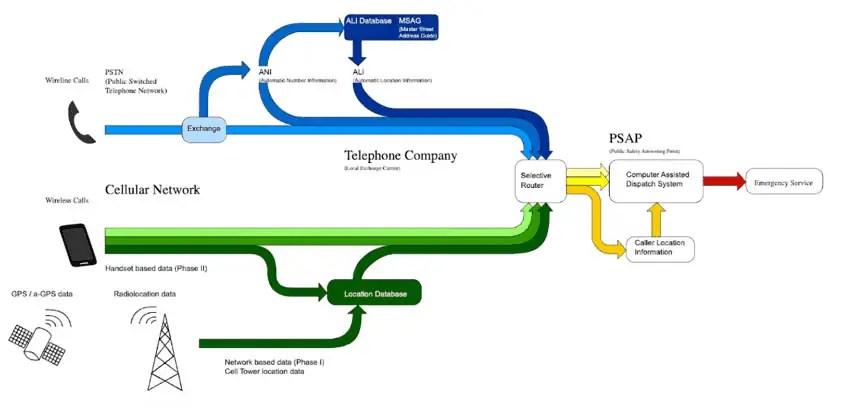
Dispatchable location means a validated street address plus information needed to locate the caller, such as a floor or suite. Requirements differ for fixed phones, non-fixed devices on site, and off-premises devices. Where automatic location is not technically feasible, the rules permit specified alternatives for certain device types.
Ask the provider:
- How will direct 911 dialing and notifications work at each site?
- Who receives alerts during business hours and after closing?
- How is location information determined for desk phones, mobile clients, and remote users?
- What must administrators or employees update when a device moves?
- How will configuration be validated before launch and after changes?
Assign an owner for these records and agree on a provider-approved validation process. Confirm the requirements for your deployment with the provider and qualified counsel, including applicable state or local rules. This is an operational checklist, not a determination of legal compliance.
Unifying Customer-Facing Channels Across Locations
Customers should be able to reach the right location and continue a conversation without starting over. That requires clear ownership of local requests and shared visibility for the teams that help resolve them.
One inbox per location, one view for headquarters
Give each location ownership of its customer conversations while allowing authorized regional and central teams to review activity across sites. Assign backup coverage so an unattended local queue doesn’t stall customer conversations.
An omnichannel platform can bring supported channels and customer history together, but confirm the scope of the proposed package. Phone, contact-center, texting, web-chat, and review-management capabilities may require different products or integrations.
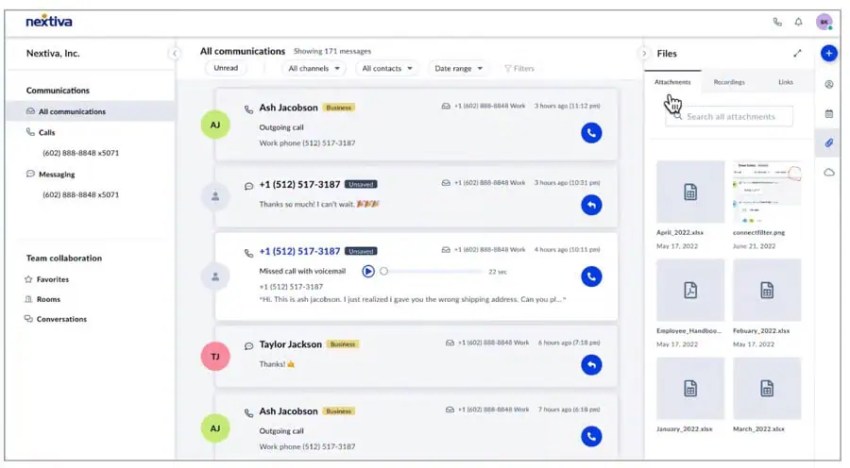
Ask the vendor to demonstrate both views: what a local employee sees and what a regional manager can access. Check permissions as carefully as visibility.
Transfers without starting over
A transferred call doesn’t automatically bring the customer’s history with it. The receiving employee needs access to the relevant record, conversation notes, and reason for the transfer.
Test this in the demo. Call one location about an issue another site must handle, then transfer the call. Check whether the receiving employee can see the context and whether the original team can confirm that someone took ownership.
Agree on a fallback when the receiving site cannot answer, such as a callback task assigned to a named team.
Local texting and reviews
Business texting from each location’s own number for confirmations and follow-ups keeps the interaction local. Managing review responses per location keeps the local manager accountable while headquarters maintains brand voice consistency.
Define who handles routine replies and when a conversation needs escalation. Local staff can provide location-specific information, while a central team handles sensitive issues and maintains consistency. Confirm that each location’s number supports business texting and that any required setup is complete before launch.

Keeping Frontline Staff and Regional Managers Aligned
Customer-facing communication gets the most attention, but internal communication is what keeps multi-location operations running smoothly.
Staff need a way to receive updates between customers and across shifts, managers need visibility into what’s happening at each site, and headquarters needs confidence that critical messages are reaching the floor.
Reach staff who never sit at a desk
In its 2020 deskless-workforce report, Emergence Capital described roughly 80% of the global workforce, or 2.7 billion people, as deskless. The practical requirement for multi-location operators is straightforward: Internal communication must work for employees who are not regularly at a computer.
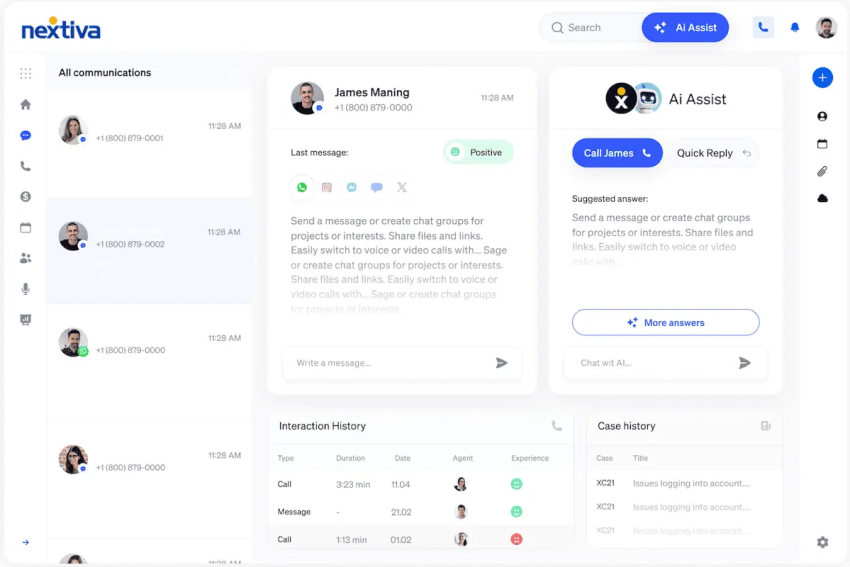
Test mobile access with frontline staff. Can they sign in, find the right location channel, read an update, and acknowledge it during a shift? Include account recovery and shared-device requirements in the trial.
Keep messages short, and assign a clear action when a response is needed. Make routine updates available during working hours, with a separate escalation process for designated on-call staff.
Channels by role and location
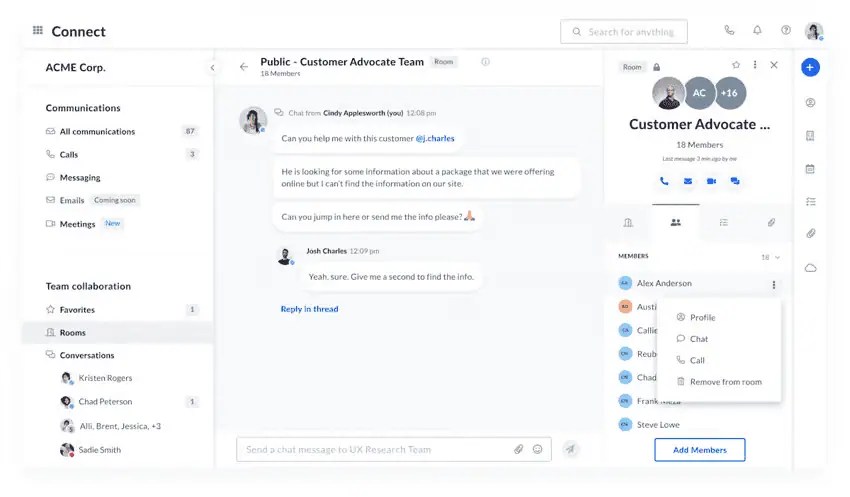
Structure matters as much as access. Role-based channels for store managers, front desk staff, or shift leads let headquarters push relevant updates to the right people without flooding everyone’s inbox. Location-specific channels give teams a place to handle shift handoffs, flag local issues, and coordinate coverage without pulling in staff from other sites who don’t need to be involved.
Use a broadcast channel for important announcements, with acknowledgment when you need confirmation that staff received an instruction. For urgent safety or service issues, define who monitors the channel and how an unanswered alert escalates. Keep work conversations in approved tools so access, records, and offboarding remain manageable.
A workplace communications platform designed for distributed teams makes this structure possible, while cobbling it together with consumer apps leaves managers guessing whether anyone actually saw the message.
Regional dashboards
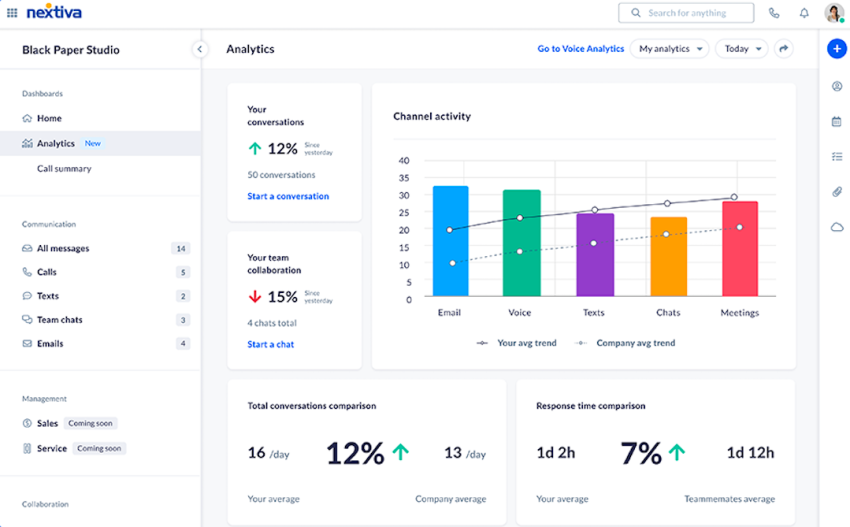
Regional managers can’t coach what they can’t see. Call volume, answer rate, missed calls, and average response time by location give them the data to have meaningful conversations with site managers instead of relying on anecdotes or gut feelings.
With real-time dashboards, a regional manager can see that location four is struggling this week and focus on it instead of trying to cover sites that are running fine. They can compare performance across locations, identify patterns, and catch problems before they become customer complaints.
How to Evaluate Multi-Site Communication Software
Use vendor calls to test the workflows your locations depend on. Ask for demonstrations and written responsibilities alongside the quote.
| Criterion | What to confirm before signing |
|---|---|
| New-location provisioning | Demonstrate creating a site from a template. Identify customer tasks, provider tasks, and launch dependencies. |
| Number porting | Confirm eligibility for every number, required documentation, the cutover plan, and who coordinates with the current carrier. |
| Local permissions | Show which settings local managers can change, which need approval, and how changes are logged. |
| Per-location routing | Demonstrate separate hours, holiday schedules, greetings, overflow, and backup destinations. |
| Emergency calling | Explain direct dialing, notification recipients, device-specific location handling, update ownership, and validation procedures. |
| Cross-location transfers | Demonstrate a transfer with customer context and a fallback when the receiving team cannot answer. |
| Channel coverage | List native channels, integrations, and separately licensed products, including texting and review management. |
| Security and regulated workflows | Provide the applicable SOC 2 report and clarify service scope, BAA availability where relevant, and responsibilities for payment workflows. |
| Reliability | Define the uptime commitment and demonstrate the planned response to a local connectivity outage. |
| Reporting | Show local and regional dashboards using consistent definitions for missed calls, answer rate, and response time. |
| Integrations | Demonstrate the required CRM, POS, scheduling, or EHR workflow and identify setup and maintenance costs. |
| Total cost | Itemize seats, sites, numbers, messaging, AI usage, implementation, support, and renewal terms. |
| Rollout support | Confirm pilot scope, staff training, escalation contacts, acceptance criteria, and the schedule for retiring old services. |
Simmons Bank shows why implementation support belongs in the evaluation. The bank moved more than 240 locations and 3,200 users to Nextiva in four and a half months, accommodating a 49-site acquisition during the project.
The rollout included Nextiva Professional Services, on-site implementation and training, and reporting configuration. Treat that result as a case study, not a standard deployment promise. Ask vendors what staffing, preparation, and services your rollout would require.
Manage Every Location From One Platform With Nextiva
Each new location should follow a repeatable communication setup: its own number, hours, greeting, routing, and assigned staff, managed within shared standards.
Nextiva Business Phone supports centralized administration with local calling requirements and mobile and desktop access. For broader channel coordination, evaluate the routing features and customer-history capabilities of Nextiva Contact Center against the workflows your locations need.
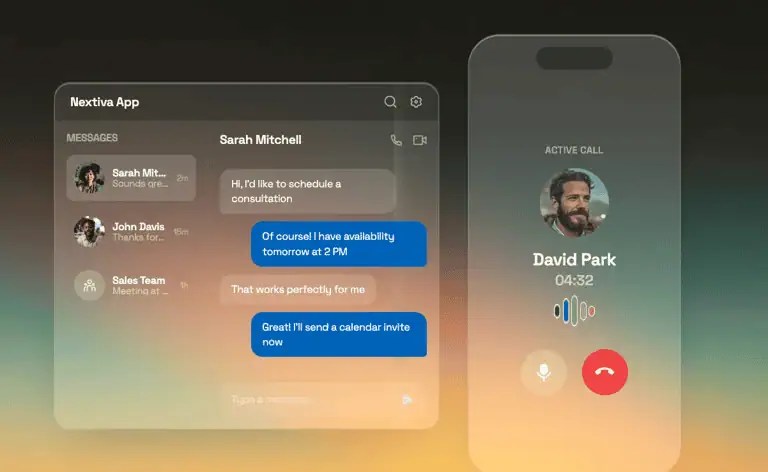
XBert can handle routine inquiries and appointment booking. Confirm the location-specific information, scheduling connections, and handoff rules required for after-hours and overflow coverage.
For regulated environments, review Nextiva’s security and compliance information, including SOC 2 attestation, HIPAA-compliant plans with signed BAAs, and PCI DSS support for payment environments. Confirm the scope of the selected services and your organization’s configuration responsibilities.
Explore Nextiva’s business phone system and request a rollout plan covering your current locations, next opening, and busiest-site overflow needs.
The small business VoIP phone system for modern work.
Bring business phone calls, video meetings, messaging, AI, and your team together on one platform that remembers the conversation and helps your business act on what happens next. Easy to set up. Built for your budget. Trusted by millions.
Frequently Asked Questions
The timeline depends on number availability, configuration, connectivity, integrations, and staff readiness. Creating a site in an admin portal is only one part of going live.
If you’re keeping existing numbers, number porting has its own schedule. Ask the provider for a written plan that separates configuration, porting, testing, and training, with a confirmed cutover date before retiring the old service.
Often, yes, but confirm portability for every number before signing. Give the new provider a complete number inventory and the account information it needs to check eligibility and coordinate the transfer.
Keep the existing service active until the provider confirms the port is complete. Test incoming calls, outbound caller ID, and any associated texting service before closing out the migration.
Kari’s Law addresses direct 911 dialing from covered multi-line telephone systems. Applicable FCC rules also require emergency-call notifications, which may go to a designated recipient on or off-site.
Coverage depends on the system and the FCC’s applicability provisions. Have your provider and qualified counsel confirm the requirements for your installation, including relevant state or local obligations.
Regional managers need dashboards, not raw data. Focus on the metrics that drive coaching conversations: call volume, answer rate, missed calls, and average response time by location. A well-designed customer communication management platform lets you filter by location, time period, and channel without requiring managers to build their own reports.