Customer Experience
 Blog
 Business Communication
 Leadership
 Marketing & Sales
 Nextiva News
 Productivity
 VoIP


A customer success playbook is a step-by-step guide that helps teams support customers at every stage of their journey. It covers onboarding, product use, renewals, and customers who may leave. Each playbook explains when to take action, who’s responsible, and what steps to follow to keep customers happy and improve retention.
Keeping customers is important for business growth. But occasional check-ins aren’t enough. Without a clear plan, your team may miss signs that customers need help or are thinking about leaving. A good playbook helps your team stay on track, but it only works when everyone follows it.
In this guide, we’ll explain how to create a customer success playbook, share useful templates, and look at five strategies from well-known brands that you can apply to your business.
What Is a Customer Success Playbook?
A customer success playbook gives customer success managers (CSMs) a clear plan for handling common customer needs. While a customer success strategy sets business goals, a playbook explains the steps your team needs to take to reach them.
Think of it as a shared guide for your team. It helps everyone follow the same process instead of deciding what to do in each situation.
A good customer success playbook includes five key parts:
- Triggers: Customer actions or events that tell your team when to step in, such as an incomplete setup or a drop in product use.
- Team responsibilities: Who handles each task, whether it’s a CSM, a support agent, or another team.
- Message templates: Ready-to-use emails, call scripts, and checklists for common situations.
- Success goals: Clear ways to measure whether an action helped the customer.
- Next steps: What to do when a customer needs more help or an issue remains unresolved.
The goal isn’t to follow a fixed script for every conversation. It’s to give your team a clear process while leaving room to meet each customer’s needs.

How to Build a Customer Success Playbook in 6 Steps
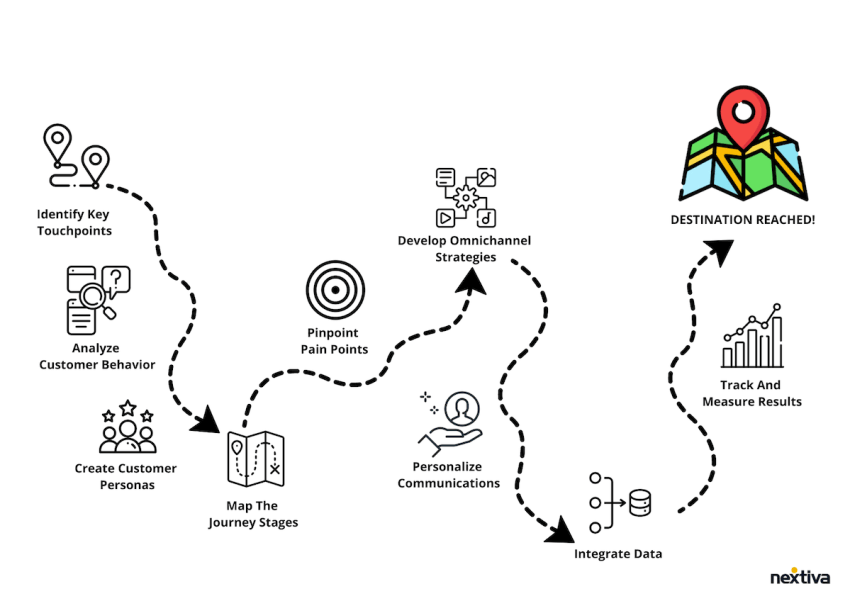
Building a customer success playbook doesn’t have to be difficult. Start by looking at your customer journey and finding the moments when your team can offer the most help.
1. Map your customer journey
Look at the stages customers go through, from onboarding and product use to renewals and loyalty. Find out where they need help, what works well, and where they face problems. Use support records, product usage data, and customer feedback to find these gaps.
2. Define customer goals and milestones
What does success look like for your customers? It could mean finishing their first project, helping their team use a new platform, or reaching a business goal. Set clear goals and find out what steps customers need to take to reach them.
3. Set triggers for each playbook
Triggers tell your team when to take action. Common examples include:
- A customer hasn’t finished onboarding.
- Product use drops below normal levels.
- Support requests increase.
- A contract is due for renewal.
- A customer may be ready for an upgrade.
Set triggers based on customer needs and actions instead of using the same rules for every account.
4. Assign team responsibilities
Make sure every task has someone responsible for it. For example, a CSM may handle onboarding, while the support team solves technical problems. Account managers may handle contract renewals. Clearly explain who handles each step and when a problem needs to be passed to another team.
5. Create reusable templates and workflows
Prepare checklists, email templates, and automated workflows for common tasks. For example, an onboarding workflow can send a welcome email after signup, share setup instructions if a customer falls behind, and alert a CSM when personal help is needed.
6. Measure results and improve
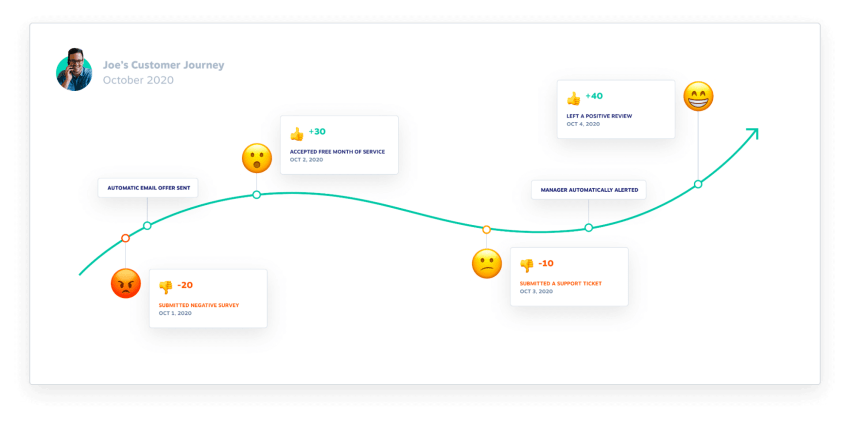
Track how well each playbook helps customers reach their goals. For example, if you contact 50 inactive customers but only two start using your product again, review your approach.
Look at customer feedback, response rates, product use, and renewals to see what’s working. Update your playbooks regularly to improve results.
Customer Success Playbook Templates for Every Lifecycle Stage
Every customer needs different support. A new customer learning to use your product may need more help than someone getting ready to renew their contract. Use this template to plan the right actions at each stage of the customer journey.
| Customer stage | When to take action | What to do | How to measure success |
|---|---|---|---|
| Onboarding | Setup isn’t complete after seven days | Send instructions or schedule a call | Onboarding completion rate |
| Product adoption | Customer rarely uses key features | Offer training or a product demo | Feature adoption rate |
| Customer health | Customer activity drops | Review the account and contact the customer | Customer health score |
| Renewal | Contract is about to expire | Review results and discuss future goals | Renewal rate |
| Expansion | Customer reaches an important goal | Suggest useful services or upgrades | Revenue from upgrades |
| Advocacy | Customer shares positive feedback | Ask for a review or referral | Reviews and referrals |
Adjust these triggers based on your product, customer needs, and business goals.
Customer onboarding checklist
A 30/60/90-day onboarding plan can help your team track customer progress and offer support at the right time.
- Days 1–30: Set goals, complete setup, schedule the first meeting, and help customers reach their first goal.
- Days 31–60: Review product use, solve problems, and help customers learn useful features.
- Days 61–90: Check progress, collect feedback, and plan future follow-ups.
Not every product needs 90 days of onboarding. Adjust the timeline based on how quickly customers can start seeing value.
Customer health score checklist
Track product use, key features, support requests, customer feedback, and progress toward goals.
For example, a customer may use your product every day but still be unhappy with ongoing problems. Another may use it less often because they only need it for certain tasks.
Your customer health score should reflect these differences instead of relying on product use alone.
Renewal and escalation checklist
Start renewal talks early so your team has time to address concerns before a contract ends.
If a customer shows signs of leaving, make sure to record:
- Why the customer may leave.
- Who’s responsible for the account.
- What action your team needs to take next.
- When to follow up with the customer.
Clear steps help your team respond faster, solve problems, and make sure customers get the support they need.
5 Customer Success Playbook Examples and Strategies
Successful brands use different ways to connect with customers, build loyalty, and solve problems early. Here are five customer success strategies you can learn from and use in your own business.
1. Put customers first with the empty chair philosophy
Amazon’s empty chair philosophy is a simple way to keep customers in mind during meetings and business decisions.
The empty chair represents the customer. It reminds teams to think about how their decisions will affect the people who use their products and services.
This idea supports Amazon’s Customer Obsession leadership principle, which encourages teams to start with customer needs and work backward.
Bring customer feedback into decision-making
Putting customers first means more than listening to their feedback. Your team also needs to act on it.
For example, customer success managers (CSMs) can share common problems with product teams. Business leaders can review customer satisfaction and product use along with sales and revenue.
A voice of the customer program can help you collect feedback and use it to make better decisions.
Practical ways to put this into action
You don’t need a complex system to keep customers at the center of your business. Start with these steps:
- Hold customer-focused meetings: Share recent customer feedback, including positive experiences and common problems.
- Track customer metrics: Review satisfaction, product use, and engagement along with business results.
- Create customer advisory groups: Invite customers to share ideas and feedback about your products.
- Observe customer behavior: Let employees watch how customers use your product to find areas for improvement.
- Choose a customer advocate: Have someone speak for customer needs during planning meetings.
The empty chair philosophy helps teams keep customers in mind. When you use customer feedback to guide decisions, you can find problems early and build stronger relationships.
2. Build a community-driven support model
Airbnb shows how experienced customers can help new users get started. Through its Superhost Ambassador program, experienced hosts offer one-on-one guidance to people creating their first listings.
New hosts can learn from people who have already been through the same process instead of relying only on Airbnb’s support team.
Build connections through peer support
Community support does more than answer questions. It helps new customers feel more confident as they learn to use a product or service.
For example, an experienced user can share tips, explain common problems, and help someone complete their first task.
As your customer base grows, a community can also answer common questions. This gives your support team more time to handle difficult issues.
Use community feedback to improve customer experiences
Customer groups can help you find problems that surveys and support tickets may miss.
For example, if several customers struggle with the same feature, your product team can use that feedback to improve it.
Here’s how to build a similar support program:
- Find active customers who are willing to help others.
- Create online groups, forums, or mentor programs.
- Encourage experienced users to share tips and advice.
- Track common questions and customer concerns.
- Share feedback with your product and support teams.
The goal is to create a community where customers can help each other while giving your business a better view of their needs.
3. Use automation to guide product adoption
Slack shows how automation can help users complete tasks and learn new ways to work.
For example, Slackbot can handle routine tasks based on certain events, such as someone joining a channel.
For customer success teams, the lesson is simple: guide customers through important steps instead of waiting for them to ask for help.
Find your product’s “aha moments”
An “aha moment” happens when customers first see the value of your product.
These aha moments are different for every business. They often happen when customers complete an important task for the first time.
Examples include:
- Completing their first task
- Inviting another team member
- Finding a feature that saves time
- Reaching an important goal
Once you know these moments, create simple steps to help customers reach them.
Build helpful automated workflows
Customer success teams can use automation to guide customers through common tasks.
For example, you can send a message when someone completes a task or share setup instructions when they fall behind.
The goal is to offer help at the right time without sending too many messages.
Not every customer needs the same level of support. Larger accounts may need personal meetings and detailed plans, while smaller accounts may prefer emails and self-service guides.
This helps your team save time and focus on customers who need extra help.
4. Personalize customer experiences through CRM integration
Starbucks uses its loyalty program to understand customer preferences and encourage repeat visits.
Through its mobile app and Starbucks Rewards program, members can earn rewards, receive offers, and enjoy benefits based on their activity.
In March 2026, Starbucks launched an updated Rewards program with three membership levels: Green, Gold, and Reserve.
The program shows how businesses can use customer data to offer more personal and useful experiences.
Group customers based on their needs
Not every customer shops or uses a product in the same way.
Customer relationship management (CRM) data can help you group customers based on how often they buy, what they prefer, and how they interact with your business.
For example, someone who visits Starbucks every day may prefer different rewards than someone who visits once a month.
You can use similar information to improve customer communication:
- Customer behavior: Send helpful messages when customer activity changes.
- Personal preferences: Suggest products based on past purchases and interests.
- Customer journey: Change your messages based on where customers are in their relationship with your business.
Build loyalty with personalized rewards
Personalization works best when it offers something useful instead of simply asking customers to buy more.
For example, you can use CRM data to track onboarding, understand customer needs, and suggest helpful resources.
As customers reach new goals, you can offer rewards or recommend services that match their needs.
You can also use customer data to spot a drop in activity or repeated support problems. This gives your team a chance to step in before customers become frustrated.
5. Use engagement data to improve customer retention
Netflix uses viewing habits to suggest shows and movies that members may enjoy.
Its recommendation system looks at viewing history, ratings, and how people use the platform to offer more relevant suggestions.
These recommendations change as customer interests change.
For businesses, the lesson is to use customer activity to understand their needs, spot problems, and offer support at the right time.
Identify early signs of customer churn
Start by looking for changes in customer behavior that may suggest they’re losing interest.
For SaaS businesses, common signs include:
- How often customers log in
- How often they use key features
- Number of active users
- Number of support tickets
- Customer feedback
Before treating a change as a warning sign, understand what normal activity looks like for each customer.
For example, a customer who usually logs in every day but hasn’t used your product for two weeks may need a follow-up.
However, a drop in activity doesn’t always mean a customer plans to leave. Find out what’s causing the change before taking action.
Set automated triggers for customer support
Once you know which signs matter, create a plan to respond based on how serious the problem is.
You can use automated contact center workflows to take different actions:
- Low risk: Send an email with tips on useful features the customer hasn’t tried.
- Moderate risk: Ask a CSM to schedule a personal check-in.
- High risk: Alert a manager to contact the customer and address their concerns.
The goal isn’t just to keep customers from leaving. It’s to understand why their activity has changed and help them get more value from your product.
Use Journey Mapping and Automation to Support Your Playbook
Reactive customer service responds to problems after they happen. Proactive customer service focuses on finding and solving issues before they get worse.
Customer journey mapping helps businesses understand how customers interact with their brand, from onboarding and product use to support and renewals.
For example, Delta Air Lines uses its Fly Delta app to update travelers about gate changes and flight delays. This helps passengers stay informed without having to contact support.
Businesses can use a similar approach to keep customers updated and address problems early.
Find problems before they get worse
Customer feedback, support tickets, and product usage data can help your team spot common problems.
For example, if several customers ask for help with the same feature, you may need to improve your setup instructions or onboarding process.
Speech analytics and sentiment analysis can also help you find common issues in customer conversations.
Share these findings with your product and support teams so they can fix the cause of the problem.
Automate support at the right time
Automation helps businesses take action when customers need support.
For example, intelligent IVR routing can direct callers to the right agent when they need help with a service issue.
You can also send automated updates about delays, onboarding progress, or support requests.
The goal is to use automation for common tasks while making sure customers can still reach a real person when they need extra help.
What to Look for in Customer Success Playbook Software
Customer success playbooks work best when they’re part of your team’s daily workflow, not just stored in a shared document.
Small businesses may start with shared documents and checklists. According to Forrester’s research on customer success platforms, businesses need tools that connect customer data, team workflows, and performance tracking. This helps teams act on customer needs, measure results, and work together across departments.
Here are the key features to look for:
| Feature | Why it matters |
|---|---|
| Automated triggers | Starts tasks based on customer actions or behavior |
| CRM integration | Keeps customer history and account details in one place |
| Multichannel communication | Helps teams connect with customers across different channels |
| Customer segmentation | Creates different workflows based on customer needs |
| Performance reports | Shows how well your playbooks are working |
| Escalation management | Sends complex issues to the right team for help |
Before choosing software, make sure it works with your current tools and meets your team’s needs.
Nextiva’s customer journey platform helps businesses connect customer interactions, track customer journeys, and automate common tasks.
Best Practices for Managing Your Customer Success Playbook
Your customer success playbook should change as your customers’ needs and business goals change.
Follow these best practices to keep it useful:
- Group your customers: Offer different levels of support based on customer needs, account size, and business goals.
- Keep communication consistent: Use clear messaging across phone, email, chat, and other channels.
- Review results regularly: Track each workflow to see what’s working and what needs to improve.
- Ask your CSMs for feedback: Get input from the team members who use the playbook every day.
- Test one change at a time: Update your messages, timing, or triggers and track the results.
Review your playbook every three months or sooner if you notice repeated problems.
Turn Your Customer Success Playbook Into Action With Nextiva
A customer success playbook helps your team know when to act, what steps to take, and how to follow up. As we’ve seen from brands like Amazon and Netflix, understanding customer needs and using the right data can help businesses build stronger relationships.
Nextiva Contact Center brings customer conversations together across supported channels. With intelligent call routing, automation, and customer journey tools, your team can provide more consistent support.
Give your team the tools to respond faster, solve problems, and build lasting customer relationships.
Playbook Into Action With Nextiva
Bring customer conversations across channels into one place. Route inquiries to the right team, automate routine tasks, and deliver consistent support at every stage of the customer journey.
Frequently Asked Questions About Customer Success Playbooks
Bring Sales, Support, and Product into a short working session to agree on shared definitions, handoffs, and what “healthy” looks like. Position the playbook as a coordination tool that reduces fire drills and clarifies ownership.
Start with a small set of tiers based on commercial value and support model, such as self-serve, mid-market, and enterprise. Keep the same core plays, then vary only the touchpoint type (human vs automated), response time targets, and depth of deliverables by tier.
Create a “message house” for each play that defines the goal, value proof, required personalization fields, and approved language. Then adapt length and format per channel while keeping the same promise and next step so customers do not receive conflicting guidance.
Track leading indicators like time-to-value, stakeholder engagement coverage, support cost-to-serve, and renewal cycle time. Pair them with financial outcomes such as net revenue retention and expansion pipeline you influenced, so you can show both operational and revenue impact.
A/B test one variable at a time, such as subject line, CTA, or timing, and limit tests to a defined segment to control risk. Set a clear success metric and a stop rule, then promote winning variants into the standard play once results are consistent.
Add compliance-specific steps like approved communication channels, data handling guidance, and audit-friendly documentation of key interactions. Include escalation routes to security, legal, or compliance stakeholders so approvals do not stall critical customer motions.
Use role-based enablement that combines short scenario drills with call reviews and a certification checklist tied to your most common plays. Reinforce adoption by embedding play links, templates, and required fields directly in the tools CSMs use during live customer work.