VoIP
VoIP  Blog
Blog  Business Communication
  Customer Experience
  Leadership
  Marketing & Sales
  Nextiva News
  Productivity
If you’re evaluating cloud-based phone systems for your sales or support team, CloudTalk has probably come up in your research. It’s a VoIP platform that receives significant attention for its user-friendly interface and CRM integrations. But if you’re here, it means you’re trying to reduce your risk before making a switch. You want to know if it’s actually right for your business.
I’ve spent years working with companies on their communications strategies, and I’ve learned that a strong G2 rating doesn’t always tell the full story. The real question isn’t whether CloudTalk works; it’s whether it works for how your team operates today and how you plan to scale tomorrow.
I dug into user reviews across platforms like G2, Capterra, and Trustpilot to surface what actual users are saying. In this post, I’ll use those reviews and my own experience to break down CloudTalk’s strengths, where it falls short, who it’s best suited for, and when you might want to consider an alternative.
CloudTalk Ratings & What They Signal
CloudTalk offers all the standard virtual phone features you’d expect: call recording, SMS, call monitoring, IVR, and analytics, but features don’t tell the full story. That’s where user reviews come in.
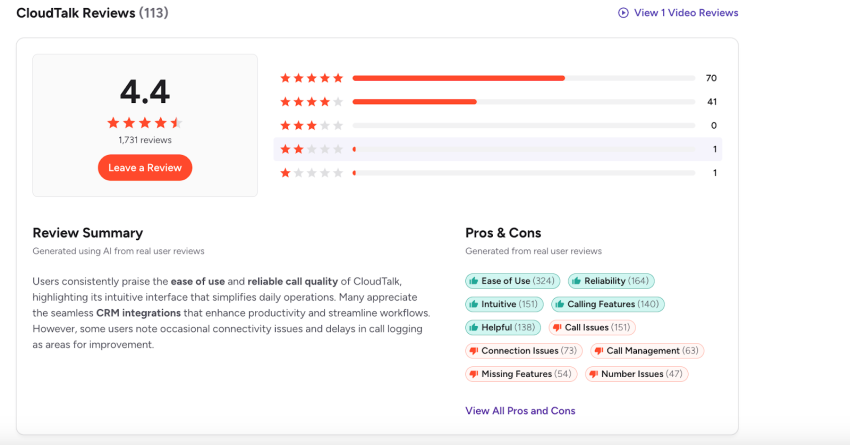
Here’s a brief overview of CloudTalk’s user ratings:
- G2 shows a strong overall rating (4.4/5) with high review volume. Users praise the platform’s usability, call quality, and reporting.
- Capterra reflects a similar sentiment, calling out the CRM integrations and ease of use as core wins.
- Trustpilot (4/5) includes harsher criticism. These reviews center on the customer experience after purchase and issue resolution, which is critical for buyers to weigh.
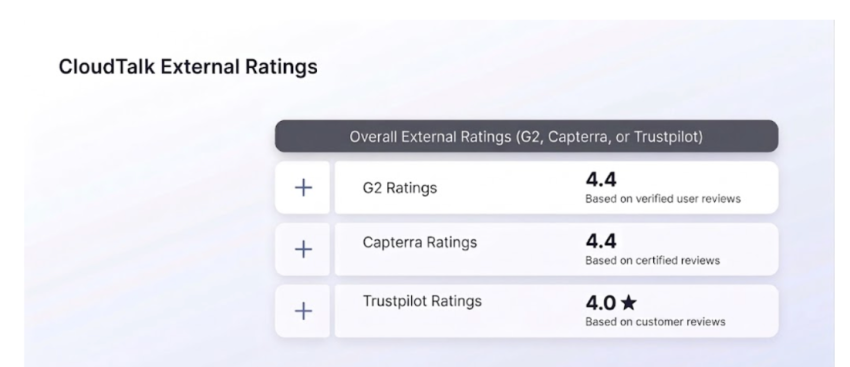
What you need to know:
A high rating on a software review site may reflect massive wins in onboarding and usability. When reps can log in and make calls on day one, they leave 5-star reviews.
However, the critical reviews cluster around the realities of scaling. You’ll see complaints about connectivity sensitivity, scaling complexity, billing surprises, and support expectations. These aren’t random edge cases but clear operational patterns that you must consider.
Common Praises in CloudTalk Reviews
When I look at verified reviews across these platforms, a few themes come up repeatedly. Here’s what users like and what it means for your business.
1. Ease of use and faster agent adoption
Users rave about the intuitive, easy-to-navigate desktop app. They like the simple setup that helps new reps ramp quickly, giving them a single place to manage their day-to-day call activity.
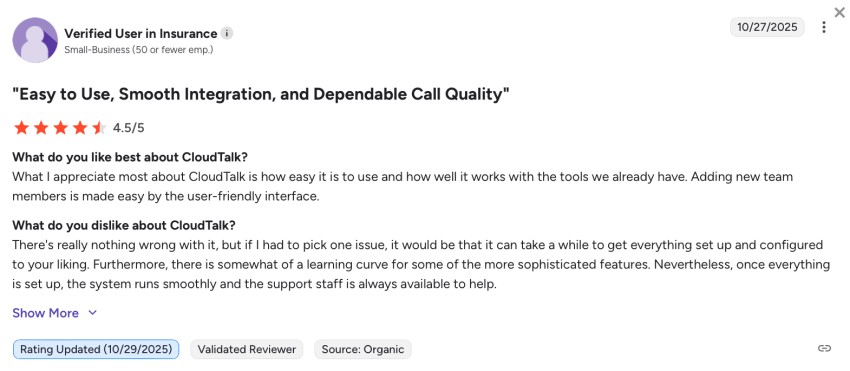
Complexity kills adoption. Because CloudTalk is easy to use, you spend less time training agents on the tool. It lowers the management effort required for basic workflows like call dispositioning. Ultimately, it delivers a much faster time-to-value for teams moving off manual dialing solutions.
While most users had positive things to say about the minimal setup, some users did cite that there was a steep learning curve for new users, especially on more advanced features.
2. Call quality and reliability when the network is solid
Plenty of reviews cited good call quality and reliability when the network is in good order (more on that later). Multiple reviewers noted clear audio and a stable call experience in normal conditions with a good internet connection. That matters when you’re choosing call center software.
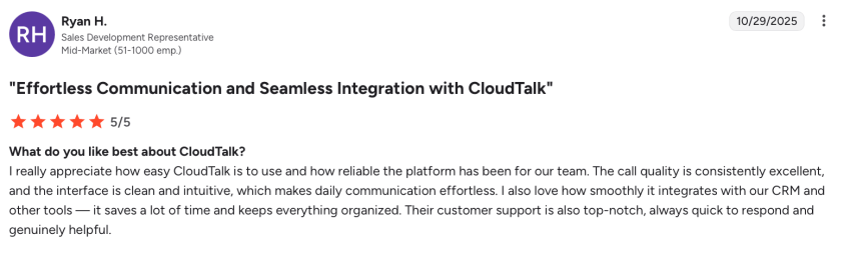
Some reviewers note that call quality is highly impacted by internet reliability, especially for remote teams. This isn’t a uniquely CloudTalk problem; it’s a reality of cloud calling and a reminder that you must validate your network readiness and headset setups during your trial period.
3. CRM integrations that reduce admin work
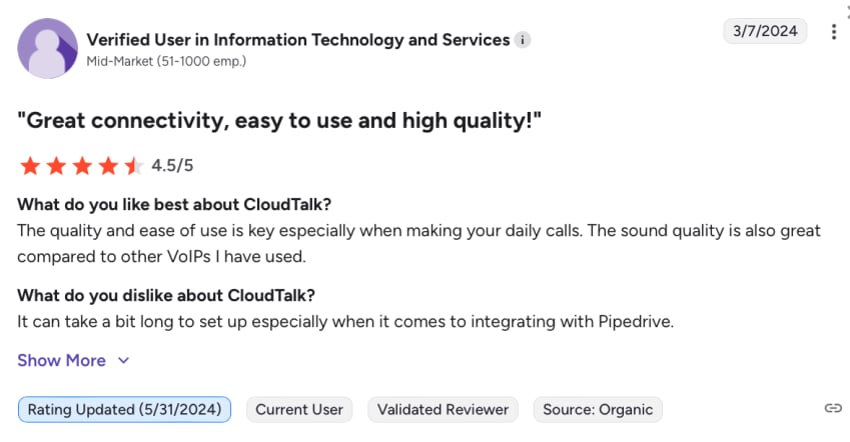
CloudTalk has smooth, native integrations with CRMs like HubSpot, Salesforce, Pipedrive, and Zoho. Users like the automatic logging and syncing that reduces tab-switching and manual note-taking.
This translates directly into more accurate activity data in your CRM. It reduces friction for your reps, meaning they make more calls. For leaders, it provides greater visibility into outreach volume and outcomes without having to chase reps for updates.
While many users had positive things to say about CloudTalk’s integrations, there were also a few noting that setup time took longer than expected.
4. Analytics and reporting that support coaching
Call center managers frequently call out the reporting dashboards that help them understand team performance and call volumes at a glance.
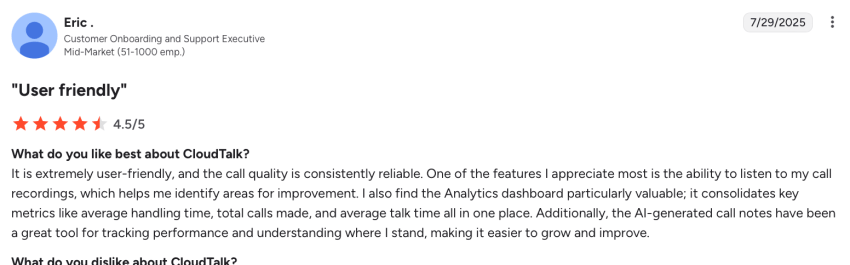
Strong analytics enable better weekly coaching sessions without a manager needing to listen to every single call. You get easier tracking of call outcomes, individual rep activity, and total clarity on peak hours, answer rates, and routing performance.
However, some reviews have found CloudTalk’s reporting capabilities to be limited compared to other providers, particularly regarding customization options. This is something to consider, especially for growing businesses evaluating contact center software.
Common Complaints and What They Mean for Your Team
No platform is perfect. When I review the critical feedback across the market, I see a few recurring frustrations. These aren’t automatic dealbreakers, but as an operations leader, you need to know exactly how to navigate them before they impact your revenue.
1. Technical glitches and app performance issues
Reviewers often flag intermittent technical glitches. Users explicitly note lag, occasional instability, and issues with the mobile app that can affect agent availability or disrupt workflow continuity.

Let’s be honest: most software platforms have occasional bugs. However, the risk of instability is significantly higher when you have high concurrency (many reps dialing at once), lots of API integrations firing simultaneously, or a highly distributed team.
My advice: Buyers must aggressively stress-test specific, heavy workflows that match their daily operations during the trial period. Don’t just make one test call and call it good; have ten reps dial at once while updating your CRM.
2. Connectivity sensitivity for remote and distributed teams
CloudTalk’s call quality is closely tied to internet quality. For teams with numerous remote reps working on varied Wi-Fi networks, this creates uneven customer experiences, a theme evident in many user reviews.
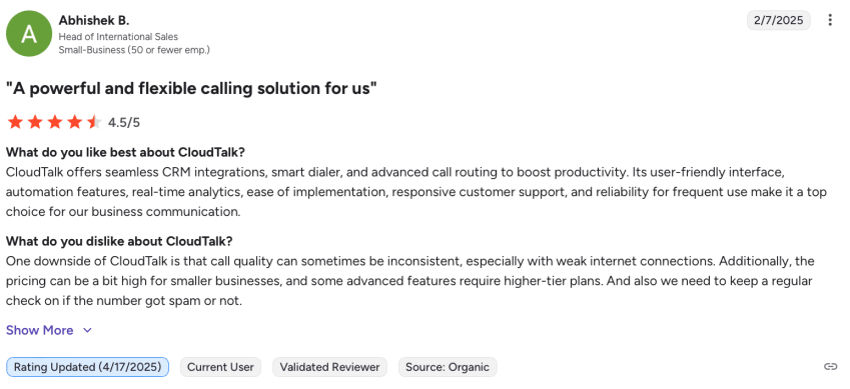
Some users also noted that CloudTalk doesn’t notify them when the connection drops. As a result, employees may not realize they’re offline.
When call quality degrades, your reps sound unprofessional, and customers instantly lose patience. I’ve seen teams roll a new dialer out to 50 remote reps only to find out half of them have severe jitter issues because they’re working from home on standard consumer Wi-Fi routers. You cannot afford to figure this out after you sign the contract. You must run a readiness test before you roll out the software.
My simple checklist: Mandate a stable, wired Ethernet connection where possible. Optimize router and firewall settings to prioritize voice traffic. Require approved, wired headsets. Finally, run a test plan during your trial that specifically includes peak traffic hours.
3. Pricing perception and feature packaging
Even when users like the platform, I see reviews noting that CloudTalk gets expensive quickly. CloudTalk’s base plans look incredibly affordable (starting around $19–$25 per user per month, billed annually), but buyers feel that every additional, advanced capability adds a surcharge. This changes the value perception as teams scale.
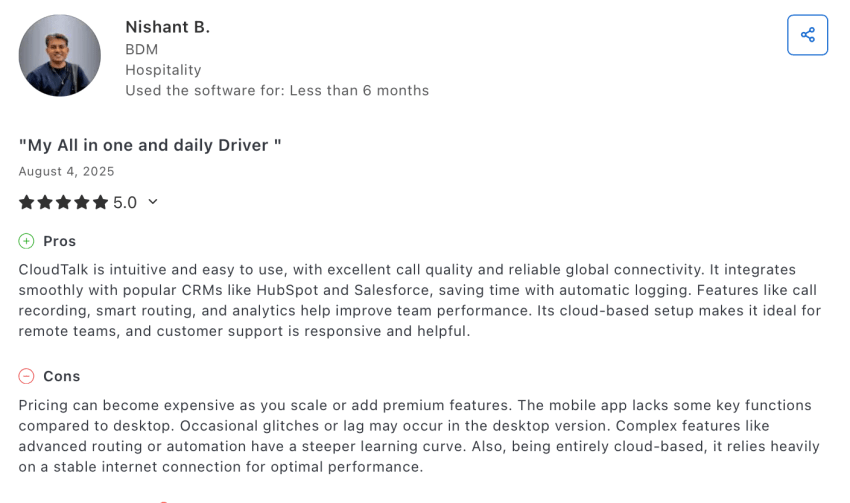
It’s common for a buyer to get hooked by a low entry price. But then six months in, you realize you absolutely need advanced call routing, custom reporting, or deep Salesforce syncs to manage your growing team. Suddenly, you’re forced to upgrade to a premium tier. What started as a budget-friendly solution quickly matches enterprise pricing, but often without the white-glove enterprise support. That shift is a massive blow to your perceived value for money.
If you’re considering CloudTalk (or any other VoIP provider), map your must-have features against the plan tiers and add-ons before you sign up. Don’t look at the entry price; calculate your total cost per seat based on the workflows you need to run.
4. Support experience and post-sale expectations
This is where review platforms diverge. While many praise the onboarding, some Trustpilot reviewers describe a strong sales experience followed by a significantly weaker, slower support experience once they became a paying customer. Some also reported delayed customer support response times.
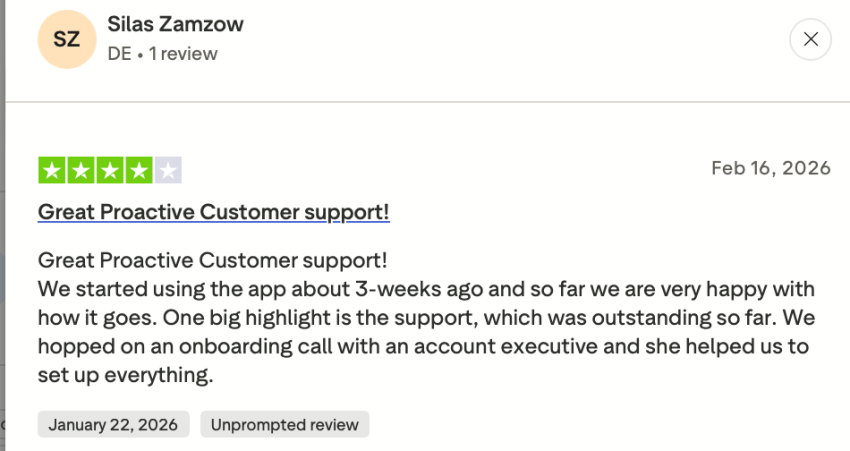
When your phone lines go down, your business literally stops. You aren’t just losing productivity; you’re losing live deals and burning goodwill with frustrated customers. Reading reviews where customers had to wait 24 to 48 hours to resolve a critical ticket is a massive red flag for any Ops leader. Support experiences vary wildly based on your plan tier and company size, so you must get guarantees in writing.
To protect yourself, ask these specific questions before signing up:
- What is the support channel mix on my specific plan (chat, email, phone)?
- Are there financially backed SLAs?
- What is the specific escalation path for a system outage?
- What exactly is included in onboarding vs. what costs extra?
Who CloudTalk Is Best for Based on Review Patterns
Not every platform fits every team. Based on user reviews, this is where CloudTalk excels and when you should perhaps look for alternatives.
CloudTalk is a strong fit for:
- Sales teams focused on outbound velocity: If your reps care about speed-to-dial, local presence numbers, and automatic CRM logging, CloudTalk delivers. Reviewers like how quickly new reps can get up and running.
- Support teams that need foundational call center features: Call queues, basic routing logic, and performance dashboards are built in — enough to manage inbound volume and coach agents without overcomplicating your setup.
- Global teams managing numbers across multiple countries: CloudTalk offers international number coverage and centralized call management, which simplifies operations for distributed or multi-market teams.
CloudTalk may not be the right fit for:
- Very small teams watching every dollar: If you’re a lean operation that won’t use power dialer features, advanced automation, or complex analytics, you may be paying for capabilities you don’t need. Simpler and cheaper options exist.
- Teams with inconsistent internet or strict uptime requirements: Like any cloud calling platform, CloudTalk’s performance depends on network quality. If your reps work from locations with unreliable connectivity — or if you need guaranteed SLAs and a clear escalation path — this could be a sticking point.
- Organizations planning to scale significantly: Costs can climb as teams unlock more advanced functionality. I always recommend mapping your must-have features against plan tiers before you sign, and not after.
- Heavily remote teams dependent on mobile apps: If you have a large number of remote team members, multiple customer reviews citing issues with the mobile app’s usability may want you to rethink CloudTalk as a solution.
CloudTalk Pros & Cons Summary
When deciding for or against CloudTalk, you need to consider the platform’s practical features. Here’s a summary of its services and an assessment of whether CloudTalk offers good value for money.
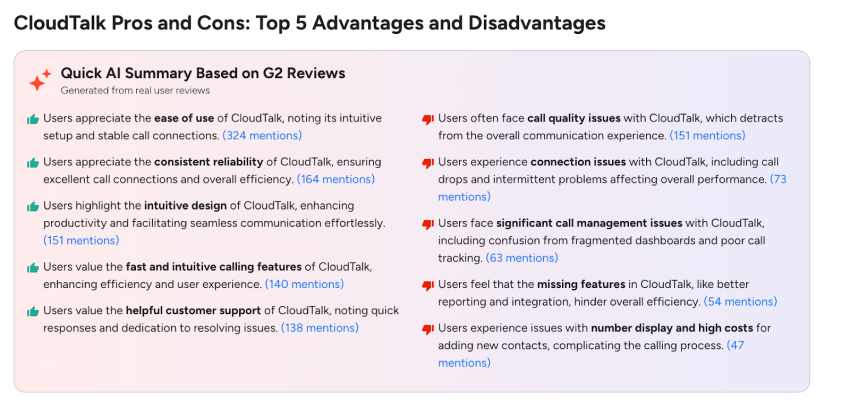
The pros
- Efficiency: Tools like click-to-call and automatic call tracking help streamline high-volume outbound calls.
- Integrations: Deep syncing with major CRM systems and helpdesk software like Zendesk creates a great experience for agents by reducing tab switching.
- Core capabilities: Robust IVR, intelligent call routing, and SMS messaging reduce caller wait time for inbound calls. You also get excellent standard calling features, including flexible caller ID options to localize your phone number.
- Visibility: Strong real-time analytics and performance metrics give managers instant visibility into team output.
- Initial ROI: For small businesses and scaling e-commerce brands, the entry-level plans offer excellent value for money.
The cons
- Network dependency: The platform is highly sensitive to internet drops, making it riskier for remote work teams relying on home Wi-Fi.
- Scaling costs: As your team grows, unlocking advanced call routing and premium caller ID features forces you into higher tiers, which lowers the overall value for money.
- App glitches: Mobile users occasionally struggle with lag during click-to-call or when managing a bloated voicemail inbox.
- Support delays: Slower technical support can severely hurt the value for money of your business phone investment if your outbound calls go down during peak hours.
- Workflow interruptions: The inability to silence secondary inbound calls while an agent is already on the line means that reps have to manually reject the second call, which breaks their focus and disrupts the conversation.
- Fragmented admin dashboard: Ops leaders sometimes find the backend dashboard disjointed, making advanced call tracking and contact syncing more complicated than it needs to be.
- Billing and cancellation friction: Several CloudTalk users have flagged rigid post-sale billing practices, noting that canceling subscriptions can be unnecessarily difficult or result in an immediate loss of access even with paid time remaining on the account.
Top CloudTalk Alternatives to Consider
If my breakdown of the critical reviews made you realize CloudTalk might not be the right fit for your scaling team, you aren’t out of options. Here’s how I usually advise clients to look at the broader market:
- Nextiva: The best option for teams that are tired of patching and want to unify their entire tech stack. Nextiva brings a standalone dialer, a separate video tool, and a team chat app together under one roof.
- Aircall: Compared directly to CloudTalk, it offers CRM integrations and a clean interface, good for outbound sales teams. However, users note that it can suffer from similar pricing scalability issues as you grow.
- Dialpad: If your team needs heavy, out-of-the-box AI features (like real-time transcription and sentiment analysis) built directly into the dialing experience, Dialpad is a strong alternative.
- RingCentral: The legacy heavyweight, it’s robust and built for complex enterprise deployments, but it can be overly complicated and expensive for agile, mid-market sales and support teams.
Unify Your Communications Stack With Nextiva
CloudTalk reviews paint a clear picture in the CloudTalk vs. Nextiva comparison. Users like the platform’s usability, call quality, CRM integrations, and reporting. The most common concerns stem from the realities of cloud calling at scale: occasional performance issues, remote connectivity variability, and the way costs climb as teams unlock advanced capabilities. The smartest buying move you can make is to match the platform to the operation you are building, not just the one you have today.
This is where Nextiva is the safer long-term bet for growing teams.
Nextiva is built to reduce tool sprawl by keeping voice, routing, analytics, and AI capabilities inside one unified platform. Teams don’t have to stitch together add-ons and workarounds as they scale. You get a more predictable operating model, clearer accountability, and a platform that grows with you rather than forcing upgrades every time your workflows mature.
If your review reading process is really about avoiding future churn, Nextiva is the option that keeps your stack simpler and your experience consistent as your team expands.
Ready to get started? Learn more about unifying your communications with Nextiva today.
Relationships start with a conversation.
Seamlessly manage all of voice, video, messaging with customers and team on a unified platform.