VoIP
VoIP  Blog
Blog  Business Communication
  Customer Experience
  Leadership
  Marketing & Sales
  Nextiva News
  Productivity
CloudTalk has earned a reputation in the modern VoIP and contact center space. If you’ve been searching for cloud-based contact center platforms, it’s probably on your shortlist already.
On the surface, CloudTalk looks straightforward: distinct plans, clear per-user pricing, and optional add-ons. That’s it. Just choose a tier, layer in some features, and build a flexible telephony solution that matches your business needs.
But here’s the reality I see every day: when you’re scaling from 10 to 50 to 100 agents, the base price is rarely your final price. You want to make sure that what you spend delivers lasting value to your business without boxing you into expensive upgrades just to maintain your workflows.
So, let’s go beyond “What does CloudTalk cost?” and ask the more important question: “What will it cost you six months from now?”
CloudTalk Pricing Overview
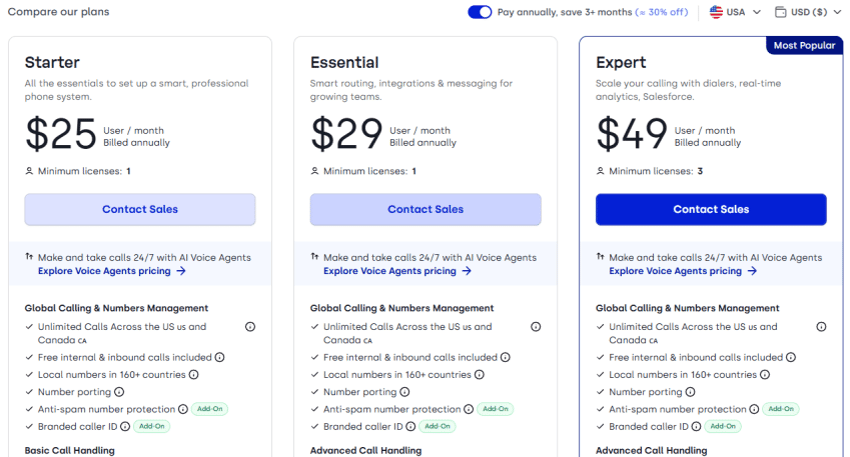
CloudTalk offers three core plans: Starter, Essential, and Expert. All plans are available with monthly billing, with savings of up to 30% when you choose annual billing.
| Plan | Annual billing | Monthly billing | Minimum licenses | Best for |
|---|---|---|---|---|
| Starter | $25/user/month | $34/user/month | 1 | Small businesses |
| Essential | $29/user/month | $39/user/month | 1 | Growing sales and support teams |
| Expert | $49/user/month | $69/user/month | 3 | Large contact centres and enterprises |
CloudTalk Pricing Plans in Detail
Each CloudTalk pricing tier targets different business needs. As you move up the plans, you’ll gain access to more advanced routing, integrations, outbound dialing capabilities, and analytics.
Starter plan pricing
Priced at $34 per user per month (billed monthly) or $25 per user per month (billed annually), this tier is accessible for startups, small teams, and companies just moving off traditional VoIP solutions. It includes:
- Unlimited U.S. and Canada calling (fair use policy)
- Unlimited inbound and internal calls (some restrictions apply)
- Chat and email support
- Call recording
- One ring group
- Basic call transfers
- Visual call flow builder
- Click-to-call
For simple voice operations, this covers the essentials. But it does NOT include:
- Call queues
- Smart call routing
- Salesforce integration
- Advanced analytics dashboards
- Power dialer
- Parallel dialer
- AI conversation intelligence
- Phone support
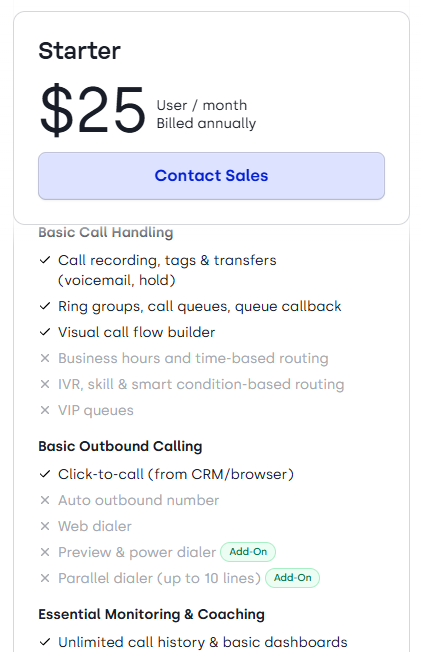
From what I see with clients, this tier is primarily voice-focused. It covers the bare essentials, but you miss out on the workflow automation and routing intelligence required to scale.
You won’t have a dialer for running outbound sales, smart routing for high-volume inbound calls, or CRM integration and AI transcripts for interactive voice response (IVR). The moment you need deeper integrations, analytics, or scalable tools, you’d have to start looking upward.
Best for: Cost-conscious startups or microbusinesses that just need a phone number.
Essential plan pricing
Approximate pricing is $39 per user per month (billed monthly) or $29 per user per month (billed annually).
The plan includes the following key features on top of the basic offerings in Starter:
- Queue callback
- Workflow designer (custom syncs, SMS triggers, Slack alerts)
- IVR menus
- Skill-based routing
- Auto outbound number
- Enhanced reporting
- CRM integrations
- APIs
Although this plan offers more features than the Starter plan, Salesforce workflows and advanced outbound tools remain unsupported. The following features are still limited or unavailable:
- Power dialer
- Parallel dialer
- Salesforce ecosystem integrations
- Live call monitoring
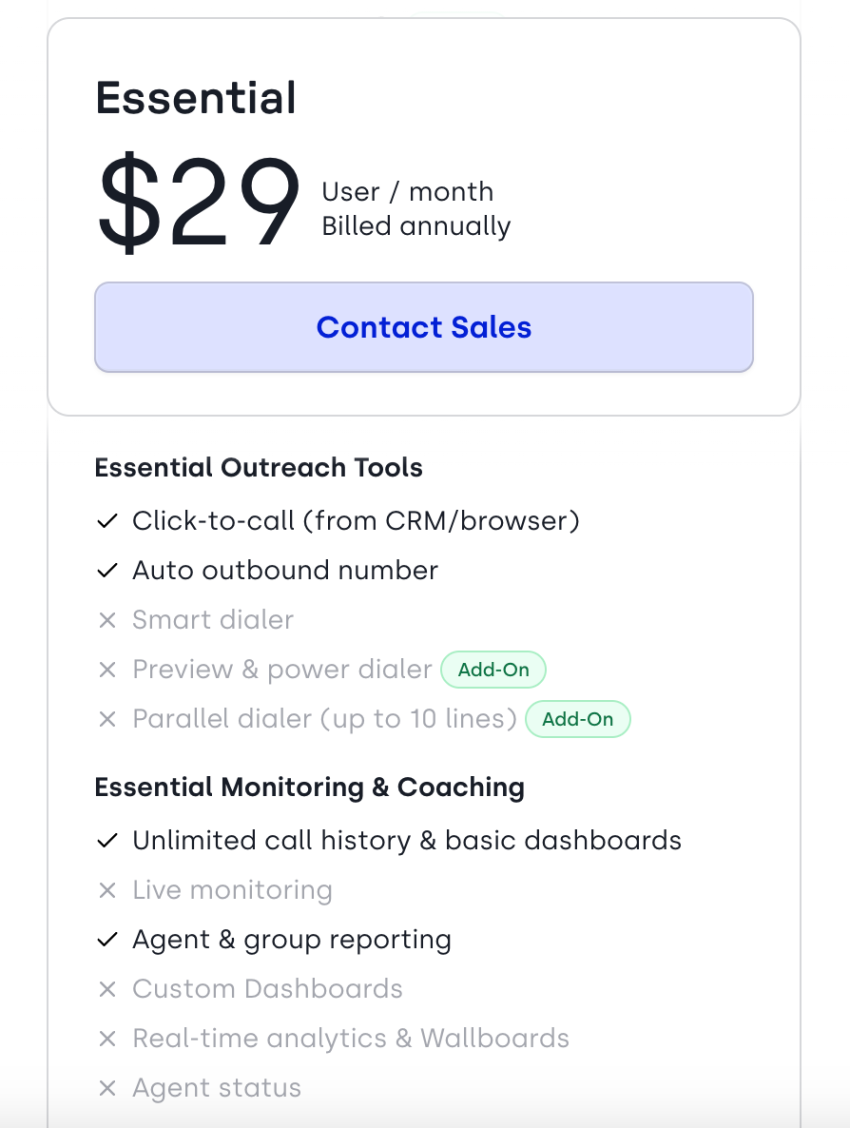
You may still find yourself in add-on territory to cover all your contact center functionality.
Best for: Growing support teams and businesses needing automation and IVR. This is typically the middle tier for scaling teams.
Expert plan pricing
The most feature-packed among CloudTalk plans, this tier meets the complex routing and monitoring needs of large sales and support teams. Its pricing starts at $69 per user per month (billed monthly) or $49 per user per month (billed annually) and requires a minimum of three licenses.
The Expert plan includes everything in the Essential plan plus:
- Power dialer
- Smart dialer
- Real-time analytics and wallboards
- Custom dashboards
- Salesforce ecosystem integrations
- Live call monitoring with listen, whisper, and barge
- Omnichannel smart routing, including SMS and WhatsApp

Notice the jump here. At this tier, your pricing almost doubles compared to the Starter annual pricing. $25 per seat becomes $49 per seat, and that is before add-ons.
Best for: Larger sales and support teams with complex routing and monitoring needs.
CloudTalk Add-Ons That Increase Total Cost
CloudTalk’s pricing appears simple, but the nuance comes from what isn’t included. When plan inclusions don’t fully meet your needs, you have to layer in add-ons. That’s when the total cost shifts dramatically.
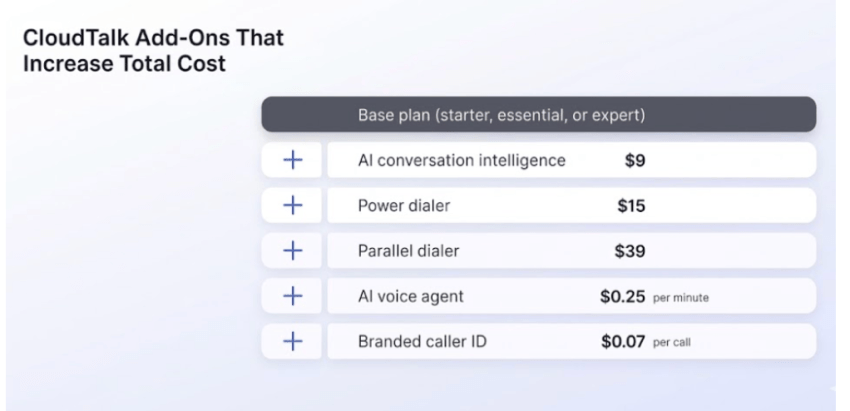
- AI conversation intelligence ($9 per user per month, billed annually): If AI is part of your coaching workflow, you pay extra for transcripts, topic extraction, and sentiment analysis. For 25 agents, that’s $225 extra per month. For 50 agents, it compounds to $450 extra per month.
- Parallel dialer ($39 per user per month, billed annually): Designed for high-volume outbound teams, this add-on alone exceeds the base price of the entire Starter plan.
- AI voice agents (starting at $350 per month or $0.50 per minute): CloudTalk’s 24/7 AI inbound/outbound agents are billed either in heavy bundles ($350 for 1,000 minutes with overage of $0.50 per minute) or on a $0.50 per minute pay-as-you-go rate. Usage-based AI pricing means high call volumes can create unpredictable spend that CFOs dislike.
- Branded caller ID (starting at $0.07 per call): Displaying your company name boosts connection rates, but for outbound-heavy teams, these per-call fees accumulate rapidly.
- Additional numbers (~$6 per number per month): While the fee is small, you must also consider the hidden administrative cost of verification requirements and regional compliance.
- Spam remediation (custom pricing): If you are making 70+ outbound calls a day per agent, you will likely need this add-on to keep your numbers from showing up as “Scam Likely,” but the pricing is completely gated behind a sales call.
Hidden Cost Considerations
There’s more to subscription plan prices than what’s shown upfront. Subscription pricing is rarely the final price, particularly once you scale and need additional features such as analytics, routing, or more advanced admin controls.
When budgeting for CloudTalk, look beyond the plan price and factor in:
- Out-of-bundle call rates
- SMS and MMS charges
- WhatsApp charges
- Regional carrier fees
- Taxes and regulatory surcharges
- CRM feature gating
- Support tier limitations
- AI activation across all users
When you factor these in, the advertised $25 per user often becomes $40 to $60 per user. For outbound teams requiring dialers, it easily hits $70 to $90 per user, depending on feature activation.
Although pricing seems affordable at first glance, total costs get expensive after expansion, especially when you want global reach.
Pros and Cons of CloudTalk Pricing
The modular structure and simple pricing of CloudTalk give you the flexibility to build a contact center stack aligned with your needs and budget. But if you’re scaling fast, getting additional features can feel like constantly hitting a paywall at every growth phase.
Here’s a balanced breakdown to help you weigh the platform’s value for your business.
Pros
- Clear three-tier structure: Pricing is easy to understand at a glance.
- Annual discount incentive: You can realize significant savings if you commit upfront.
- Flexible add-on selection: Pay only for the extras you explicitly turn on.
- Good entry-level pricing: It’s very accessible for basic inbound calling.
Cons
- Advanced tools gated: Key routing and analytics tools require higher tiers.
- AI sold separately: Core AI features are not included by default.
- Salesforce locked: You cannot integrate Salesforce unless you pay for Expert.
- Dialers not included: Essential outbound tools are missing from base plans.
- Usage-based AI: Minute-by-minute billing complicates budget forecasting.
- Support limits: Only chat and email are available.
What users say about CloudTalk pricing
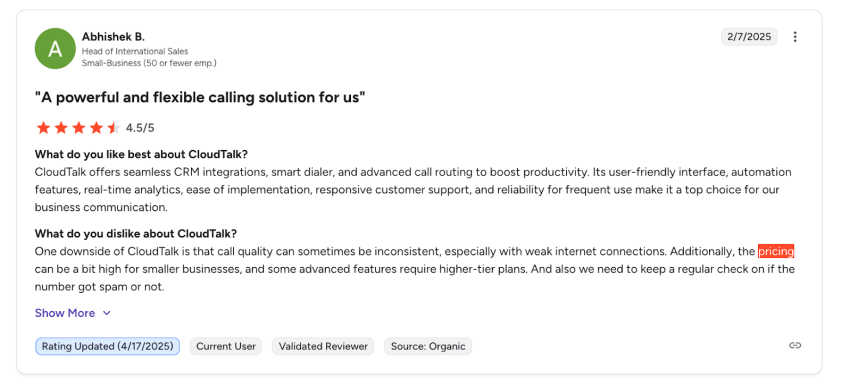
When reviewing customer feedback, most users praise CloudTalk’s initial affordability but quickly express frustration as their teams scale. Many growing businesses feel completely blindsided by the expensive add-ons required for essential routing and intelligence features.
The modular pricing structure makes accurate long-term budget forecasting incredibly difficult for operations leaders.
I always advise my clients to calculate their fully loaded cost per seat before signing any contract.
When CloudTalk Pricing Makes Sense
CloudTalk is a strong fit for specific business operations. It works well for small teams under 10 agents who simply need a reliable mobile app and basic inbound features. If your primary goal is to set up standard call queuing and a functioning voicemail inbox, you can extract solid value here.
It’s also a good choice for businesses comfortable selecting (and managing) add-ons individually or organizations operating mainly within the included calling regions that don’t need expensive international numbers.
However, the pricing model becomes far less predictable for outbound-heavy sales teams who rely on high-volume dialing. If you require robust call transcription across all seats, or if your enterprise security mandates single sign-on (SSO), you’ll find yourself forced into the highest tiers. Teams seeking unified AI, voice, SMS, and deep API automation in one seamless package often find that piecing together different providers and add-ons inflates their budget.
Why Nextiva Delivers More Built-In Value
The cloud-based contact center market is projected to grow from $10.5 billion to $30.7 billion (USD) in the next ten years:
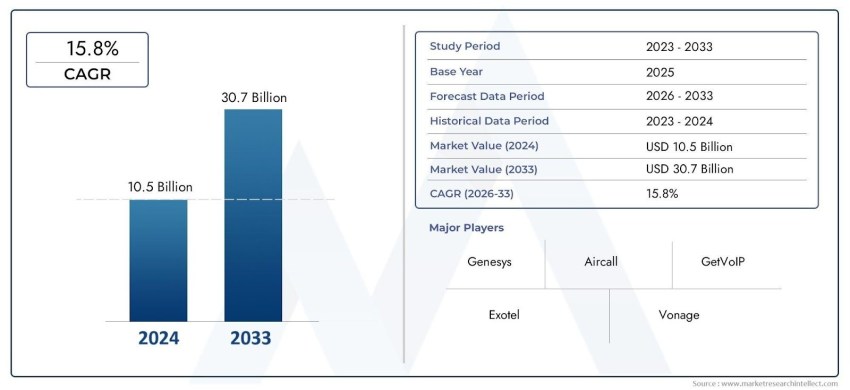
This acceleration tells us one thing: more businesses are modernizing their contact centers.
Where CloudTalk segments functionality across tiers and add-ons, Nextiva delivers a unified communications platform that includes more capabilities by default.
With Nextiva, businesses get built-in AI insights, omnichannel communication, advanced call routing, CRM integrations, real-time analytics, and enterprise reliability — all without stacking dialer add-ons, AI add-ons, and integration upgrades.
For growing organizations, the decision is not only about the base per-seat price. It’s about what is included, what is gated, and what will be required in six months. Nextiva reduces vendor sprawl and avoids the feature paywalls that artificially inflate your costs as your team grows.
When your team grows from 10 to 50 agents, you wouldn’t want to renegotiate your feature set every quarter. You want consistency — and predictable costs.
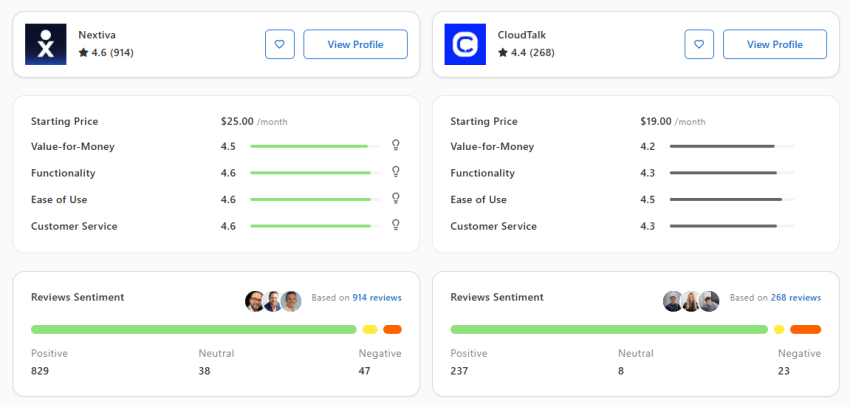
When you consider all the aspects of a scalable, comprehensive VoIP solution and full contact center capabilities, Nextiva delivers more value. Its all-in approach reduces vendor sprawl and avoids feature paywalls that inflate costs as teams grow.
Is CloudTalk Worth the Price?
For small businesses that need foundational inbound features, yes. The Starter plan offers a good entry point if you just need to reduce missed calls and create a decent customer experience through standard call forwarding and the occasional automated callback.
However, if you’re building a robust outbound call center, the math changes. The per-seat costs inflate when you have to purchase add-ons for essential tools like high-speed dialing.
By the time you upgrade to get custom API access, detailed call summaries, and full SSO security, you’re paying enterprise prices. Outbound teams relying on heavy dialing will find the lack of native dialing tools in the base tiers frustrating — every hour spent on manual dialing instead of automated dialing directly hurts your revenue.
A better alternative for a scalable contact center is a unified platform like Nextiva. Where CloudTalk pricing plans gate features, Nextiva builds them in. From unlimited call capabilities and intelligent follow-ups to seamless HubSpot syncs, you get everything you need without the hidden fees. You don’t have to worry about managing separate providers for toll-free numbers; it is all unified, giving you predictable costs as you grow.
Relationships start with a conversation.
Seamlessly manage all of voice, video and messaging with customers and teams on a unified platform.
CloudTalk Pricing FAQs
CloudTalk provides a mobile app for iOS and Android. It allows remote agents to handle inbound routing, check voicemail, and manage follow-ups on the go, though some users report occasional lag during rapid dialing.
No. If you want AI summaries, real-time call transcription, or AI-generated summaries of your voicemail drops, you must pay for add-ons. The Starter plan doesn’t include these advanced intelligence tools out of the box.
You can configure call queuing and call forwarding rules to effectively minimize missed calls. If all agents are busy, the system can route callers to voicemail or offer an automated callback so the customer doesn’t lose their place in line.
On the Essential and Expert tiers, CloudTalk offers native integrations with major CRMs, including HubSpot. This allows for automated follow-ups, instant screen pops, and logged data for every automated call.
Power dialing is included on the Expert plan, while parallel dialing is an add-on for all plans. These advanced dialing modes increase rep efficiency by automating the dialing process and leaving prerecorded voicemail drops.
SSO is available, but you’ll need to upgrade. Advanced API and SSO configurations are reserved for the highest tiers. Smooth onboarding for large, complex teams almost always requires this level of access.