Customer Experience
  Blog
Blog  Business Communication
  Leadership
  Marketing & Sales
  Nextiva News
  Productivity
  VoIP
VoIP 

A customerwrites: “Where’s my refund? It’s been two weeks.” Your chatbot replies with a link to the refund policy, and the ticket closes as deflected. The customer still doesn’t have their money, so they call. Now your team has to handle the same request twice, with a more frustrated customer.
The best agentic customer service platforms are built to resolve that request instead of explaining it. Gartner predicts agentic AI will resolve 80% of common service issues without human help by 2029, cutting costs by 30%. It also expects over 40% of Agentic AI projects to be canceled by the end of 2027.
The outcome you get depends on what you buy and how you roll it out. This guide covers a test for real AI agents, the pricing math finance will ask for, a shortlist, and a four-phase rollout.
What Makes a Customer Service Platform Agentic?
If you already run a chatbot, you know what it’s good at. The harder question is what a platform does once it understands the customer. For more background, here’s how agentic AI works.
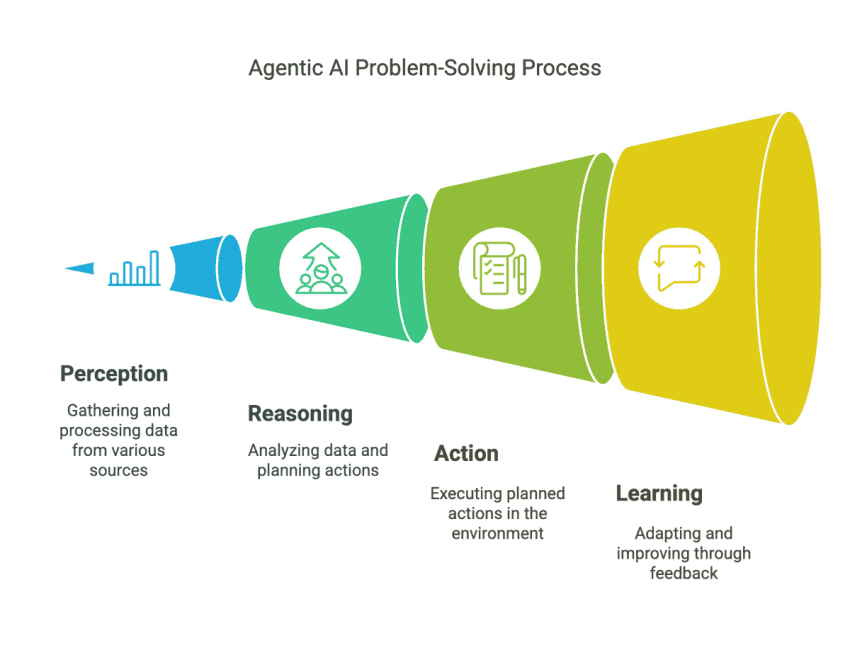
Answering common questions vs. acting on them
A retrieval-augmented generation (RAG) chatbot searches your knowledge base and writes a reply in natural language. It covers common questions like return windows or business hours. Ask it to move a delivery date, though, and it can explain how rescheduling works, but it can’t reschedule anything.
An AI agent calls toolsinstead. It looks up the order, checks the requestagainst your policy and what the billing system’s application programming interface will accept, writes the refund to your system of record (usually your billing or order platform), and confirms it went through. Each step depends on the last, so the agent has to track where it is in the process. Our conversational AI vs. chatbots guide covers the language side in more depth.
| Capability | RAG chatbot | Agentic platform |
|---|---|---|
| Answers policy questions | Yes | Yes |
| Looks up live account or order data | Sometimes, read-only | Yes |
| Changes a record (refund, reschedule, address) | No | Yes, within guardrails |
| Chains steps across systems | No | Yes, with state tracking |
| Handles a failed step | Not applicable | Retries safely, rolls back, or escalates |
| Success metric | Deflection | Verified resolution |
The agent-washing test for agentic AI
Gartner warns that many vendors are relabeling chatbots, AI assistants, and robotic process automation (RPA) as agents. Of the thousands of vendors claiming agentic capabilities, it estimates only about 130 are real.
So skip the product page and book a live demo. Then ask four questions:
- Can you show me a write action in a live system of record? Order-status lookups don’t count. They only read data, and plenty of chatbots already do that. Ask to watch the agent make a real change on a test account.
- What happens if that call fails midway? You want a specific answer about what the customer is told and what gets reversed. Vague reassurance is a red flag.
- Where is the audit log? Ask them to pull up the auditlog for the change you just saw.
- What does the agent do when it isn’t confident? The right answer involves a human agent. An AI agent that makes guesses about a refund is a liability.
A vendor that can only demo answers is selling a chatbot. If I could ask just one of these questions, it’d be the second. A good answer about failure handling is hard to fake.
Guardrails: What Happens When a Refund Fails Halfway?
Say a customerreceives a cracked blender and decides to switch to another model. The agent places the new order and requests a refund. The processor marks it as pending, so the agent assumes everything is fine and tells the customer the refund is on its way.
A few days later, the bank rejects the refund because the card account was closed. No one is alerted. The customer checks the statement, sees no refund, and comes back with the chat transcript in hand. Now the team has to explain why the promised refund never arrived.
A chatbot that simply pointed the customer to the refund policy would have caused less trouble.
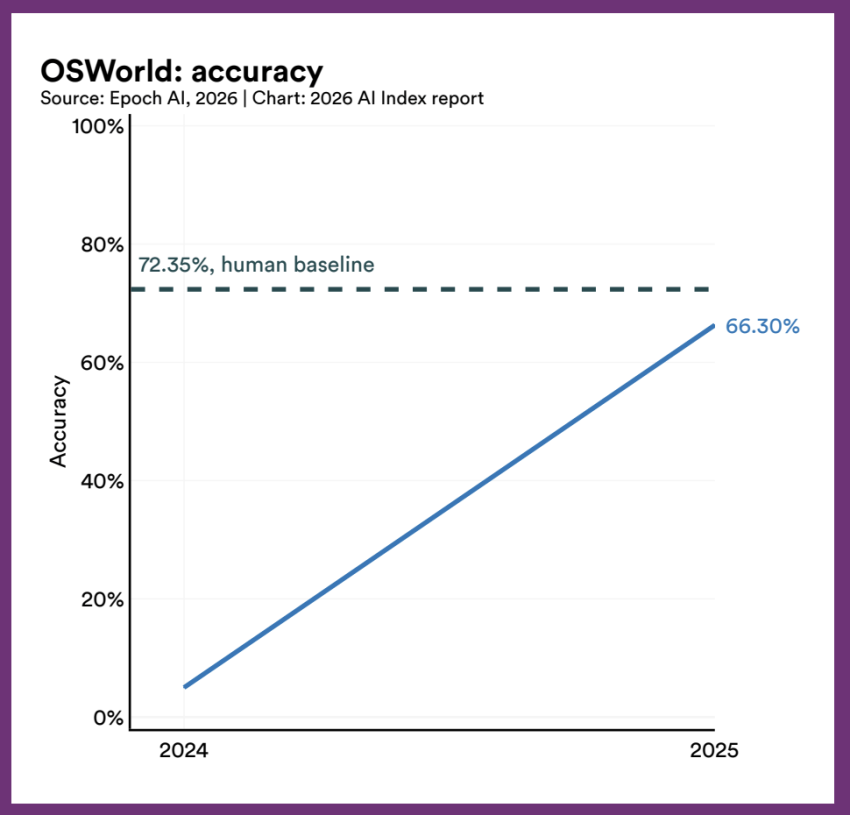
Failures like these aren’t rare, even with the best agents available today. On OSWorld, a benchmark built from real computer tasks, top agents scored 66.3% in accuracy in 2025, a big jump from 2024 and a few points short of the 72.35% human baseline. They still got about one in three tasks wrong.
Policy rules wrap the natural language model
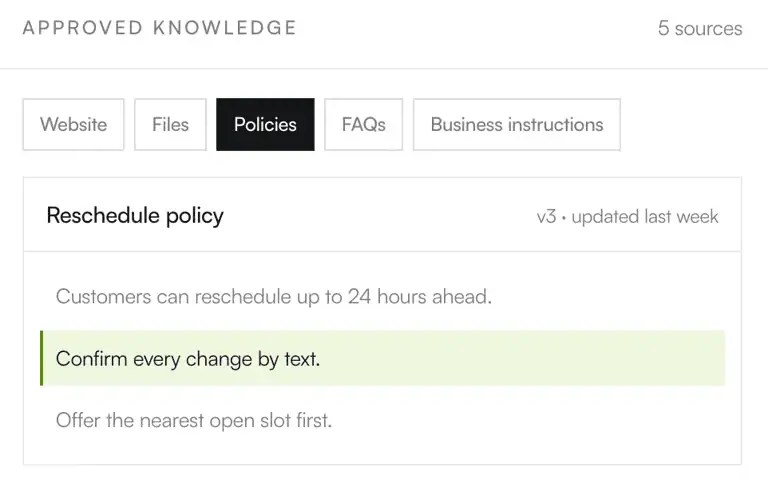
A language model reads a message and works out what the customer wants. It shouldn’t decide what the agent is allowed to do. That job belongs to deterministic rules, meaning fixed rules that give consistentresults no matter how the customer phrases their request.
Here are a few examples of what they look like in practice:
- Refund caps: Anything above a set amount, say $250, requires human involvement before it goes through.
- Identity checks: The agent verifies the customer’s ID before it views or changes anything on the account.
- A “never” list: These are actions the agent can’t take under any circumstances, like changing payout details or closing an account.
These are your business rules, so your support team should be able to see and edit them without help from the AI vendor. When a vendor walks you through its platform, ask who on your side can change a refund cap and how long the change takes to go live. If it means filing a ticket with the vendor and waiting, your refund policy is effectively in someone else’s hands.
Retries, timeouts, and rollbacks
The blender refund went wrong because the agent treated “pending” as “done.” A well-built agent keeps those categories separate. When the processor says “pending,” or the call times out with no answer, the agent tells the customer the refund is being processed. It confirms only once your payment system marks the refund as completed, and if the refund fails, someone on your team gets an alert.
Retries create a different problem. A call that timed out may have gone through anyway, so if the agent simply sends it again, the customer could get refunded twice. An idempotency key prevents that. It’s a unique ID attached to each refund request, so when the same request arrives a second time, the payment system recognizes it and doesn’t pay out again. Payment processors like Stripe use idempotency keys for this.
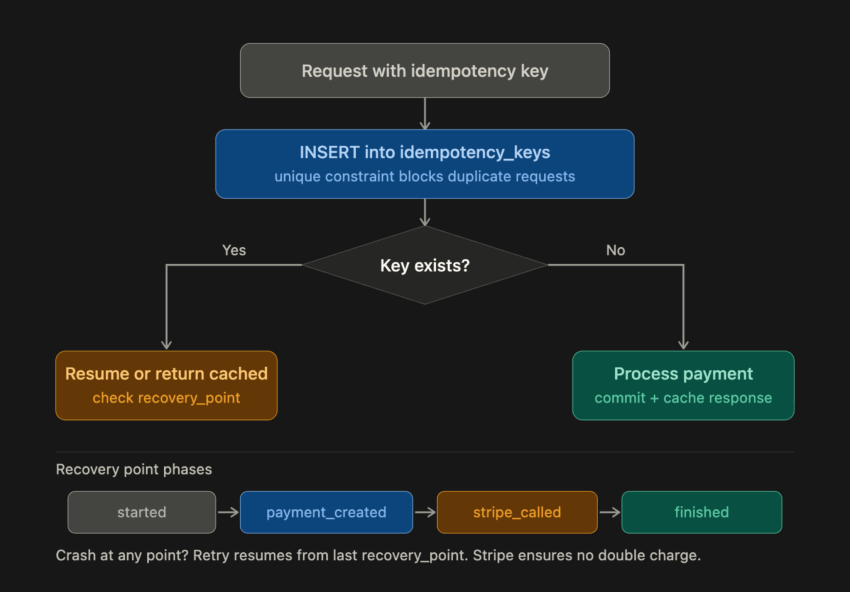
The blender swap also involved two actions: placing the new order and refunding the old one. When one step fails, the steps before it may need to be undone, which is called a compensating transaction. Here, the agent puts the new order on hold until someone confirms with the customer whether they still want it.
Escalation that protects the customer experience
Some requests will always need human expertise. A common complaint about AI support is having to repeat everything once a human picks up. With a good handoff, the human agent sees the transcript, what the AI understood the customer wanted, and every action it attempted, along with its status.
Say the customer who ordered the blender is transferred to a human agent. If that person can’t see the failed refund, they might issue a new one to the same closed card, and it’ll fail again. AI agent assist tools can show the action history as soon as someone picks up the conversation.
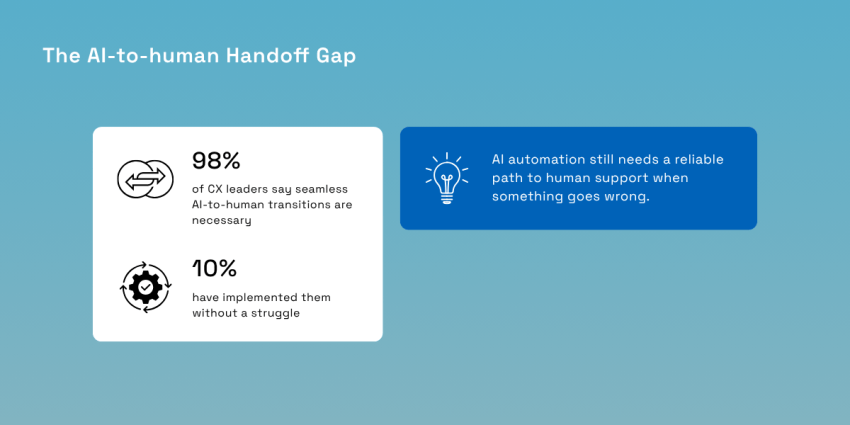
Few teams have this working yet. Nextiva’s state of customer experience research found that 98% of CX leaders see seamless AI-to-human transitions as necessary, but only 10% have implemented them without a struggle. When you test escalation, trigger a failed action first and see whether the human agent can tell what happened.
Backtest Before You Bank on Instant ROI
In a Gartner survey of 321 service leaders, 91% said executives are pushing them to implement AI. Add a vendor pitch promising instant ROI, and it’s easy to put an agent in front of customers before anyone has tested it on real tickets. Backtesting lets you find its mistakes on old conversations, where they can’t cost you a customer.
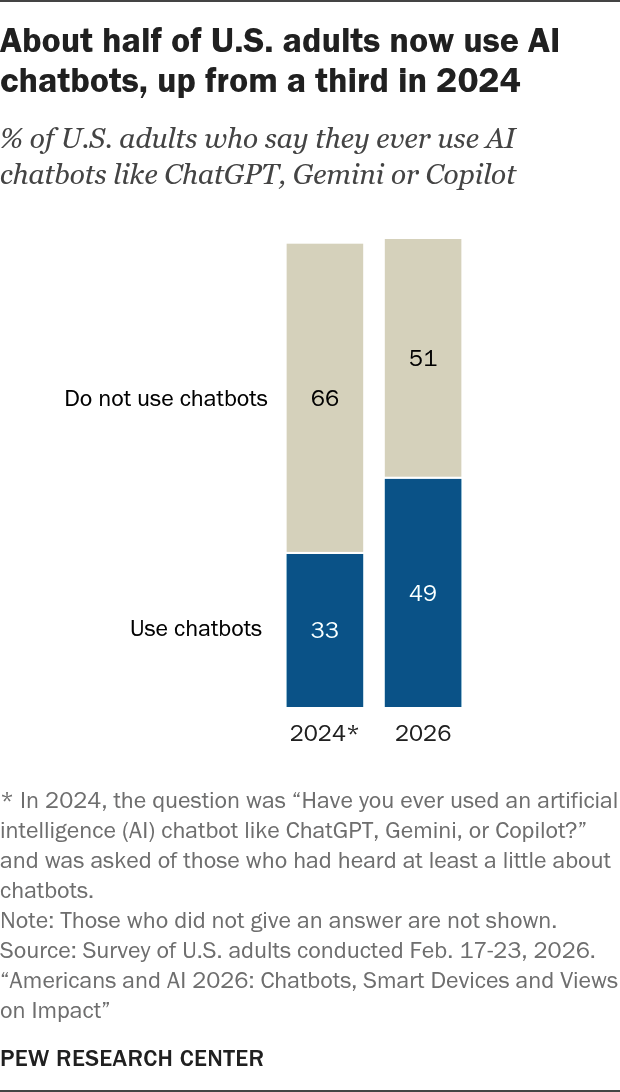
A growing share of the people who contact your support team already use chatbots on their own. Pew measured general use rather than customer service, but it means customer expectations for AI are increasingly set outside your support channel.
Start with an audit of your knowledge base. The agent acts on whatever your articles say, so an outdated return policy turns into a wrong refund decision delivered with full confidence. In the aforementioned Gartner survey, 58% of leaders said they plan to retrain human agents as knowledge management specialists to keep content accurate for both AI and self-service. Gartner also found that 61% of service leaders have a backlog of knowledge articles to edit. Clean up your knowledge sources before testing, or the agent will be working from outdated articles.
Next, replay thousands of historical tickets through the candidate in a sandbox, a test copy of your systems where nothing changes real accounts. Track four numbers:
- Resolution ceiling: The share of tickets the agent could fully resolve.
- Policy adherence: How often it stayed within the limits you set.
- Incorrect-action rate: How often it made errors, like updating the shipping address on the wrong order.
- Escalation accuracy: Whether the tickets it handed off were ones that needed a person.
Then run shadow mode on live traffic. The agent drafts each reply and action, a team member reviews and sends it, and you compare the agent’s choices with your team’s. Hold off on write access until the agent’s mistakes in shadow mode are rare and low-stakes. You want enough shadow data on each request type to see its unusual cases, like partial refunds or split shipments, before letting the agent act alone.
Agentic AI Pricing and Total Cost of Ownership
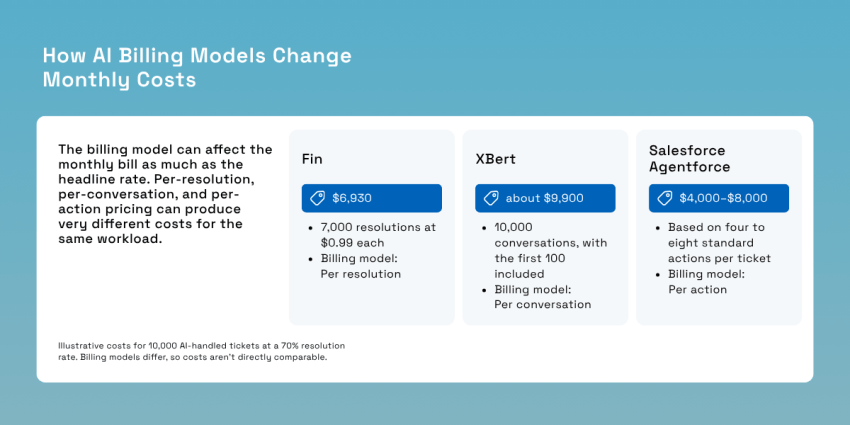
Two vendors can quote the same ticket volume and send invoices thousands of dollars apart because the billing model has equal importance as the rate. The table below runs four common models against the same workload: 10,000 AI-handled tickets a month, with 70% resolved without a person.
| Billing model | How it charges | Example | Monthly cost at 10,000 tickets | Watch for |
|---|---|---|---|---|
| Per resolution | Only tickets the AI resolves | Fin, $0.99 per resolution | $6,930 (7,000 resolutions) | How “resolved” is defined and whether handoffs are billed |
| Per conversation | Every AI-handled conversation | XBert, $0.99 after 100 included | About $9,900 | You also pay for the 3,000 escalated conversations |
| Per action | Each tool call or step | Agentforce, about $0.10 per action | $4,000 at four actions per ticket, $8,000 at eight | Actions per ticket are hard to forecast |
| Seat add-on | Per licensed human agent | Fin Copilot, $35 per user | Depends on team size | Cost doesn’t fall as automation rises |
Each vendor’s pricing page has fine print that can change these numbers.
Fin counts a resolution when no further help is requested after its last answer. A customerwho gives up on the chat and calls your support line can still be billed as resolved. Handoffs to a human that run through a configured procedure also cost $0.99, so if all 3,000 escalations went that way, the bill would grow by $2,970. Fin Voice is sold separately on custom pricing, which matters if phone calls are a big share of your volume.
XBert, Nextiva’s AI receptionist, charges the same $0.99 for every interaction after the first 100, which makes it easy to forecast. That total includes the conversations it hands to your team.
Agentforce sells Flex Credits at $500 per 100,000. A standard action uses 20 credits, and a voice action uses 30. Unused credits don’t roll over. Salesforce also offers a flat $2 per conversation, but you can’t mix the two models in one org. Since 20 standard actions cost $2 under the Flex Credits model, long, multi-step conversations can be cheaper at the flat rate.
Sierra and Decagon don’t appear in the table because they negotiate outcome-based contracts and don’t publish prices.
The table also leaves out what you’ll spend around the AI: the integration build, knowledge base upkeep, time your team spends reviewing the agent’s work, and labor from your human agents on every escalated ticket. Some vendors add aplatform fee or require helpdesk seats on top.
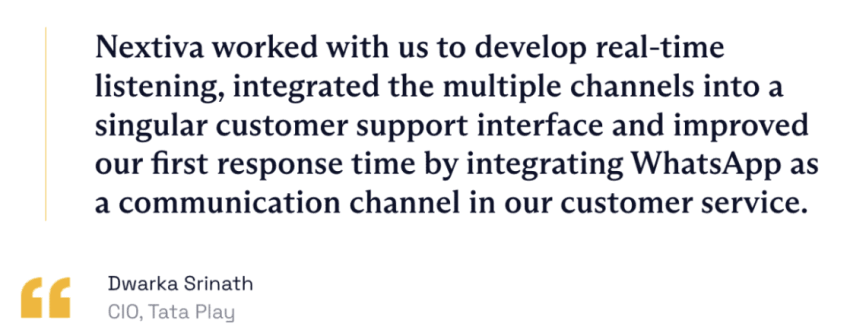
That human labor is why the share of tickets the AI actually resolves matters so much. The table assumes 70% for every vendor, but real rates differ, and every ticket the AI fully resolves is one your team doesn’t have to handle. Tata Play, a satellite TV provider in India with over 19 million subscribers, shows what that looks like at scale. Once it connected an AI bot to its backend systems, the bot could complete routine requests on its own. It handled over 5 million of them, and Tata Play’s cost per customer resolution fell by 40%.
Because so much depends on that number, write the definition of “resolution” into the contract and measure it in your system of record. For a refund, “resolved” should mean the payment system shows that the money went out.
The Best Agentic Customer Service Platforms Compared
The biggest difference between these platforms is where the agent lives. Agentforce and Zendesk build the agent into the customer relationship management (CRM) tool or helpdesk you already use. Fin and the newer challengers can run on top of an existing helpdesk. Nextiva runs its agent on the communications platform itself, phone network. That choice determines how much customer data the agent can reach and who picks up when it hands off.
| Platform | Best for | Channels | Pricing model |
|---|---|---|---|
| Nextiva (XBert + Contact Center) | Voice-heavy teams that want the agent, phone, and handoff on one platform | Voice, SMS, chat, email, social | XBert from $99/mo; Contact Center from $75/agent/mo |
| Salesforce Agentforce | Service Cloud organizations | Chat, messaging, voice | Flex Credits, per conversation, or per user |
| Fin (formerly Intercom) | Adding a standalone agent to an existing helpdesk | Chat, email, SMS, phone, WhatsApp, Slack | Per resolution |
| Zendesk AI agents | Zendesk-native support teams | Messaging, email | Per verified resolution; rate quoted by sales |
| Sierra / Decagon | Large enterprises with engineering support | Chat, voice, email | Custom quote, outcome-based, or per conversation |
| Lorikeet / eesel AI / Fini | Low-commitment pilots on an existing helpdesk | Mostly chat and email | Varies by vendor |
Nextiva: AI agents, phone network, and contact center in one place
Because Nextiva owns both the network and the contact center, the AI agent, the call, the routing, and the person who takes the escalation share one platform and one customer record. Agents that borrow telephony from another provider can’t offer that. The network runs on eight points of presence and strives for 99.999% uptime, and Nextiva publishes its history on a public status page, so you can check that claim yourself.
XBert, which works as an AI receptionist among other roles, answers calls, chats, and text messages at any hour. It completes routine tasks like booking appointments within the guardrails your team sets and logs every conversation, which makes it a practical fit for voice-heavy teams such as clinics or law firms scheduling consultations.
Nextiva Contact Center adds journey orchestration and agent assist, and Nextiva reports a 50% reduction in wrap-up time with AI summaries. Its data centers are ISO/IEC 27001 certified, the platform is SOC 2 audited and PCI DSS compliant, and it offers HIPAA-compliant plans with a signed business associate agreement.

If your support is almost entirely chat and email and your team lives in Zendesk, a native agent may be the simpler fit.
Salesforce Agentforce and Fin
Agentforce makes the most sense if your team already works in Service Cloud since it acts on the records and workflowsyour agents use every day. Fin works as a standalone agent on Salesforce, HubSpot, Freshworks, and other helpdesks.
The two now belong to the same company. Salesforce completed its acquisition of Fin on September 10, 2026, and Fin now operates inside Salesforce’s AI Labs while continuing to serve its existing customers. If you run Fin on a helpdesk other than Salesforce, ask what’s planned for that integration and whether your current terms hold at renewal.
Zendesk AI agents
For teams that run on Zendesk, the native agent already works with your ticket history and help center content. Zendesk bills only for verified resolutions, meaning outcomes it confirms were complete and satisfactory. That’s a stricter test than a customer simply leaving the chat. Zendesk doesn’t publish the per-resolution rate, so get it from your sales rep before you compare.
Sierra and Decagon
Both are enterprise AI-native vendors with hands-on, vendor-led implementations. Sierra prices on outcomes. Decagon lets customers choose per-conversation or per-resolution billing and says most enterprises pick per-conversation to avoid negotiating what counts as a resolution. They suit large brands with engineering teams to support the build, and they’re usually more than a mid-market team needs.
Lorikeet, eesel AI, and Fini
These challengers plug into the helpdesk you already have, and most lean on simulations against past tickets, which makes them a low-commitment way to pilot. For example, eesel AI replays historical tickets and compares its answers with what your team actually sent. Lorikeet is built for complex, regulated businesses like fintech and insurance, while Fini (a separate company from Fin) emphasizes write actions, such as issuing refunds and updating subscriptions.
A Four-Phase Self-Service Rollout That Survives Real Customers
Each phase gives the agent a little more room and ends with a test it should pass before you move on. Treat the process as a frameworkand adjust the timing to your ticket volume.
Before Phase 1, map where your customer data lives. The agent can only act on what it’s connected to, so if order history is in one system and billing in another, it has only half the information. Nextiva’s CX research found that 81% of CX leaders believe consolidating customer data into a single system would make a seamless experience much easier to deliver. Determine which systems the agent needs before you start testing it.
- Phase 1 — Audit and backtesting: Fix stale articles in your knowledge base, then test the agent on past tickets. You’re ready for Phase 2 once you know which ticket types it handles well and which it gets wrong.
- Phase 2 — Read-only shadow mode: Connect the agent to your live systems with read access only, and run it in shadow mode so your team still handles all customer interactions. Move on when it can pull every record it needs without a person filling the gaps.
- Phase 3 — Bounded write actions: Turn on writes for a few intents, such as address changes or small refunds, with caps and verification rules in pl ace. Complex tasks stay with your team. Expand only after real traffic shows no wrong actions reaching customers.
- Phase 4 — Expand channels and chained actions: Add channels like voice,and let the agent chain steps across systems. Hold a weekly exception review where your team goes through failed actions and bad escalations and turns them into feedback for the agent’s rules and knowledge.
This pacing keeps a team out of the 40% of agentic AI projects that Gartner expects to cancel by the end of 2027. Gartner’s advice is to pursue agentic AI only where it delivers clear value, and each phase gives you proof of that before you widen the scope to more autonomous customer service.
What Changes When the AI Handles the Refund?
Go back to the customer who’s been waiting two weeks for a refund. With a working agent, that conversation goes differently. The agent finds the order, issues the refund, waits for the payment system to confirm it, and records each step before the chat ends. The customer has no reason to call back, and your team doesn’t have to work the ticket.
Your next steps depend on your channel mix. If phone calls are a big part of your support volume, look at XBert, Nextiva’s AI receptionist, together with Nextiva Contact Center. When XBert does need a person, whoever picks up the call can already see the refund attempt on the customer’s record, so the customer only has to explain the problem once.
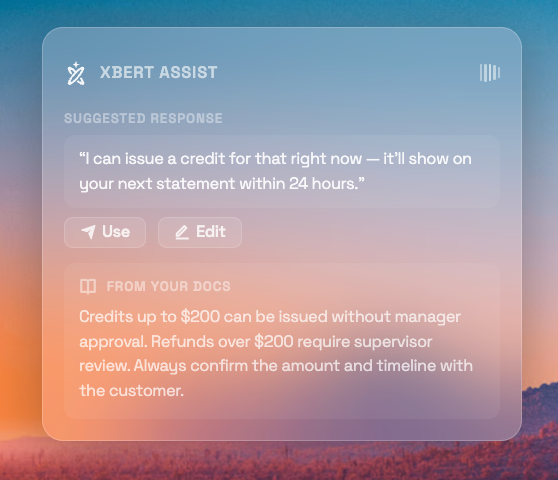
Run XBert on your own calls with a 14-day free trial, and measure what it does for your resolution rate and customer satisfaction.
Your AI-Powered Contact Center
Create amazing customer experiences with AI-powered contact center software. Scalable contact center platform built for omnichannel customer conversations.