VoIP
VoIP  Blog
Blog  Business Communication
  Customer Experience
  Leadership
  Marketing & Sales
  Nextiva News
  Productivity

A missed phone call costs more than a missed opportunity.
Let’s say a customer calls you in a time of need, reaches voicemail, but doesn’t leave a message. Instead, they call the next number on their contact list. You don’t just lose the opportunity to solve that problem, but also the chance to sell to the same customer.
Next time, you might not be the first they call when there is a presumption that their call will go unanswered. Quo Sona was built to catch such calls before they go elsewhere.
While Quo Sona is a starting point for some, buyers often encounter limitations when seeking stronger integrations, compliance features, and pricing options. This is often when the search for a better alternative begins. Many buyers comparing Quo alternatives also weigh other VoIP and business communications providers such as RingCentral, Aircall, Vonage, Ooma, and Google Voice, where telephony features such as unlimited calling and cloud-based call routing are standard.
This guide focuses on AI answering agents that address the needs of a small business, and we have curated the alternatives accordingly.
Why Businesses Search for Quo Sona Alternatives
According to the U.S. Small Business Administration Office of Advocacy, small businesses account for 99.9% of all American businesses. It’s safe to say that, while small businesses run the economy, they run on phone calls. A ringing phone on a business day means work; a missed call means lost opportunity.
Based on an August 2025 report from Ambs Call Center, the average direct cost of a single missed call is $12.15, which amounts to an annual cost of $26,000. Interestingly, the same research suggests that small businesses answer only 38% of incoming calls. You would assume that the rest would go to voicemail. And they do. But 85% of people who hit voicemail never call back and are most likely to dial a competitor.
The voicemail leak widens outside business hours. In the past, AI felt like a risky option for after-hours call handling, but it has now become the default, especially with 85% of customer service leaders planning to explore conversational generative AI.
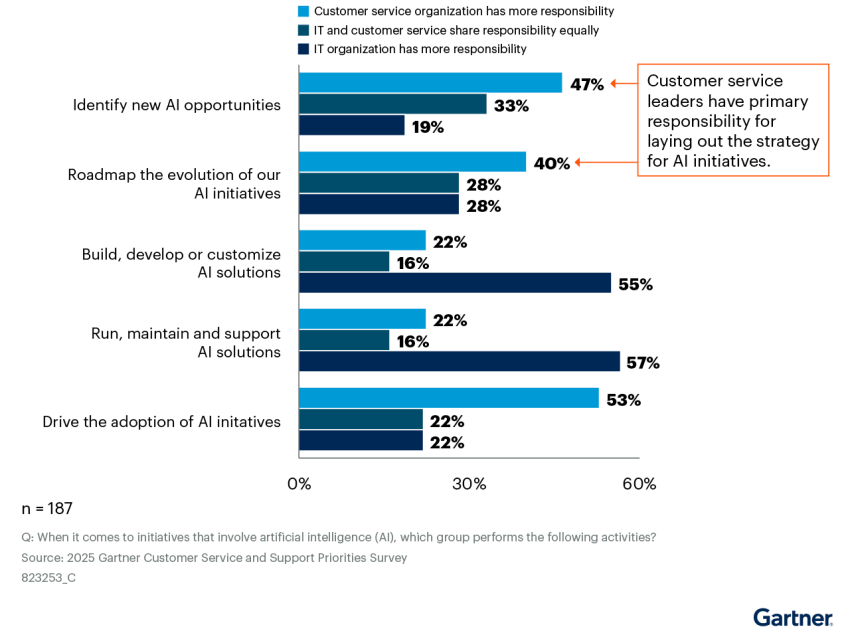
Today, the question is not about whether to use AI; it’s about which AI receptionist can do the job perfectly. This is where Quo Sona enters conversations. Quo plans include 1,000 free credits, which is equivalent to about 10 Sona calls a month. However, as a business grows, users seem to outgrow the credit model. Some even start facing issues with routing and analytics.
This leads businesses to search for a Quo Sona alternative that delivers better value. Options like Nextiva XBert start making more sense at this point.
The 5 Best Quo Sona Alternatives for AI Call Answering
The tools listed below earn their spot for solving the missed-call problem in their unique ways. Some are fully automated, while some pair AI with live humans. And there’s one that’s human-only. Here’s how their starting prices and models compare:
| Service | Starting price | What it is | Best fit for |
|---|---|---|---|
| Nextiva XBert | $99 per month per 100 interactions, then $0.99 per interaction after | 24/7 AI voice, text, and chat | Owners who want an AI virtual receptionist to not only answer calls but also book appointments and qualify new inquiries |
| Smith.ai | $95 per month for 50 calls per month | AI with live human backup | Owners who want a human safety net |
| AnswerConnect | $350 per month for 200 minutes | Live human agents, 24/7 | Premium, no-bot preference |
| Dialpad | $12,516 per year, with a 70% AI agent successful completion rate | Unified comms with AI built in | Big teams who need AI support with their phone system |
| Fireflies.ai | Free; paid from $10 per seat per month | Meeting note-taker, not a receptionist | Note-taking, not call answering |
1. Nextiva: The full-service AI employee
Nextiva XBert is an AI-powered, all-in-one virtual receptionist built to act like a hire. It takes calls, messages, and live chats, and autonomously books appointments on your calendar. For an urgent call, the agent routes it to a real team member with full context.
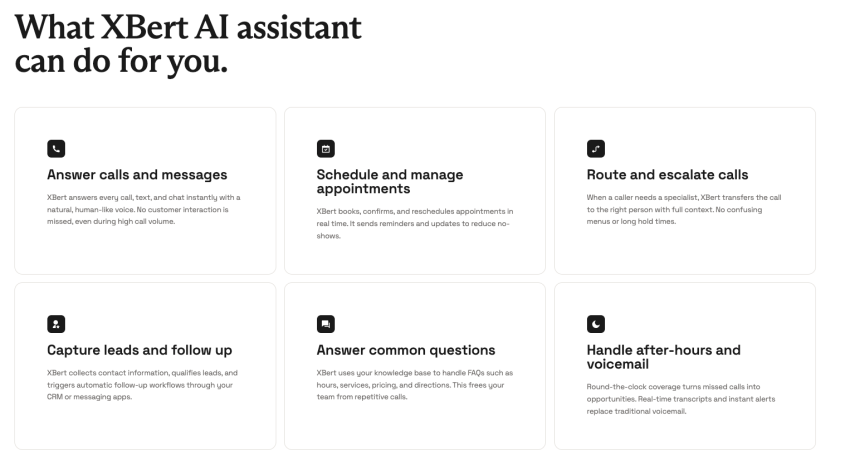
Pricing is a flat $99 per month for 100 interactions, and then $0.99 per interaction after that. An interaction counts only when a call runs 30 seconds or longer, or a text/chat gets three or more AI responses. That way, short hang-ups don’t burn the budget, and there are no surprise add-on fees. You can try XBert risk-free for 30 days.
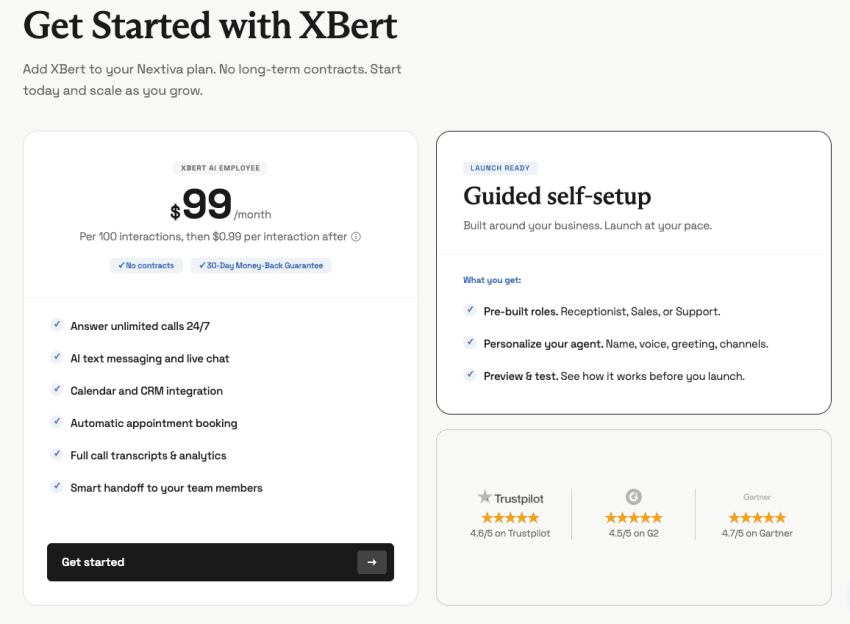
XBert connects with Salesforce, HubSpot, Zendesk, Microsoft Teams, Google Workspace, Zapier, Zoho, and ServiceNow. It ensures a captured lead lands in the system your team uses, ready for follow-up through automated workflows and open APIs. Your team gets full call transcripts and real-time call analytics, so you know what happened and what a buyer wants.
There’s no long-term contract, with enterprise-grade reliability of 99.999% uptime, SOC 2 certification, and HIPAA compliance. For a clinic, a law firm, or any business that deals with sensitive information, XBert is a suitable choice, as it doesn’t nudge the compliance posture.
2. Smith.ai: Human-AI hybrid
If you’re hesitant to rely on software for all of your calls, Smith.ai may be the right fit. Human escalation is included in every plan and costs $3 per call. The receptionist costs $95 per month for roughly two calls a day in the starter plan. For around 150 calls per month, the cost is $270 per month for the AI front desk; live calls are billed additionally.
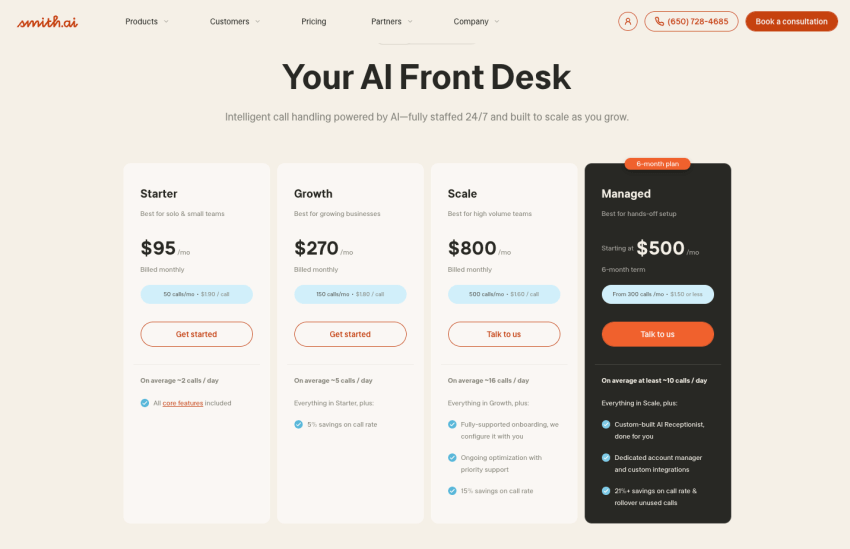
Although Smith.ai backs this service with 500-plus live agents and integration options, the trade-off is cost. When you lean on the human side, the price climbs well past the flat-fee AI option. It’s worth considering if your call volume grows.
3. AnswerConnect: Human-only answering service
AnswerConnect takes the opposite route in managing calls and interactions. It goes with the people-first positioning rather than AI-first or AI-assisted. Every call reaches a live agent 24/7, with no voicemail or automated voice. For services that need human-only interactions, AnswerConnect is a suitable choice.
But human-first service comes at a cost. The entry plans start at $350 a month for 200 minutes plus a $49.99 one-time setup fee. At the higher tier, the costs rise to $575 a month and per-minute charges once you pass your allotment. This is several times the cost of the AI options for a comparable amount of coverage.
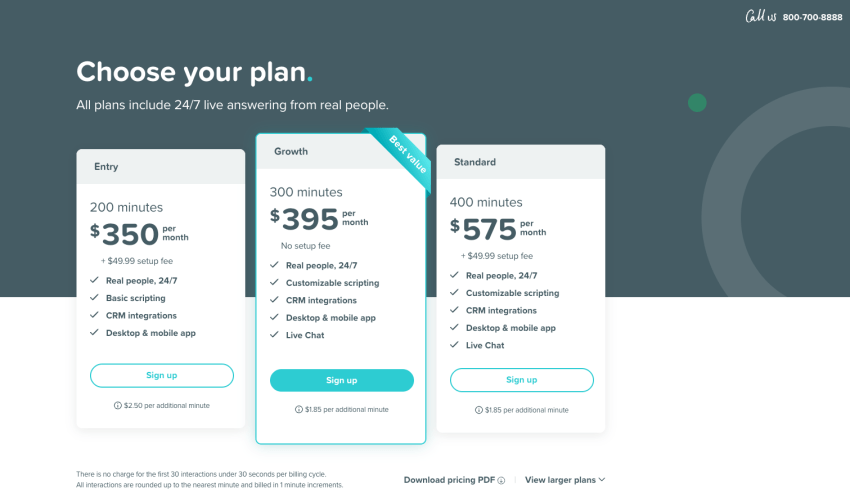
AnswerConnect is a suitable choice when you want premium human handling, and that matters more to you than the price. But if you’re seeking a smarter and more cost-effective way to manage missed calls, consider Nextiva XBert.
4. Dialpad: A communications platform with AI inside
Dialpad is a cloud-based business phone system and contact center with AI woven through it. For teams that want their phone, team messaging, SMS, and AI within a single tool, Dialpad might fit the requirements list.
However, if you’re a small business, it might be a bit beyond your budget. Dialpad doesn’t show pricing plans on its website, but based on the ROI calculator, for one rep, the AI costs $12,516 for a year, for a 70% AI agent successful completion rate.
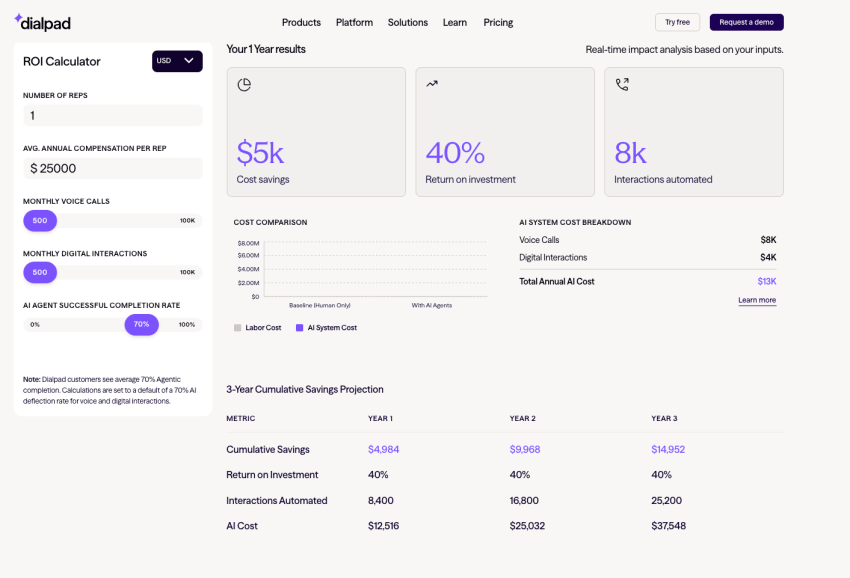
Dialpad makes sense if you’re a big team and purchasing a communication platform. However, as a small team, you might want to look for more cost-effective solutions that fit your requirements.
5. Fireflies.ai: A note-taker, not a receptionist
When looking for Quo Sona alternatives, Fireflies shows up quite frequently. But it’s a meeting note-taker, not a virtual AI receptionist. It can record, transcribe, and summarize meetings into searchable summaries on Zoom, Google Meet, and Microsoft Teams, but it doesn’t answer inbound business calls.
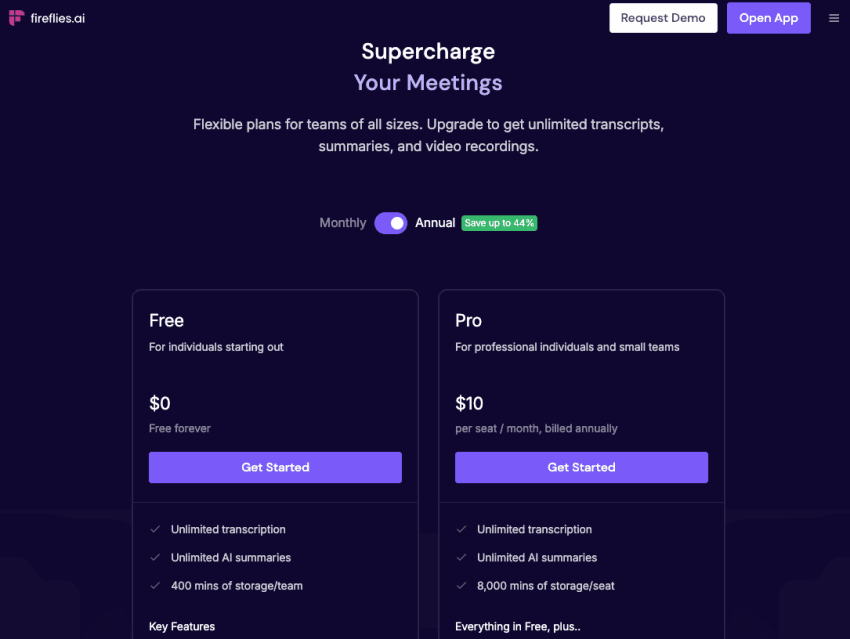
It’s good at what it does with a free tier, and its paid plan starts from $10 per seat per month (on an annual contract; $18 if you pay monthly). If you simply need to capture what happened in a sales call, it fits. However, if your goal is to make sure the phone gets answered when you can’t pick up, you’re shopping in the wrong category.
What to Look For in an AI Receptionist Platform
On paper, the ROI of an AI receptionist looks like a healthy bargain. But there are many things to consider to make the bargain work. At the time of choosing an AI receptionist for your company, you need to consider the following:
- CRM and calendar integrations: If your AI just responds nicely in conversations but fails to act on callers’ requests, it doesn’t do justice to a receptionist’s work. An AI receptionist setup should be able to capture and qualify a lead, and book an appointment while pushing the data into CRM integrations like Salesforce or HubSpot through automation and workflows. This counts as a successful interaction rather than simply answering callers’ queries.
- Natural voice and low latency: Callers who are welcomed by a stiff, robotic greeting generally hang up the same way they do on voicemail. The voice needs to closely mimic a human tone to keep the caller on the line, and strong call quality protects the user experience on every call.
- Security and compliance: For healthcare, legal, and financial work, these are non-negotiable. Look for SOC 2 certification and HIPAA compliance, and confirm them before you handle any sensitive information. Quo’s co-founder, Daryna Kulya, noted in late 2025 that the company had just launched HIPAA compliance. It means Sona’s regulated-industry posture is recent. Nextiva lists SOC 2 certification and HIPAA compliance for XBert as established.
- Memory across calls: The AI receptionist should be able to carry context, and a returning caller shouldn’t have to repeat what they have previously communicated. Context that carries from one call to the next is what makes the agent feel like a staff member rather than a script.
- Multilingual support: If your community speaks more than one language, the agent should too. Sona covers English, Spanish, and French, which is a reasonable spread for many U.S. service areas.
- Channels beyond voice: Look for SMS and MMS text messaging, and even social media support so teams can reply on the channels people actually use.
- Routing, recording, and analytics: Strong call handling depends on smart call routing, call queues, and a clear call flow, plus recording and real-time analytics that show how each conversation performed.
- Scalability and support: As call volume grows, the provider should scale with you in both capacity and functionality. Check for scalability across higher tiers, responsive customer support, and phone support, and onboarding that keeps the learning curve short for small teams, growing teams, and growing businesses.
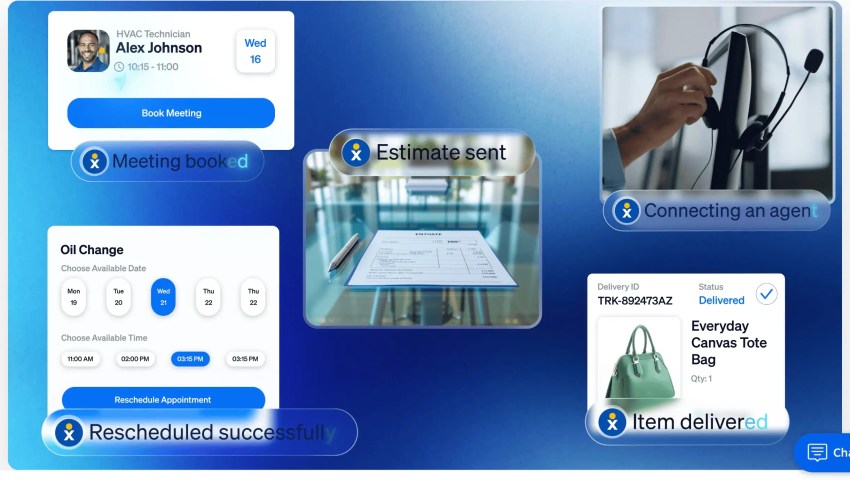
That said, your agent is only as good as what it does after it picks up. The best AI answering service doesn’t require a developer or a long, technical setup. While setting it up, you can start with your knowledge base and list short, specific points you want the receptionist to consider. Write all instructions in plain language, and test before you go live.
Making the Best Choice
The best choice comes down to what you need the AI to do, how much time you want to invest in setup, and how much you want to spend. Make sure to run the ROI honestly. As the Bureau of Labor Statistics reports, a full-time receptionist earns a median of $37,230 a year, and a single hire covers business hours only.
An agent like XBert costs $99 a month and covers all 168 hours of the week for a small fraction of that wage. This is why onboarding an AI receptionist feels more like recovered revenue. Nextiva makes the leap low-risk by pairing XBert with a 30-day money-back guarantee and no contract. You get to route calls, read transcripts, and decide based on results rather than a sales pitch. If your goal is to stop losing leads to voicemail without taking on a payroll line, it’s the path of least resistance.
Explore Nextiva XBert and let it answer that 8 p.m. call before it goes to your competitor.
XBert AI receptionist never misses a call, text or chat.
Greet customers, book appointments, and capture leads while you run your business. See why it’s the best AI receptionist.
FAQs About Quo Sona Alternatives
OpenPhone rebranded to Quo on September 23, 2025. The company raised $105 million in growth financing and repositioned itself around AI-driven front-office tools, with the Sona AI agent built into the new platform.
An auto attendant, or IVR menu, is a static push-button menu that routes callers (e.g., “Press 1 for sales…”). An AI receptionist holds a real conversation, answering questions and booking appointments in natural language.
Generally, yes. A full-time receptionist earns a median of $37,230 a year for business-hours coverage. An AI service like Nextiva XBert starts at $99 a month for 100 interactions and covers calls around the clock, which is a fraction of the cost of a single hire.
Yes, top platforms log every conversation. Nextiva XBert delivers a full call transcript and analytics in a dashboard.
It depends on the provider, so it’s best to check before you commit. Nextiva lists SOC 2 certification and HIPAA compliance for XBert, which is one of the main reasons regulated businesses move from a newer startup tool to an established platform.
Not entirely. An AI receptionist focuses on call handling and inbound calls, while a full business phone system or VoIP system adds telephony features like unlimited calling, desk phone hardware, and contact center tools. Many small business teams run an AI receptionist alongside their existing unified communications platform.
Usually, yes. Most providers support porting, so you can move your phone numbers over without changing what customers dial. Confirm porting timelines and any fees before you switch.