VoIP
VoIP  Blog
Blog  Business Communication
  Customer Experience
  Leadership
  Marketing & Sales
  Nextiva News
  Productivity

JustCall pricing might seem like a low-cost entry point, but businesses often hit plan limits before they expect to. Usage limits and extra fees for SMS workflows, AI transcription, or even voicemail make it hard to estimate total cost without digging into the fine print.
If you’re comparing JustCall pricing to other tools, don’t just look at the base rate. Look at what the plan actually lets your team do in real business communication scenarios.
JustCall Pricing Plans Explained
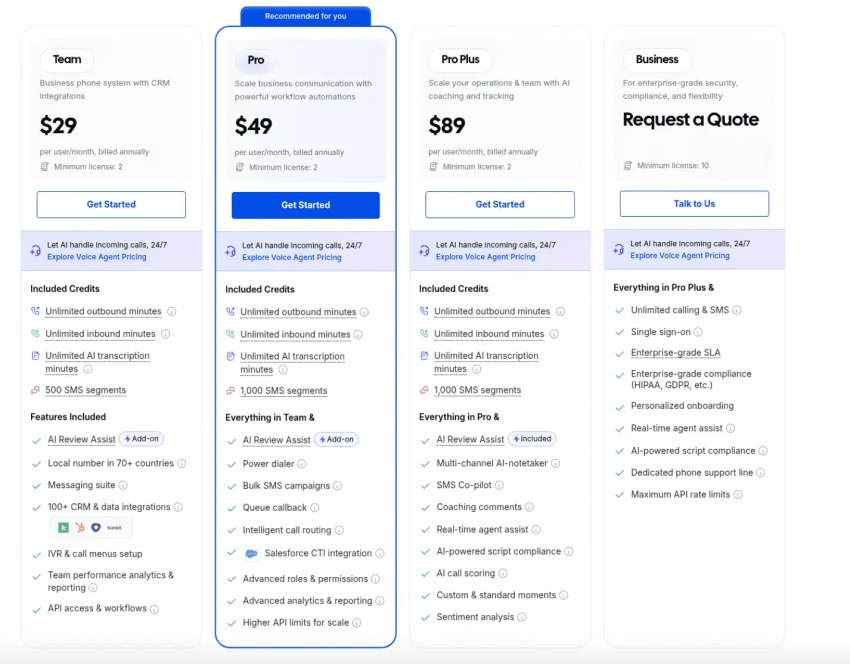
JustCall offers four main pricing plans — Team, Pro, Pro Plus, and Business — tailored to different business sizes. At first glance, the monthly cost looks simple, but each tier includes key limitations that impact scale and total cost.
Plan Comparison Table
| Plan | Price (Annual) | Users Required | SMS Segments |
|---|---|---|---|
| Team | $29 per user per month | 2+ users | 500 |
| Pro | $49 per user per month | 2+ users | 1000 |
| Pro Plus | $89 per user per month | 2+ users | 1000 |
| Business | Custom pricing | 10+ users | Unlimited |
Each plan includes one phone number per user, unlimited inbound and outbound minutes (subject to the Fair Usage Policy), and limited SMS segments.
Many small businesses start with the Team or Pro plan, only to hit feature and usage limits sooner than expected. Each plan comes with minute caps, SMS segment limits, and restricted AI usage. Overages lead to escalating add-on charges as your team grows.
- Team Plan ($29/mo): Lacks essential integrations like Salesforce and restricts SMS to U.S. numbers only.
- Pro Plan ($49/mo): Adds CRM integrations (Salesforce/HubSpot) but caps SMS at 1,000 segments.
- Pro Plus ($89/mo): Adds AI coaching, but AI Voice Agents are still a paid add-on.
The Hidden Costs Behind JustCall’s “Affordable” Plans
JustCall’s $29 per month base rate looks straightforward — until real usage starts. Many core features carry limits that trigger fees fast, especially once your team ramps up calls, automates texts, or expands headcount. These costs are outlined in the fine print, but often only get noticed after a surprise invoice.
Inbound & outbound minute caps
JustCall advertises unlimited calling, but the Fair Usage Policy (FUP) enforces caps, especially for teams with steady or high-volume activity. If call patterns resemble contact center behavior (like high-velocity sales), the system flags accounts and bills per-minute overages. Unlimited explicitly excludes widely used workflows like auto-dialers and telemarketing unless you are on specific high-tier custom plans.
SMS overages
Each user gets 500–1,000 SMS segments, but only for manual texts to U.S. and Canadian numbers. Workflow messages, CRM automations, and bulk campaigns don’t count and incur charges instantly. Every 160 characters counts as one segment, so even a short follow-up can turn into two or three.
With fees at $0.0086 inbound and $0.008625 outbound, those costs build up fast, especially when automations are running quietly in the background.
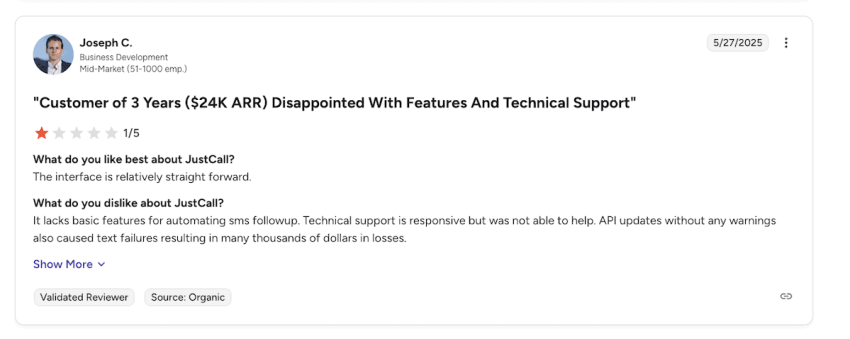
SMS access outside North America isn’t available by default. UK and Australian users must contact support to enable it. One JustCall review on G2 flagged undocumented API changes that caused failed SMS delivery, costing their team thousands in lost leads.
AI add-ons
JustCall leans hard on AI as a selling point, but most of its automation tools aren’t included. The AI Review Assist tool costs $9 per user, even on higher-tier plans. AI Voice Agents start at $99 per month, and that only covers 100 minutes.
Transcription may be labeled unlimited, but the same Fair Usage Policy applies. If your team records long calls or uses voice follow-ups regularly, you may hit thresholds without warning and then pay per minute from your credit balance.
Number fees
Each user gets one number. Extra lines — for local presence, routing, or campaign testing — cost $6 to $10 per month each.
Scaling fast? JustCall doesn’t offer number pooling or a bulk setup option. Teams often end up patching together separate lines for support, marketing, or region-based messaging. CRM-contact center integration helps streamline this, but the costs stack quickly.
Unanswered call charges
Every missed call costs $0.0027, even if the caller hangs up before reaching an agent. Most VoIP platforms don’t bill for unconnected calls. But here, that dead air still counts. Spam, transfer loops, or after-hours traffic can rack up dozens (or hundreds) of micro-charges you won’t catch unless you’re auditing closely.
Toll-free charges
Toll-free numbers and minutes aren’t included. If you run campaigns or offer a support hotline, you’ll be charged per call, but JustCall doesn’t publish those rates clearly. Some teams only realize the impact after deployment, when toll-free usage becomes routine and untracked.
International calls & texting
Calling and texting outside the U.S. and Canada require separate activation and per-country pricing. There are no global bundles — just pay-as-you-go tolls. Several UK and Australian users report needing to contact sales just to unlock SMS.
For global campaigns or remote teams, this adds cost, slows onboarding, and breaks message delivery if not configured early.
Add-On Sales Suite & AI Voice Agents
Beyond the basic user license, JustCall offers two key add-on modules that drastically change the price-value ratio. If you’re a high-volume sales team, these are not optional upgrades — they’re essential.
1. The Sales Dialer (Auto Dialer)
JustCall bundles its dialer technology into the Pro and Business plans, but it’s not available on the entry-level Team plan. The platform includes power dialers, predictive dialers, and dynamic dialing to minimize downtime between calls.
You cannot buy this as a standalone product. You must upgrade every user to the Pro Plan ($49/mo) or higher to access it, even if only half your team does outbound sales.
Predictive dialing burns through minutes fast. Since unlimited plans have Fair Usage caps, heavy dialer usage often triggers the per-minute overage rate much faster than standard manual dialing. It offers high-volume dialing using a separate SalesPro suite, for which you need a custom quote.
2. AI Voice Agent Pricing (Inbound Only)
JustCall’s AI Voice Agent is a separate product designed to handle inbound calls, answer FAQs, and book appointments 24/7. It doesn’t make outbound cold calls.
There are three ways to pay for it, and the per-minute math can be difficult to account for if you underestimate volume.
| Plan | Monthly cost | Included minutes | Overage cost |
|---|---|---|---|
| Pay As You Go (PAYG) | $0 (Base Fee) | 0 | $0.99/min |
| Agent Lite | $99/mo | 100 | $0.99/min |
| Agent Max | $249/mo | 300 | $0.99/min |
Why is this pricing tricky?
- The high overage rate: At $0.99 per minute, overages are nearly 20x more expensive than standard VoIP calling rates. If your AI agent handles just 5 extra calls a day (avg 5 mins each), you could rack up $700+ in monthly overages.
- Inbound focus: This tool is strictly for receiving calls. If you want an AI that dials out to leads (AI SDR), that is a completely different tool with custom pricing.
- Base plan requirement: You cannot just buy the AI Agent. You must also have a standard JustCall phone subscription (min $29/mo) to anchor the service.
Pro tip
Use PAYG only for testing. The $0.99/min rate is too high for production use. The Lite plan ($99) is effectively just a pre-payment for 100 minutes. It offers no discount over the pay-as-you-go rate ($0.99/min * 100 = $99). The Max plan ($249) offers a slight discount (approx $0.83/min for the first 300 mins), but the overage rate jumps right back to $0.99/min.
Compared to Nextiva: Nextiva includes advanced IVR and automation in its core Power Suite plans, avoiding the need to calculate AI minutes or pay dollar-per-minute penalties for automating your customer service.
Feature Gating and Scalability Challenges
For fast-growing teams, JustCall’s plan structure doesn’t scale cleanly — it fragments. As soon as you try to centralize call routing, sync contact data, or expand into global workflows, advanced features get held back by paywalls. The gating isn’t just about price. It’s about momentum loss.
- Salesforce is gated: The Team Plan ($29) does not support Salesforce integration. If you’re a sales team using Salesforce, you’re forced to jump instantly to the Pro Plan ($49), nearly doubling your license cost just to log calls.
- Support is tiered: Only Business plan users get 24/5 phone support. Lower tiers are restricted to chat or email. If your phone lines go down during a launch, you cannot call a helpdesk unless you are on the most expensive tier.
- Transcription caps: Live call transcription is labeled unlimited but subject to FUP. Long calls or frequent QA reviews can push teams over the threshold, triggering throttling or credit-based billing.
Across the board, the growth curve doesn’t align with the plan structure. Teams outgrow features faster than the platform releases them, and the fix is always another upgrade. That forces organizations to stretch usage within lower tiers, delay implementation, or accept operational gaps.
In contrast, some platforms unlock features based on how teams use the product, not just what they’re paying. Here’s a breakdown of how a more predictable cost model looks in practice.
JustCall Pros and Cons Summary
Pros:
- User-friendly interface: The dashboard is designed to be simple so that even teams without IT support can manage figures and users.
- Integrated CRM integrations: Easy connection to HubSpot, Zoho, and Pipedrive (in the Pro plans) reduces manual data entry.
- Fast campaign launch: Bulk SMS and dialer campaigns can be set up quickly for agile sales teams.
- WhatsApp support: Ideal for international teams that need multichannel support from a single inbox.
Cons:
- Strict usage caps: Unlimited plans are subject to a strict fair-use policy that limits call minutes and text message segments.
- High AI costs: Essential automation features like AI voice assistants require an add-on package for $99 per month, with only a few included call minutes.
- Reliability issues: G2 and Capterra users report delays and lag during peak hours, due to reliance on underlying network operators like Twilio.
- Paid support: Live phone support is only available on the Enterprise/Business plan, a factor to consider when comparing a JustCall alternative.
Why Nextiva Is a Better Fit for Growing Teams
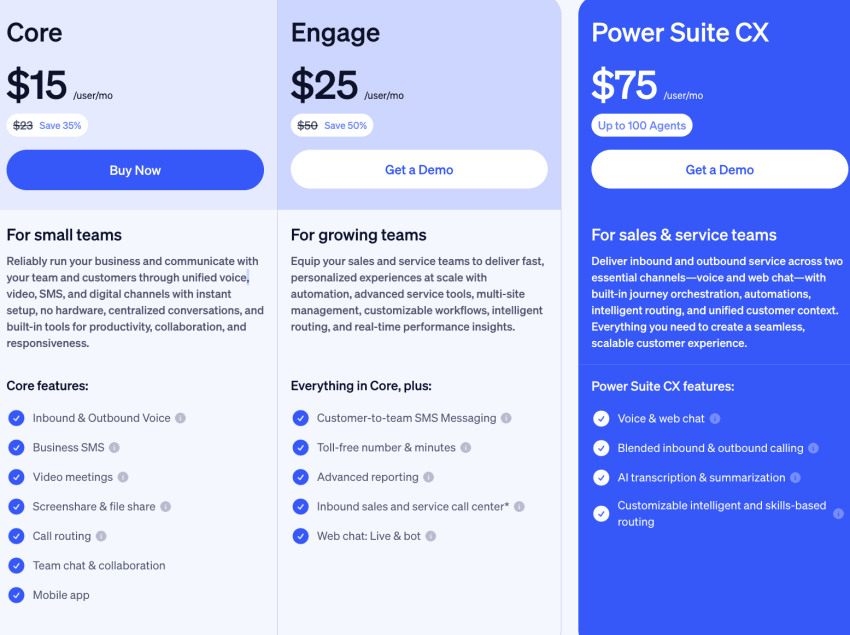
JustCall’s pricing may work for lightweight use. But as call center teams grow, they hit limits — usage caps, locked features, and surprise fees stacked on core tools. Nextiva takes a different approach: it’s built to scale without forcing teams to rework their setup every time they grow.
| Feature | JustCall | Nextiva |
|---|---|---|
| Pricing structure | Low base + high overages | Transparent flat rate |
| Salesforce integration | Locked behind $49+ plan | Available on core plans |
| Reliability | Dependent on public carriers | 99.999% uptime, carrier-grade network |
| Support | Chat/Email (phone gated) | 24/7 live phone support for all |
| AI Features | Expensive add-ons ($99/mo+) | Built-in AI & automation options |
Flat pricing, no penalties
Nextiva includes unlimited calling, texting, and call recording across all plans. No fine print. No Fair Usage thresholds. Cost stays consistent, even when support queues spike or reps launch outbound pushes across multiple time zones.
There’s no need to micromanage segment counts or flag down support to clarify what’s included. If you’re pricing out long-term usage, see how VoIP costs scale across providers.
AI built in
Live transcription, call summaries, and agent assist are included by default. No upgrade is required. Support leads can skip manual reviews. Sales managers get visibility without chasing transcripts. New hires ramp faster; they can review flagged moments instead of sitting through full calls. You shouldn’t need a premium tier to unlock basic AI support.
All-in-one app
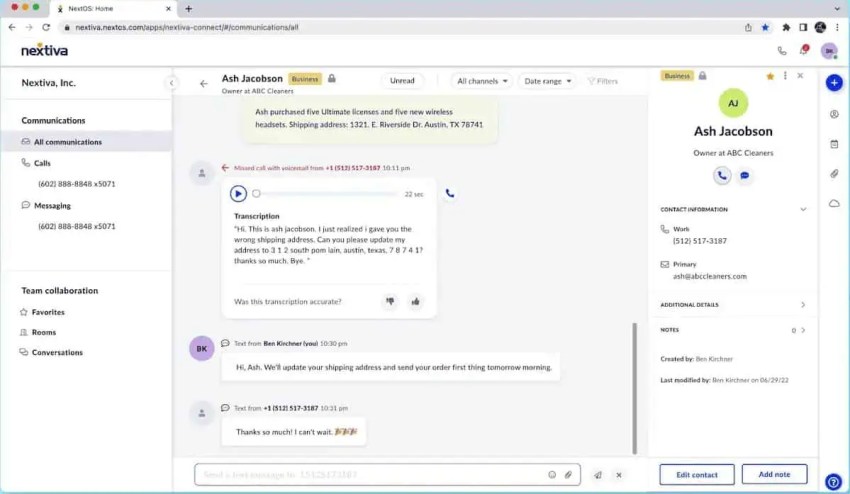
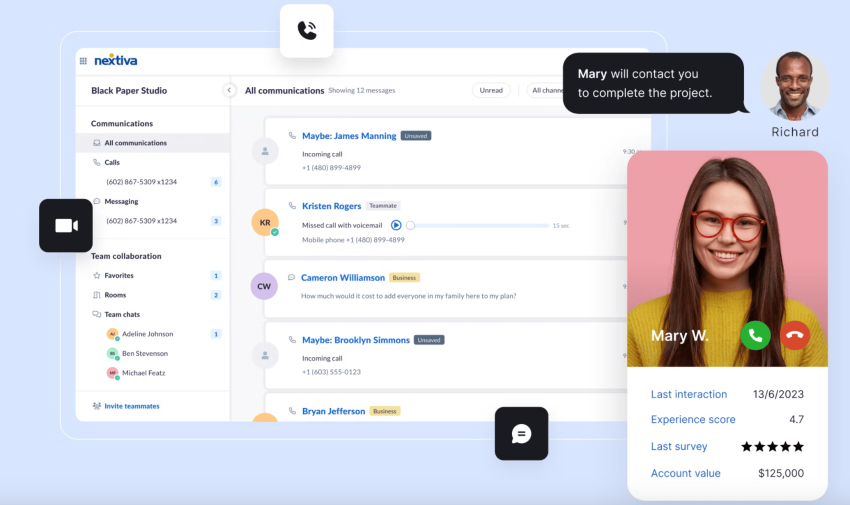
NextivaONE keeps SMS, voice, and team chat in one place, simplifying day-to-day business communication without tab hopping or app switching. Reps don’t have to log in to three tools just to return a message. It cuts lag across remote teams.
Call logs and customer records stay connected to the thread, so no one’s digging for context during handoffs or switching tools midstream during customer interactions.
The dialer is only one piece. NextivaONE functions more like a communication platform than a tool built to unify calls, chats, and context without stacking tools.
Superior uptime and reliability
Unlike JustCall’s Twilio-only setup, Nextiva runs on a multi-carrier backbone with 99.999% uptime. If a carrier fails, traffic shifts to the next available route. Calls keep flowing without gaps. Teams running real-time support or live demos don’t get second chances.
Call uptime has to be held, especially when customer interaction is happening in real time. That’s why Nextiva is used by companies where downtime isn’t just annoying but also expensive.
Real 24/7 support
All business plans come with full live customer support. It’s built in, not something you pay extra for. If something breaks at midnight, the helpdesk picks up — no bots and no tickets. For teams where every outage cuts into revenue, Nextiva’s always-on support model makes a difference.
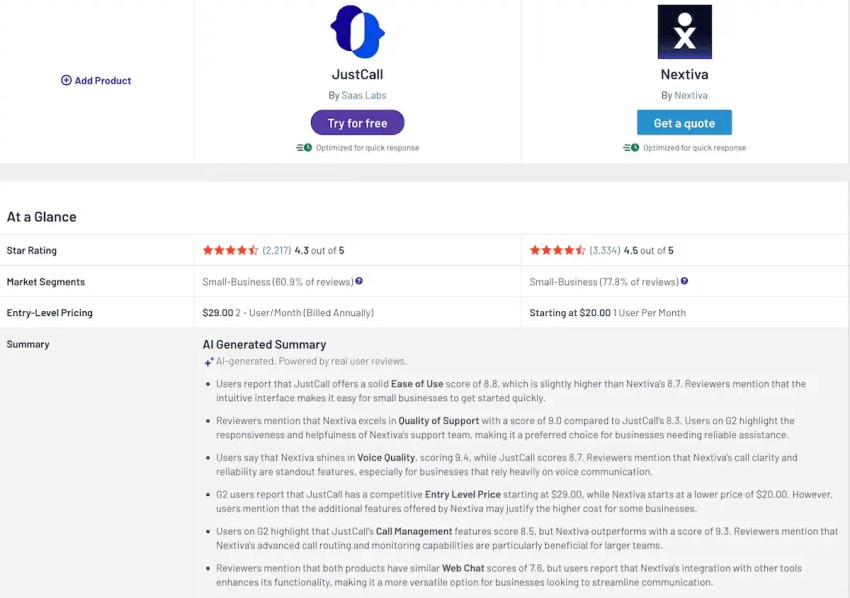
Key takeaway: If you’re a small team making a few calls a day, JustCall is a flexible option. But for growing businesses that need Salesforce integration, reliable uptime, and predictable billing, Nextiva offers significantly better value.
Nextiva’s VoIP Phone System Solution
It’s not about feature lists. It’s about what gets in your way once you start scaling. JustCall can work for small teams with narrow needs. But its pricing model expects you to pay more just to keep pace. If you hire more reps or launch a new campaign, the price climbs.
Even enabling basic AI features can trigger a spike. Tools get gated. Support gets conditional. A simple setup can turn into a chain of workarounds.
Nextiva avoids that spiral. Pricing is upfront, and features are standard. You’re not left guessing what breaks once your team hits real volume. Nextiva doesn’t claim more. It’s structured for companies that outgrow the typical setup fast.
Choose a platform that doesn’t make you rethink every step forward.
The small business VoIP phone system for modern work.
Get business phone calls, video meetings, and secure messaging in one platform. Easy setup. Budget-friendly. Trusted by millions.